


memory-recall
zilliztech/memsearch · skills.sh
Open source Repository Open in the app JSON README (API)
About
Skill publicada por zilliztech/memsearch no skills.sh. Instale com: npx skills add zilliztech/memsearch@memory-recall
Details
- Kind
- Agent skills
- Topic
- AI, RAG & memory
- Publisher
- zilliztech
- Origin
- skillssh
- Category
- ferramentas
- Stars
- 2,728
- Forks
- 266
- Open pull requests
- 222
- Last push
- 2026-09-24T08:08:09Z
- Repository state
- ativo
- Language
- Python
- License
- MIT
- Added
- 2026-10-07 06:22:04
- Updated
- 2026-10-07 06:22:04
- Origin id
zilliztech/memsearch/memory-recall
README
<h1 align="center">
<img src="https://raw.githubusercontent.com/zilliztech/memsearch/HEAD/assets/logo-icon.jpg" alt="" width="100" valign="middle">
memsearch
</h1>
<p align="center">
<strong>Cross-platform semantic memory for AI coding agents.</strong>
</p>
<p align="center">
<a href="https://pypi.org/project/memsearch/"><img src="https://img.shields.io/pypi/v/memsearch?style=flat-square&color=blue" alt="PyPI"></a>
<a href="https://zilliztech.github.io/memsearch/platforms/claude-code/"><img src="https://img.shields.io/badge/Claude_Code-plugin-c97539?style=flat-square&logo=claude&logoColor=white" alt="Claude Code"></a>
<a href="https://zilliztech.github.io/memsearch/platforms/codex/"><img src="https://img.shields.io/badge/Codex-plugin-ff6b35?style=flat-square" alt="Codex"></a>
<a href="https://zilliztech.github.io/memsearch/platforms/dsh/"><img src="https://img.shields.io/badge/DeepSeek_Harness-plugin-4d6bfe?style=flat-square" alt="DeepSeek Harness"></a>
<a href="https://zilliztech.github.io/memsearch/platforms/openclaw/"><img src="https://img.shields.io/badge/OpenClaw-plugin-4a9eff?style=flat-square" alt="OpenClaw"></a>
<a href="https://zilliztech.github.io/memsearch/platforms/opencode/"><img src="https://img.shields.io/badge/OpenCode-plugin-22c55e?style=flat-square" alt="OpenCode"></a>
<a href="https://pypi.org/project/memsearch/"><img src="https://img.shields.io/badge/python-%3E%3D3.10-blue?style=flat-square&logo=python&logoColor=white" alt="Python"></a>
<a href="https://github.com/zilliztech/memsearch/blob/main/LICENSE"><img src="https://img.shields.io/github/license/zilliztech/memsearch?style=flat-square" alt="License"></a>
<a href="https://github.com/zilliztech/memsearch/actions/workflows/test.yml"><img src="https://img.shields.io/github/actions/workflow/status/zilliztech/memsearch/test.yml?branch=main&style=flat-square" alt="Tests"></a>
<a href="https://zilliztech.github.io/memsearch/"><img src="https://img.shields.io/badge/docs-memsearch-blue?style=flat-square" alt="Docs"></a>
<a href="https://github.com/zilliztech/memsearch/stargazers"><img src="https://img.shields.io/github/stars/zilliztech/memsearch?style=flat-square" alt="Stars"></a>
<a href="https://discord.com/invite/FG6hMJStWu"><img src="https://img.shields.io/badge/Discord-chat-7289da?style=flat-square&logo=discord&logoColor=white" alt="Discord"></a>
<a href="https://x.com/zilliz_universe"><img src="https://img.shields.io/badge/follow-%40zilliz__universe-000000?style=flat-square&logo=x&logoColor=white" alt="X (Twitter)"></a>
</p>
<p align="center">
<img src="https://github.com/user-attachments/assets/427b7152-bc16-408c-a8b0-59a2b05fd1e0" alt="memsearch demo" width="800">
</p>
## 📰 What's New
- **Optional Jev reranking** — rerank memory search results with Jev through the TypeSafe API, with no local model download. See [configuration](https://github.com/zilliztech/memsearch/blob/HEAD/docs/home/configuration.md#optional-remote-reranking) and the [Chinese/English evaluation](https://github.com/zilliztech/memsearch/blob/HEAD/evaluation/reranking-evaluation.md).
- **DeepSeek Harness support** — MemSearch now brings automatic capture, pre-step memory injection, native skill-based recall, background maintenance, and a read-only memory browser to [DeepSeek Harness (DSH)](https://zilliztech.github.io/memsearch/platforms/dsh/).
- **Skills from memory** — MemSearch now distills the workflows you repeat into reusable, installable agent skills (a third "procedural memory" layer) and keeps them up to date in the background. See [Skills from Memory](#skills-from-memory).
- **Advanced memory maintenance** — optional background tasks keep durable `PROJECT.md` and `USER.md` notes current across sessions. See [Advanced Memory Maintenance](#advanced-memory-maintenance).
---
### Why memsearch?
- 🌐 **All Platforms, One Memory** — memories flow across [Claude Code](https://github.com/zilliztech/memsearch/blob/HEAD/plugins/claude-code/README.md), [Codex](https://github.com/zilliztech/memsearch/blob/HEAD/plugins/codex/README.md), [DeepSeek Harness](https://github.com/zilliztech/memsearch/blob/HEAD/plugins/dsh/README.md), [OpenClaw](https://github.com/zilliztech/memsearch/blob/HEAD/plugins/openclaw/README.md), and [OpenCode](https://github.com/zilliztech/memsearch/blob/HEAD/plugins/opencode/README.md). A conversation in one agent becomes searchable context in all others — no extra setup
- 👥 **For Agent Users**, install a plugin and get persistent memory with zero effort; **for Agent Developers**, use the full [CLI](https://zilliztech.github.io/memsearch/cli/) and [Python API](https://zilliztech.github.io/memsearch/python-api/) to build memory and harness engineering into your own agents
- 📄 **Markdown is the source of truth** — inspired by [OpenClaw](https://github.com/openclaw/openclaw). Your memories are just `.md` files — human-readable, editable, version-controllable. Milvus is a "shadow index": a derived, rebuildable cache
- 🔍 **Progressive retrieval, hybrid search, smart dedup, live sync** — 3-layer recall (search → expand → transcript); dense vector + BM25 sparse + RRF reranking; SHA-256 content hashing skips unchanged content; file watcher auto-indexes in real time
---
## 🧑💻 For Agent Users
Pick your platform, install the plugin, and you're done. Each plugin captures conversations automatically and provides semantic recall with zero configuration.
<details open>
<summary><h3>For Claude Code Users</h3></summary>
```bash
# Install
/plugin marketplace add zilliztech/memsearch
/plugin install memsearch
# Restart Claude Code to activate the plugin
```
After restarting, just chat with Claude Code as usual. The plugin captures every conversation turn automatically.
**Verify it's working** — after a few conversations, check your memory files:
```bash
ls .memsearch/memory/ # you should see daily .md files
cat .memsearch/memory/$(date +%Y-%m-%d).md
```
**Recall memories** — two ways to trigger:
```
/memory-recall what did we discuss about Redis?
```
Or just ask naturally — Claude auto-invokes the skill when it senses the question needs history:
```
We discussed Redis caching before, what was the TTL we chose?
```
> 📖 [Claude Code Plugin docs](https://zilliztech.github.io/memsearch/platforms/claude-code/) · [Troubleshooting](https://zilliztech.github.io/memsearch/platforms/claude-code/troubleshooting/)
</details>
<details open>
<summary><h3>For Codex Users</h3></summary>
```bash
# Install
git clone --depth 1 https://github.com/zilliztech/memsearch.git
bash memsearch/plugins/codex/scripts/install.sh
codex --yolo # needed for ONNX model network access
```
After installing, chat as usual. Hooks capture and summarize each turn.
**Verify it's working:**
```bash
ls .memsearch/memory/
```
**Recall memories** — use the skill:
```
$memory-recall what did we discuss about deployment?
```
> 📖 [Codex Plugin docs](https://zilliztech.github.io/memsearch/platforms/codex/)
</details>
<details open>
<summary><h3>For DeepSeek Harness Users</h3></summary>
```bash
# Install the published plugin into your DSH profile
uv tool install "memsearch[onnx]"
dsh plugin --profile web add @zilliz/memsearch-dsh
# Restart that DSH profile, or start a new session
```
After installing, use DSH normally. Completed turns are captured automatically, and relevant memories are injected before the first model step only when they are useful.
**Verify it's working:**
```bash
ls .memsearch/memory/
```
**Recall memories** — ask naturally or tell DSH to use the registered `memory-recall` skill:
```
Use memory-recall to find what we decided about the deployment architecture.
```
The web profile also adds a compact MemSearch dock where you can review skill candidates and browse supported files under `.memsearch/` without editing them.
> 📖 [DeepSeek Harness Plugin docs](https://zilliztech.github.io/memsearch/platforms/dsh/)
</details>
<details>
<summary><h3>For OpenClaw Users</h3></summary>
```bash
# Install from ClawHub
openclaw plugins install --force clawhub:memsearch
openclaw config set plugins.entries.memsearch.hooks.allowConversationAccess true
openclaw config set plugins.entries.memsearch.hooks.allowPromptInjection true
openclaw gateway restart
```
After installing, chat in TUI as usual. The plugin captures each turn automatically.
**Verify it's working** — memory files are stored in your agent's workspace:
```bash
# For the main agent:
ls ~/.openclaw/workspace/.memsearch/memory/
# For other agents (e.g. work):
ls ~/.openclaw/workspace-work/.memsearch/memory/
```
**Recall memories** — two ways to trigger:
```
/memory-recall what was the batch size limit we set?
```
Or just ask naturally — the LLM auto-invokes memory tools when it senses the question needs history:
```
We discussed batch size limits before, what did we decide?
```
> 📖 [OpenClaw Plugin docs](https://zilliztech.github.io/memsearch/platforms/openclaw/) · [Browse on ClawHub](https://clawhub.ai/plugins/memsearch)
</details>
<details>
<summary><h3>For OpenCode Users</h3></summary>
```json
// In ~/.config/opencode/opencode.json
{ "plugin": ["@zilliz/memsearch-opencode"] }
```
After installing, chat in TUI as usual. A background daemon captures conversations.
**Verify it's working:**
```bash
ls .memsearch/memory/ # daily .md files appear after a few conversations
```
**Recall memories** — two ways to trigger:
```
/memory-recall what did we discuss about authentication?
```
Or just ask naturally — the LLM auto-invokes memory tools when it senses the question needs history:
```
We discussed the authentication flow before, what was the approach?
```
> 📖 [OpenCode Plugin docs](https://zilliztech.github.io/memsearch/platforms/opencode/)
</details>
### ⚙️ Configuration (all platforms)
All plugins share the same memsearch backend. Configure once, works everywhere.
#### Embedding
Defaults to **ONNX bge-m3** — runs locally on CPU, no API key, no cost. On first launch the model (~558 MB) is downloaded from HuggingFace Hub.
```bash
memsearch config set embedding.provider onnx # default — local, free
memsearch config set embedding.provider openai # needs OPENAI_API_KEY
memsearch config set embedding.provider ollama # local, any model
```
> All providers and models: [Configuration — Embedding Provider](https://zilliztech.github.io/memsearch/home/configuration/#embedding-provider)
#### Milvus Backend
Just change `milvus_uri` (and optionally `milvus_token`) to switch between deployment modes:
**Milvus Lite** (default) — zero config, single file. Great for getting started:
```bash
# Works out of the box, no setup needed
memsearch config get milvus.uri # → ~/.memsearch/milvus.db
```
⭐ **Zilliz Cloud** (recommended) — fully managed, [free tier available](https://cloud.zilliz.com/signup?utm_source=github&utm_medium=referral&utm_campaign=memsearch-readme) — [sign up](https://cloud.zilliz.com/signup?utm_source=github&utm_medium=referral&utm_campaign=memsearch-readme) 👇:
```bash
memsearch config set milvus.uri "https://in03-xxx.api.gcp-us-west1.zillizcloud.com"
memsearch config set milvus.token "your-api-key"
```
<details>
<summary>⭐ Sign up for a free Zilliz Cloud cluster</summary>
You can [sign up](https://cloud.zilliz.com/signup?utm_source=github&utm_medium=referral&utm_campaign=memsearch-readme) on Zilliz Cloud to get a free cluster and API key.
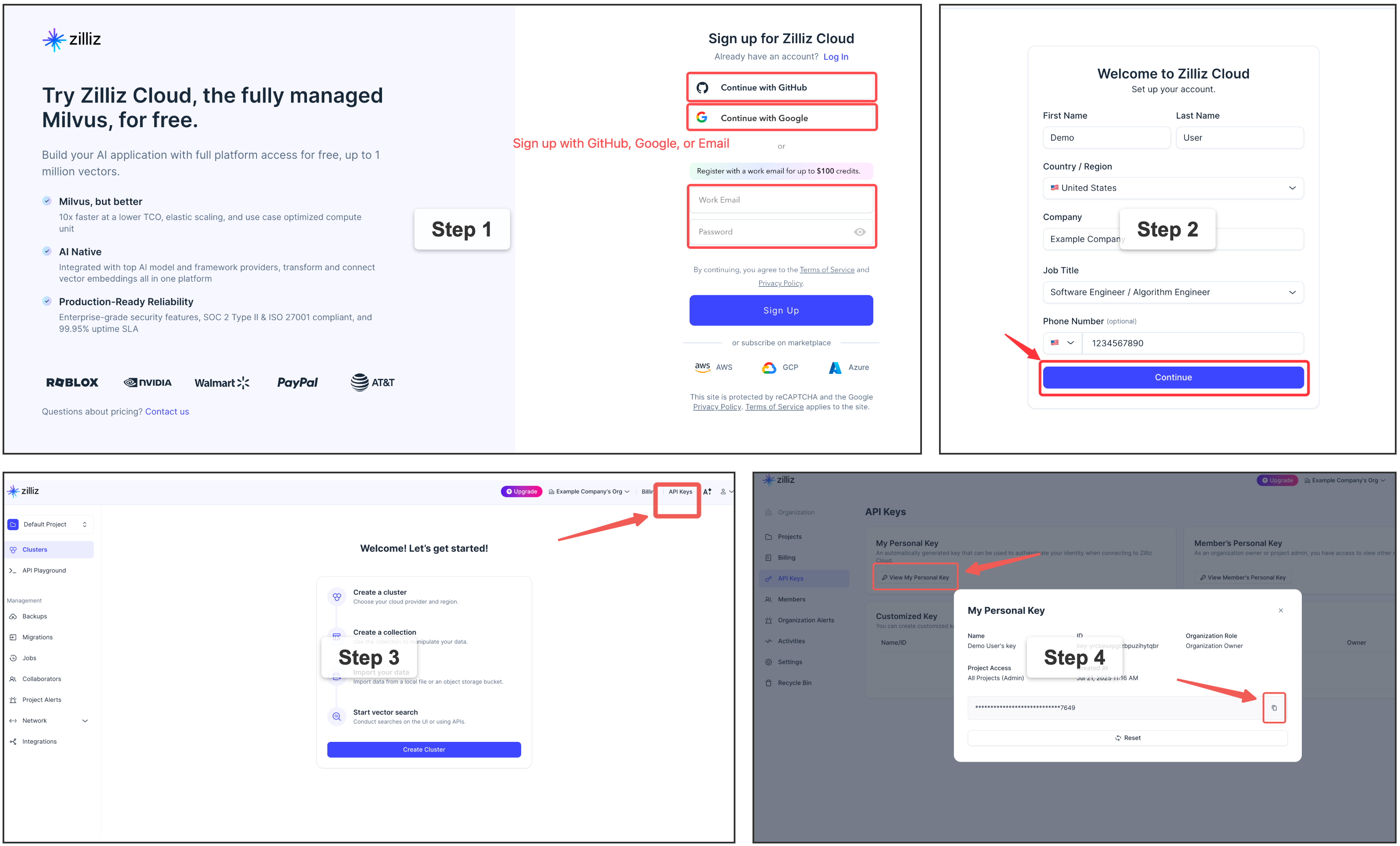
</details>
<details>
<summary>Self-hosted Milvus Server (Docker) — for advanced users</summary>
For multi-user or team environments with a dedicated Milvus instance. Requires Docker. See the [official installation guide](https://milvus.io/docs/install_standalone-docker-compose.md).
```bash
memsearch config set milvus.uri http://localhost:19530
```
</details>
> 📖 Full configuration guide: [Configuration](https://zilliztech.github.io/memsearch/home/configuration/) · [Platform comparison](https://zilliztech.github.io/memsearch/platforms/)
#### Capture Summarization Routing
Each plugin keeps its native capture summarizer unless you override it explicitly:
```bash
memsearch config set plugins.codex.summarize.model gpt-5.1-codex-mini
memsearch config set plugins.opencode.summarize.model anthropic/claude-haiku
```
Advanced users can route plugin summarization through a memsearch-managed API provider:
```bash
memsearch config set llm.providers.openai.type openai
memsearch config set llm.providers.openai.model gpt-5-mini
memsearch config set llm.providers.openai.api_key env:OPENAI_API_KEY
memsearch config set plugins.codex.summarize.provider openai
```
Leave `plugins.<platform>.summarize.provider` empty to preserve the platform's default behavior. Claude Code, Codex, OpenClaw, and OpenCode also accept `native`; DSH selects its headless-agent backend when the provider is unset. Plugin-specific summarize settings do not fall back to `llm.model`.
You can also disable automatic capture globally for a platform while keeping the plugin installed:
```bash
memsearch config set plugins.codex.summarize.enabled false
```
#### Advanced Memory Maintenance
Your agent can keep two higher-level notes current in the background: **`PROJECT.md`** — durable project state (active threads, decisions, risks, next steps) — and **`USER.md`** — your reusable preferences, working style, and recurring goals. They refresh after a session only when the journals changed and a minimum interval has passed, and they are **off by default**.
Turn them on by asking your agent — *"enable MemSearch's PROJECT.md and USER.md maintenance"* — and it configures them through the `memory-config` skill, which can also choose the model/provider, the interval, and custom prompts, or diagnose the current setup. Prefer editing files? The settings live under `[plugins.<agent>.project_review]` and `[plugins.<agent>.user_profile]` in your MemSearch config (both read `.memsearch/memory` and write `.memsearch/PROJECT.md` / `.memsearch/USER.md` by default).
If a background maintenance task seems silent, check `.memsearch/.maintenance-state.json` or ask the `memory-config` skill to inspect it; failed runs record `last_error` and retry on the next due run because failed input digests are not marked successful.
#### Skills from Memory
Beyond the episodic journals and the semantic `PROJECT.md` / `USER.md` notes, MemSearch grows a third memory layer — **procedural memory**: your agent turns the workflows you repeat into reusable, installable skills. You drive it entirely through your agent, in natural language — nothing to memorize:
- *"Make a skill out of what we just did."* — the agent drafts a skill from the session (reading the original transcript so the steps are exact, not guessed), saves it as a candidate, and offers to install it.
- *"What skill candidates do I have? Install the deploy one."* — the agent lists candidates and installs the one you pick into its own skill directory, where it becomes a real `/`-command.
<p align="center">
<img width="1086" height="752" alt="MemSearch skill distillation demo" src="https://github.com/user-attachments/assets/39a90f1c-54e3-4c7a-b168-051f0e096d39">
</p>
Under the hood, candidates live in a git-tracked `.memsearch/skill-candidates/` store — diffable and revertible, and **inert until you install one** (that step is always yours). An optional background pass can also mine recurring workflows from your history on its own. Distilled skills follow the [Agent Skills](https://agentskills.io) open standard, so one capture is portable across Claude Code, Codex, DSH, OpenClaw, OpenCode, and other compatible agents.
**Turning it on is also just a sentence:** ask your agent *"enable MemSearch skill distillation"* (or *"make it more eager"*) and it configures things through the `memory-config` skill — it's off by default. Prefer editing files? The same settings live under `[plugins.<agent>.memory_to_skill]` in your MemSearch config. Full guide: **[Skills from Memory](https://zilliztech.github.io/memsearch/home/skills-from-memory/)**.
### What can you use it for?
- **Resume debugging threads** — ask how a similar Redis, Docker, database, or deployment issue was fixed last time.
- **Recover decision rationale** — find why the project chose one architecture, library, migration path, or API design over another.
- **Trace feature history** — understand how a feature evolved across sessions, including the files changed and tradeoffs discussed.
- **Do code archaeology** — ask when and why a module, config, or workflow was changed before touching it again.
- **Find the right session to resume** — ask which previous conversation covered a topic, recover the relevant context, and continue from there.
- **Carry context across agents** — keep Claude Code, Codex, DeepSeek Harness, OpenClaw, and OpenCode working from the same project memory.
---
## 🛠️ For Agent Developers
Beyond ready-to-use plugins, memsearch provides a complete **CLI and Python API** for building memory into your own agents. Whether you're adding persistent context to a custom agent, building a memory-augmented RAG pipeline, or doing harness engineering — the same core engine that powers the plugins is available as a library.
### 🏗️ Architecture Overview
```
┌──────────────────────────────────────────────────────────────┐
│ 🧑💻 For Agent Users (Plugins) │
│ Claude Code · Codex · DSH · OpenClaw · OpenCode · Your App │
│ │ │
├────────────────────────────┬─────────────────────────────────┤
│ 🛠️ For Agent Developers │ Build your own with ↓ │
│ ┌─────────────────────────┴──────────────────────────────┐ │
│ │ memsearch CLI / Python API │ │
│ │ index · search · expand · watch · compact │ │
│ └─────────────────────────┬──────────────────────────────┘ │
│ ┌─────────────────────────┴──────────────────────────────┐ │
│ │ Core: Chunker → Embedder → Milvus │ │
│ │ Hybrid Search (BM25 + Dense + RRF) │ │
│ └────────────────────────────────────────────────────────┘ │
├──────────────────────────────────────────────────────────────┤
│ 📄 Markdown Files (Source of Truth) │
│ memory/2026-03-27.md · memory/2026-03-26.md · ... │
└──────────────────────────────────────────────────────────────┘
```
Plugins sit on top of the CLI/API layer. The API handles indexing, searching, and Milvus sync. Markdown files are always the source of truth — Milvus is a rebuildable shadow index. Everything below the plugin layer is what you use as an agent developer.
### How Plugins Work (Claude Code as example)
**Capture — after each conversation turn:**
```
User asks question → Agent responds → Stop hook fires
│
┌────────────────────┘
▼
Parse last turn
│
▼
LLM summarizes (haiku)
"- User asked about X."
"- Claude did Y."
│
▼
Append to memory/2026-03-27.md
with <!-- session:UUID --> anchor
│
▼
memsearch index → Milvus
```
**Recall — 3-layer progressive search:**
```
User: "What did we discuss about batch size?"
│
▼
L1 memsearch search "batch size" → ranked chunks
│ (need more?)
▼
L2 memsearch expand <chunk_hash> → full .md section
│ (need original?)
▼
L3 parse-transcript <session.jsonl> → raw dialogue
```
### 📄 Markdown as Source of Truth
```
Plugins append ──→ .md files ←── human editable
│
▼
memsearch watch (live watcher)
│
detects file change
│
▼
re-chunk changed .md
│
hash each chunk (SHA-256)
│
┌───────────┴───────────┐
▼ ▼
hash unchanged? hash is new/changed?
→ skip (no API call) → embed → upsert to Milvus
│ │
└───────────┬───────────┘
▼
┌──────────────────┐
│ Milvus (shadow) │
│ always in sync │
│ rebuildable │
└──────────────────┘
```
### 📦 Installation
```bash
# Install as a global CLI tool — recommended when you mainly use the
# `memsearch` command or any of the agent plugins (Claude Code, Codex,
# DSH, OpenClaw, OpenCode), which all shell out to the CLI.
uv tool install memsearch # via uv
pipx install memsearch # via pipx
pip install memsearch # plain pip
# Install as a project dependency — use this if you want to import
# `memsearch` from your own Python code (e.g. via the MemSearch class).
uv add memsearch # via uv, adds to pyproject.toml
pip install memsearch # into an activated venv
```
<details>
<summary><b>Optional embedding providers</b></summary>
```bash
# As a CLI tool (recommended — local ONNX, no API key)
uv tool install "memsearch[onnx]"
pipx install "memsearch[onnx]"
pip install "memsearch[onnx]"
# As a project dependency
uv add "memsearch[onnx]"
# Other options: [openai], [google], [voyage], [jina], [mistral], [ollama], [local], [all]
```
</details>
### 🐍 Python API — Give Your Agent Memory
```python
from memsearch import MemSearch
mem = MemSearch(paths=["./memory"])
await mem.index() # index markdown files
results = await mem.search("Redis config", top_k=3) # semantic search
scoped = await mem.search("pricing", top_k=3, source_prefix="./memory/product")
print(results[0]["content"], results[0]["score"]) # content + similarity
```
<details>
<summary><b>Full example — agent with memory (OpenAI)</b> — click to expand</summary>
```python
import asyncio
from datetime import date
from pathlib import Path
from openai import OpenAI
from memsearch import MemSearch
MEMORY_DIR = "./memory"
llm = OpenAI() # your LLM client
mem = MemSearch(paths=[MEMORY_DIR]) # memsearch handles the rest
def save_memory(content: str):
"""Append a note to today's memory log (OpenClaw-style daily markdown)."""
p = Path(MEMORY_DIR) / f"{date.today()}.md"
p.parent.mkdir(parents=True, exist_ok=True)
with open(p, "a") as f:
f.write(f"\n{content}\n")
async def agent_chat(user_input: str) -> str:
# 1. Recall — search past memories for relevant context
memories = await mem.search(user_input, top_k=3)
context = "\n".join(f"- {m['content'][:200]}" for m in memories)
# 2. Think — call LLM with memory context
resp = llm.chat.completions.create(
model="gpt-5-mini",
messages=[
{"role": "system", "content": f"You have these memories:\n{context}"},
{"role": "user", "content": user_input},
],
)
answer = resp.choices[0].message.content
# 3. Remember — save this exchange and index it
save_memory(f"## {user_input}\n{answer}")
await mem.index()
return answer
async def main():
# Seed some knowledge
save_memory("## Team\n- Alice: frontend lead\n- Bob: backend lead")
save_memory("## Decision\nWe chose Redis for caching over Memcached.")
await mem.index() # or mem.watch() to auto-index in the background
# Agent can now recall those memories
print(await agent_chat("Who is our frontend lead?"))
print(await agent_chat("What caching solution did we pick?"))
asyncio.run(main())
```
</details>
<details>
<summary><b>Anthropic Claude example</b> — click to expand</summary>
```bash
pip install memsearch anthropic
```
```python
import asyncio
from datetime import date
from pathlib import Path
from anthropic import Anthropic
from memsearch import MemSearch
MEMORY_DIR = "./memory"
llm = Anthropic()
mem = MemSearch(paths=[MEMORY_DIR])
def save_memory(content: str):
p = Path(MEMORY_DIR) / f"{date.today()}.md"
p.parent.mkdir(parents=True, exist_ok=True)
with open(p, "a") as f:
f.write(f"\n{content}\n")
async def agent_chat(user_input: str) -> str:
# 1. Recall
memories = await mem.search(user_input, top_k=3)
context = "\n".join(f"- {m['content'][:200]}" for m in memories)
# 2. Think — call Claude with memory context
resp = llm.messages.create(
model="claude-sonnet-4-6",
max_tokens=1024,
system=f"You have these memories:\n{context}",
messages=[{"role": "user", "content": user_input}],
)
answer = resp.content[0].text
# 3. Remember
save_memory(f"## {user_input}\n{answer}")
await mem.index()
return answer
async def main():
save_memory("## Team\n- Alice: frontend lead\n- Bob: backend lead")
await mem.index()
print(await agent_chat("Who is our frontend lead?"))
asyncio.run(main())
```
</details>
<details>
<summary><b>Ollama (fully local, no API key)</b> — click to expand</summary>
```bash
pip install "memsearch[ollama]"
ollama pull nomic-embed-text # embedding model
ollama pull llama3.2 # chat model
```
```python
import asyncio
from datetime import date
from pathlib import Path
from ollama import chat
from memsearch import MemSearch
MEMORY_DIR = "./memory"
mem = MemSearch(paths=[MEMORY_DIR], embedding_provider="ollama")
def save_memory(content: str):
p = Path(MEMORY_DIR) / f"{date.today()}.md"
p.parent.mkdir(parents=True, exist_ok=True)
with open(p, "a") as f:
f.write(f"\n{content}\n")
async def agent_chat(user_input: str) -> str:
# 1. Recall
memories = await mem.search(user_input, top_k=3)
context = "\n".join(f"- {m['content'][:200]}" for m in memories)
# 2. Think — call Ollama locally
resp = chat(
model="llama3.2",
messages=[
{"role": "system", "content": f"You have these memories:\n{context}"},
{"role": "user", "content": user_input},
],
)
answer = resp.message.content
# 3. Remember
save_memory(f"## {user_input}\n{answer}")
await mem.index()
return answer
async def main():
save_memory("## Team\n- Alice: frontend lead\n- Bob: backend lead")
await mem.index()
print(await agent_chat("Who is our frontend lead?"))
asyncio.run(main())
```
</details>
> 📖 Full Python API reference: [Python API docs](https://zilliztech.github.io/memsearch/python-api/)
### ⌨️ CLI Usage
**Setup:**
```bash
memsearch config init # interactive setup wizard
memsearch config set embedding.provider onnx # switch embedding provider
memsearch config set milvus.uri http://localhost:19530 # switch Milvus backend
```
**Index & Search:**
```bash
memsearch index ./memory/ # index markdown files
memsearch index ./memory/ ./notes/ --force # re-embed everything
memsearch index . --ignore-file .gitignore # opt in to repository ignore rules
memsearch search "Redis caching" # hybrid search (BM25 + vector)
memsearch search "auth flow" --top-k 10 --json-output # JSON for scripting
memsearch expand <chunk_hash> # show full section around a chunk
```
**Live Sync & Maintenance:**
```bash
memsearch watch ./memory/ # live file watcher (auto-index on change)
memsearch compact # LLM-powered chunk summarization
memsearch stats # show indexed chunk count
memsearch reset --yes # drop all indexed data and rebuild
```
> 📖 Full CLI reference with all flags: [CLI docs](https://zilliztech.github.io/memsearch/cli/)
## ⚙️ Configuration
Embedding and Milvus backend settings → [Configuration (all platforms)](#️-configuration-all-platforms)
Collection priority: integration-derived default → `~/.memsearch/config.toml` → `.memsearch.toml` → explicit `--collection` or Python argument. Without an integration-derived default, the built-in collection is used.
> 📖 Full config guide: [Configuration](https://zilliztech.github.io/memsearch/home/configuration/)
## 🔗 Links
- 📖 [Documentation](https://zilliztech.github.io/memsearch/) — full guides, API reference, and architecture details
- 🔌 [Platform Plugins](https://zilliztech.github.io/memsearch/platforms/) — Claude Code, Codex, DeepSeek Harness, OpenClaw, OpenCode
- 💡 [Design Philosophy](https://zilliztech.github.io/memsearch/design-philosophy/) — why markdown, why Milvus, competitor comparison
- 🦞 [OpenClaw](https://github.com/openclaw/openclaw) — the memory architecture that inspired memsearch
- 🗄️ [Milvus](https://milvus.io/) | [Zilliz Cloud](https://cloud.zilliz.com/signup?utm_source=github&utm_medium=referral&utm_campaign=memsearch-readme) — the vector database powering memsearch
## 🤝 Contributing
Bug reports, feature requests, and pull requests are welcome! See the [Contributing Guide](https://github.com/zilliztech/memsearch/blob/HEAD/CONTRIBUTING.md) for development setup, testing, and plugin development instructions. For questions and discussions, join us on [Discord](https://discord.com/invite/FG6hMJStWu).
## 📄 License
[MIT](https://github.com/zilliztech/memsearch/blob/HEAD/LICENSE)