


app-store-screenshot
zaferayan/app-store-screenshot-skill · skills.sh
Open source Repository Open in the app JSON README (API)
About
Skill publicada por zaferayan/app-store-screenshot-skill no skills.sh. Instale com: npx skills add zaferayan/app-store-screenshot-skill@app-store-screenshot
Details
- Kind
- Agent skills
- Topic
- Web search, scraping & browser
- Publisher
- zaferayan
- Origin
- skillssh
- Category
- ferramentas
- Stars
- 33
- Last push
- 2026-09-21T13:14:44Z
- Repository state
- ativo
- Language
- HTML
- License
- MIT
- Added
- 2026-10-07 06:28:08
- Updated
- 2026-10-07 06:28:08
- Origin id
zaferayan/app-store-screenshot-skill/app-store-screenshot
README
# app-store-screenshot
A reusable Agent Skill for turning raw mobile app screenshots into premium App Store and Google Play marketing screenshots.
The skill is designed for agents that need to create store-ready promotional images while preserving the original app UI exactly. It guides the agent to use realistic phone frames, brand-aware backgrounds, concise marketing headlines, and consistent multi-screen compositions without redrawing, rewriting, or reinterpreting the uploaded screenshot content.
## Why This Skill Exists
Most image-generation workflows are tempted to regenerate the whole screenshot. That often changes button labels, icons, spacing, charts, balances, navigation, and other product details.
`app-store-screenshot` makes preservation the core rule:
> Keep the raw app screenshot intact. Design around it.
Use it when you want a polished marketing screenshot from an existing iOS or Android app screen, especially for:
- App Store and Google Play listing images
- Launch announcements
- Product Hunt galleries
- Landing page visuals
- Social posts featuring real app UI
- Multi-screen feature sets
## Features
- Preserves the original UI exactly: images are rendered from HTML with headless Chrome, and the screenshot is a plain `<img>` that is resized but never regenerated
- Rich backgrounds in CSS: accent glows, grain, and eight pattern variants (rings, dots, grid, rays, arcs, diagonal, frames, none), plus a metallic device frame and two-tone headlines
- HTML scenes: build a themed background (caption pills, pipelines, waveforms) as an HTML fragment that reads the device position and decorates the free space around it
- Scene backgrounds: drop any photo, artwork, or generated scene behind the device with an automatic legibility scrim, plus optional subheadlines and black, titanium, or silver frames
- Fully restylable: copy the HTML template and change the CSS for your brand
- No dependencies beyond Node and a Chromium-based browser
- Adds realistic iPhone or Android device frames
- Builds premium backgrounds from the app's actual brand colors
- Creates short, store-style marketing headlines
- Supports single-screen hero images and multi-screen screenshot sets
- Includes guidance for wellness, finance, dark mode, productivity, education, and creator tools
- Avoids generic green gradients, fake UI regeneration, and overdesigned mockup clutter
## Install
```bash
npx skills add zaferayan/app-store-screenshot-skill
```
Works with any agent supported by the [skills](https://skills.sh) CLI (Claude Code, Codex, Cursor, and others).
Requirements: Node 18+ and a Chromium-based browser (Chrome, Chromium, Edge, or Brave). No packages to install.
## Usage
Attach one or more raw mobile screenshots and ask your agent to use the skill.
```text
Use the app-store-screenshot skill.
Turn the attached raw app screenshot into a premium App Store promotional screenshot.
Preserve the original UI exactly.
Add a realistic iPhone frame, a branded minimal background, and a concise headline above the device.
```
With a fixed headline:
```text
Use the app-store-screenshot skill.
Headline: "Oats, done right."
Create a portrait App Store-style marketing screenshot from the attached raw mobile screenshot.
Do not alter anything inside the screenshot.
```
For a full screenshot set:
```text
Use the app-store-screenshot skill.
Create a consistent 5-image App Store screenshot set from the attached app screens.
Preserve each screen exactly.
Choose short headlines based on the visible feature of each screen.
Use one cohesive visual system across all images.
```
For Google Play:
```text
Use the app-store-screenshot skill.
Create Google Play promotional screenshots from these Android app screens.
Preserve the UI exactly, use realistic Android device frames, and keep the composition clean and readable.
```
## Demo
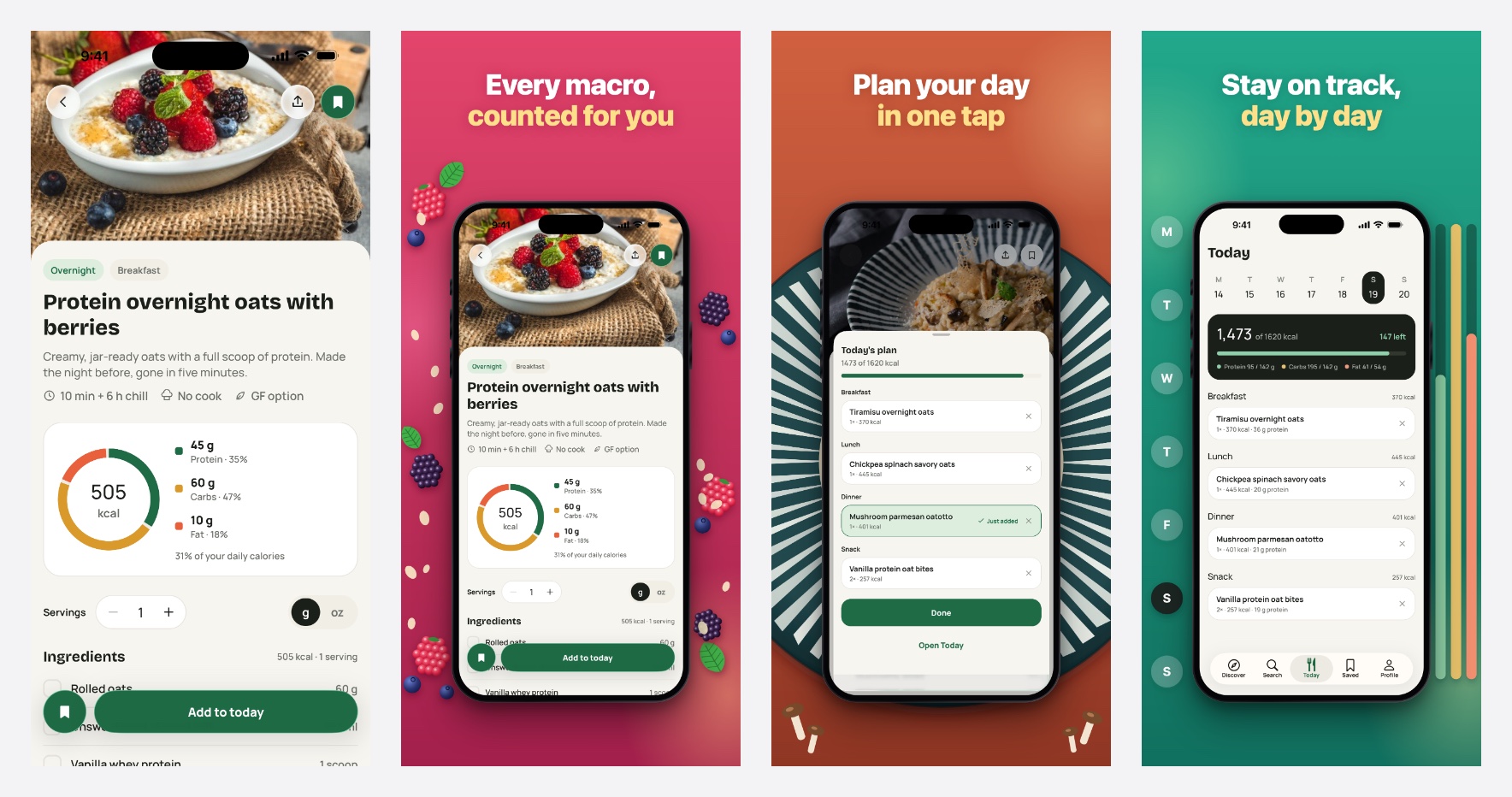
Left: a raw screenshot from an oat recipe app. Right: three images from the same set, rendered by `scripts/render.mjs` with one shared theme and a separate HTML scene per screen, each built from what that screen shows: the berries on the recipe spill past the bezel, the phone sits on the striped plate from the dinner photo, and the week strip and macro bars from the Today screen stand in the gutters. The UI inside each frame is the original screenshot, only resized.
You can also run the renderer yourself. Describe the set in a JSON file (see [`set.example.json`](https://github.com/zaferayan/app-store-screenshot-skill/blob/HEAD/skills/app-store-screenshot/assets/set.example.json)):
```json
{
"size": "1290x2796",
"out_dir": "stores",
"theme": { "accent2": "#ffe08a", "headline_weight": 800, "headline_lines": 2, "device_max_w": 0.66 },
"images": [
{ "screenshot": "raw/01-recipe.png", "headline": "Every macro,\n*counted for you*",
"bg": "#e3456b", "bg2": "#a3204c", "scene": "scenes/01-berries.html", "out": "01-recipe.png" }
]
}
```
```bash
node skills/app-store-screenshot/scripts/render.mjs set.json
```
`*text*` in a headline gets the accent treatment and `\n` forces a line break. For Google Play, set `"size": "1080x1920"` and `"platform": "android"` (Play rejects images whose long side exceeds 2x the short side).
## Repository Structure
```text
app-store-screenshot-skill/
├── README.md
├── LICENSE
├── assets/
│ └── demo.jpg
└── skills/
└── app-store-screenshot/
├── SKILL.md
├── assets/
│ ├── template.html
│ └── set.example.json
├── scripts/
│ └── render.mjs
├── references/
│ ├── visual-directions.md
│ └── store-sizes.md
└── examples/
├── scenes/
│ ├── berries.html
│ ├── plate.html
│ └── tracker.html
├── wellness.md
├── finance.md
└── dark-mode.md
```
## Design Philosophy
The app screenshot is the product evidence. The frame, headline, background, and layout should make that evidence feel intentional, premium, and easy to understand.
Good outputs should feel like they came from the app's brand system, not from a generic mockup template.
## License
[MIT](https://github.com/zaferayan/app-store-screenshot-skill/blob/HEAD/LICENSE)