


fscan-scan
wgpsec/aboutsecurity · skills.sh
Open source Repository Open in the app JSON README (API)
About
Skill publicada por wgpsec/aboutsecurity no skills.sh. Instale com: npx skills add wgpsec/aboutsecurity@fscan-scan
Details
- Kind
- Agent skills
- Publisher
- wgpsec
- Origin
- skillssh
- Category
- ferramentas
- Stars
- 1,776
- Forks
- 245
- Last push
- 2026-10-03T19:03:35Z
- Repository state
- ativo
- Language
- Python
- Added
- 2026-10-07 06:31:25
- Updated
- 2026-10-07 06:31:25
- Origin id
wgpsec/aboutsecurity/fscan-scan
README
[中文文档](https://github.com/wgpsec/aboutsecurity/blob/HEAD/README.zh-CN.md) | English
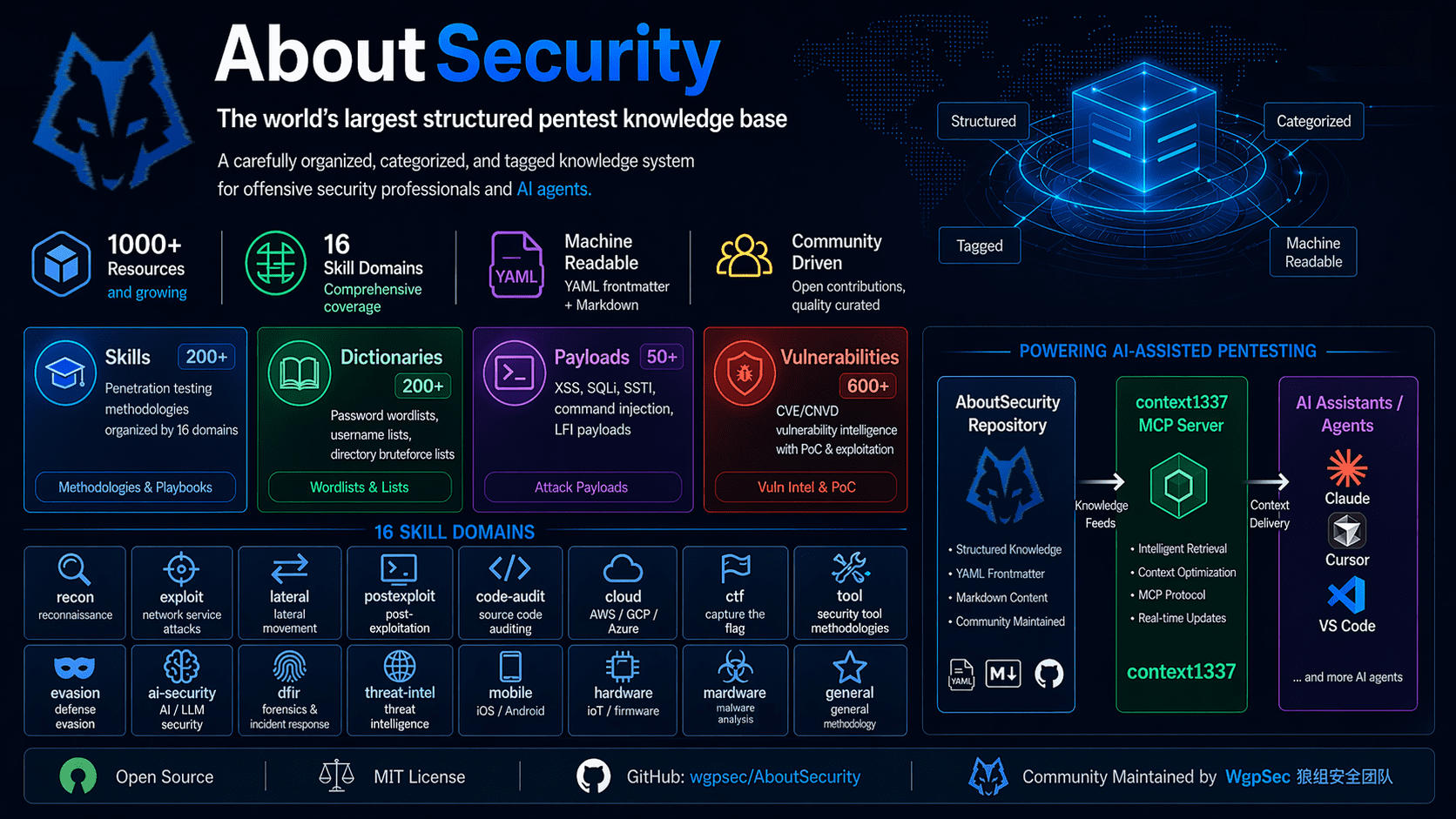
# AboutSecurity
Penetration testing knowledge base with security methodologies in AI Agent-executable format.
## Core Modules
**Skills/** — 200+ skill methodologies covering the full chain from recon to post-exploitation
- `ai-security/` — AI security (prompt injection, model jailbreaking, prompt leaking, agent attack chains)
- `cloud/` — Cloud environments (Docker escape, K8s attack chains, AWS IAM, Alibaba Cloud, Tencent Cloud, Serverless)
- `code-audit/` — Code auditing (PHP 8-skill system, Java 8-skill system covering injection/file/serialization/auth/framework/exploit chains)
- `ctf/` — CTF competitions (Web challenges, reversing, PWN, cryptography, forensics, AI/ML)
- `dfir/` — Digital forensics & incident response (memory forensics & anti-forensics, disk forensics, log evasion)
- `evasion/` — Evasion techniques (C2 frameworks, shellcode generation, security research)
- `exploit/` — Exploitation (organized by subcategory)
- `advanced/` — Advanced exploitation (HTTP smuggling, race conditions, supply chain attacks, OT/ICS, crypto attacks)
- `auth/` — Authentication & authorization (JWT, OAuth/SSO, IDOR, CORS, CSRF, cookie analysis)
- `binary/` — Binary exploitation methodology and tools
- `network-service/` — Network service pentesting by port/protocol (SMB, FTP, SMTP, DNS, LDAP, etc.)
- `web-method/` — Web methodology (injection, XSS, SSRF, SSTI, file upload, deserialization, WAF bypass...)
- `general/` — General (report generation, supply chain auditing, mobile backend API)
- `hardware/` — Hardware/physical access pentesting
- `lateral/` — Lateral movement (AD domain attacks, NTLM relay, database pivoting, Kerberoasting, ACL abuse)
- `malware/` — Malware (sample analysis methodology, C2 beacon config extraction, sandbox evasion)
- `mobile/` — Mobile app pentesting (Android, iOS)
- `postexploit/` — Post-exploitation
- `post-exploit-linux/` / `post-exploit-windows/` — OS-level privilege escalation, credential theft
- `persist-maintain/` — Persistence techniques (cron, services, webshell)
- `tool-delivery/` — Tool delivery to compromised hosts (fscan, frp, chisel, linpeas, mimikatz, etc.; Linux/Windows transfer methods: wget/curl/certutil/bitsadmin/PowerShell/python/nc/base64/SMB; no-egress scenarios, AV bypass, post-exec cleanup)
- `product/` — Product-specific post-exploitation tactics (ArgoCD, Harbor, databases, middleware, Portainer, RabbitMQ)
- `recon/` — Reconnaissance (subdomain enumeration, passive information gathering, JS API extraction)
- `threat-intel/` — Threat intelligence (IOC evasion, APT simulation, threat hunting evasion)
- `tool/` — Tool usage (fscan, nuclei, sqlmap, msfconsole, ffuf, hashcat)
**Dic/** — Dictionary library (lowercase hyphen-separated naming, each directory has `_meta.yaml` metadata)
- `auth/` — Usernames/passwords (complexity-rule passwords, WPA, pinyin names), plus default credentials of government/enterprise security appliances & OA systems (`device-default/`)
- `network/` — DNS servers, excluded IP ranges
- `port/` — Service-specific brute-force dictionaries (mysql, redis, ssh, etc. — 19 types)
- `regular/` — General-purpose dictionaries (numbers, letters, addresses, keywords)
- `web/` — Web directories, API parameters, middleware, upload bypass, webshells, HTTP headers
**Payload/** — Attack payloads (lowercase hyphen-separated naming, each directory has `_meta.yaml` metadata)
- `sqli/`, `xss/`, `ssrf/`, `xxe/`, `lfi/`, `rce/`, `upload/`, `cors/`, `hpp/`, `format/`, `ssi/`, `email/`, `access-bypass/`, `prompt-injection/`
**Vuln/** — 600+ vulnerability entries, structured vulnerability data organized by product
- `ai/` — AI-related (ComfyUI, Dify, LangFlow, AnythingLLM, etc.)
- `cloud/` — Cloud platforms (AWS API Gateway, etc.)
- `middleware/` — Middleware (ActiveMQ, Nacos, Grafana, Jenkins, RocketMQ, etc. — 394 entries)
- `network/` — Network devices (routers, switches, etc.)
- `web/` — Web applications (1Panel, WordPress, OFBiz, etc.)
> **postexploit/ vs Vuln/**: Skills under `postexploit/` are the **post-exploitation layer** — what to do after gaining access (privilege escalation, persistence, credential extraction, lateral movement, product-specific tactics). Entries under `Vuln/` are the **vulnerability data layer** — affected versions, PoC code, specific exploitation steps per CVE. In short: **Skills tell you "what to do after you're in", Vuln tells you "how to get in"**.
## Quick Start
### 1. Clone the Repository
```bash
git clone https://github.com/wgpsec/AboutSecurity.git
```
### 2. Sync Skills to Your Project
```bash
# Sync all security skills to your working project
cd AboutSecurity
./scripts/sync-claude-skills.sh --target /path/to/your-project
# Result: creates .claude/skills/<skill-name>/ symlinks in the target project
# Claude Code will automatically discover and invoke these skills
```
> Omit `--target` to sync to the AboutSecurity repo itself (for using Agent directly in this repo). Re-run after adding or removing skills.
### 3. Using Dictionaries & Payloads
Dictionaries and payloads don't need syncing — just reference the paths in your Agent conversation:
```
"Use the dictionaries under /path/to/AboutSecurity/Dic/auth/ to brute-force SSH"
"Load the payload list from /path/to/AboutSecurity/Payload/xss/ for fuzz testing"
```
The Agent reads these files directly via Read / Glob tools — just provide the correct repo path.
<details>
<summary><b>Background (for newcomers): What is a Skill? Why sync?</b></summary>
- **Skill** = a structured methodology file (`SKILL.md`) that tells an AI Agent "what to do when encountering scenario X"
- Claude Code only recognizes the flat structure `.claude/skills/<name>/SKILL.md`
- This repo organizes skills in nested categories (e.g., `skills/exploit/web-method/sql-injection/SKILL.md`), the sync script creates symlinks for the nested → flat mapping
- After syncing, the Agent **automatically matches and loads** relevant Skills based on conversation context — no manual specification needed
</details>
### 4. Use via MCP Service (context1337) (Highly Recommended)
If you want to **search and invoke** all resources in this repo via natural language through AI assistants (Claude Code, Cursor, Claude Desktop, etc.), deploy [context1337](https://github.com/wgpsec/context1337) — a standalone MCP resource service that turns AboutSecurity from a file repo into a consumable API (like context7, but for security).
```bash
git clone https://github.com/wgpsec/context1337.git
cd context1337
make run # One command: clone data + build index + start server
```
Then add the MCP service to your AI tool:
```bash
# Claude Code
claude mcp add aboutsecurity --transport http http://localhost:1337/mcp
```
After that, query with natural language: "Search for SQL injection resources", "List all XSS payloads", "Find critical Apache vulnerabilities", etc. See [context1337 README](https://github.com/wgpsec/context1337) for details.
---
## Skills Overview
[skills/README.md](https://github.com/wgpsec/aboutsecurity/blob/HEAD/skills/README.md) covers the skills classification architecture, format specification, and benchmark testing process.
## Dic/Payload Naming Conventions
### Directory Naming
- All lowercase, hyphen-separated: `file-backup/`, `api-param/`, `prompt-injection/`
### File Naming
- All English, lowercase, hyphen-separated
- No `Fuzz_` prefix (legacy naming has been cleaned up)
- Examples: `password-top100.txt`, `xss-tag-event-full.txt`, `complex-8char-upper-lower-digit.txt`
### `_meta.yaml` Metadata
Every directory containing data files has a `_meta.yaml` providing structured metadata for AI search:
```yaml
category: auth # Top-level category
subcategory: password # Subcategory (optional)
description: "Common weak passwords and complexity-rule generated password dictionaries"
tags: "password,weak-password,brute-force,login,credential"
files:
- name: top100.txt
lines: 100
description: "Top 100 most common weak passwords"
usage: "Initial brute-force screening, quick default password verification"
tags: "top100,common,weak"
```
`description` and `usage` use Chinese, `tags` are bilingual (Chinese + English). Update the corresponding `_meta.yaml` when adding new dictionary/payload files.
## Contributing
Read [CONTRIBUTING.md](https://github.com/wgpsec/aboutsecurity/blob/HEAD/CONTRIBUTING.md) before submitting, which covers Skill format specification, Vuln database writing standards, references requirements, and benchmark testing process.
## WgpSec Agentic Ecosystem
AboutSecurity is the knowledge layer of the **WgpSec Agentic Ecosystem** — a full-stack pipeline from structured security knowledge to autonomous penetration testing.
```
┌───────────────────── WgpSec Agentic Ecosystem ─────────────────────┐
│ │
│ Knowledge ➜ Service ➜ Execution ➜ Evaluation │
│ │
│ AboutSecurity ──▶ context1337 ──▶ tchkiller ──▶ benchmark-platform │
│ (this repo) (MCP Server) (Pentest Agent) (CTF Range) │
│ ▲ │
│ PoJun (通用求解引擎) │
│ │
└─────────────────────────────────────────────────────────────────────┘
```
| Project | Role |
|---------|------|
| [AboutSecurity](https://github.com/wgpsec/AboutSecurity) | Structured pentest knowledge base (Skills, Dic, Payload, Vuln) |
| [context1337](https://github.com/wgpsec/context1337) | MCP Server — turns AboutSecurity into a searchable API for AI agents |
| [tchkiller](https://github.com/wgpsec/tchkiller) | Autonomous pentest agent with multi-round decision-making and team collaboration |
| [benchmark-platform](https://github.com/wgpsec/benchmark-platform) | HunXiang CTF challenge platform for evaluating agent offensive capabilities |
| [benchmark-challenges](https://github.com/wgpsec/benchmark-challenges) | Challenge data repository — packed & distributed via GitHub Releases |
| PoJun | General-purpose AI problem-solving engine (private) |
## References
- https://github.com/anthropics/skills/blob/main/skills/skill-creator/SKILL.md
- https://github.com/ljagiello/ctf-skills
- https://github.com/JDArmy/Evasion-SubAgents
- https://github.com/teamssix/twiki
- https://github.com/yaklang/hack-skills
- https://github.com/mukul975/Anthropic-Cybersecurity-Skills
- https://github.com/Pa55w0rd/secknowledge-skill
- https://github.com/0xShe/PHP-Code-Audit-Skill
- https://github.com/RuoJi6/java-audit-skills
- https://github.com/HackTricks-wiki/hacktricks
- https://github.com/HackTricks-wiki/hacktricks-cloud
- https://github.com/swisskyrepo/InternalAllTheThings