


visual-spec
visual-req/visual-spec · skills.sh
Open source Repository Open in the app JSON README (API)
About
Skill publicada por visual-req/visual-spec no skills.sh. Instale com: npx skills add visual-req/visual-spec@visual-spec
Details
- Kind
- Agent skills
- Publisher
- visual-req
- Origin
- skillssh
- Category
- ferramentas
- Stars
- 51
- Forks
- 13
- Last push
- 2026-10-05T04:28:48Z
- Repository state
- ativo
- Language
- HTML
- License
- MIT
- Added
- 2026-10-07 05:27:59
- Updated
- 2026-10-07 05:27:59
- Origin id
visual-req/visual-spec/visual-spec
README
<h3 align="center">visual-spec</h3> <p align="center">Turn a one-sentence idea into runnable prototypes and traceable specs with a staged <code>/vspec:*</code> workflow.</p> <p align="center"> <a href="https://github.com/visual-req/visual-spec/releases"><img src="https://img.shields.io/github/v/release/visual-req/visual-spec" alt="Release"></a> <a href="https://github.com/visual-req/visual-spec"><img src="https://img.shields.io/github/stars/visual-req/visual-spec?style=flat-square" alt="Stars"></a> <a href="https://github.com/visual-req/visual-spec/issues"><img src="https://img.shields.io/github/issues/visual-req/visual-spec?style=flat-square" alt="Issues"></a> <a href="https://github.com/visual-req/visual-spec/blob/HEAD/LICENSE"><img src="https://img.shields.io/badge/license-MIT-blue?style=flat-square" alt="License"></a> </p> <p align="center"> <a href="https://github.com/visual-req/visual-spec/blob/HEAD/README.md">English</a> · <a href="https://github.com/visual-req/visual-spec/blob/HEAD/README-zh-CN.md">中文</a> · <a href="https://github.com/visual-req/visual-spec/blob/HEAD/README-ja-JP.md">日本語</a> <br/> <a href="https://github.com/visual-req/visual-spec/blob/HEAD/docs/en-US/getting-started.md">Getting started</a> · <a href="https://github.com/visual-req/visual-spec/blob/HEAD/docs/en-US/commands.md">Commands</a> · <a href="https://github.com/visual-req/visual-spec/blob/HEAD/docs/en-US/workflows.md">Workflows</a> · <a href="https://github.com/visual-req/visual-spec/blob/HEAD/docs/en-US/theory.md">Theory</a> </p> <hr /> Version: 0.1.13 (2026-04-12) · License: MIT ([LICENSE](https://github.com/visual-req/visual-spec/blob/HEAD/LICENSE)) ## Quick Start (3 Lines) - Install: `npx skills add visual-req/visual-spec --skill visual-spec` - Run: `/vspec:new` and paste a minimal requirement (example below) - Review outputs: `/vspec:verify` → runnable prototype under `/specs/prototypes/` Minimal input example: > The company has many vehicles (sedans and minibuses) and many drivers. Employees request vehicles as needed. Dispatchers assign the appropriate vehicle based on passenger count and route. Drivers record accurate departure/arrival to standardize fleet usage management. ## See It In 30 Seconds Input (your raw requirement): > “A team task board that can create projects, assign tasks, and show progress stats per person.” After running `/vspec:new` → `/vspec:verify`: - A runnable prototype + scenario review entry page - Structured specs: roles, scenarios, flows, and per-function details - Data models, plus the specs needed to review permissions/validation/logic ## Quick Start (3 Steps) 1. Install the Skill into your AI editor configuration directory (Trae / Claude Code / Cursor / GitHub Copilot, etc.): ```bash npx skills add visual-req/visual-spec --skill visual-spec ``` 2. Run `/vspec:new` and paste your requirement. 3. Answer the open questions, then run `/vspec:verify` to get a runnable prototype for review. Beginner tutorial: [Getting started](https://github.com/visual-req/visual-spec/blob/HEAD/docs/en-US/getting-started.md) ## Who This Is For | Product / BA | Engineer | QA / Acceptance | | --- | --- | --- | | Turn fuzzy ideas into reviewable scenarios and prototypes | Get implementation-ready details (permissions/validation/logic) and models | Turn key scenarios into executable acceptance cases | ## Overview Workflow diagram (SVG): 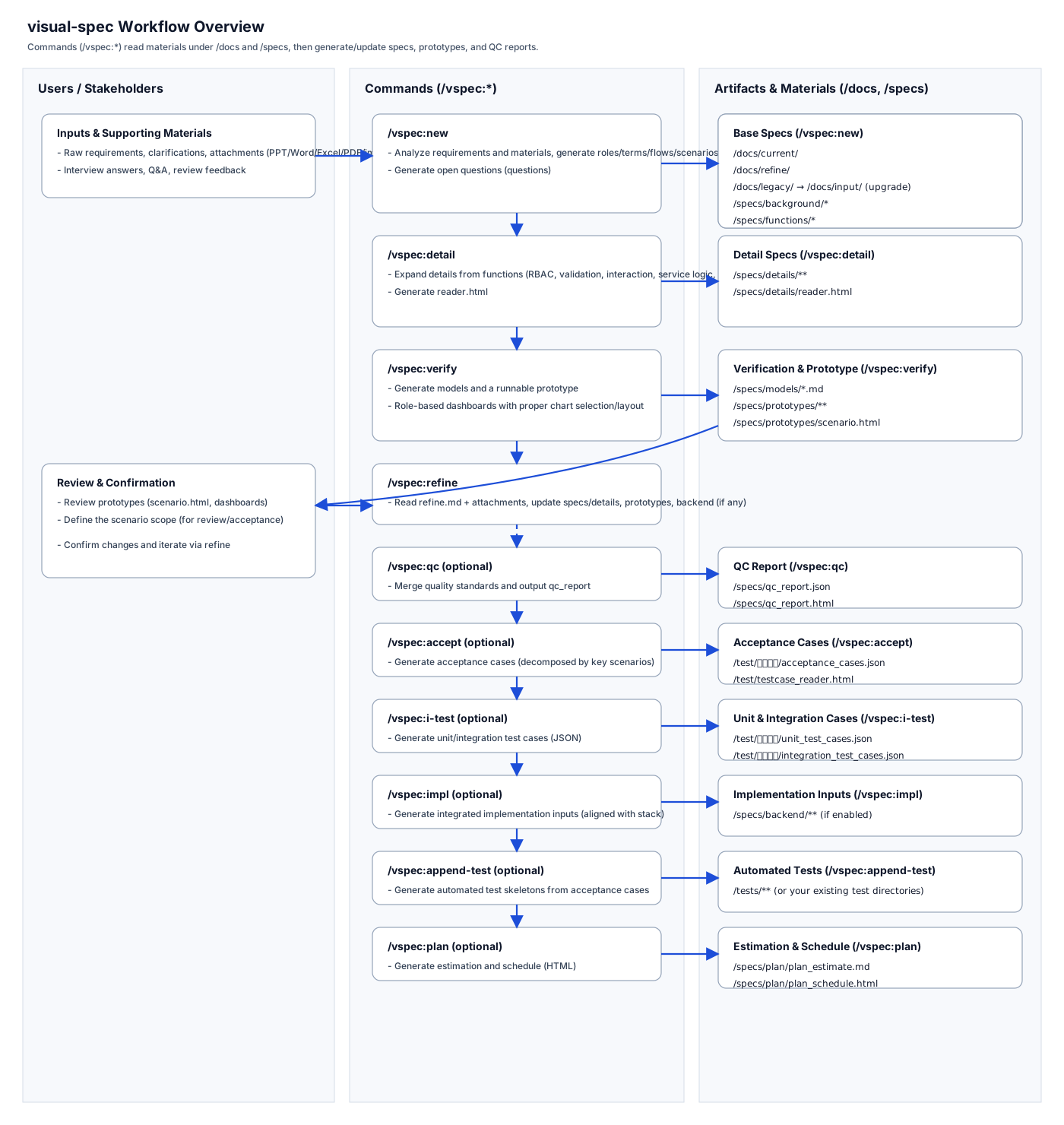 Methodology: visualized requirements analysis visual-spec prioritizes visualization, traceability, and early validation to reduce misunderstanding-driven rework. See: [Theory](https://github.com/visual-req/visual-spec/blob/HEAD/docs/en-US/theory.md) Stage map (SVG): 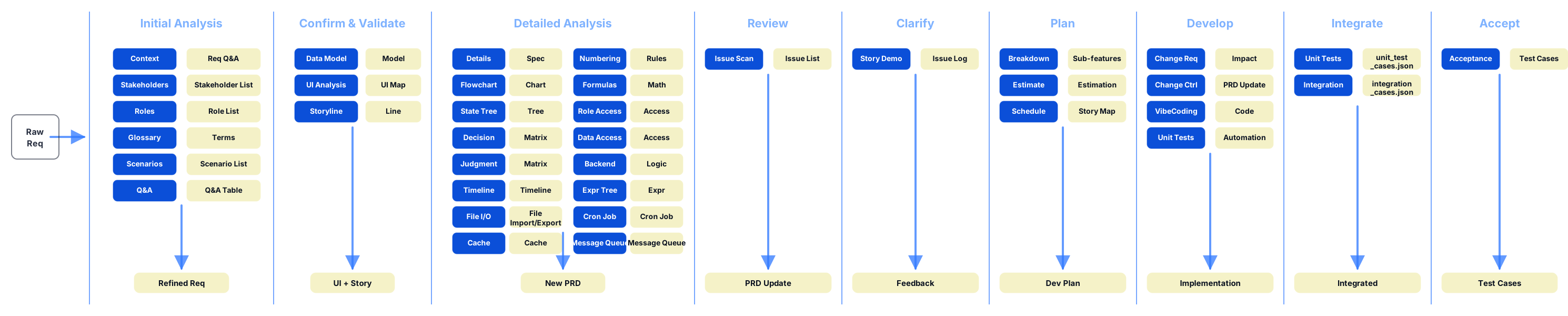 - Requirements analysis: generate background, stakeholders, roles, terms, flows, scenarios, details, dependencies, function list, and open questions - Solution verification: generate data models, runnable prototypes, and a scenario review page - Prototype generation (high-frequency): `/vspec:verify` generates a runnable Web prototype aligned with `/scheme.yaml`, including role-based dashboards (proper chart selection/layout) and a scenario review page under `/specs/prototypes/` - Detailed design: produce RBAC/data-permission/interaction/validation/logging/notification/MQ/import-export/cron specs per function - Acceptance & testing: generate acceptance cases and automated test code - Integrated implementation: generate backend + frontend integrated code (aligned with the repo’s actual stack and conventions) - Planning: estimate and schedule based on the function list (HTML output) ## Commands | Command | Purpose | Key benefit | Main outputs | | --- | --- | --- | --- | | `/vspec:new` | Generate baseline spec artifacts | Turn raw text into structured, reviewable baseline | `/specs/` (background/functions/flows, etc.) | | `/vspec:detail` | Generate per-function detailed specs | Make specs implementable and testable | `/specs/details/` | | `/vspec:verify` | Generate data models and a runnable prototype | Validate behavior early with stakeholders | `/specs/models/`, `/specs/prototypes/` | | `/vspec:qc` | Run quality checks on artifacts | Surface omissions/contradictions before build | `/specs/qc_report.json`, `/specs/qc_report.html` | | `/vspec:refine` | Refine the canonical requirement and sync downstream artifacts | Keep all artifacts consistent as requirements change | updates `original.md` + sync updates to impacted artifacts | | `/vspec:accept` | Generate acceptance test cases (JSON) | Turn scenarios into executable acceptance cases | `/test/验收用例/acceptance_cases.json` + `/test/testcase_reader.html` | | `/vspec:i-test` | Generate unit + integration test cases (JSON) | Make logic/permission/branch coverage explicit | `/test/单元测试/unit_test_cases.json`, `/test/集成测试/integration_test_cases.json` + `/test/testcase_reader.html` | | `/vspec:script` | Generate Playwright scripts | Convert JSON cases into runnable automation skeletons | `/test/playwright/acceptance.spec.ts`, `/test/playwright/integration.spec.ts` | | `/vspec:append-test` | Generate automated test code | Reduce adoption cost for test automation | existing test directories or `/tests/` | | `/vspec:impl` | Generate integrated backend + frontend inputs | Produce structured implementation inputs aligned to stack | `/specs/backend/` (if enabled) and related integration code | | `/vspec:plan` | Generate estimation and schedule | Turn scope into a reviewable plan | `/specs/plan/plan_estimate.md`, `/specs/plan/plan_schedule.html` | | `/vspec:upgrade` | Upgrade/redesign based on legacy + new inputs | Rebuild specs from existing materials | regenerated `/specs/` + synced technical selections | If you only want the standalone planning capability (estimation + schedule) without the full visual-spec workflow, use: https://github.com/visual-req/project-plan If you only want the standalone quality check capability (without the full visual-spec workflow), use: https://github.com/visual-req/spec-review ## Documentation Beginner: - [Getting started](https://github.com/visual-req/visual-spec/blob/HEAD/docs/en-US/getting-started.md) - [Workflows](https://github.com/visual-req/visual-spec/blob/HEAD/docs/en-US/workflows.md) - [Theory](https://github.com/visual-req/visual-spec/blob/HEAD/docs/en-US/theory.md) - [Troubleshooting](https://github.com/visual-req/visual-spec/blob/HEAD/docs/en-US/troubleshooting.md) Reference: - [Commands](https://github.com/visual-req/visual-spec/blob/HEAD/docs/en-US/commands.md) - [Structure](https://github.com/visual-req/visual-spec/blob/HEAD/docs/en-US/structure.md) - [Installation](https://github.com/visual-req/visual-spec/blob/HEAD/docs/en-US/installation.md) - [Fork guide](https://github.com/visual-req/visual-spec/blob/HEAD/docs/en-US/fork.md) ## Upgrade vs Refine - `upgrade`: for legacy-system upgrade/rebuild scenarios; it uses `/docs/legacy/` + `/docs/current/` (and related template/text/assets inputs) to produce an upgraded target spec and technical selections. - `refine`: for improving/adjusting an already visual-spec-structured requirement (legacy or new); it updates the canonical requirement and keeps downstream artifacts in sync. ## Directory Structure - `skills/visual-spec/SKILL.md`: Skill definition and command workflow - `skills/visual-spec/prompts/`: prompt files used by each command ## FAQ - Does this work with my tech stack? The prototype generated by `/vspec:verify` is web-based and follows `/scheme.yaml`. For deeper integration, see: [scheme.yaml](https://github.com/visual-req/visual-spec/blob/HEAD/docs/en-US/scheme.example.yaml) and [Structure](https://github.com/visual-req/visual-spec/blob/HEAD/docs/en-US/structure.md). - Where do the outputs go? Under `/specs/` (models, prototypes, details, qc reports, plan) and `/test/` (JSON test cases, Playwright scripts). See: [Structure](https://github.com/visual-req/visual-spec/blob/HEAD/docs/en-US/structure.md). - Troubleshooting See: [Troubleshooting](https://github.com/visual-req/visual-spec/blob/HEAD/docs/en-US/troubleshooting.md). ## Contributing - For customization, see: [Fork guide](https://github.com/visual-req/visual-spec/blob/HEAD/docs/en-US/fork.md) - To report issues or contribute changes, use GitHub Issues and Pull Requests