


preview-leaflet
veelenga/preview-skills · skills.sh
Open source Repository Open in the app JSON README (API)
About
Skill publicada por veelenga/preview-skills no skills.sh. Instale com: npx skills add veelenga/preview-skills@preview-leaflet
Details
- Kind
- Agent skills
- Publisher
- veelenga
- Origin
- skillssh
- Category
- ferramentas
- Stars
- 9
- Last push
- 2026-09-14T07:30:35Z
- Repository state
- ativo
- Language
- Shell
- License
- MIT
- Added
- 2026-10-07 05:39:20
- Updated
- 2026-10-07 05:39:20
- Origin id
veelenga/preview-skills/preview-leaflet
README
# Preview Skills **Reduce cognitive load when reviewing AI agent work.** Transform plans, diffs, and data into navigable previews. | Name | Description | File Types | | ------------------------------------------------------------------------------------------------------------- | --------------------------------------------------------------- | ------------------- | | [**preview-plan**](https://github.com/veelenga/preview-skills/blob/main/skills/preview-plan/SKILL.md) | Navigable plans with sidebar TOC and progress tracking | `.plan.md`, `.plan` | | [**preview-csv**](https://github.com/veelenga/preview-skills/blob/main/skills/preview-csv/SKILL.md) | Sortable tables with search, filtering, and column statistics | `.csv` | | [**preview-json**](https://github.com/veelenga/preview-skills/blob/main/skills/preview-json/SKILL.md) | Syntax highlighting with collapsible tree structure | `.json`, `.jsonl` | | [**preview-markdown**](https://github.com/veelenga/preview-skills/blob/main/skills/preview-markdown/SKILL.md) | GitHub-flavored rendering with syntax highlighting | `.md`, `.markdown` | | [**preview-mermaid**](https://github.com/veelenga/preview-skills/blob/main/skills/preview-mermaid/SKILL.md) | Interactive diagrams (flowcharts, sequences, ER, etc.) | `.mmd`, `.mermaid` | | [**preview-svg**](https://github.com/veelenga/preview-skills/blob/main/skills/preview-svg/SKILL.md) | Animated SVGs with play/pause, scrub, zoom — concept explainers | `.svg` | | [**preview-diff**](https://github.com/veelenga/preview-skills/blob/main/skills/preview-diff/SKILL.md) | GitHub-style diffs with side-by-side comparison | `.diff`, `.patch` | | [**preview-d3**](https://github.com/veelenga/preview-skills/blob/main/skills/preview-d3/SKILL.md) | Interactive 2D data visualizations with zoom and pan | `.d3` | | [**preview-threejs**](https://github.com/veelenga/preview-skills/blob/main/skills/preview-threejs/SKILL.md) | Interactive 3D visualizations with orbit controls | `.threejs`, `.3d` | | [**preview-leaflet**](https://github.com/veelenga/preview-skills/blob/main/skills/preview-leaflet/SKILL.md) | Interactive maps with markers and routes | `.leaflet`, `.map` | 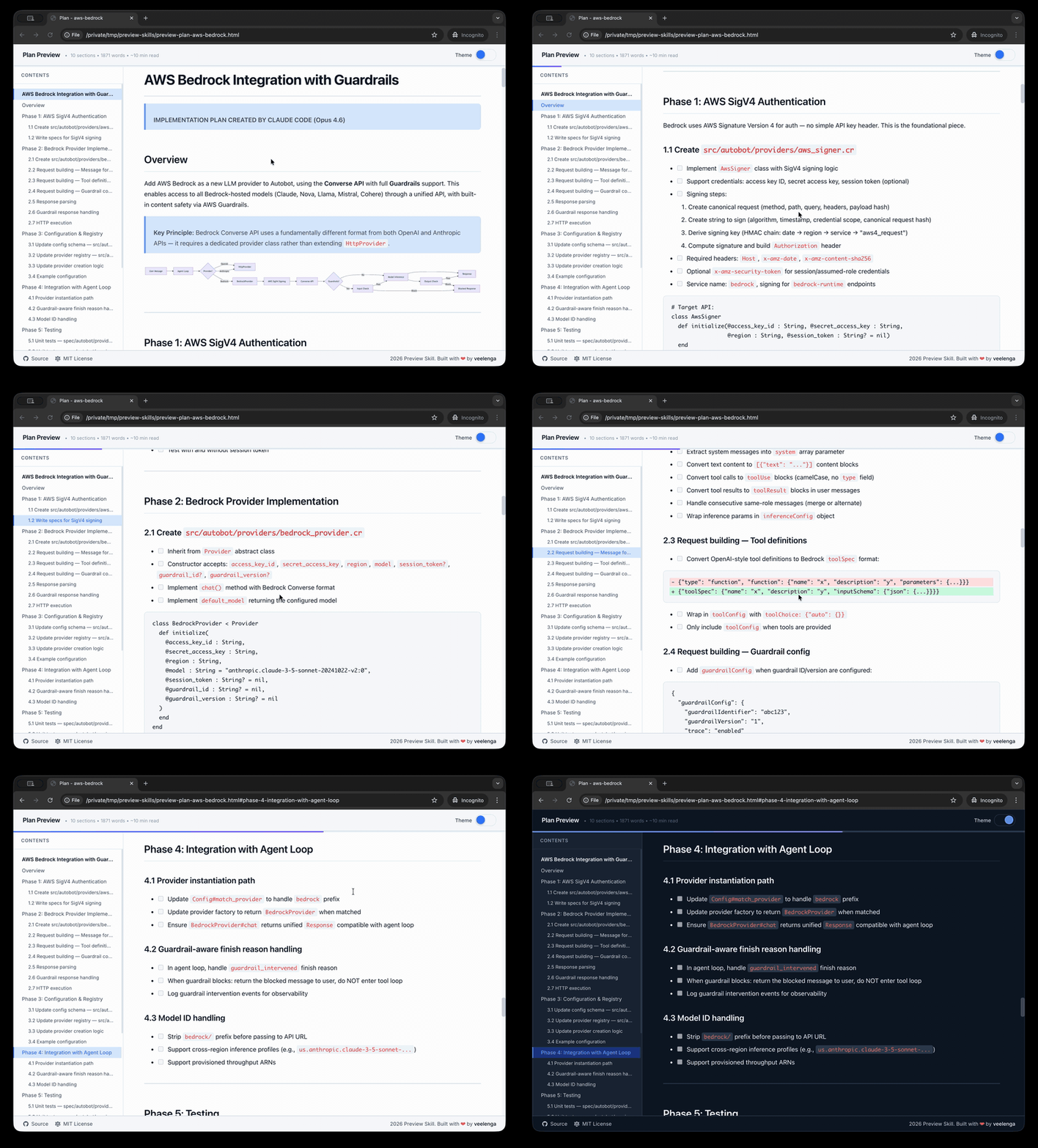 [🌐 Visit website](https://veelenga.github.io/preview-skills/) • [📚 Live examples](https://veelenga.github.io/preview-skills/examples/plan/sample.html) ## Quick start ### Installation script (recommended) The easiest way to install skills using symlinks: ```bash # Clone repository git clone https://github.com/veelenga/preview-skills.git && cd preview-skills # Interactive installation - select which skills to install scripts/install.sh # Or install all skills scripts/install.sh --all # Or install specific skills scripts/install.sh preview-csv preview-json preview-markdown ``` Symlinks keep the skills up-to-date with your repository. Use `git pull` to update, and the changes are immediately reflected. Alternatively the specified skills can be manually copied to your agent skills directory. ### Uninstall ```bash # Interactive - select skills to remove scripts/uninstall.sh # Remove all preview skills scripts/uninstall.sh --all # Remove specific skills scripts/uninstall.sh preview-csv preview-json ``` ## Usage Each skill can be invoked directly: ```bash # Preview CSV file /preview-csv data.csv # Preview JSON file /preview-json config.json # Preview Markdown file /preview-markdown README.md ``` Or use natural language: - "generate pie diagram and preview" - "preview this CSV file" - "show me the JSON data" - "render this Markdown document" ## Examples ```bash # Plans /preview-plan examples/plan/sample.plan.md # Data files /preview-csv examples/csv/employees.csv /preview-json examples/json/sample.json /preview-json examples/json/logs.jsonl # Documentation /preview-markdown README.md # Diffs /preview-diff examples/diff/feature.diff # Diagrams /preview-mermaid examples/mermaid/sample.mmd /preview-d3 examples/d3/network-graph.d3 # 3D and maps /preview-threejs examples/threejs/sample.threejs /preview-leaflet examples/leaflet/longest-trails.leaflet # Animated SVG (concept explainers) /preview-svg examples/svg/bubble-sort.svg /preview-svg examples/svg/load-balancer.svg /preview-svg examples/svg/https-handshake.svg ``` ### Running tests ```bash npm test # Run all tests npm run test:watch # Watch mode npm run lint # ESLint ``` ## How it works No servers, no dependencies, no installation complexity. Each skill is a bash script that: 1. Reads input file or stdin 2. Validates and processes content 3. Generates standalone HTML file with embedded JavaScript/CSS 4. Opens in default browser The generated HTML files are completely self-contained and portable. ## Configuration Each skill has a `config.sh` file with well-documented configuration options: - Metadata (tool name, title, defaults) - Layout settings (type, background color) - Dependencies (CDN scripts, CSS files) - Processing options (content encoding) - Renderer configuration See `skills/preview-csv/config.sh` for a working example. ## See also If you like this project, you might also be interested in - [claude-mermaid](https://github.com/veelenga/claude-mermaid) — MCP Server to previewing mermaid diagrams