


revdiff
umputun/revdiff · skills.sh
Open source Repository Open in the app JSON README (API)
About
Skill publicada por umputun/revdiff no skills.sh. Instale com: npx skills add umputun/revdiff@revdiff
Details
- Kind
- Agent skills
- Publisher
- umputun
- Origin
- skillssh
- Category
- ferramentas
- Stars
- 916
- Forks
- 94
- Open pull requests
- 8
- Last push
- 2026-10-07T01:53:49Z
- Repository state
- ativo
- Language
- Go
- License
- MIT
- Added
- 2026-10-07 06:25:09
- Updated
- 2026-10-07 06:25:09
- Origin id
umputun/revdiff/revdiff
README
# <img src="https://raw.githubusercontent.com/umputun/revdiff/HEAD/site/assets/logo.png" alt="" width="28"> revdiff <a href="https://github.com/umputun/revdiff/actions/workflows/ci.yml"><img src="https://github.com/umputun/revdiff/actions/workflows/ci.yml/badge.svg" alt="build"></a> <a href="https://coveralls.io/github/umputun/revdiff?branch=master"><img src="https://coveralls.io/repos/github/umputun/revdiff/badge.svg?branch=master" alt="Coverage Status"></a> <a href="https://goreportcard.com/report/github.com/umputun/revdiff"><img src="https://goreportcard.com/badge/github.com/umputun/revdiff" alt="Go Report Card"></a>
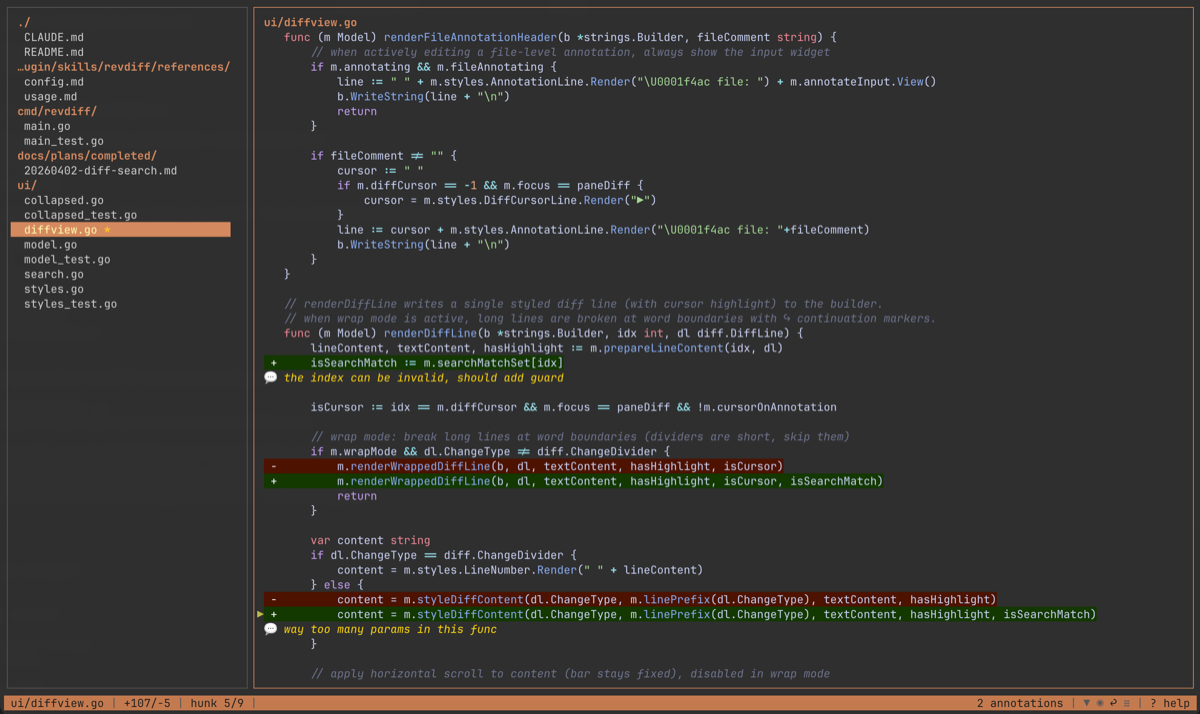
TUI for reviewing diffs, files, and documents with inline annotations. Outputs structured annotations to stdout on quit, making it easy to pipe results into AI agents, scripts, or other tools.
Built for a specific use case: reviewing code changes, plans, and documents without leaving a terminal-based AI coding session (e.g., Claude Code). Just enough UI to navigate diffs and files, annotate specific lines, and return the results to the calling process - no more, no less.
## Features
- Structured annotation output to stdout - pipe into AI agents, scripts, or other tools
- Full-file diff view with syntax highlighting
- Intra-line word-diff: highlights the specific changed words within paired add/remove lines using a brighter background overlay, off by default — enable with `--word-diff` or toggle with `W`
- Collapsed diff mode: shows final text with change markers, toggle with `v`
- Word wrap mode: wraps long lines at viewport boundary with `↪` continuation markers, toggle with `w`; optional `--wrap-indent N` for hanging-indent continuations (handy for markdown lists)
- Page scroll overlap: `--page-overlap N` carries the bottom N lines of the screen to the top of the next one on PgUp/PgDn, so the seam between screens keeps context; the carryover is approximate on wrapped or annotated lines, which occupy several rows but are a single cursor stop
- Horizontal scroll overflow indicators: truncated diff lines show `«` / `»` markers at the edges to signal hidden content off-screen
- Vertical scrollbar thumb: a thicker `┃` segment on pane right borders indicates the visible portion of long diffs, file trees, and markdown TOCs; thumb size and position track scroll progress automatically
- Line numbers: side-by-side old/new line number gutter for diffs, single column for full-context files, toggle with `L`
- Rename-aware diffs (git): a renamed file shows its origin in the diff-pane header as `old → new` and renders only the real line changes instead of a full delete-and-add
- Mercurial support: auto-detects hg repos, translates git-style refs (HEAD, HEAD~N) to Mercurial revsets
- Jujutsu support: auto-detects jj repos (including colocated git+jj), translates git-style refs to jj revsets (`HEAD` → `@-`, `HEAD~N` → `@` plus N+1 dashes); `--all-files` supported
- Blame gutter: shows author name and commit age per line, toggle with `B`
- Annotate any line in the diff (added, removed, or context) plus file-level notes
- Single-file auto-detection: when a diff contains exactly one file, hides the tree pane and gives full terminal width to the diff view
- Two-pane TUI: file tree (left) + colorized diff viewport (right)
- Vim-style `/` search within diff with `n`/`N` match navigation
- Hunk navigation to jump between change groups
- Annotation list popup (`@`): browse all annotations across files, jump to any annotation
- Filter file tree to show only annotated files
- Status line with filename, diff stats, hunk position, line number, and mode indicators
- Help overlay (`?`) showing all keybindings organized by section
- Info popup (`i`) showing launch scope (mode, VCS, ref, filters, file/status counts, aggregate `+/-` line stats), the optional `--description` prose, and the commit log subject + body for every commit in the current ref range (git/hg/jj) — useful for restoring narrative context when reviewing PR-style diffs
- Markdown TOC navigation: single-file markdown files in context-only mode show a table-of-contents pane with header navigation and active section tracking
- All-files mode: browse and annotate all tracked files with `--all-files` (git `ls-files` or jj `file list`), filter with `--include` and `--exclude`
- No-VCS file review: `--only` files outside a VCS repo (or not in any diff) are shown as context-only with full annotation support
- Scratch-buffer review: annotate arbitrary piped or redirected text with `--stdin`, optionally naming it with `--stdin-name`. When the piped content sniffs as a git unified diff, revdiff parses it as a real multi-file diff (review `gh pr diff` or `git format-patch -1 --stdout` output directly); otherwise the input is shown as a single context-only buffer.
- Pi package: launch revdiff from pi, capture annotations, and send them to the agent immediately for the normal review loop
- Review history: auto-saves annotations and diffs to `~/.config/revdiff/history/` on quit as a safety net
- Fully customizable colors via environment variables, CLI flags, or config file
- Custom keybindings: remap any key via config file, export defaults with `--dump-keys`
## Requirements
- `git`, `hg`, or `jj` (used to generate diffs; optional when using `--only` or `--stdin`)
- Jujutsu must be 0.27 or newer. Versions 0.23 through 0.26 have no `jj file annotate -T`, so the blame gutter does not work. Versions before 0.23 also reject the commit-log template behind the commit-info popup.
## Installation
**Homebrew (macOS/Linux):**
```bash
brew install umputun/apps/revdiff
```
**Arch Linux (AUR):**
```bash
paru -S revdiff
```
**Debian/Ubuntu (.deb):**
```bash
# download the latest .deb for your architecture from GitHub Releases
sudo dpkg -i revdiff_*.deb
```
**RPM-based (Fedora, RHEL, etc.):**
```bash
# download the latest .rpm for your architecture from GitHub Releases
sudo rpm -i revdiff_*.rpm
```
**Go:**
```bash
go install github.com/umputun/revdiff/app/revdiff@latest
```
Installs the `revdiff` binary into `GOBIN` (defaults to `$(go env GOPATH)/bin`). Add that directory to your `PATH`.
**Binary releases:** download from [GitHub Releases](https://github.com/umputun/revdiff/releases) (deb, rpm, archives for linux/darwin amd64/arm64).
## Claude Code Plugin
revdiff ships with a Claude Code plugin for interactive code review directly from a Claude session. The plugin launches revdiff as a terminal overlay, captures annotations, and feeds them back to Claude for processing.
The plugin requires one of the following terminals since Claude Code itself cannot display interactive TUI applications - the overlay runs revdiff in a separate terminal layer on top of the current session:
| Terminal | Overlay method | Detection |
|----------|---------------|-----------|
| **agterm** | `agtermctl session overlay open … --block` (full-pane overlay, blocks until quit) | `$AGTERM_SESSION_ID` env var |
| **tmux** | `display-popup` (blocks until quit) | `$TMUX` env var |
| **Zellij** | `zellij run --floating` | `$ZELLIJ` env var |
| **herdr** | `herdr tab create` + `herdr pane run` (new tab), or a zoomed `herdr pane split` with `REVDIFF_HERDR_PANE=1` | `$HERDR_ENV` env var |
| **kitty** | `kitty @ launch --type=overlay` | `$KITTY_LISTEN_ON` env var |
| **wezterm** | `wezterm cli split-pane` | `$WEZTERM_PANE` env var |
| **Kaku** | `kaku cli split-pane` (same API as wezterm) | `$WEZTERM_PANE` env var |
| **cmux** | `cmux new-split` + `cmux send` | `$CMUX_SURFACE_ID`, `__CFBundleIdentifier=com.cmuxterm.app`, or `GHOSTTY_RESOURCES_DIR` / `GHOSTTY_BIN_DIR` containing `cmux.app` |
| **ghostty** | AppleScript split + zoom (macOS only) | `$TERM_PROGRAM` + AppleScript probe |
| **iTerm2** | `osascript` split pane (macOS only) | `$ITERM_SESSION_ID` env var |
| **Emacs vterm** | New frame via `emacsclient` | `$INSIDE_EMACS` env var |
Priority: agterm → tmux → Zellij → herdr → kitty → wezterm/Kaku → cmux → ghostty → iTerm2 → Emacs vterm (first detected wins). If none are available, the plugin exits with an error.
> **Note:** cmux is detected before ghostty when `$CMUX_SURFACE_ID` is set, `__CFBundleIdentifier=com.cmuxterm.app`, or `GHOSTTY_RESOURCES_DIR` / `GHOSTTY_BIN_DIR` contains `cmux.app`. The cmux block uses the cmux CLI (`new-split` + `send --surface`) instead of Ghostty's AppleScript API.
> **Note:** iTerm2 uses a split pane (vertical or horizontal, auto-detected from terminal dimensions) rather than a full-screen overlay. The iTerm2 AppleScript API does not expose a zoom command, so the split view shares screen space with the invoking session.
> **Note:** Ghostty and iTerm2 launchers use `osascript` (Apple Events), which is blocked by Claude Code's sandbox. If you use these terminals with sandbox enabled, add the launcher to `excludedCommands` in your Claude Code `settings.json`:
>
> ```json
> {
> "permissions": {
> "excludedCommands": ["*/launch-revdiff.sh*"]
> }
> }
> ```
>
> Terminals that use CLI tools instead of AppleScript (agterm, tmux, Zellij, herdr, kitty, wezterm, Kaku, cmux) are not affected.
> **Disconnect-resilient tmux window mode:** set `REVDIFF_TMUX_WINDOW=1` in the launcher's environment to open revdiff in a persistent, server-owned tmux window instead of a client-owned `display-popup`. A dropped SSH or tmux client tears down a popup and kills the review, but a server-owned window survives the disconnect — reattach and the live review is still there. This is a launcher environment variable, not a revdiff flag.
> **Pane-scoped overlay (herdr):** Set `REVDIFF_HERDR_PANE=1` in the launcher's environment to open revdiff in a zoomed split of the agent's own herdr pane instead of a new fullscreen tab, so the agent pane stays one keypress away. It needs a herdr whose CLI carries `pane split`, `pane get` and `pane close`; an unsupported CLI or a refused split falls back to the tab overlay; a split that succeeds but returns no usable pane id fails closed with a warning rather than opening a second surface, and may leave a stray pane to close by hand. This is a launcher environment variable, not a revdiff flag.
> **Pane-scoped overlay (agterm):** set `REVDIFF_AGTERM_PANE=1` in the launcher's environment to open revdiff in the agent's own split pane instead of over the whole session, leaving the sibling pane live and visible. It applies only when that session is split — the session-wide overlay stands otherwise, and the launcher retries session-wide if agterm refuses the pane. The review gets pane width rather than session width, which is why it is opt-in. This is a launcher environment variable, not a revdiff flag.
**Install:**
```bash
# add marketplace and install
/plugin marketplace add umputun/revdiff
/plugin install revdiff@revdiff
```
**Use with `/revdiff` command:**
```
/revdiff -- smart detection: uncommitted, last commit, or branch diff
/revdiff HEAD~1 HEAD -- review last commit
/revdiff main -- review current branch against main
/revdiff --staged -- review staged changes only
/revdiff HEAD~3 HEAD -- review last 3 commits
```
**Use with free text** (no slash command needed):
```
"review diff" -- smart detection, same as /revdiff
"review diff HEAD~1 HEAD" -- last commit
"review diff against main" -- branch diff
"review changes from last 2 days" -- Claude resolves the ref automatically
"revdiff for staged changes" -- staged only
```
When no ref is provided, the plugin auto-detects the VCS (git, hg, or jj) and inspects the current repo state to pick what to review:
- On main/master with uncommitted changes — reviews uncommitted changes
- On main/master with clean tree — reviews the last commit
- On a feature branch with clean tree — reviews branch diff against main
- On a feature branch with uncommitted changes — asks whether to review uncommitted only or the full branch diff
- Outside a VCS repo — falls back to asking the user what to review
The plugin includes built-in reference documentation and can answer questions about revdiff usage, available themes, keybindings, and configuration options. It can also create or modify the local config file (`~/.config/revdiff/config`) on request:
```
"what chroma themes does revdiff support?"
"switch revdiff to dracula theme"
"what are the revdiff keybindings?"
"set tree width to 3 in revdiff config"
```
The plugin supports the full review loop: annotate → plan → fix → re-review until no more annotations remain. The bundled launcher treats exit code `10` as success-with-annotations and processes stdout normally.
**Ask instead of instruct:** an annotation containing `??` anywhere in its text is treated as a question rather than a directive, so the agent explains that code instead of changing it. Openers `explain`, `remind`, `describe`, `what is`, `what are`, `how does`, `how do` and `clarify` do the same. `??` is the language-neutral form and works whatever you write in.
```
## renderer.go:142 (+)
why a pointer here??
## store.go:88 (-)
explain what this lock protects
```
The answer comes back as a markdown document reopened in revdiff, with a TOC sidebar, so you can annotate the explanation itself to ask follow-ups. That loop repeats until you quit without annotating. Any code-change annotations from the same batch are held and applied afterwards. The Codex plugin behaves the same way; the Pi package classifies questions too but answers them in chat.
**Custom launchers:** the Claude diff-review skill and the cross-runtime planning plugin resolve launchers through a two-layer chain (user → bundled). Claude uses `${CLAUDE_PLUGIN_DATA}/scripts/<launcher>`; the Codex planning hook uses `${PLUGIN_DATA}/scripts/launch-plan-review.sh`. There is no project-level executable override by design because these hooks auto-fire in any opened repository. See `.claude-plugin/skills/revdiff/references/install.md` for diff review and [plugins/revdiff-planning/README.md](https://github.com/umputun/revdiff/blob/HEAD/plugins/revdiff-planning/README.md) for plan review.
### Plan Review Plugin
A separate `revdiff-planning` plugin automatically opens revdiff when Claude or Codex completes a plan, letting you annotate it before implementation. If you add annotations, the agent revises the full plan and presents it again — looping until you're satisfied. Exit code `10` means annotations were captured, not launcher failure.
Claude Code:
```bash
/plugin marketplace add umputun/revdiff
/plugin install revdiff-planning@revdiff
```
Codex:
```bash
codex plugin marketplace add umputun/revdiff
codex plugin add revdiff-planning@revdiff
```
Start a new Codex session and trust the hook through `/hooks`. Codex automatic review is opt-in and only fires for complete `<proposed_plan>` blocks in Plan mode; `/revdiff-plan` remains the manual fallback.
This plugin is independent from the main `revdiff` plugin. In Claude Code it hooks `ExitPlanMode`, and so does `planning` from `cc-thingz`; Claude Code runs both hooks, so enabling both can review the same plan twice.
## Pi Package
revdiff also ships as a [pi](https://github.com/badlogic/pi-mono) package. The `/revdiff` command routes requests through the revdiff skill, which resolves refs, files, and natural-language targets before launching the existing `revdiff` binary through the `revdiff_review` tool. If no annotations were captured, the agent stops the review loop unless you explicitly ask for another review.
**Install:**
```bash
pi install https://github.com/umputun/revdiff
```
**Command inside pi:**
```text
/revdiff [args]
```
Useful args:
```text
/revdiff -- detect uncommitted, staged, or branch changes, then open revdiff
/revdiff HEAD~1 HEAD -- review last commit
/revdiff main -- review against main
/revdiff --staged -- review staged changes
/revdiff --untracked -- include untracked files in working-tree review
/revdiff --all-files -- browse all tracked files
/revdiff --all-files --exclude vendor
/revdiff --only README.md -- review a single file in context-only mode
/revdiff HEAD~3 --description="why this refactor matters"
/revdiff HEAD~3 --description-file=/tmp/revdiff-desc.md
/revdiff main --annotations=/tmp/revdiff-review.md
```
Natural-language targets are supported because `/revdiff` routes through the skill:
```text
/revdiff prev commit
/revdiff last tag
/revdiff 2 weeks ago
```
You can also call the skill explicitly with `/skill:revdiff <request>`.
**Agent workflow:**
- `/revdiff` is a Pi command alias for `/skill:revdiff`; the skill resolves the request and calls `revdiff_review`.
- `revdiff_review` suspends pi, hands the terminal to revdiff, then returns captured annotations to the agent.
- The agent classifies annotations into explanation requests and code-change directives.
- Explanation requests are answered first in normal chat, without opening another revdiff session for the explanation.
- Any no-annotation `revdiff_review` result stops the loop. The agent must not relaunch revdiff unless you explicitly ask for another review.
- For explanation-only annotations, the agent asks whether to continue the original review or finish.
- Before editing repository files, the agent lists planned code/file changes, applies the changes, then reruns `revdiff_review` with the same args until no annotations are captured.
**Notes:**
- Requires the `revdiff` binary on `PATH`
- Set `REVDIFF_BIN=/absolute/path/to/revdiff` if pi can't find the binary
- Direct terminal handoff is the only Pi launch mode
- Exit code `10` means annotations were captured, not failure
- Use `--untracked` when agent-created files should be reviewed before they are staged
- Use `--description` or `--description-file` after analysis/refactor work so the info popup carries review context
- Use `--annotations=<tempfile>` to preload in-session review notes
- Successful `revdiff_review` results include captured annotation text; history is only for explicit latest-history requests or missing-output fallback
- For "use my latest revdiff annotations", the agent should read the newest file under `$REVDIFF_HISTORY_DIR` or `~/.config/revdiff/history/` instead of relaunching revdiff
- In the repo, the pi-specific resources live under `plugins/pi/` to keep harness integrations clearly separated
## Codex Plugin
revdiff ships with a [Codex CLI](https://github.com/openai/codex) plugin for interactive diff review and plan annotation directly from a Codex session. The plugin provides two skills:
- `/revdiff` — same diff review workflow as the Claude Code plugin (detect ref, launch overlay, capture annotations, feedback loop)
- `/revdiff-plan` — extracts the last Codex assistant message from session rollout files, opens it in revdiff for annotation, and feeds feedback back
The plugin uses the same terminal overlay mechanism (tmux, Zellij, herdr, kitty, wezterm, etc.) as the Claude Code plugin.
**Install the diff-review skills and automatic plan-review plugin:**
```bash
codex plugin marketplace add umputun/revdiff
codex plugin add revdiff@revdiff
codex plugin add revdiff-planning@revdiff
```
If you previously copied the skills manually, remove `~/.codex/skills/revdiff` and `~/.codex/skills/revdiff-plan` after installing the plugin so the plugin copy is the only one in use.
Start a new session and trust the plugin hook through `/hooks`. The `Stop` hook runs only in Plan mode and first checks `last_assistant_message`; whenever that field has no complete `<proposed_plan>`, it reads the exact event transcript and selects the last assistant message for the matching `session_id` and `turn_id`, without depending on a provider-specific phase. A readable clarification turn is ignored. Missing or mismatched event data, dependencies, and launcher failures warn and fail open.
When annotations are present, the hook asks Codex to return the complete revised plan with a snapshot marker on the first line inside `<proposed_plan>`. The next round opens a rolling compare (`<new> <old>`); reviewed snapshots are replaced, and a clean review removes the final snapshot.
The `revdiff` plugin installs both interactive skills. The separate `revdiff-planning` plugin adds automatic Plan-mode review.
**Requirements:**
- `revdiff` binary on `PATH`
- `jq` (required only for manual `/revdiff-plan` session extraction)
- One of the supported terminal multiplexers for overlay mode
**Notes:**
- Codex treats exit code `10` as success-with-annotations and keeps captured output
- Automatic review uses the opt-in `revdiff-planning` plugin; `/revdiff-plan` remains a manual fallback
- Scripts are portable copies from the Claude Code plugin, not symlinks
- Codex plugin source lives under `plugins/codex/` in the repository
### Integration with Other Tools
#### OpenCode
revdiff integrates with [OpenCode](https://opencode.ai). V1 provides a tool, slash command, and plan-review plugin. V2 provides a CLI plugin for `/revdiff` and automatic plan review, using the shared launcher in the client's terminal environment.
**Install (automatically detects OpenCode v1 or v2):**
```bash
cd plugins/opencode && bash setup.sh
```
The v2 CLI plugin is discovered automatically under `plugins/revdiff/`. It runs reviews locally and returns annotations to the session captured at launch. Automatic plan review handles live completion events only, deduplicated between local clients using an atomic marker per event ID. Markers older than one day are removed on the next claim. Clients must share the same state directory and local checkout; the winner may be in a window the user is not looking at. Restart OpenCode after installing.
The installer uses `opencode --version` from `PATH`; use `bash setup.sh --opencode /path/to/opencode /path/to/config` to select another v2 installation. The v2 integration supports OpenCode v2.0.0+ and has no runtime npm dependencies. Its config directory follows `OPENCODE_CONFIG_DIR`, then XDG defaults. V1 installs only to `~/.config/opencode`. Upgrade removes the obsolete v1 plan plugin, Markdown command and exact JSON registration; JSONC is left untouched with a notice. V1 code remains unchanged, and rollback leaves the inert v2 directory in place. See [plugins/opencode/README.md](https://github.com/umputun/revdiff/blob/HEAD/plugins/opencode/README.md) for prerequisites, ownership rules and migration details.
**Commands inside OpenCode:**
V2 also supports `/revdiff` from the home screen. A clean review leaves it unchanged; annotations create a feedback session using the configured default agent and selected model, falling back to the configured model on older v2 clients.
```text
/revdiff -- review git diff with revdiff TUI
/revdiff HEAD~3..HEAD -- review last 3 commits
```
The v2 plan-review plugin automatically launches revdiff after a completed plan-agent response in the displayed root session. Annotations and a line-numbered snapshot of the reviewed plan are returned to that session for revision, so the agent does not need the deleted temporary file. V1 uses the plan-mode idle hook.
#### General
The structured stdout output works with any tool that can read text. By default revdiff exits `0` even when annotations are produced; pass `--exit-code-on-annotations` to return `10` for successful annotation output:
```bash
# capture annotations for processing
rc=0
annotations=$(revdiff --exit-code-on-annotations main) || rc=$?
case "$rc" in
0) [ -n "$annotations" ] && echo "$annotations" | your-tool ;;
10) echo "$annotations" | your-tool ;;
*) exit "$rc" ;;
esac
```
Exit status: `0` = no annotations, discarded annotations, or default mode; `10` = annotations were produced with `--exit-code-on-annotations`; `1` = real errors.
## Usage
```
revdiff [OPTIONS] [base] [against]
```
Positional arguments support several forms:
- `revdiff` — uncommitted changes
- `revdiff HEAD~3` — diff a single ref against the working tree
- `revdiff HEAD~1 HEAD` — review exactly the last commit
- `revdiff main feature` — diff between two refs
- `revdiff main..feature` — same as above, using git's dot-dot syntax
- `revdiff main...feature` — changes since `feature` diverged from `main`
### Options
| Option | Description | Default |
|--------|-------------|---------|
| `base` | Git ref to diff against | uncommitted changes |
| `against` | Second git ref for two-ref diff | |
| `--staged` | Show staged changes, env: `REVDIFF_STAGED` | `false` |
| `--untracked` | Show untracked files in the tree, env: `REVDIFF_UNTRACKED` | `false` |
| `--tree-width` | File tree panel width in units (1-10), env: `REVDIFF_TREE_WIDTH` | `2` |
| `--tab-width` | Number of spaces per tab character, env: `REVDIFF_TAB_WIDTH` | `4` |
| `--no-colors` | Disable all colors including syntax highlighting, env: `REVDIFF_NO_COLORS` | `false` |
| `--no-status-bar` | Hide the status bar, env: `REVDIFF_NO_STATUS_BAR` | `false` |
| `--wrap` | Enable line wrapping in diff view, env: `REVDIFF_WRAP` | `false` |
| `--wrap-indent` | Indent wrap continuation rows by N columns so they hang under the first row's content (helps when reviewing markdown lists where unindented continuation can be misread as a new bullet), env: `REVDIFF_WRAP_INDENT` | `0` |
| `--page-overlap` | Keep N lines from the previous screen when paging the diff, env: `REVDIFF_PAGE_OVERLAP` | `0` |
| `--collapsed` | Start in collapsed diff mode, env: `REVDIFF_COLLAPSED` | `false` |
| `--compact` | Start in compact diff mode (small context around changes), env: `REVDIFF_COMPACT` | `false` |
| `--compact-context` | Number of context lines around changes when in compact mode, env: `REVDIFF_COMPACT_CONTEXT` | `5` |
| `--cross-file-hunks` | Allow `[` and `]` to continue into adjacent files, env: `REVDIFF_CROSS_FILE_HUNKS` | `false` |
| `--cross-file-motion` | Allow cursor motion (`j`/`k`, `PgDown`/`PgUp`, `Ctrl+d`/`Ctrl+u`) to continue into adjacent files at a boundary, env: `REVDIFF_CROSS_FILE_MOTION` | `false` |
| `--start-at-change` | Position the cursor on the first changed line, env: `REVDIFF_START_AT_CHANGE` | `false` |
| `--line-numbers` | Show line numbers in diff gutter, env: `REVDIFF_LINE_NUMBERS` | `false` |
| `--blame` | Show blame gutter, env: `REVDIFF_BLAME` | `false` |
| `--word-diff` | Highlight intra-line word-level changes in paired add/remove lines, env: `REVDIFF_WORD_DIFF` | `false` |
| `--filter-unreviewed` | Show only files not marked reviewed, env: `REVDIFF_FILTER_UNREVIEWED` | `false` |
| `--annotation-marker` | Prefix shown before annotation lines, env: `REVDIFF_ANNOTATION_MARKER` | `💬` |
| `--exit-code-on-annotations` | Exit 10 when annotations are produced, env: `REVDIFF_EXIT_CODE_ON_ANNOTATIONS`, config: `exit-code-on-annotations` | `false` |
| `--no-confirm-discard` | Skip confirmation when discarding annotations with Q, env: `REVDIFF_NO_CONFIRM_DISCARD` | `false` |
| `--no-confirm-reload` | Skip confirmation when dropping annotations on reload with R, env: `REVDIFF_NO_CONFIRM_RELOAD` | `false` |
| `--no-mouse` | Disable mouse support (scroll wheel, click), env: `REVDIFF_NO_MOUSE` | `false` |
| `--no-tree` | Hide the file tree pane, env: `REVDIFF_NO_TREE` | `false` |
| `--vim-motion` | Enable vim-style motion preset (counts, `gg`, `G`, `H`/`M`/`L`, `zz`/`zt`/`zb`, `ZZ`/`ZQ`), env: `REVDIFF_VIM_MOTION` | `false` |
| `--chroma-style` | Chroma color theme for syntax highlighting, env: `REVDIFF_CHROMA_STYLE` | `catppuccin-macchiato` |
| `--theme` | Load color theme from `~/.config/revdiff/themes/`; use `auto` to choose by terminal background, env: `REVDIFF_THEME` | |
| `--auto-theme-dark` | Theme used by `--theme auto` on dark terminal backgrounds, env: `REVDIFF_AUTO_THEME_DARK` | `revdiff` |
| `--auto-theme-light` | Theme used by `--theme auto` on light terminal backgrounds, env: `REVDIFF_AUTO_THEME_LIGHT` | `catppuccin-latte` |
| `--dump-theme` | Print currently resolved colors as theme file to stdout and exit | |
| `--list-themes` | Print available theme names to stdout and exit | |
| `--init-themes` | Write bundled theme files to themes dir and exit | |
| `--init-all-themes` | Write all gallery themes (bundled + community) to themes dir and exit | |
| `--install-theme` | Install theme(s) from gallery or local file path and exit (repeatable) | |
| `-A`, `--all-files` | Browse all tracked files, not just diffs (git or jj) | `false` |
| `--compare-old` | Compare mode: old file path (use with `--compare-new`; uses `git diff --no-index`, no VCS repo needed) | |
| `--compare-new` | Compare mode: new file path (use with `--compare-old`) | |
| `--stdin` | Review stdin as a scratch buffer (piped or redirected input only) | `false` |
| `--stdin-name` | Synthetic file name for stdin content; enables extension-based highlighting/TOC | `scratch-buffer` |
| `--description` | Prose context shown in the info popup (markdown; for multi-line text, use a multi-line quoted shell string or `--description-file`) | |
| `--description-file` | Read the info-popup description from this file (markdown) | |
| `-I`, `--include` | Include only files matching prefix, may be repeated, env: `REVDIFF_INCLUDE` (comma-separated) | |
| `-X`, `--exclude` | Exclude files matching prefix, may be repeated, env: `REVDIFF_EXCLUDE` (comma-separated) | |
| `-F`, `--only` | Show only matching files by exact path or suffix, may be repeated (e.g. `--only=model.go`) | |
| `-o`, `--output` | Write annotations to file instead of stdout, env: `REVDIFF_OUTPUT` | |
| `--post-flush-command` | Run command after a successful `O` flush, env: `REVDIFF_POST_FLUSH_COMMAND`, config: `post-flush-command` | |
| `--annotations` | Preload annotations from a markdown file in `-o` format | |
| `--history-dir` | Directory for review history auto-saves, env: `REVDIFF_HISTORY_DIR` | `~/.config/revdiff/history/` |
| `--config` | Path to config file, env: `REVDIFF_CONFIG` | `~/.config/revdiff/config` |
| `--keys` | Path to keybindings file, env: `REVDIFF_KEYS` | `~/.config/revdiff/keybindings` |
| `--dump-keys` | Print effective keybindings to stdout and exit | |
| `--dump-config` | Print default config to stdout and exit | |
| `-V`, `--version` | Show version info | |
### Config File
All options can be set in a config file at `~/.config/revdiff/config` (INI format). CLI flags and environment variables override config file values. For annotation exit status, use `exit-code-on-annotations = true`.
Generate a default config file:
```bash
mkdir -p ~/.config/revdiff
revdiff --dump-config > ~/.config/revdiff/config
```
Then uncomment and edit the values you want to change.
### Themes
revdiff ships with eight bundled color themes: **basic**, **catppuccin-latte**, **catppuccin-mocha**, **dracula**, **gruvbox**, **nord**, **revdiff**, and **solarized-dark**. Themes are stored in `~/.config/revdiff/themes/` and are automatically created on first run.
Press `T` inside revdiff to open the interactive theme selector with live preview — browse themes, see colors applied instantly, and persist your choice to the config file on confirm.
```bash
# apply a theme
revdiff --theme dracula
# choose a theme from the terminal background color
revdiff --theme auto
# list available themes
revdiff --list-themes
# re-create bundled theme files (overwrites bundled, keeps custom themes)
revdiff --init-themes
# install a specific theme from the gallery
revdiff --install-theme catppuccin-latte
# install all gallery themes (bundled + community)
revdiff --init-all-themes
# export current colors as a custom theme
revdiff --dump-theme > ~/.config/revdiff/themes/my-custom
```
**Creating custom themes** — two approaches:
1. **From current colors:** customize individual colors in your config file or via `--color-*` flags, then dump the resolved result as a theme: `revdiff --dump-theme > ~/.config/revdiff/themes/my-custom`
2. **From scratch:** copy a bundled theme and edit it directly — each file defines all 23 color keys plus `chroma-style` in INI format:
```ini
# name: my-custom
# description: custom color scheme
chroma-style = dracula
color-accent = #bd93f9
color-border = #6272a4
...all 23 color keys...
```
Set a default theme in the config file:
```ini
theme = dracula
```
Or via environment variable: `REVDIFF_THEME=dracula`.
Set `theme = auto` to query the terminal background and choose a matching theme. By default, auto mode uses `revdiff` for dark backgrounds and `catppuccin-latte` for light backgrounds:
```ini
theme = auto
auto-theme-dark = revdiff
auto-theme-light = catppuccin-latte
```
**Contributing themes** — community themes live in the `themes/gallery/` directory. See [themes/README.md](https://github.com/umputun/revdiff/blob/HEAD/themes/README.md) for the contribution guide, format requirements, and validation instructions.
**Precedence:** When `--theme` is set, it takes over completely — all 23 color fields and chroma-style are overwritten by the theme, ignoring any `--color-*` flags or env vars. Without `--theme`: built-in defaults → config file → env vars → CLI flags. `--theme` + `--no-colors` prints a warning and applies the theme.
<details>
<summary>Color customization flags (click to expand)</summary>
All color options accept hex values (`#rrggbb`) and have corresponding `REVDIFF_COLOR_*` env vars.
| Option | Description | Default |
|--------|-------------|---------|
| `--color-accent` | Active pane borders and directory names | `#D5895F` |
| `--color-border` | Inactive pane borders | `#585858` |
| `--color-normal` | File entries and context lines | `#d0d0d0` |
| `--color-muted` | Divider lines and status bar | `#585858` |
| `--color-selected-fg` | Selected file text | `#ffffaf` |
| `--color-selected-bg` | Selected file background | `#D5895F` |
| `--color-annotation` | Annotation text and markers | `#ffd700` |
| `--color-cursor-fg` | Cursor indicator color | `#bbbb44` |
| `--color-cursor-bg` | Cursor indicator background | terminal default |
| `--color-add-fg` | Added line text | `#87d787` |
| `--color-add-bg` | Added line background | `#123800` |
| `--color-remove-fg` | Removed line text | `#ff8787` |
| `--color-remove-bg` | Removed line background | `#4D1100` |
| `--color-word-add-bg` | Intra-line word-diff add background | auto-derived from add-bg |
| `--color-word-remove-bg` | Intra-line word-diff remove background | auto-derived from remove-bg |
| `--color-modify-fg` | Modified line text (collapsed mode) | `#f5c542` |
| `--color-modify-bg` | Modified line background (collapsed mode) | `#3D2E00` |
| `--color-tree-bg` | File tree pane background | terminal default |
| `--color-diff-bg` | Diff pane background | terminal default |
| `--color-status-fg` | Status bar foreground | `#202020` |
| `--color-status-bg` | Status bar background | `#C5794F` |
| `--color-search-fg` | Search match text | `#1a1a1a` |
| `--color-search-bg` | Search match background | `#4a4a00` |
</details>
<details>
<summary>Available chroma styles (click to expand)</summary>
**Dark themes:** `aura-theme-dark`, `aura-theme-dark-soft`, `base16-snazzy`, `catppuccin-frappe`, `catppuccin-macchiato` (default), `catppuccin-mocha`, `doom-one`, `doom-one2`, `dracula`, `evergarden`, `fruity`, `github-dark`, `gruvbox`, `hrdark`, `monokai`, `modus-vivendi`, `native`, `nord`, `nordic`, `onedark`, `paraiso-dark`, `rose-pine`, `rose-pine-moon`, `rrt`, `solarized-dark`, `solarized-dark256`, `tokyonight-moon`, `tokyonight-night`, `tokyonight-storm`, `vim`, `vulcan`, `witchhazel`, `xcode-dark`
**Light themes:** `autumn`, `borland`, `catppuccin-latte`, `colorful`, `emacs`, `friendly`, `github`, `gruvbox-light`, `igor`, `lovelace`, `manni`, `modus-operandi`, `monokailight`, `murphy`, `paraiso-light`, `pastie`, `perldoc`, `pygments`, `rainbow_dash`, `rose-pine-dawn`, `solarized-light`, `tango`, `tokyonight-day`, `trac`, `vs`, `xcode`
**Other:** `RPGLE`, `abap`, `algol`, `algol_nu`, `arduino`, `ashen`, `average`, `bw`, `hr_high_contrast`, `onesenterprise`, `swapoff`
</details>
### Examples
```bash
# review uncommitted changes
revdiff
# review changes against a branch
revdiff main
# review staged changes
revdiff --staged
# review last commit
revdiff HEAD~1 HEAD
# diff between two refs
revdiff main feature
# same with git dot-dot syntax
revdiff main..feature
# review only specific files
revdiff --only=model.go --only=README.md
# browse all git-tracked files in a project
revdiff --all-files
# browse all files, excluding vendor and mocks directories
revdiff --all-files --exclude vendor --exclude mocks
# include only src/ files
revdiff --include src
# include src/ but exclude src/vendor/
revdiff --include src --exclude src/vendor
# exclude paths in normal diff mode
revdiff main --exclude vendor
# review a file outside a VCS repo (context-only, no diff markers)
revdiff --only=/tmp/plan.md
# review a file that has no VCS changes (context-only view with annotations)
revdiff --only=docs/notes.txt
# diff two arbitrary files (no VCS repo needed)
revdiff --compare-old=/tmp/plan-old.md --compare-new=docs/plans/plan.md
# review arbitrary piped text as a scratch buffer
printf '# Plan\n\nShip it\n' | revdiff --stdin --stdin-name plan.md
# capture annotations from generated output
some-command | revdiff --stdin --output /tmp/annotations.txt
# round-trip: capture, edit externally, reload
revdiff -o review.md HEAD~1
$EDITOR review.md
revdiff --annotations=review.md HEAD~1
```
`--annotations` reads the same markdown format that `-o` writes (see [Output Format](#output-format) below), so any file revdiff produces can be loaded back. You can also hand-author or generate that file from any other source — each record is `## path/to/file.go:LINE (+)` followed by the comment body — then step through the comments inline against the actual diff, edit or delete them in the TUI, and quit with `q` to write the final set to stdout (or to `-o`).
### All-Files Mode
Use `--all-files` (or `-A`) to browse all tracked files in a project, not just files with changes. This turns revdiff into a general-purpose code annotation tool. All files are shown in context-only mode (no `+`/`-` markers) with full annotation and syntax highlighting support.
`--all-files` requires a git or jj repository (uses `git ls-files` or `jj file list` for file discovery) and is mutually exclusive with refs, `--staged`, and `--only`. Not supported in hg repos.
Combine with `--include` (or `-I`) to narrow to specific paths and `--exclude` (or `-X`) to filter out unwanted paths:
```bash
revdiff --all-files --include src
revdiff --all-files --include src --exclude src/vendor
revdiff --all-files --exclude vendor --exclude mocks
```
`--include` and `--exclude` both use prefix matching: `--include src` keeps only `src/`, `src/foo.go`, etc. `--exclude vendor` skips `vendor/`, `vendor/foo.go`, etc. Both work in `--all-files` and normal diff modes and are composable: include narrows first, then exclude removes from the included set.
Both options can be persisted in the config file:
```ini
include = src
exclude = vendor
exclude = mocks
```
Or via environment variables (comma-separated): `REVDIFF_INCLUDE=src`, `REVDIFF_EXCLUDE=vendor,mocks`.
### Context-Only File Review
When `--only` specifies a file that has no VCS changes (or when no VCS repo exists at all), revdiff shows the file in context-only mode: all lines are displayed without `+`/`-` gutter markers, with full annotation and syntax highlighting support. This enables reviewing arbitrary files without requiring VCS context.
Two scenarios trigger this mode:
1. **Inside a repo (git/hg/jj)** - `--only` files not in the diff are read from disk and shown alongside any changed files
2. **Outside a VCS repo** - `--only` is required; files are read directly from disk
### Two-File Diff
Use `--compare-old=<path>` together with `--compare-new=<path>` to diff two arbitrary files on disk using `git diff --no-index`. No VCS repository is required — this works anywhere `git` is installed.
```bash
revdiff --compare-old=/tmp/plan-old.md --compare-new=docs/plans/plan.md
revdiff --compare-old=a.txt --compare-new=b.txt
```
`--compare-old` and `--compare-new` must be used together and are mutually exclusive with refs, `--staged`, `--only`, `--all-files`, `--stdin`, `--include`, `--exclude`, and `--annotations`. All standard diff features work: word-diff, compact mode, syntax highlighting, scrollbar, and inline annotations.
### Scratch-Buffer Review
Use `--stdin` to review arbitrary piped or redirected text. revdiff sniffs the input for a git unified-diff signature: when a line beginning with `diff --git a/` is found near the start, the input is parsed as a real multi-file diff (one tree entry per file, with `+`/`-` markers, hunk navigation, word-diff, compact mode, and per-file annotations); otherwise the input is shown as a single context-only buffer with all lines as context, supporting annotations, file-level notes, search, wrap, collapsed mode, and structured output. Any per-section parse failure falls the whole input back to raw-text mode so a malformed patch never silently drops files. Input is capped at 64 MiB.
`--stdin` is explicit and mutually exclusive with refs, `--staged`, `--only`, `--all-files`, `--include`, `--exclude`, and `--annotations`. stdin mode requires piped or redirected input; plain terminal stdin is rejected to avoid accidentally launching an empty scratch buffer.
Use `--stdin-name` to control the synthetic filename for the context-only case (it is ignored in multi-file diff mode, where the tree shows the real paths). This gives annotation output a stable key and enables filename-based syntax highlighting or markdown TOC activation:
```bash
echo "plain text" | revdiff --stdin
printf '# Plan\n\nBody\n' | revdiff --stdin --stdin-name plan.md
git show HEAD~1:README.md | revdiff --stdin --stdin-name README.md
# multi-file diff parsing — tree shows real paths, per-file annotations
gh pr diff 123 | revdiff --stdin
git format-patch -1 --stdout | revdiff --stdin
```
### Review Description
Use `--description` (or `--description-file=path.md`) to attach prose context to a review. The text is rendered at the top of the info popup (`i` key), with the same markdown highlighting used for `.md` files in the diff view. Useful when an agent (or a script) launches revdiff on your behalf and you come back to it later — the popup tells you what the change is and why.
```bash
revdiff HEAD~3 --description="# Refactor auth middleware
Drop session-token storage to meet new compliance requirements.
See ticket SEC-441 for context."
# longer descriptions: keep the markdown in a file
revdiff HEAD~3 --description-file=.review-description.md
```
`--description` and `--description-file` are mutually exclusive. The description section is hidden when neither is set, so the flag is purely additive — existing invocations are unchanged.
### Markdown TOC Navigation
When reviewing a single markdown file in context-only mode (e.g., `revdiff --only=README.md` or `printf '# title\n' | revdiff --stdin --stdin-name plan.md`), revdiff shows a table-of-contents pane on the left listing all markdown headers. Use `Tab` to switch focus between the TOC and diff panes, `j`/`k` to navigate headers, and `Enter` to jump to a header in the diff. The TOC automatically highlights the current section as you scroll through the file.
This mode activates when all three conditions are met: single file, markdown extension (`.md`/`.markdown`), and all lines are context (no diff changes). Headers inside fenced code blocks are excluded from the TOC.
### Beyond Code Review
The `--only` flag enables use cases beyond VCS diffs. Any text file can be loaded for annotation — no VCS repo required.
**Reviewing AI-generated drafts** — When an AI assistant drafts text to be posted publicly (PR comments, issue responses, release notes), write it to a temp file and review in revdiff. Annotate specific lines with changes, the assistant reads annotations and rewrites, re-open to verify. Same annotate-fix-verify loop as code review.
**Reviewing documentation and specs** — Markdown files, API specs, config files, and plan documents can all be reviewed with inline annotations. Useful for reviewing RFCs, annotating configs before deployment, or marking up plans with questions.
```bash
revdiff --only=docs/plans/feature.md
revdiff --only=/tmp/draft-comment.md
```
**Reviewing generated output** — CI configs, Terraform plans, generated migrations, or command output. Load files with `--only` or stream ephemeral output with `--stdin`, annotate what needs fixing, feed annotations back to the generator.
### Zed Integration
Zed's [custom tasks](https://zed.dev/docs/tasks) can launch revdiff directly in an editor terminal tab.
See the [Zed integration guide](https://revdiff.com/docs.html#zed-integration) for ready-to-use task definitions, keybinding setup, and platform-specific clipboard notes.
### Review History
When you quit with annotations (`q`), revdiff automatically saves a copy of the review session to `~/.config/revdiff/history/<repo-name>/<timestamp>.md`. This is a safety net — if annotations are lost (process crash, agent fails to capture stdout), the history file preserves them.
Each history file contains:
- Header with path, refs, and (git only) a short commit hash
- Full annotation output (same format as stdout)
- Raw git diff for annotated files only
History auto-save is always on and silent — errors are logged to stderr, never fail the process. No history is saved on discard quit (`Q`) or when there are no annotations. For `--stdin` mode, files are saved under `stdin/` subdirectory; for `--only` without git, the parent directory name is used instead of a repo name.
The history file is also a crash-recovery save when the process is terminated by a signal — a SIGHUP from a dropped SSH or tmux client, or a SIGTERM. On a signal exit only the history file is written, never the `-o` output, because a signal is not the deliberate handoff that `q` and `O` perform. Recover the annotations the usual way — load the newest history file. A signal-delivered SIGTERM previously wrote the `-o` output; it no longer does.
Override the history directory with `--history-dir`, `REVDIFF_HISTORY_DIR` env var, or `history-dir` in the config file.
In the Claude Code and Codex plugins, you can also tell the agent to use a past review by saying things like "locate my latest revdiff review" or "use the annotations from the review I just did in another terminal". The plugin reads the newest history file for the current repo via the helper script `read-latest-history.sh` and processes the annotations as if they had come from a fresh launcher call. This is useful for standalone revdiff runs outside the plugin, or when the live launcher output is unavailable (e.g., a broken custom launcher or a crashed agent).
### Key Bindings
**Navigation:**
| Key | Action |
|-----|--------|
| `j/k` or up/down | Navigate files (tree) / scroll diff (diff pane); with `--cross-file-motion`, continues to the previous/next file at the boundary |
| `h/l` | Switch between file tree and diff pane |
| left/right | Horizontal scroll in diff pane (truncated lines show `«` / `»` overflow indicators at the edges) |
| `Tab` | Switch between file tree and diff pane |
| `PgDown/PgUp` | Page scroll in file tree and diff pane; with `--cross-file-motion`, continues to the previous/next file at the boundary |
| `Ctrl+d/Ctrl+u` | Half-page scroll in file tree and diff pane; with `--cross-file-motion`, continues to the previous/next file at the boundary |
| `J/K` | Scroll diff viewport (works from either pane) |
| `Home/End` | Jump to first/last item |
| `Enter` | Switch to diff pane (tree) / start annotation (diff pane) |
| `n/p` | Next/previous changed file; next/prev header in markdown TOC mode (n = next match when search active) |
| `P` | Open the file picker |
| `[` / `]` | Jump to previous/next change hunk in diff; add `--cross-file-hunks` to continue into the previous/next file at the boundary |
| `e` | Open focused file in `$EDITOR` |
The file picker lists paths currently visible in the sidebar, so annotated-only and unreviewed-only filters remain active. Printable keys always filter full relative paths; use the arrow keys or mouse wheel to move, and press `Enter` or left-click to jump. `Backspace` edits the filter. The first `Esc` clears a non-empty filter and keeps the picker open; the second closes it. Because printable keys always filter, `P` typed inside the picker adds to the filter rather than closing it; a `jump_file` binding with a modifier (e.g. `map alt+f jump_file`) closes the picker when pressed again.
**Search:**
| Key | Action |
|-----|--------|
| `/` | Start search in diff pane |
| `n` | Next search match (overrides next file when search active) |
| `N` | Previous file (previous search match when searching) |
| `↑` / `Ctrl+P` | Recall previous search query (in search prompt) |
| `↓` / `Ctrl+N` | Recall next search query / clear (in search prompt) |
| `Esc` | Cancel search input / clear search results |
**Annotations:**
| Key | Action |
|-----|--------|
| `a` or `Enter` (diff pane) | Annotate current diff line |
| `A` | Add file-level annotation (stored at top of diff) |
| `@` | Toggle annotation list popup (navigate and jump to any annotation) |
| `}` / `{` | Jump to next/previous annotation (always crosses file boundaries; silent no-op at the first/last annotation) |
| `d` | Delete annotation under cursor |
| `O` | Export annotations without exiting (requires `--output` and/or `--post-flush-command`) |
| `Ctrl+E` (during annotation input) | Open `$EDITOR` for multi-line annotation (`open_editor` — rebindable) |
| `Esc` | Cancel annotation input |
While the annotation input is active, press `Ctrl+E` (or whatever key is bound to `open_editor`) to hand off the current text to an external editor for multi-line comments. Editor resolution: `$EDITOR` → `$VISUAL` → `vi`. Values with arguments work (e.g. `EDITOR="code --wait"`). On editor save and quit, the full file contents (including newlines) become the annotation. Quitting the editor with an empty file cancels the annotation and preserves any previously stored note on that line. Multi-line annotations are rendered line-by-line in the diff view, shown flattened in the annotation list popup (`@`), and emitted with embedded newlines in the structured output.
Press `e` in the diff pane to open the focused file in `$EDITOR` (`open_file_in_editor` — rebindable) when revdiff has a stable source path. Editor resolution is the same `$EDITOR` → `$VISUAL` → `vi` chain. Known editors receive either `$EDITOR +N path` or `$EDITOR --goto path:N` as appropriate; unknown editors receive only the file path. File lines are resolved on a best-effort basis. For working tree changes, a clean editor exit reloads the displayed file. For `--staged` or refs, a clean editor exit returns to revdiff without reloading the displayed diff. In compare mode, `e` opens the `--compare-new` side. Working tree files with line annotations cannot be opened for editing because edits can orphan those annotations. Diffs read with `--stdin` do not support opening files. Unsupported rows or files and editor errors show a status hint instead of launching an editor or changing the diff.
Press `O` to export the current annotations without exiting (`flush_output`, rebindable). Configure `--output`, `--post-flush-command`, or both. With `--output`, each flush atomically overwrites the file with the full current annotation set (a snapshot, not an append log). With `--post-flush-command`, the same snapshot is sent to the command on stdin. If neither is configured, or if there are no annotations, revdiff shows a status hint and does nothing.
The output file supports a keep-open review loop with an AI agent: annotate, flush with `O`, let the agent read the file and edit code, then reload with `R` and continue in the same session.
For a local clipboard-only workflow on macOS, set this in `~/.config/revdiff/config`:
```ini
post-flush-command = pbcopy
```
Each `O` copies the full current annotation set without requiring `--output`. On Linux, use `xclip -selection clipboard` for X11 or `wl-copy` for Wayland.
For a terminal clipboard over SSH or a multiplexer, use OSC 52. revdiff does not include an OSC 52 helper; create an `osc-copy` shell script on your `PATH` that reads stdin and writes the clipboard sequence to `/dev/tty`:
```sh
#!/bin/sh
data=$(base64 | tr -d '\n')
printf '\033]52;c;%s\007' "$data" > /dev/tty
```
After making the script executable, run revdiff with `--post-flush-command=osc-copy` or set `post-flush-command = osc-copy` in the config file. No output file is required; add `--output` only when the same flush should also write a snapshot file.
The post-flush command runs synchronously. Use a fast, non-interactive command because revdiff waits for it to finish before restoring the TUI.
Press `Space` to mark the focused file reviewed. Press `F` to toggle the sidebar between all files and unreviewed files; while filtered, marking a file reviewed removes it from the list and advances to the next unfinished file. On `R` reload, revdiff keeps the mark only when the file's effective text diff is unchanged; rebases that only shift line numbers or surrounding context keep it, while changed or removed files lose it. Binary files and opaque placeholders are conservatively unmarked on reload because their rendered diff does not expose enough content to prove they are unchanged.
**View:**
| Key | Action |
|-----|--------|
| `v` | Toggle collapsed diff mode (shows final text with change markers) |
| `C` | Toggle compact diff view (small context around changes, re-fetches current file) |
| `w` | Toggle word wrap (long lines wrap with `↪` continuation markers) |
| `t` | Toggle tree/TOC pane visibility (gives diff full terminal width) |
| `L` | Toggle line numbers (side-by-side old/new for diffs, single column for full-context files) |
| `B` | Toggle blame gutter (author name + commit age per line) |
| `W` | Toggle intra-line word-diff highlighting for paired add/remove lines |
| `.` | Expand/collapse individual hunk under cursor (collapsed mode only) |
| `T` | Open theme selector with live preview |
| `f` | Toggle filter: all files / annotated only (shown when annotations exist) |
| `F` | Toggle filter: all files / unreviewed only |
| `?` | Toggle help overlay showing all keybindings |
| `i` | Toggle info popup — review scope (mode, VCS, ref, filters, file/status counts, aggregate `+/-` stats) plus the commit log for the current ref range when applicable |
| `R` | Reload diff from VCS (warns if annotations exist) |
| `q` | Quit, output annotations to stdout |
| `Q` | Discard all annotations and quit (confirms if annotations exist) |
### Status Bar Icons
The status bar shows a fixed row of mode indicators on the right side. All slots are always rendered — active modes use the status bar foreground color, inactive modes use muted gray, so the row occupies the same width regardless of what's toggled on. The help overlay (`?`) shows each icon beside the key that controls it.
| Icon | Toggle | Meaning |
|------|--------|---------|
| `▼` | `v` | Collapsed diff mode |
| `⊂` | `C` | Compact diff mode (small context around changes) |
| `◉` | `f` | Filter: annotated files only |
| `↩` | `w` | Word wrap mode |
| `≋` | `/` | Search active |
| `⊟` | `t` | Tree/TOC pane hidden (diff uses full width) |
| `#` | `L` | Line numbers visible in gutter |
| `b` | `B` | Blame gutter visible |
| `±` | `W` | Intra-line word-diff highlighting |
| `✓` / `○` | `Space` / `F` | Reviewed files / unreviewed-only filter active |
| `∅` | `u` | Untracked files visible in tree |
On narrow terminals, the left-hand segments are dropped before the icons: search position first, then line and hunk info, then the filename truncates. The icon row on the right stays put.
### Mouse Support
revdiff enables mouse tracking by default so the scroll wheel and left-click work consistently across terminals.
- **Scroll wheel**: scrolls whichever pane the cursor is over. In the tree/TOC pane the wheel moves the cursor one entry per notch (matches `j`/`k`). In the diff pane the wheel scrolls the viewport by three lines per notch — the diff cursor stays on its current logical line and is pinned to the visible edge if scrolling pushes it off-screen. During fast scrolls (a trackpad flick) the cursor highlight catches up after a brief pause once the burst settles, matching less/vim behavior.
- **Shift+scroll**: half-page scroll in the diff pane. In the tree/TOC pane Shift+wheel behaves the same as plain wheel (one entry per notch — no page step).
- **Left-click in the tree**: focuses the tree and selects/loads the clicked entry (same as pressing `j`/`k` to land there). Clicking a directory row moves the cursor but does not load a file.
- **Left-click in the diff**: focuses the diff and moves the cursor to the clicked line. Enables a "click, then `a`" annotation flow.
- **Left-click in the TOC pane** (single-file markdown): focuses the TOC and selects the clicked header.
- **Scroll wheel in overlay popups** (info, annotations, themes, help): scrolls the popup content or moves its cursor. Shift+wheel uses a half-page step. In the theme selector, wheel previews each theme live.
- **Left-click in the annotation popup**: jumps to the clicked annotation (same as pressing `Enter`).
- **Left-click in the theme popup**: confirms the clicked theme (same as pressing `Enter`). Clicks on the filter row or blank separator are ignored.
- **Left-click in the file picker**: jumps to the clicked file (same as pressing `Enter`). Clicks on the filter row or blank separator are ignored.
- **Scroll wheel in the file picker**: moves the picker cursor. Shift+wheel uses a half-page step.
Horizontal wheel, right-click, middle-click, drag selection, and clicks on the status bar or diff header are intentionally ignored. Clicks outside an open overlay are swallowed — dismiss an overlay with `Esc` or its toggle key. Modal states (annotation input, search input, confirm discard, reload confirm) swallow mouse events entirely.
**Text selection trade-off** — once mouse tracking is on, plain drag is captured by revdiff. For terminal-native text selection:
- **kitty**: hold `Ctrl+Shift` while dragging
- **iTerm2**: hold `Option` while dragging
- **ghostty** (and ghostty-based terminals such as agterm): hold `Shift` while dragging. Ghostty also uses `Shift` to *extend* an existing selection, so if text is already selected the drag grows that selection instead of starting a new one - clear it first. Ghostty 1.3.0+ additionally has a `toggle_mouse_reporting` keybind, unbound by default, which suspends mouse capture without restarting revdiff
- **most other terminals**: hold `Shift` while dragging
Because the tree pane is rendered alongside the diff on the same rows, multi-line Shift+drag will include tree content. For clean copies of diff text, use your terminal's block-select mode (Option+drag in iTerm2, Ctrl+Shift+drag in kitty) or run with `--no-mouse` to disable mouse capture entirely.
Opt out with `--no-mouse`, `REVDIFF_NO_MOUSE=true`, or `no-mouse = true` in the config file.
### Custom Keybindings
All keybindings can be customized via a keybindings file at `~/.config/revdiff/keybindings`. Override the path with `--keys` flag or `REVDIFF_KEYS` env var.
The file uses a simple `map`/`unmap` format (blank lines and `#` comments are ignored):
```
# ~/.config/revdiff/keybindings
map ctrl+d half_page_down
map ctrl+u half_page_up
map x quit
unmap q
```
- `map <key> <action>` — binds a key to an action (additive, defaults are kept unless explicitly unmapped)
- `unmap <key>` — removes a default binding
Generate a template with all current bindings:
```bash
mkdir -p ~/.config/revdiff
revdiff --dump-keys > ~/.config/revdiff/keybindings
```
Then edit to taste. Fixed modal keys