


bridge-commander
tonylampada/bridge-commander · skills.sh
Open source Repository Open in the app JSON README (API)
About
Skill publicada por tonylampada/bridge-commander no skills.sh. Instale com: npx skills add tonylampada/bridge-commander@bridge-commander
Details
- Kind
- Agent skills
- Publisher
- tonylampada
- Origin
- skillssh
- Category
- ferramentas
- Stars
- 25
- Forks
- 7
- Open pull requests
- 4
- Last push
- 2026-09-26T19:55:10Z
- Repository state
- ativo
- Language
- JavaScript
- Added
- 2026-10-07 06:31:46
- Updated
- 2026-10-07 06:31:46
- Origin id
tonylampada/bridge-commander/bridge-commander
README
# Bridge Commander
<p align="center">
<a href="https://youtu.be/lewm5_2LiNs">
<img src="https://github.com/user-attachments/assets/048b00c1-bae8-4a49-aa7c-4ae8f0d8656c" width="420" alt="Watch the video">
</a>
</p>
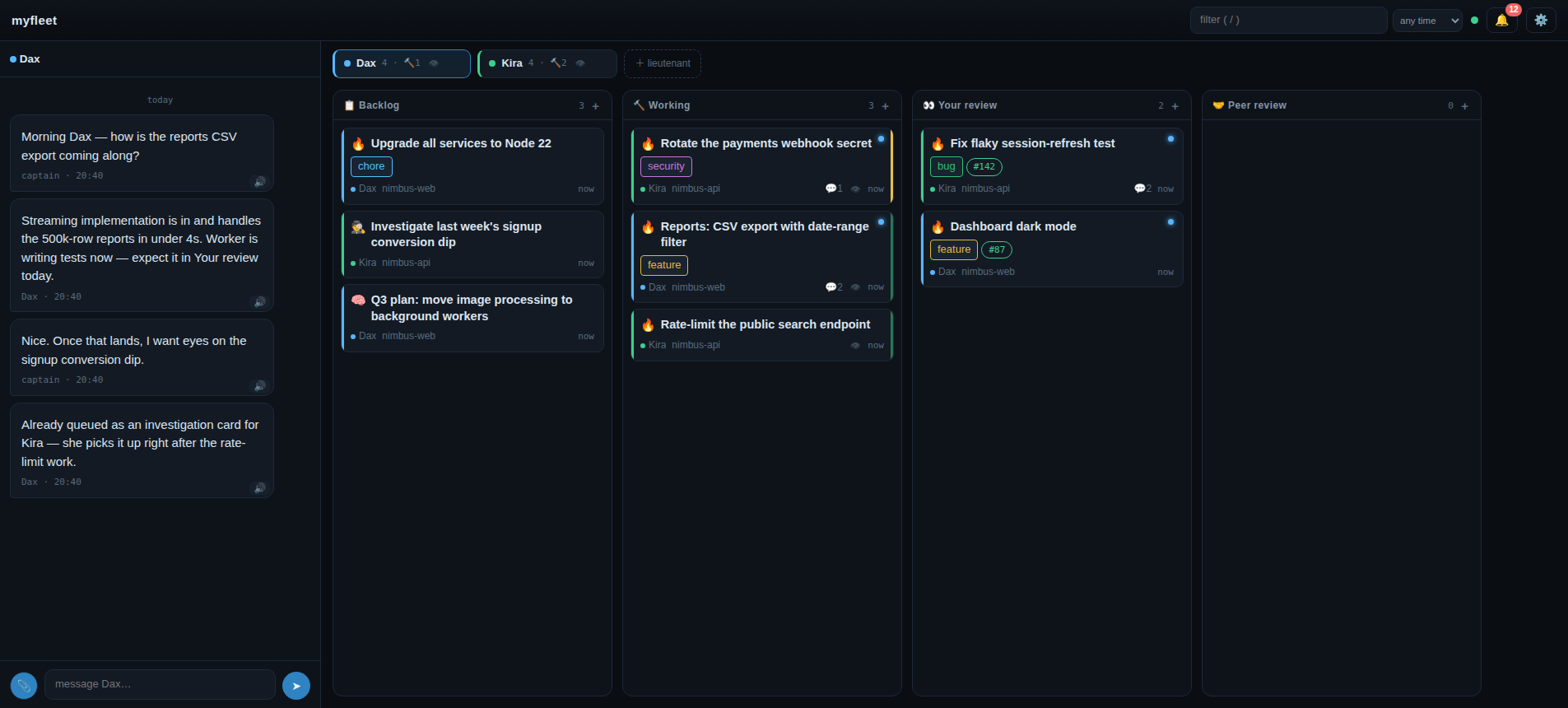
As you work with AI, your **attention gets fragmented** — driving multiple planning tasks while
overseeing multiple implementation tasks. Chat quickly becomes the wrong UX for piloting a fleet
of agents.
This skill lets you use Claude Code / Codex as multiple chiefs of staff (**lieutenants**). You
get a web UI where you work together, as work items get done by independent agent sessions on a
kanban board.
## Install
One skill:
```sh
npx skills add tonylampada/bridge-commander -g -y
```
That's it. The rest happens in the terminal you already have.
## Start
- Make an empty folder (e.g. `myfleet`) and start `claude` in it
- (Recommended) Set permissions mode to auto
- `/bridge-commander`
- Open the board URL it prints (default `http://localhost:4780/`)
**Bridget** is already there with a message waiting. She's your first lieutenant, and she does the
rest of the setup with you.
You need `tmux` and `git` on the machine (Bridget will offer to install if missing).
You never have to use tmux yourself, but you can if you want.
## Configuration
Per-workspace config lives in `.bridge-commander/config.json`:
| Key | Default | Meaning |
|---|---|---|
| `port` | `4780` | server port (also `--port N` on `init`/`open`) |
| `host` | `127.0.0.1` | bind address — see network exposure below |
| `harness` | `claude` | default agent harness (`claude` \| `codex`) |
| `voices` | — | UI text-to-speech voice filter |
| `tts` | — | speak agent messages through an external TTS engine: `{"url": "http://127.0.0.1:8883", "lang": "pt", "voice": null, "params": {}}` (voxbench API). Absent = the board stays silent. The **server** reaches the engine: the browser talks to `/api/tts/*` on the board's own origin and the url only has to be reachable from the machine running the server (no CORS, no tailnet on the phone) |
Env knobs (set on the server process):
| Variable | Default | Meaning |
|---|---|---|
| `BC_SUPERVISE_INTERVAL_MS` | `30000` | supervision tick (lieutenant respawn, dead-worker detection); `0` disables |
| `BC_PRWATCH_INTERVAL_MS` | `120000` | PR watch tick; `0` disables |
| `BC_UPLOAD_MAX_BYTES` | `10485760` | per-file chat upload cap |
| `BC_WORKER_TTL_SECS` | `600` | card status lease TTL — `working`/`needs-you` decays to `idle` past it |
| `BC_WORKTREE_TOOL` | auto | `treehouse` \| `git` — worker worktree provisioning |
| `BC_HARNESS_STATE` | `~/.bridge-commander/harness` | harness state dir (prompts, session ids, turn-end logs) |
| `BC_GH_CMD` | `gh` | gh binary used by the PR watch and by the packaged `gh-watch` hook |
| `BC_SCHEDULE_INTERVAL_MS` | `15000` | schedule tick — how often the clock looks for due windows; `0` disables |
| `BC_TURNEND_URL` | — | default callback URL baked into installed turn-end hooks |
| `BC_SEND_RETRIES` / `BC_SEND_SLEEP_MS` | `3` / `400` | verified-submit tuning for `harness.send` |
| `BC_HOOK_TIMEOUT_MS` | `120000` | per-script timeout for workspace hooks, lifecycle and named alike |
| `BC_TEARDOWN_TIMEOUT_MS` | `300000` / `60000` | timeout for a playbook's `teardown` command — 5 min at the handoff and archive (un-awaited), 60s at a rework restart (awaited inside `card start`); set, it overrides both |
| `BC_TTS_IDLE_MS` | `20000` | how long the TTS passthrough waits for the next byte from the engine before hanging up — a gap between bytes, not a cap on the request |
| `BC_SYSLOAD_MS` | `2000` | monitoring panel (⚙️ → machine load) sample interval; the sampler runs only while the panel is open |
### Network exposure
The board has **no application-level auth** — whoever reaches the bind address fully controls
the board, including starting workers (running code):
- **Default (recommended): loopback only** (`127.0.0.1`).
- Private mesh (e.g. Tailscale): set `host` to that interface's address; a loopback listener is
kept alongside. The mesh is your only auth boundary.
- **Never bind `0.0.0.0`.**
How it works inside: [ARCHITECTURE.md](https://github.com/tonylampada/bridge-commander/blob/HEAD/ARCHITECTURE.md). The conceptual API
([docs/api/overview.md](https://github.com/tonylampada/bridge-commander/blob/HEAD/docs/api/overview.md)) is the spec the implementation follows.