chat-with-anyone
noizai/skills · skills.sh
Open source Repository Open in the app JSON README (API)
About
Skill publicada por noizai/skills no skills.sh. Instale com: npx skills add noizai/skills@chat-with-anyone
Details
- Kind
- Agent skills
- Topic
- No topic detected
- Publisher
- noizai
- Origin
- skillssh
- Category
- ferramentas
- Stars
- 524
- Forks
- 78
- Open pull requests
- 2
- Last push
- 2026-05-07T08:41:50Z
- Repository state
- ativo
- Language
- Python
- Added
- 2026-08-30 15:22:09
- Updated
- 2026-09-08 15:04:37
- Origin id
noizai/skills/chat-with-anyone
README
# Unmute your intelligent bot <img width="1760" height="608" alt="banner" src="https://github.com/user-attachments/assets/79efa5ae-e056-426c-ae67-362dd0f44963" /> English | [简体中文](./README.zh-CN.md) Central repository for managing Skills to "human" vibe-talking. ## Install with `npx skills add` ```bash # List skills from GitHub repository npx skills add NoizAI/skills --list --full-depth # Install a specific skill from GitHub repository npx skills add NoizAI/skills --full-depth --skill tts -y # Install from GitHub repository npx skills add NoizAI/skills # Local development (run in this repo directory) npx skills add . --list --full-depth ``` ## Highlights - 🔒 Secure and local-first: run skills on your own machine to keep sensitive text and assets localized. - 🧠 Character-style controls: tune fillers, emotion, and speaking presets for companion-like output. - 🎙️ Production-ready voice: from quick TTS generation to timeline-aligned rendering. - 📤 One-command delivery to chat platforms: generate speech and send it as a native voice message to Feishu, Telegram, or Discord — zero extra code. ## Available skills | Name | Description | Documentation | Run command | |------|-------------|---------------|-------------| | tts | Convert text into speech with Kokoro or Noiz: simple mode, timeline-aligned rendering, precise duration control, and reference-audio voice cloning. | [SKILL.md](./skills/tts/SKILL.md) | `npx skills add NoizAI/skills --full-depth --skill tts -y` | | chat-with-anyone | Chat with any real person or fictional character in their own voice by automatically finding their speech online, extracting a clean reference sample, and generating audio replies. | [SKILL.md](./skills/chat-with-anyone/SKILL.md) | `npx skills add NoizAI/skills --full-depth --skill chat-with-anyone -y` | | characteristic-voice | Make generated speech feel companion-like with fillers, emotional tuning, and preset speaking styles. | [SKILL.md](./skills/characteristic-voice/SKILL.md) | `npx skills add NoizAI/skills --full-depth --skill characteristic-voice -y` | | video-translation | Translate and dub videos from one language to another, replacing the original audio with TTS while keeping the video intact. | [SKILL.md](./skills/video-translation/SKILL.md) | `npx skills add NoizAI/skills --full-depth --skill video-translation -y` | | daily-news-caster | Fetch the latest real-time news and automatically generate a dual-host conversational podcast with audio. | [SKILL.md](./skills/daily-news-caster/SKILL.md) | `npx skills add NoizAI/skills --full-depth --skill daily-news-caster -y` | | sound-fx | Generate any sound effect from a text description — animals, ambience, cartoon sounds, sci-fi, and more. One command, 1–30 seconds, WAV/MP3/FLAC output. | [SKILL.md](./skills/sound-fx/SKILL.md) | `npx skills add NoizAI/skills --full-depth --skill sound-fx -y` | ## Quick Verify For example, characteristic-voice ```bash bash skills/characteristic-voice/scripts/speak.sh \ --preset comfort -t "Hmm... I'm right here." -o comfort.wav ``` ## English Audio Demos Sample outputs for quick listening (MP4 for inline playback): - Breaking news style https://github.com/user-attachments/assets/e1e75371-49e2-4858-9993-428d999c3723 - Mindful calm style https://github.com/user-attachments/assets/d2e6472d-9edf-449d-a5ee-51ad7e19a861 - Podcast intro style https://github.com/user-attachments/assets/e8f78ffa-7f12-4475-b1af-09161b3ee01b - Startup hype style https://github.com/user-attachments/assets/0d3b8af9-2288-4a63-9246-2748ed232b0e ## Noiz API Key (recommended) For the best experience (faster, emotion control, voice cloning), get your API key from [developers.noiz.ai/api-keys](https://developers.noiz.ai/api-keys): ```bash bash skills/tts/scripts/tts.sh config --set-api-key YOUR_KEY ``` The key is persisted to `~/.noiz_api_key` and loaded automatically. Alternatively, pass `--backend kokoro` to use the local Kokoro backend. ## Contributing For skill authoring rules, directory conventions, and PR guidance, see `CONTRIBUTING.md`. ## Feedback & Discussion [Join discord](https://discord.gg/kKqKnmCCPq) ## Project Trends ### GitHub Star Trend [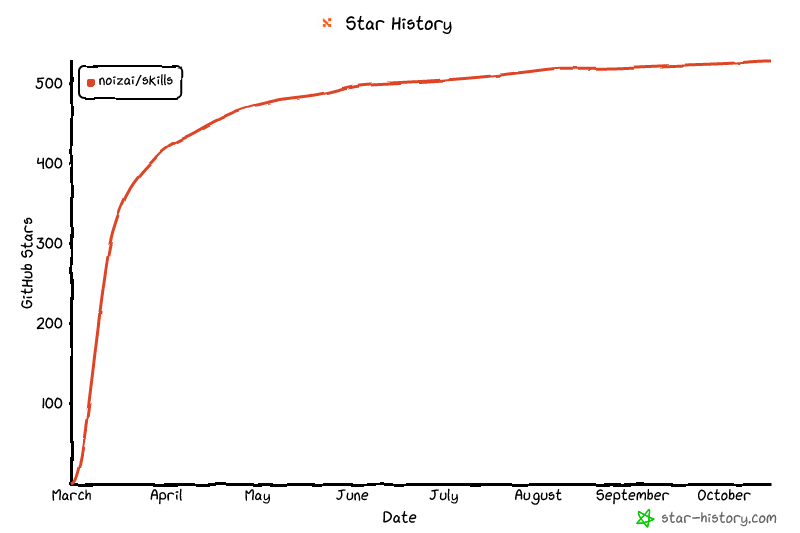](https://www.star-history.com/?repos=NoizAI%2Fskills&type=date&legend=top-left) ### Git Clone Trend []()