ccs-delegation
Auto-activate CCS CLI delegation for deterministic tasks. Parses user input, auto-selects optimal profile (glm/kimi/custom) from ~/.ccs/conf
Open source Repository Open in the app JSON README (API)
About
Auto-activate CCS CLI delegation for deterministic tasks. Parses user input, auto-selects optimal profile (glm/kimi/custom) from ~/.ccs/config.json, enhances prompts with context, executes via `ccs {p
Details
- Kind
- Agent skills
- Topic
- Developer tools
- Publisher
- kaitranntt
- Origin
- majiayu
- Category
- ferramentas
- Stars
- 2,844
- Forks
- 260
- Last push
- 2026-09-09T22:00:56Z
- Repository state
- ativo
- Language
- TypeScript
- License
- MIT
- Added
- 2026-09-01 17:05:58
- Updated
- 2026-09-01 17:05:58
- Origin id
kaitranntt/ccs/.claude/skills/ccs-delegation@main
README
<div align="center"> # CCS - Claude Codex Switch  ### The multi-provider profile and runtime manager for Claude Code and compatible CLIs Run Claude, Codex, Droid-routed profiles, GLM, local models, and Anthropic-compatible APIs without config thrash. [](LICENSE) [](https://www.npmjs.com/package/@kaitranntt/ccs) [](https://claudekit.cc?ref=HMNKXOHN) **[Website](https://ccs.kaitran.ca)** | **[Documentation](https://docs.ccs.kaitran.ca)** | **[Product Tour](https://docs.ccs.kaitran.ca/getting-started/product-tour)** | **[CLI Reference](https://docs.ccs.kaitran.ca/reference/cli-commands)** </div> > **[Docker]** `ghcr.io/kaitranntt/ccs-dashboard:latest` is deprecated. Use `ghcr.io/kaitranntt/ccs:latest` instead. See [#1251](https://github.com/kaitranntt/ccs/issues/1251) and [docker/README.md](docker/README.md#choosing-an-image) for migration details. To wire a sibling container to CLIProxy, see [Connect your app to CLIProxy](docker/README.md#connect-your-app-to-cliproxy). <!-- quickstart-snippet-start --> ## Quick Start (Docker) With Docker installed: ```bash curl -fsSL https://ccs.kaitran.ca/docker-compose.yaml -o docker-compose.yaml docker compose up -d ``` Dashboard at http://localhost:3000 · CLIProxy at http://localhost:8317. Need a corporate-proxy alternative? Download directly: `https://raw.githubusercontent.com/kaitranntt/ccs/main/docker/compose.yaml` <!-- quickstart-snippet-end --> ## Install on Host (npm) ```bash npm install -g @kaitranntt/ccs ccs config ``` Then launch whatever runtime fits the task: ```bash ccs ccs codex ccs xai # Alias: ccs grok ccs --target droid glm ccs glm ccs ollama ``` ## Why CCS CCS gives you one stable command surface while letting you switch between: - multiple runtimes such as Claude Code, Factory Droid, and Codex CLI - multiple Claude subscriptions and isolated account contexts - OAuth providers like Codex, xAI/Grok, Kiro, Claude, Kimi, and more, with legacy Copilot compatibility for existing setups - API and local-model profiles like GLM, Kimi, OpenRouter, Ollama, llama.cpp, Novita, Fireworks AI, and Alibaba Coding Plan Qwen Code account linking is not available in the bundled CLIProxy runtime yet; use an API-key Qwen profile such as Alibaba Coding Plan for Qwen models. The goal is simple: stop rewriting config files, stop breaking active sessions, and move between providers in seconds. ## OpenAI-Compatible Routing CCS can now bridge Claude Code into OpenAI-compatible providers through a local Anthropic-compatible proxy instead of requiring a native Anthropic upstream. ```bash ccs api create --preset hf ccs hf ``` Need to manage the proxy manually? ```bash ccs proxy start hf eval "$(ccs proxy activate)" ``` The proxy also supports request-time `profile:model` selectors, scenario-based model routing through `proxy.routing`, and explicit activation helpers such as `ccs proxy activate --fish`. Guide: [OpenAI-Compatible Provider Routing](https://docs.ccs.kaitran.ca/features/proxy/openai-compatible-providers). ### Related Project: claude-code-router [claude-code-router](https://github.com/musistudio/claude-code-router) is an excellent standalone tool for routing Claude Code requests to OpenAI-compatible providers. CCS's local proxy and SSE transformation work was directly informed by CCR's transformer architecture. Use CCR when you want a standalone router without CCS profile management. Use CCS when you want the routing flow integrated with CCS profiles, runtime bridges, and the existing `ccs` command surface. Need the full setup path instead of the short version? | Need | Start here | | --- | --- | | Install and verify CCS | [`/getting-started/installation`](https://docs.ccs.kaitran.ca/getting-started/installation) | | First successful session | [`/getting-started/first-session`](https://docs.ccs.kaitran.ca/getting-started/first-session) | | Visual walkthrough | [`/getting-started/product-tour`](https://docs.ccs.kaitran.ca/getting-started/product-tour) | | Provider selection | [`/providers/concepts/overview`](https://docs.ccs.kaitran.ca/providers/concepts/overview) | | Full command reference | [`/reference/cli-commands`](https://docs.ccs.kaitran.ca/reference/cli-commands) | | Troubleshooting | [`/reference/troubleshooting`](https://docs.ccs.kaitran.ca/reference/troubleshooting) | ## See CCS In Action ### CCS Bar For macOS  CCS Bar puts live subscription quota, daily spend, and account controls in the macOS menu bar. Install it with `ccs bar install`, launch it with `ccs bar`, and tell us what would make it more useful: issues and ideas are welcome in [GitHub Issues](https://github.com/kaitranntt/ccs/issues). Deep dive: [CCS Bar](https://docs.ccs.kaitran.ca/features/dashboard/ccs-bar). ### Usage Analytics  Track usage, costs, and session patterns across profiles. Deep dive: [Dashboard Analytics](https://docs.ccs.kaitran.ca/features/dashboard/analytics). ### Live Auth And Health Monitoring  See auth state, account health, and provider readiness without dropping into raw config. Deep dive: [Live Auth Monitor](https://docs.ccs.kaitran.ca/features/dashboard/live-auth-monitor). ### OAuth Provider Control Center  Manage OAuth-backed providers, quota visibility, and proxy-wide routing from one place. CCS now surfaces round-robin vs fill-first natively in both CLI and dashboard flows instead of hiding that choice inside raw upstream controls. The original CLIProxyAPI backend remains the default; the community-maintained CLIProxyAPIPlus fork is opt-in for plus-only providers. When Plus is selected, CCS points the embedded management panel at the maintained CPAMC dashboard fork by default. Deep dive: [CLIProxy API](https://docs.ccs.kaitran.ca/features/proxy/cliproxy-api). ### Managed Tooling And Fallbacks  CCS can provision first-class local tools like WebSearch and image analysis for third-party launches instead of leaving you to wire them by hand. Browser automation now has a first-class setup path as well. Deep dive: [WebSearch](https://docs.ccs.kaitran.ca/features/ai/websearch) | [Browser Automation](https://docs.ccs.kaitran.ca/features/workflow/browser-automation). ## Docs Matrix The README stays short on purpose. The docs site owns the detailed guides and reference material. | If you want to... | Read this | | --- | --- | | Understand what CCS is and how the pieces fit together | [Introduction](https://docs.ccs.kaitran.ca/introduction) | | Install CCS cleanly on a new machine | [Installation](https://docs.ccs.kaitran.ca/getting-started/installation) | | Go from install to a successful first run | [Your First CCS Session](https://docs.ccs.kaitran.ca/getting-started/first-session) | | See the dashboard and workflow surfaces before setup | [Product Tour](https://docs.ccs.kaitran.ca/getting-started/product-tour) | | Install the native macOS menu-bar companion | [CCS Bar](https://docs.ccs.kaitran.ca/features/dashboard/ccs-bar) | | Compare OAuth providers, Claude accounts, and API profiles | [Provider Overview](https://docs.ccs.kaitran.ca/providers/concepts/overview) | | Learn the dashboard structure and feature pages | [Dashboard Overview](https://docs.ccs.kaitran.ca/features/dashboard/overview) | | Configure profiles, paths, and environment variables | [Configuration](https://docs.ccs.kaitran.ca/getting-started/configuration) | | Understand browser attach vs Codex browser tooling | [Browser Automation](https://docs.ccs.kaitran.ca/features/workflow/browser-automation) | | Keep OpenCode aligned with your live CCS setup | [OpenCode Sync Plugin](https://docs.ccs.kaitran.ca/features/workflow/opencode-sync) | | Browse every command and flag | [CLI Commands](https://docs.ccs.kaitran.ca/reference/cli-commands) | | Recover from install, auth, or provider failures | [Troubleshooting](https://docs.ccs.kaitran.ca/reference/troubleshooting) | | Understand storage, config, and architecture details | [Reference](https://docs.ccs.kaitran.ca/reference/architecture) | ## Example Workflow ```bash # Design with default Claude ccs "design the auth flow" # Implement with a different provider ccs codex "implement the user service" # Use a cheaper API profile for routine work ccs glm "clean up tests and docs" # Run a local model when you need privacy or offline access ccs ollama "summarize these logs" ``` ## Community Projects | Project | Author | Description | | --- | --- | --- | | [opencode-ccs-sync](https://github.com/JasonLandbridge/opencode-ccs-sync) | [@JasonLandbridge](https://github.com/JasonLandbridge) | Auto-sync CCS providers into OpenCode | ## Contribute And Report Safely - Contributing guide: [CONTRIBUTING.md](./CONTRIBUTING.md) - Daily local gate: `bun run format && bun run lint:fix && bun run validate` (`validate` is the fast path only) - Before review or merge confidence: `bun run validate:ci-parity` - Cross-runtime proxy transport: `bun run test:runtime-matrix` (Node 18/22/26 and Bun) - If PR checks stay queued for more than 10 minutes, assume the self-hosted runner is offline and notify a maintainer instead of retrying blindly - Starter work: [good first issue](https://github.com/kaitranntt/ccs/labels/good%20first%20issue), [help wanted](https://github.com/kaitranntt/ccs/labels/help%20wanted) - Questions: [open a question issue](https://github.com/kaitranntt/ccs/issues/new/choose) - Security reports: [SECURITY.md](./SECURITY.md) and the [private advisory form](https://github.com/kaitranntt/ccs/security/advisories/new) ## Star History [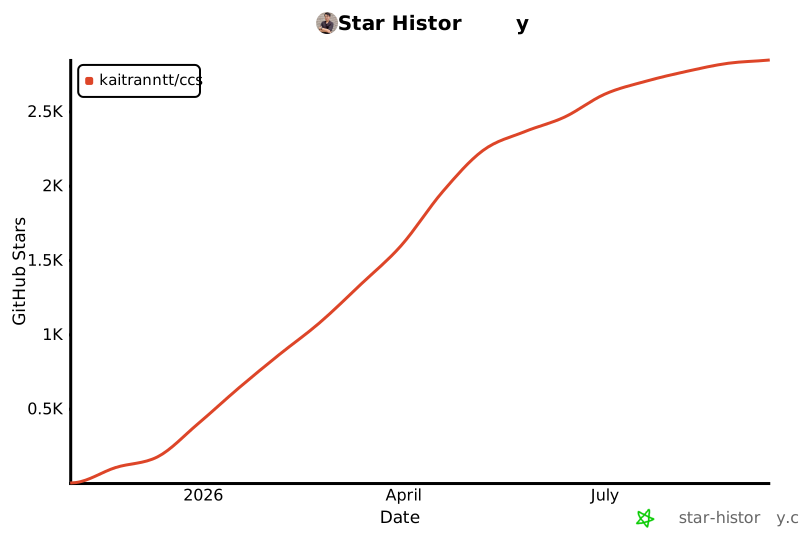](https://star-history.com/#kaitranntt/ccs&Date)