opencli-usage
Use at the start of any OpenCLI session — this is the top-level map of what `opencli` can do, how to discover adapters, what flags and outpu
Open source Repository Open in the app JSON README (API)
About
Use at the start of any OpenCLI session — this is the top-level map of what `opencli` can do, how to discover adapters, what flags and output formats are universal, and which specialized skill to load next. Point here when an agent asks "what can opencli do?" or "how do I find the right command?".
Details
- Kind
- Agent skills
- Topic
- Maps, weather & travel
- Publisher
- jackwener
- Origin
- skillssh
- Category
- ferramentas
- Stars
- 29,146
- Forks
- 2,856
- Open pull requests
- 161
- Last push
- 2026-08-30T17:36:26Z
- Repository state
- ativo
- Language
- JavaScript
- License
- Apache-2.0
- Added
- 2026-08-30 15:21:09
- Updated
- 2026-09-09 21:04:25
- Origin id
jackwener/opencli/opencli-usage
README
# OpenCLI
> **Convert any website into a CLI & run Browser Use on your logged-in Chrome.**
> Turn websites, browser sessions, Electron apps, and local tools into deterministic interfaces for humans and AI agents.
> Or run Browser Use against any page — navigate, fill forms, click, extract, automate.
[](./README.zh-CN.md)
[](https://www.npmjs.com/package/@jackwener/opencli)
[](https://nodejs.org)
[](./LICENSE)
OpenCLI gives you one surface for three different kinds of automation:
- **Use built-in adapters** for sites like Bilibili, Zhihu, Xiaohongshu, Reddit, HackerNews, Twitter/X, and [many more](#built-in-commands).
- **Let AI Agents operate any website** — install the `opencli-browser` skill in your AI agent (Claude Code, Cursor, etc.), and it can navigate, click, type/fill, extract, and inspect any page through your logged-in browser via `opencli browser` primitives.
- **Write new adapters** end-to-end with `opencli browser` + the `opencli-adapter-author` skill, which guides from first recon through field decoding, code, and `opencli browser verify`.
It also works as a **CLI hub** for local tools such as `gh`, `docker`, `longbridge`, `tg`, `discord`, `wx`, `ntn` (Notion), and other binaries you register yourself, plus **desktop app adapters** for Electron apps like Cursor, Trae CN, Codex, Antigravity, ChatGPT, and Trae SOLO.
## Quick Start
### 1. Install OpenCLI
For desktop use, start with **OpenCLIApp**. It bundles the OpenCLI runtime,
keeps the managed `opencli` command installed, and gives you a system tray UI
for setup, diagnostics, updates, browser-login keepalive, and Web → Markdown.
**Option A — OpenCLIApp (recommended for macOS / Windows):**
Download the latest app from <https://opencli.info/download>, install it, then
open the app once and use the System page to install or repair the `opencli`
command.
**Option B — npm global install (CLI-only / CI / servers):**
OpenCLI requires **Node.js >= 20.18.1** when installed through npm.
```bash
node --version
npm install -g @jackwener/opencli
```
### 2. Install the Browser Bridge Extension
OpenCLI connects to Chrome/Chromium through a lightweight Browser Bridge extension plus a small local daemon. The daemon auto-starts when needed.
**Option A — Chrome Web Store (recommended):**
Install **OpenCLI** from the [Chrome Web Store](https://chromewebstore.google.com/detail/opencli/ildkmabpimmkaediidaifkhjpohdnifk).
**Option B — Manual install:**
1. Download the latest `opencli-extension-v{version}.zip` from the GitHub [Releases page](https://github.com/jackwener/opencli/releases).
2. Unzip it, open `chrome://extensions`, and enable **Developer mode**.
3. Click **Load unpacked** and select the unzipped folder.
### 3. Verify the setup
```bash
opencli doctor
```
### 4. Optional: name your Chrome profile
Each Chrome profile runs its own OpenCLI extension instance. If you use multiple Chrome profiles, list the connected profiles and assign local aliases:
```bash
opencli profile list
opencli profile rename <contextId> work
opencli profile use work
opencli --profile work browser main state
```
With only one connected profile, OpenCLI uses it automatically. With multiple connected profiles and no default, OpenCLI asks you to choose instead of guessing.
### 5. Run your first commands
```bash
opencli list
opencli hackernews top --limit 5
opencli bilibili hot --limit 5
```
## For Humans
Use OpenCLI directly when you want a reliable command instead of a live browser session:
- `opencli list` shows every registered command.
- `opencli <site> <command>` runs a built-in or generated adapter.
- `opencli external register mycli` exposes a local CLI through the same discovery surface.
- `opencli doctor` helps diagnose browser connectivity.
## Extending OpenCLI
If you want to add your own commands, start with the [Extending OpenCLI guide](./docs/guide/extending-opencli.md). README keeps this short; the guide covers the directory layout, source-control model, and install commands.
| Need | Recommended path |
|------|------------------|
| Keep personal website commands in your own Git repo | `opencli plugin create` + `opencli plugin install file://...` |
| Quickly draft a private local adapter | `opencli browser init <site>/<command>` in `~/.opencli/clis/` |
| Modify an official adapter locally | `opencli adapter eject <site>` + `opencli adapter reset <site>` |
| Publish or install third-party commands | `opencli plugin install github:user/repo` |
| Wrap an existing local binary | `opencli external register <name>` |
## For AI Agents
OpenCLI's browser commands are designed to be used by AI Agents — not run manually. Install skills into your AI agent (Claude Code, Cursor, etc.), and the agent operates websites on your behalf using your logged-in Chrome session.
### Install skills (also refreshes existing installs)
```bash
npx skills add jackwener/opencli
```
Or install only what you need:
```bash
npx skills add jackwener/opencli --skill opencli-adapter-author
npx skills add jackwener/opencli --skill opencli-autofix
npx skills add jackwener/opencli --skill opencli-browser
npx skills add jackwener/opencli --skill opencli-browser-sitemap
npx skills add jackwener/opencli --skill opencli-sitemap-author
npx skills add jackwener/opencli --skill opencli-usage
```
### Which skill to use
| Skill | When to use | Example prompt to your AI agent |
|-------|------------|-------------------------------|
| **opencli-adapter-author** | Write a reusable adapter for a new site or add a command to an existing site | "Write an adapter for douyin trending" / "Make a command that grabs the top posts from this page" |
| **opencli-autofix** | Repair a broken adapter when a built-in command fails | "`opencli zhihu hot` is returning empty — fix it" |
| **opencli-browser** | Drive a real Chrome page ad-hoc — navigate, fill forms, click, extract | "Help me check my Xiaohongshu notifications" / "Help me fill out this form" / "Use browser commands to scrape this page" |
| **opencli-browser-sitemap** | Consume site sitemap context while driving a browser task | "Use the sitemap to navigate this website without blind clicking" |
| **opencli-sitemap-author** | Create or update site sitemap knowledge for browser agents | "Record the stable workflow you just discovered for this site" |
| **opencli-usage** | Quick reference for all OpenCLI commands and sites | "What commands does OpenCLI have for Twitter?" |
### How it works
Once `opencli-browser` is installed, your AI agent can:
1. **Navigate** to any URL using your logged-in browser
2. **Read** page content via structured DOM snapshots (not screenshots)
3. **Interact** — click buttons, fill forms, select options, press keys
4. **Extract** data from the page or intercept network API responses
5. **Wait** for elements, text, or page transitions
The agent handles all the `opencli browser` commands internally — you just describe what you want done in natural language.
**Skill references:**
- [`skills/opencli-browser/SKILL.md`](./skills/opencli-browser/SKILL.md) — drive Chrome ad-hoc (navigate, fill forms, click, extract)
- [`skills/opencli-browser-sitemap/SKILL.md`](./skills/opencli-browser-sitemap/SKILL.md) — use sitemap context while driving a browser task
- [`skills/opencli-sitemap-author/SKILL.md`](./skills/opencli-sitemap-author/SKILL.md) — create or update site sitemap knowledge
- [`skills/opencli-adapter-author/SKILL.md`](./skills/opencli-adapter-author/SKILL.md) — write a new adapter end-to-end
- [`skills/opencli-autofix/SKILL.md`](./skills/opencli-autofix/SKILL.md) — repair broken adapters
- [`skills/opencli-usage/SKILL.md`](./skills/opencli-usage/SKILL.md) — command and site reference
Available browser commands include `open`, `state`, `click`, `type`, `fill`, `select`, `keys`, `wait`, `get`, `find`, `extract`, `frames`, `screenshot`, `scroll`, `back`, `eval`, `network`, `tab list`, `tab new`, `tab select`, `tab close`, `init`, `verify`, and `close`.
`opencli browser` commands require a `<session>` positional immediately after `browser`. `opencli browser work open <url>` and `opencli browser work tab new [url]` both return a target ID. Use `opencli browser work tab list` to inspect target IDs, then pass `--tab <targetId>` to route a command to a specific tab. `tab new` creates a new tab without changing the default browser target; only `tab select <targetId>` promotes that tab to the default target for later untargeted commands in the same session.
## Writing a new adapter
When the site you need is not yet covered, use the `opencli-adapter-author` skill end-to-end:
1. **Recon** the site and pick a pattern (SPA / SSR / JSONP / Token / Streaming).
2. **Discover** the right endpoint — network inspection, initial state, bundle search, token trace, or interceptor fallback.
3. **Pick auth** — `PUBLIC` / `COOKIE` / `INTERCEPT` / `UI` / `LOCAL`.
4. **Decode** response fields and design output columns.
5. `opencli browser recon analyze <url>` → `opencli browser recon init <site>/<name>` → write adapter → `opencli browser recon verify <site>/<name>`.
6. Site knowledge persists to `~/.opencli/sites/<site>/` so the next adapter for the same site starts from context.
## Configuration
| Variable | Default | Description |
|----------|---------|-------------|
| `OPENCLI_PROFILE` | — | Browser Bridge profile alias/contextId to use when multiple Chrome profiles are connected |
| `OPENCLI_WINDOW` | command default | Set to `foreground` or `background` to override Browser Bridge window placement. Browser-backed commands also accept `--window <foreground\|background>`. |
| `OPENCLI_SITE_SESSION` | adapter default | Set to `ephemeral` or `persistent` to override `siteSession` metadata for browser-backed adapter commands. `ephemeral` closes the one-shot automation window when the command finishes; `persistent` reuses the site's session. Per-command `--site-session` takes precedence. |
| `OPENCLI_BROWSER_CONNECT_TIMEOUT` | `45` | Seconds to wait for browser connection |
| `OPENCLI_BROWSER_COMMAND_TIMEOUT` | `60` | Seconds to wait for a single browser command |
| `OPENCLI_CDP_ENDPOINT` | — | Chrome DevTools Protocol endpoint for remote browser or Electron apps |
| `OPENCLI_CDP_TARGET` | — | Filter CDP targets by URL substring (e.g. `detail.1688.com`) |
| `OPENCLI_VERBOSE` | `false` | Enable verbose logging (`-v` flag also works) |
| `DEBUG_SNAPSHOT` | — | Set to `1` for DOM snapshot debug output |
`opencli browser *` requires an explicit `<session>` positional, uses a foreground browser window by default, and keeps that session's tab lease until `opencli browser <session> close` or idle cleanup. Browser-backed adapters use a background adapter window and release one-shot tab leases by default. Interactive adapters can declare `siteSession: 'persistent'` to keep a stable site tab for continuity; pass `--site-session ephemeral` for a one-shot tab.
## Built-in Commands
| Site | Commands |
|------|----------|
| **xiaohongshu** | `search` `ask` `note` `comments` `feed` `user` `download` `publish` `follow` `unfollow` `notifications` `creator-notes` `creator-notes-summary` `creator-note-detail` `creator-profile` `creator-stats` |
| **bilibili** | `hot` `search` `history` `feed` `ranking` `download` `comments` `dynamic` `favorite` `following` `follow` `unfollow` `me` `subtitle` `summary` `video` `user-videos` `creator-stats` |
| **zhihu** | `hot` `search` `question` `download` `follow` `like` `favorite` `comment` `answer` |
| **hackernews** | `top` `new` `best` `ask` `show` `jobs` `search` `user` |
| **hltv** | `search` `player-summary` `player-matches` `player-form` `player-map-pool` `player-vs-team` `player-teammate-impact` `player-duel` `match-map` `match-series` `team-matches` `team-map-pool` `event-matches` |
| **geogebra** | `eval` `add-point` `add-line` `add-circle` `add-polygon` `triangle` `hexagon` `list` `info` |
| **linkedin** | `connect` `inbox` `job-detail` `jobs-preferences` `post-analytics` `posts` `profile-experience` `profile-projects` `profile-read` `profile-analytics` `safe-send` `search` `services-read` `sent-invitations` `thread-snapshot` `timeline` `salesnav-search` `salesnav-inbox` `salesnav-message` `salesnav-thread` |
| **reddit** | `hot` `frontpage` `popular` `search` `subreddit` `read` `user` `user-posts` `user-comments` `upvote` `upvoted` `save` `saved` `comment` `subscribe` |
| **twitter** | `trending` `search` `timeline` `tweets` `lists` `list-tweets` `list-create` `list-delete` `list-add` `list-add-batch` `list-remove` `list-remove-batch` `bookmarks` `post` `download` `profile` `article` `like` `likes` `notifications` `reply` `reply-dm` `thread` `follow` `unfollow` `followers` `following` `block` `unblock` `bookmark` `unbookmark` `delete` `hide-reply` `accept` |
| **claude** | `ask` `send` `new` `status` `read` `history` `detail` |
| **gemini** | `new` `ask` `image` `deep-research` `deep-research-result` |
| **notebooklm** | `status` `list` `open` `current` `get` `history` `summary` `note-list` `notes-get` `source-list` `source-get` `source-fulltext` `source-guide` |
| **amazon** | `bestsellers` `search` `product` `offer` `discussion` `movers-shakers` `new-releases` `rankings` |
| **upwork** | `search` `feed` `detail` |
| **slock** | `message-send` `message-read` `message-search` `channel-list` `channel-info` `channel-create` `channel-members` `channel-join` `task-list` `task-create` `task-claim` `task-status` `task-convert` `task-delete` `thread-list` `thread-follow` `attachment-upload` `attachment-download` `bookmark-add` `inbox` `dm-list` `server-list` `server-use` `whoami` |
| **huodongxing** | `events` |
| **midjourney** | `login` `whoami` `settings` `quota` `generate` `describe` `history` `status` `action` `download` |
Curated highlights — **[→ see all 100+ supported sites & commands](./docs/adapters/index.md)** (douyin / weibo / spotify / 1688 / quark / nowcoder / google-scholar / hupu / xianyu / weread / weread-official / xiaoyuzhou / Chess.com / and more).
## CLI Hub
Unified passthrough for your existing command-line tools. Run `opencli <tool> ...` for any of:
`gh` · `docker` · `vercel` · `wrangler` · `obsidian` · `longbridge` · `lark-cli` · `ntn(notion)` · `dws(DingTalk Workspace)` · `wecom-cli(企业微信)` · `tg(tg-cli)` · `discord(discord-cli)` · `wx(wx-cli)`
Register your own with `opencli external register <name>`; list everything with `opencli external list`.
**Desktop app adapters** (Electron, via CDP): Cursor / Trae CN / Codex / Antigravity / ChatGPT App / ChatWise / Qoder / Discord / Doubao / Trae SOLO — see [`docs/adapters/desktop/`](./docs/adapters/desktop/).
## Download Support
OpenCLI supports downloading images, videos, and articles from supported platforms.
| Platform | Content Types | Notes |
|----------|---------------|-------|
| **xiaohongshu** | Images, Videos | Downloads all media from a note |
| **rednote** | Images, Videos | Downloads all media from a signed rednote note URL |
| **bilibili** | Videos | Requires `yt-dlp` installed |
| **twitter** | Images, Videos | From user media tab or single tweet |
| **douban** | Images | Poster / still image lists |
| **pixiv** | Images | Original-quality illustrations, multi-page |
| **1688** | Images, Videos | Downloads page-visible product media from item pages |
| **xiaoyuzhou** | Audio, Transcript | Downloads episode audio and transcript JSON/text with local credentials |
| **zhihu** | Column articles, answers (Markdown) | Exports with optional image download |
| **weixin** | Articles (Markdown) | WeChat Official Account articles |
For video downloads, install `yt-dlp` first: `brew install yt-dlp`
```bash
opencli xiaohongshu download "https://www.xiaohongshu.com/search_result/<id>?xsec_token=..." --output ./xhs
opencli xiaohongshu download "https://xhslink.com/..." --output ./xhs
opencli rednote download "https://www.rednote.com/search_result/<id>?xsec_token=..." --output ./rednote
opencli bilibili download BV1xxx --output ./bilibili
opencli twitter download elonmusk --limit 20 --output ./twitter
opencli 1688 download 841141931191 --output ./1688-downloads
opencli xiaoyuzhou download 69b3b675772ac2295bfc01d0 --output ./xiaoyuzhou
opencli xiaoyuzhou transcript 69dd0c98e2c8be31551f6a33 --output ./xiaoyuzhou-transcripts
```
`opencli xiaoyuzhou download` and `transcript` require local Xiaoyuzhou credentials in `~/.opencli/xiaoyuzhou.json`.
## Output Formats
All built-in commands support `--format` / `-f` with `table` (default), `json`, `yaml`, `md`, and `csv`.
```bash
opencli bilibili hot -f json # Pipe to jq or LLMs
opencli bilibili hot -f csv # Spreadsheet-friendly
opencli bilibili hot -v # Verbose: show pipeline debug steps
```
## Exit Codes
opencli follows Unix `sysexits.h` so CI / scripts can branch on failure mode: `0` success, `66` empty result, `69` Browser Bridge down, `75` timeout, `77` auth required, `78` config error, `130` Ctrl-C. Full reference: [docs/guide/exit-codes.md](./docs/guide/exit-codes.md).
## Plugins
Extend OpenCLI with community-contributed adapters:
```bash
opencli plugin install github:user/opencli-plugin-my-tool
opencli plugin list
opencli plugin update --all
opencli plugin uninstall my-tool
```
| Plugin | Type | Description |
|--------|------|-------------|
| [opencli-plugin-github-trending](https://github.com/ByteYue/opencli-plugin-github-trending) | JS | GitHub Trending repositories |
| [opencli-plugin-hot-digest](https://github.com/ByteYue/opencli-plugin-hot-digest) | JS | Multi-platform trending aggregator |
| [opencli-plugin-juejin](https://github.com/Astro-Han/opencli-plugin-juejin) | JS | 稀土掘金 (Juejin) hot articles |
| [opencli-plugin-vk](https://github.com/flobo3/opencli-plugin-vk) | JS | VK (VKontakte) wall, feed, and search |
| [opencli-plugin-x-article-publisher](https://github.com/genoooool/opencli-plugin-x-article-publisher) | JS | Publish Markdown with local images as X long-form Articles via OpenCLI and xPoster |
See [Plugins Guide](./docs/guide/plugins.md) for creating your own plugin.
## Testing
See **[TESTING.md](./TESTING.md)** for how to run and write tests.
## Troubleshooting
- **"Extension not connected"** — Ensure the Browser Bridge extension is installed from the [Chrome Web Store](https://chromewebstore.google.com/detail/opencli/ildkmabpimmkaediidaifkhjpohdnifk) and **enabled** in `chrome://extensions`.
- **"attach failed: Cannot access a chrome-extension:// URL"** — Another extension may be interfering. Try disabling other extensions temporarily.
- **Empty data or 'Unauthorized' error** — Your Chrome/Chromium login session may have expired. Navigate to the target site and log in again.
- **Node API errors / missing `fetch` / startup crash on old Node** — OpenCLI requires **Node.js >= 20.18.1**. Run `node --version`, upgrade Node if needed, then retry.
- **Daemon issues** — Check status: `curl localhost:19825/status` · View logs: `curl localhost:19825/logs`
## Star History
[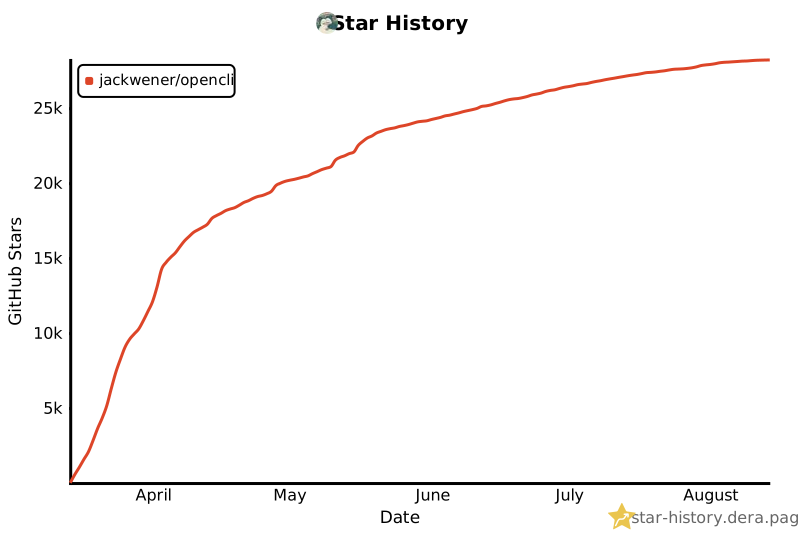](https://star-history.dera.page/#jackwener/opencli&Date)
## License
[Apache-2.0](./LICENSE)