obsidian-canvas-creator
axtonliu/axton-obsidian-visual-skills · skills.sh
Open source Repository Open in the app JSON README (API)
About
Skill publicada por axtonliu/axton-obsidian-visual-skills no skills.sh. Instale com: npx skills add axtonliu/axton-obsidian-visual-skills@obsidian-canvas-creator
Details
- Kind
- Agent skills
- Topic
- Productivity
- Publisher
- axtonliu
- Origin
- skillssh
- Category
- ferramentas
- Stars
- 3,594
- Forks
- 323
- Open pull requests
- 1
- Last push
- 2026-06-26T15:32:40Z
- Repository state
- ativo
- License
- MIT
- Added
- 2026-08-30 15:22:15
- Updated
- 2026-09-08 15:04:45
- Origin id
axtonliu/axton-obsidian-visual-skills/obsidian-canvas-creator
README
# Obsidian Visual Skills Pack [](https://opensource.org/licenses/MIT) [](#status) **[中文文档](README_CN.md)** Visual Skills Pack for Obsidian: generate Canvas, Excalidraw, and Mermaid diagrams from text with Claude Code. > **Next Step:** Want to turn Skills from demo to asset? Check out [Agent Skills Resource Library](https://www.axtonliu.ai/agent-skills) (includes slides, PDF, diagnostics) ## Demo <table> <tr> <td align="center"><strong>Excalidraw</strong></td> <td align="center"><strong>Mermaid</strong></td> <td align="center"><strong>Canvas</strong></td> </tr> <tr> <td><img src="assets/excalidraw-demo.png" width="280" alt="Excalidraw Demo"></td> <td><img src="assets/mermaid-demo.png" width="280" alt="Mermaid Demo"></td> <td><img src="assets/canvas-demo.png" width="280" alt="Canvas Demo"></td> </tr> <tr> <td align="center"><em>Hand-drawn style</em></td> <td align="center"><em>Hierarchical flowchart</em></td> <td align="center"><em>Colorful card layout</em></td> </tr> </table> ### Video Demo [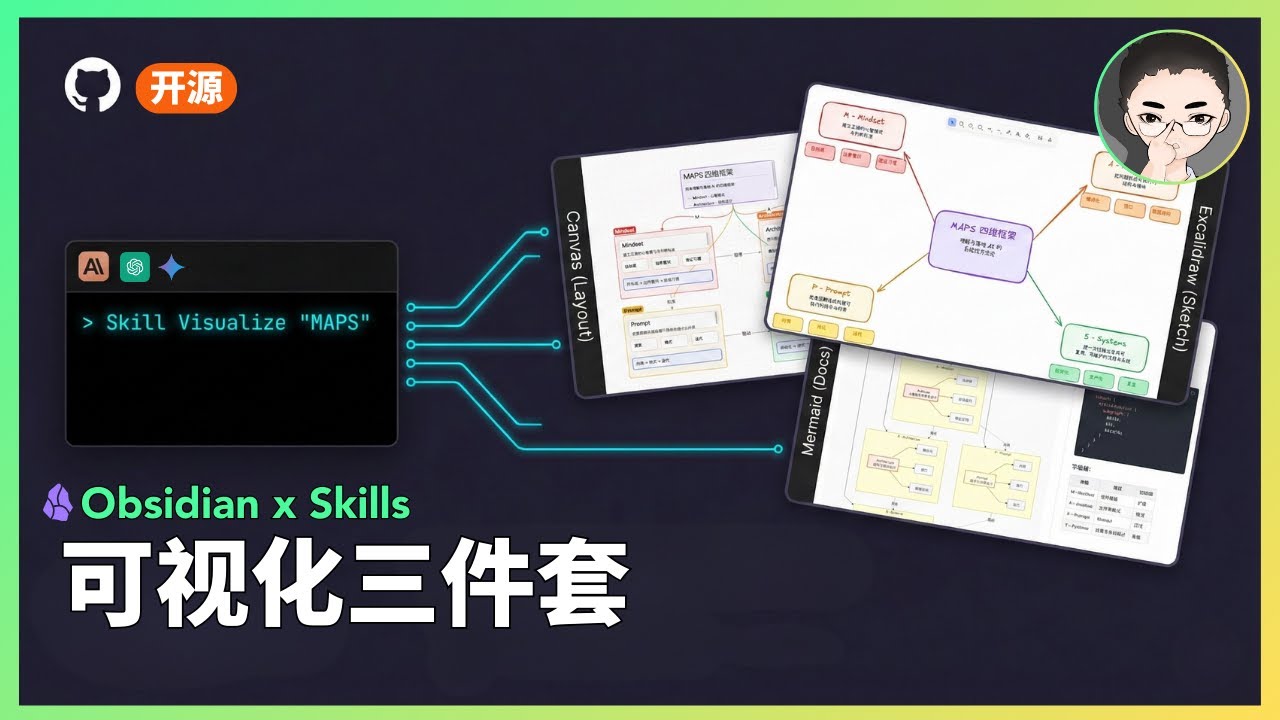](https://youtu.be/TUJ_3G1cylc) ## Status > **Status: Experimental** > > - This is a public prototype that works for my demos, but does not yet cover all input scales and edge cases. > - Output quality varies based on model version and input structure; results may fluctuate. > - My primary focus is demonstrating how tools and systems work together, not maintaining this codebase. > - If you encounter issues, please submit a reproducible case (input + output file + steps to reproduce). ## What Are Skills? Skills are prompt-based extensions for [Claude Code](https://docs.anthropic.com/en/docs/claude-code) that give Claude specialized capabilities. Unlike MCP servers that require complex setup, skills are simple markdown files that Claude loads on demand. ## Included Skills ### 1. Excalidraw Diagram Generator Generate hand-drawn style diagrams with three output modes: | Mode | Output | Use Case | |------|--------|----------| | **Obsidian** (default) | `.md` | Open directly in Obsidian | | **Standard** | `.excalidraw` | Open/edit/share on excalidraw.com | | **Animated** | `.excalidraw` | Generate animations with [excalidraw-animate](https://dai-shi.github.io/excalidraw-animate/) | **Supported Diagram Types:** | Type | Best For | |------|----------| | **Flowchart** | Step-by-step processes, workflows, task sequences | | **Mind Map** | Concept expansion, topic categorization, brainstorming | | **Hierarchy** | Org charts, content levels, system decomposition | | **Relationship** | Dependencies, influences, interactions between elements | | **Comparison** | Side-by-side analysis of approaches or options | | **Timeline** | Event progression, project milestones, evolution | | **Matrix** | 2D categorization, priority grids, positioning | | **Freeform** | Scattered ideas, initial exploration, free-form notes | **Key Features:** - Three output modes for different use cases - Hand-drawn aesthetic with Excalifont (fontFamily: 5) - Full Chinese text support with proper character handling - Animation support with customizable element order **Trigger words:** - Obsidian: `Excalidraw`, `diagram`, `flowchart`, `mind map`, `画图`, `流程图` - Standard: `标准Excalidraw`, `standard excalidraw` - Animated: `Excalidraw动画`, `动画图`, `animate` ### 2. Mermaid Visualizer Transform text content into professional Mermaid diagrams optimized for presentations and documentation. Includes built-in syntax error prevention for common pitfalls. **Supported Diagram Types:** - **Process Flow** (graph TB/LR) - Workflows, decision trees, AI agent architectures - **Circular Flow** - Cyclic processes, feedback loops, continuous improvement - **Comparison Diagram** - Before/after, A vs B analysis, traditional vs modern - **Mindmap** - Hierarchical concepts, knowledge organization - **Sequence Diagram** - Component interactions, API calls, message flows - **State Diagram** - System states, status transitions, lifecycle stages **Key Features:** - Built-in syntax error prevention (list conflicts, subgraph naming, special characters) - Configurable layouts: vertical/horizontal, simple/standard/detailed - Professional color schemes with semantic meaning - Compatible with Obsidian, GitHub, and other Mermaid renderers **Trigger words:** `Mermaid`, `visualize`, `flowchart`, `sequence diagram`, `可视化` ### 3. Obsidian Canvas Creator Create interactive Obsidian Canvas (`.canvas`) files with MindMap or freeform layouts. Outputs valid JSON Canvas format that opens directly in Obsidian. **Layout Modes:** | Mode | Structure | Best For | |------|-----------|----------| | **MindMap** | Radial hierarchy from center | Brainstorming, topic exploration, hierarchical content | | **Freeform** | Custom positioning, flexible connections | Complex networks, non-hierarchical content, custom arrangements | **Key Features:** - Smart node sizing based on content length - Automatic edge creation with labeled relationships - Color-coded nodes (6 preset colors + custom hex) - Proper spacing algorithms to prevent overlap - Group nodes for visual organization **Trigger words:** `Canvas`, `mind map`, `visual diagram`, `思维导图` ## Installation ### Prerequisites - [Claude Code CLI](https://docs.anthropic.com/en/docs/claude-code) installed - [Obsidian](https://obsidian.md/) with relevant plugins: - [Excalidraw plugin](https://github.com/zsviczian/obsidian-excalidraw-plugin) (for Excalidraw skill) ### Option A: Plugin Marketplace (Recommended) Install via Claude Code's plugin system: ``` /plugin marketplace add axtonliu/axton-obsidian-visual-skills /plugin install obsidian-visual-skills ``` Then restart Claude Code to load the skills. ### Option B: Manual Installation Copy the skill folders to your Claude Code skills directory: ```bash # Clone the repository git clone https://github.com/axtonliu/axton-obsidian-visual-skills.git # Copy skills to Claude Code directory cp -r axton-obsidian-visual-skills/excalidraw-diagram ~/.claude/skills/ cp -r axton-obsidian-visual-skills/mermaid-visualizer ~/.claude/skills/ cp -r axton-obsidian-visual-skills/obsidian-canvas-creator ~/.claude/skills/ ``` Or copy individual skills as needed. ## Usage Once installed, Claude Code will automatically use these skills when you ask for visualizations: ``` # Excalidraw "Create an Excalidraw flowchart showing the CI/CD pipeline" "Draw a mind map about machine learning concepts" "用 Excalidraw 画一个商业模式关系图" # Mermaid "Visualize this process as a Mermaid diagram" "Create a sequence diagram for the API authentication flow" "把这个工作流程转成 Mermaid 图表" # Canvas "Turn this article into an Obsidian Canvas" "Create a mind map canvas for project planning" "把这篇文章整理成 Canvas 思维导图" ``` ## File Structure ``` axton-obsidian-visual-skills/ ├── excalidraw-diagram/ │ ├── SKILL.md # Main skill definition │ ├── assets/ # Example outputs │ └── references/ # Excalidraw JSON schema ├── mermaid-visualizer/ │ ├── SKILL.md │ └── references/ # Syntax rules & error prevention ├── obsidian-canvas-creator/ │ ├── SKILL.md │ ├── assets/ # Template canvas files │ └── references/ # Canvas spec & layout algorithms ├── README.md ├── README_CN.md └── LICENSE ``` ## Troubleshooting ### Excalidraw: Chinese text not showing as handwriting font The skill correctly sets `fontFamily: 5` (Excalifont). However, **Excalifont only covers Latin characters** — CJK handwriting font (Xiaolai) is loaded dynamically from the network. **Why it works for me:** My Chinese text displays in handwriting style because the font loads successfully from Excalidraw.com. **Why it might not work for you:** - Offline mode or unstable network connection - Cannot access Excalidraw.com (firewall, etc.) **Solutions:** **Option A (Online):** Ensure your network can access Excalidraw.com **Option B (Offline):** 1. Download CJK font files from [Excalidraw GitHub](https://github.com/excalidraw/excalidraw/tree/master/public/fonts) 2. Place them in your vault's `Excalidraw/CJK Fonts` folder 3. In Excalidraw plugin settings, enable "Load Chinese fonts from file at startup" 4. Restart Obsidian (required for settings to take effect) ## Contributing Contributions welcome (low-maintenance project): - Reproducible bug reports (input + output + steps + environment) - Documentation improvements - Small PRs (fixes/docs) > **Note:** Feature requests may not be acted on due to limited maintenance capacity. ## Acknowledgments This project builds upon these excellent open-source tools and specifications: - [Excalidraw](https://excalidraw.com/) - Hand-drawn style whiteboard - [Mermaid](https://mermaid.js.org/) - Diagram and chart generation - [JSON Canvas](https://jsoncanvas.org/) - Open file format for infinite canvas (MIT License) - [Obsidian](https://obsidian.md/) - Knowledge base application ## License MIT License - see [LICENSE](LICENSE) for details. --- ## Author **Axton Liu** - AI Educator & Creator - Website: [axtonliu.ai](https://www.axtonliu.ai) - YouTube: [@AxtonLiu](https://youtube.com/@AxtonLiu) - Twitter/X: [@axtonliu](https://twitter.com/axtonliu) ### Learn More - [MAPS™ AI Agent Course](https://www.axtonliu.ai/aiagent) - Systematic AI agent skills training - [Claude Skills: A Systematic Guide](https://www.axtonliu.ai/newsletters/ai-2/posts/claude-agent-skills-maps-framework) - Complete methodology - [AI Elite Weekly Newsletter](https://www.axtonliu.ai/newsletters/ai-2) - Weekly AI insights - [Free AI Course](https://www.axtonliu.ai/axton-free-course) - Get started with AI --- © AXTONLIU™ & AI 精英学院™ 版权所有