Catalog›Agent skills›Marketing & analytics›google-adsGAgoogle-adsacedatacloud/skills · skills.sh Open site Project Open in the app JSON README (API)Skill publicada por acedatacloud/skills no skills.sh. Instale com: npx skills add acedatacloud/skills@google-adsREADMELoading documentation…# AceDataCloud Agent Skills <p align="center"> <a href="https://agentskills.io"><img src="https://img.shields.io/badge/Agent_Skills-agentskills.io-blue" alt="Agent Skills"></a> <a href="https://platform.acedata.cloud?utm_source=opensource&utm_medium=referral&utm_campaign=evergreen&utm_content=skills_readme_platform"><img src="https://img.shields.io/badge/API-platform.acedata.cloud-green" alt="Platform"></a> <a href="https://www.npmjs.com/package/@acedatacloud/skills"><img src="https://img.shields.io/npm/v/@acedatacloud/skills.svg" alt="npm"></a> <a href="https://github.com/AceDataCloud/Skills/actions"><img src="https://github.com/AceDataCloud/Skills/actions/workflows/validate.yml/badge.svg" alt="Validate"></a> <a href="https://github.com/acedatacloud/skills/blob/HEAD/LICENSE"><img src="https://img.shields.io/badge/license-Apache--2.0-orange" alt="License"></a> </p> [Agent Skills](https://agentskills.io/) for [AceDataCloud](https://platform.acedata.cloud?utm_source=opensource&utm_medium=referral&utm_campaign=evergreen&utm_content=skills_readme_platform) AI services — music, image, video generation, LLM chat, web search, and more. Compatible with **30+ AI coding agents** via the [agentskills.io](https://agentskills.io/) open standard: Claude Code, GitHub Copilot, Gemini CLI, OpenAI Codex, Cursor, Roo Code, Goose, and more. ## First run from skills.sh Choose the service you want, then install **that Skill only**. Each integration is maintained by **Ace Data Cloud** and uses your Ace API key; it is not published by the model or service vendor. | Service | Official directory entry | Skill name | First-run guide | |---|---|---|---| | Suno | [Suno on skills.sh](https://skills.sh/acedatacloud/skills/suno-music) | `suno-music` | [English](https://github.com/acedatacloud/skills/blob/HEAD/skills/suno-music/README.md) / [简体中文](https://github.com/acedatacloud/skills/blob/HEAD/skills/suno-music/readme.zh-CN.md) | | Seedance | [Seedance on skills.sh](https://skills.sh/acedatacloud/skills/seedance-video) | `seedance-video` | [English](https://github.com/acedatacloud/skills/blob/HEAD/skills/seedance-video/README.md) / [简体中文](https://github.com/acedatacloud/skills/blob/HEAD/skills/seedance-video/readme.zh-CN.md) | | HappyHorse | [HappyHorse on skills.sh](https://skills.sh/acedatacloud/skills/happyhorse-video) | `happyhorse-video` | [English](https://github.com/acedatacloud/skills/blob/HEAD/skills/happyhorse-video/README.md) / [简体中文](https://github.com/acedatacloud/skills/blob/HEAD/skills/happyhorse-video/readme.zh-CN.md) | | GPT Image | [GPT Image on skills.sh](https://skills.sh/acedatacloud/skills/gpt-image-2-5) | `gpt-image-2-5` | [English](https://github.com/acedatacloud/skills/blob/HEAD/skills/gpt-image-2-5/README.md) / [简体中文](https://github.com/acedatacloud/skills/blob/HEAD/skills/gpt-image-2-5/readme.zh-CN.md) | | Nano Banana | [Nano Banana on skills.sh](https://skills.sh/acedatacloud/skills/nano-banana-image) | `nano-banana-image` | [English](https://github.com/acedatacloud/skills/blob/HEAD/skills/nano-banana-image/README.md) / [简体中文](https://github.com/acedatacloud/skills/blob/HEAD/skills/nano-banana-image/readme.zh-CN.md) | For example, install Suno into your Codex project: ```bash npx --yes skills@1.7.2 add acedatacloud/skills --skill suno-music -a codex --yes npx --yes skills@1.7.2 list ``` Replace `codex` with your supported agent, such as `claude-code` or `cursor`. For Codex the files are copied to `.agents/skills/suno-music/`; start a fresh assistant session. No ClawHub account, OpenClaw installation or paired MCP server is required for this path. Installation itself does not generate media. Follow the selected service's guide: **Ace registration/sign-in → Applications / General application → check service access, balance and current price → copy or create a dedicated API key → make it available to the assistant process → submit once and query the same task ID**. The guides include real redacted Ace key-management images and service-specific request examples. A Skill cannot configure an environment variable or load `.env` automatically; follow your assistant's environment/secret settings. Never paste a key into a prompt. The optional [`acedatacloud` account Skill](https://github.com/acedatacloud/skills/blob/HEAD/skills/acedatacloud/) can read public catalog/pricing without a key. Account-resource reads such as balance use the separate `ACEDATACLOUD_PLATFORM_TOKEN`; service generation uses `ACEDATACLOUD_API_TOKEN`. Neither the account Skill nor a model-provider configuration is a prerequisite for the five service Skills. ## First run with ClawHub and OpenClaw This example uses Suno. The same API-key steps apply to the other AceDataCloud image, video, music, chat, search, and face Skills. A ClawHub account installs Skills; an **AceDataCloud API key** authorizes API calls. They are separate credentials. ### 1. Install the Skill Open [Suno on ClawHub](https://clawhub.ai/acedatacloud/skills/suno) and check that the publisher is **@acedatacloud**. Install the [ClawHub CLI](https://github.com/openclaw/clawhub/blob/main/docs/cli.md) if needed, then run: ```bash npm install -g clawhub clawhub install @acedatacloud/suno clawhub list ``` Start a new OpenClaw session so it loads the installed Skill. The ClawHub names are shorter than the folders in this repository: for example, `@acedatacloud/suno` corresponds to [`skills/suno-music`](https://github.com/acedatacloud/skills/blob/HEAD/skills/suno-music/), and `@acedatacloud/nano-banana` to [`skills/nano-banana-image`](https://github.com/acedatacloud/skills/blob/HEAD/skills/nano-banana-image/). For other agents, use [Quick Install](#quick-install) below. ### 2. Get an AceDataCloud API key New account? Register and sign in first. If the Applications page has no General application yet, choose **Initialize General Application**, then continue with the key steps below. 1. Sign in at [AceDataCloud → Applications](https://platform.acedata.cloud/console/applications?utm_source=opensource&utm_medium=referral&utm_campaign=evergreen&utm_content=skills_readme_api_key). Create an account first if needed. 2. Open **General application** (initialize it if the console prompts you). Its key can access the services enabled for your account. A service-specific application key is limited to that service. Enable the intended service if needed, then check its access, balance, and current price before running an example. 3. Copy an existing API key, or choose **Manage Keys → Create** to make a separate key for OpenClaw. Name it, set an expiration and restrictions if needed, then copy the key from the application card or key list. If you restrict **Allowed APIs**, include both the generation endpoint and its task-query endpoint. For Suno these are `/suno/audios` and `/suno/tasks`. 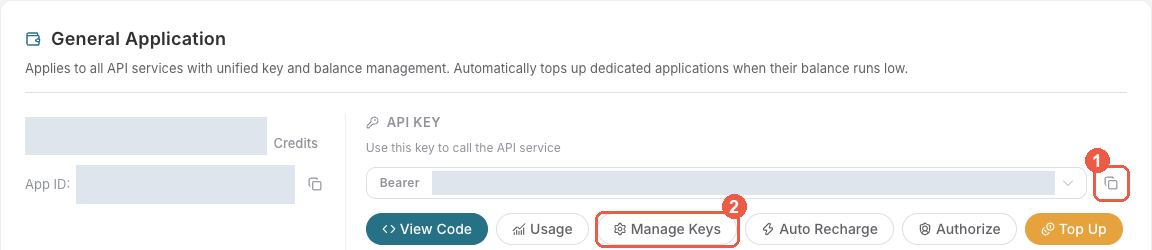 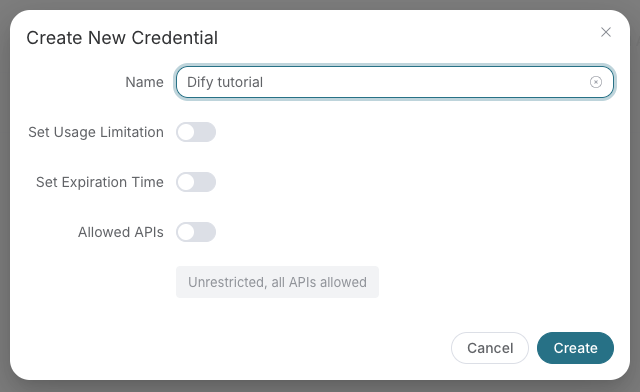 Copy the **key value only**. Do not include `Bearer ` or quotation marks when pasting into a credential field. A platform-management token beginning with `platform-` is for the [account-management Skill](https://github.com/acedatacloud/skills/blob/HEAD/skills/acedatacloud/), not for generation/search requests to `api.acedata.cloud`. ### 3. Make the key available to OpenClaw Put this line in `~/.openclaw/.env` on the machine running the OpenClaw Gateway, replacing the placeholder with your key: ```dotenv ACEDATACLOUD_API_TOKEN=your_api_key_here ``` OpenClaw [loads this global `.env` file](https://docs.openclaw.ai/help/faq/env-vars#how-does-openclaw-load-environment-variables) even when its Gateway runs as a service. Restart the Gateway and start a fresh session after changing it. Keep the file private (`chmod 600 ~/.openclaw/.env`) and never commit it or paste the key into a chat. For a direct terminal-only test, use `export ACEDATACLOUD_API_TOKEN="your_api_key_here"` in that terminal instead. ### 4. Submit once, then check the same task Ask your agent: “Use the Suno Skill to make an instrumental piano melody for a sunrise.” Or run this example after checking the current Suno price; generation is billable: ```bash curl -X POST https://api.acedata.cloud/suno/audios \ -H "Authorization: Bearer $ACEDATACLOUD_API_TOKEN" \ -H "Content-Type: application/json" \ -d '{"model":"chirp-v6","prompt":"A gentle instrumental piano melody for a sunrise, no vocals.","instrumental":true,"async":true}' ``` If the response gives a task ID, copy it and query **that same task** until it succeeds or fails: ```bash curl -X POST https://api.acedata.cloud/suno/tasks \ -H "Authorization: Bearer $ACEDATACLOUD_API_TOKEN" \ -H "Content-Type: application/json" \ -d '{"id":"YOUR_TASK_ID"}' ``` Use the audio URL from the completed result. Do not submit the generation request again just because a task is pending; that creates another billable task. Other Skills have their own request examples and task endpoints in their `SKILL.md` files. ### 5. If the first run fails | Symptom | Check | |---|---| | 401 / unauthorized | Copy the complete API key again. Confirm `ACEDATACLOUD_API_TOKEN` is available to the Gateway, and do not put `Bearer ` inside the key value. | | 403 / no access | Check the application has access to the service, the key has not expired, and **Allowed APIs** includes both the submit and task-query routes. A moderation rejection can also return 403; read the response before changing keys. | | 400 / invalid request | Use the exact model and request shape in the Skill's current Quick Start. | | 429 | Wait and reduce request rate or concurrency; do not automatically retry a billable submit. | | Pending, timeout, or 5xx | Query the existing task or request history before resubmitting. Share a task or trace ID with support, never the key. | For more detail, see the [authentication guide](https://github.com/acedatacloud/skills/blob/HEAD/skills/_shared/authentication.md) and [task-polling guide](https://github.com/acedatacloud/skills/blob/HEAD/skills/_shared/async-tasks.md). Support: [dev@acedata.cloud](mailto:dev@acedata.cloud). The general [ClawHub API guide](https://clawhub.ai/acedatacloud/skills/api-guide) is the entry point for agents that have not selected a service yet. ## Available Skills ### AI Music & Audio | Skill | Description | |-------|-------------| | [suno-music](https://github.com/acedatacloud/skills/blob/HEAD/skills/suno-music/) | Generate Suno music, lyrics, covers, vocals, check audio availability before follow-up processing, and edit/render versioned multitrack Studio projects | | [producer-music](https://github.com/acedatacloud/skills/blob/HEAD/skills/producer-music/) | Generate music, covers, extend tracks, swap vocals with Producer | | [fish-audio](https://github.com/acedatacloud/skills/blob/HEAD/skills/fish-audio/) | Fish text-to-speech, one-shot cloning, and persistent public voice models with account-scoped listing | ### AI Image Generation | Skill | Description | |-------|-------------| | [gpt-image-2-5](https://github.com/acedatacloud/skills/blob/HEAD/skills/gpt-image-2-5/) | Generate and edit images with GPT Image 2.5 Flare or Sunburst | | [midjourney-image](https://github.com/acedatacloud/skills/blob/HEAD/skills/midjourney-image/) | Generate, edit, upscale, and describe Midjourney images or videos | | [flux-image](https://github.com/acedatacloud/skills/blob/HEAD/skills/flux-image/) | Generate/edit Flux images and generate FLUX 3 videos | | [qwen-image](https://github.com/acedatacloud/skills/blob/HEAD/skills/qwen-image/) | Generate and edit images with Qwen Image 3 | | [seedream-image](https://github.com/acedatacloud/skills/blob/HEAD/skills/seedream-image/) | Generate and edit images with ByteDance Seedream | | [nano-banana-image](https://github.com/acedatacloud/skills/blob/HEAD/skills/nano-banana-image/) | Generate and edit images with Google Gemini (NanoBanana) | ### AI Video Generation | Skill | Description | |-------|-------------| | [luma-video](https://github.com/acedatacloud/skills/blob/HEAD/skills/luma-video/) | Generate videos with Luma Dream Machine | | [sora-video](https://github.com/acedatacloud/skills/blob/HEAD/skills/sora-video/) | Retired integration guidance; not currently published | | [veo-video](https://github.com/acedatacloud/skills/blob/HEAD/skills/veo-video/) | Generate videos with Google Veo (native audio) | | [kling-video](https://github.com/acedatacloud/skills/blob/HEAD/skills/kling-video/) | Generate Kling videos, Turbo, multishot, commerce and owned asset references | | [hailuo-video](https://github.com/acedatacloud/skills/blob/HEAD/skills/hailuo-video/) | Generate videos with Hailuo / MiniMax | | [minimax-video](https://github.com/acedatacloud/skills/blob/HEAD/skills/minimax-video/) | Generate MiniMax-H3 videos (768P/2K) and poll tasks to confirmed success | | [grok-video](https://github.com/acedatacloud/skills/blob/HEAD/skills/grok-video/) | Generate Grok videos from text or images and query the final task | | [happyhorse-video](https://github.com/acedatacloud/skills/blob/HEAD/skills/happyhorse-video/) | Generate and edit videos with Happy Horse | | [seedance-video](https://github.com/acedatacloud/skills/blob/HEAD/skills/seedance-video/) | Generate dance/motion videos with ByteDance Seedance | | [maestro-video](https://github.com/acedatacloud/skills/blob/HEAD/skills/maestro-video/) | Produce complete videos from a brief with script, media, voiceover, captions, and editing — one language per task | | [capability-spotlight-video](https://github.com/acedatacloud/skills/blob/HEAD/skills/capability-spotlight-video/) | Produce a recurring, evidence-led Ace Data Cloud capability video series with topic/demo/style/layout/voice rotation | ### AI Chat & Tools | Skill | Description | |-------|-------------| | [ai-chat](https://github.com/acedatacloud/skills/blob/HEAD/skills/ai-chat/) | Unified LLM gateway — native Claude Messages, native Gemini audio analysis, OpenAI-compatible chat with public `/v1` aliases, embeddings, stateful conversations and scheduled agent tasks (50+ models) | | [google-search](https://github.com/acedatacloud/skills/blob/HEAD/skills/google-search/) | Search the web, images, news, maps, places, and videos via Google | | [tgstat](https://github.com/acedatacloud/skills/blob/HEAD/skills/tgstat/) | Discover and analyze public Telegram channels/groups using a connected username as the default target | | [face-transform](https://github.com/acedatacloud/skills/blob/HEAD/skills/face-transform/) | Face analysis, beautification, age/gender transform, swap, cartoon | | [short-url](https://github.com/acedatacloud/skills/blob/HEAD/skills/short-url/) | Create and manage short URLs | | [onepage-pdf](https://github.com/acedatacloud/skills/blob/HEAD/skills/onepage-pdf/) | Convert an HTML page into one tall single-page PDF — no pagination breaks (local, no token) | | [apple-notes](https://github.com/acedatacloud/skills/blob/HEAD/skills/apple-notes/) | Manage Apple Notes on macOS — create, search, read, export, and organize notes (macOS-only, local, no token) | | [acedatacloud](https://github.com/acedatacloud/skills/blob/HEAD/skills/acedatacloud/) | Manage your AceDataCloud account — scoped OAuth access, balance, usage/spend, API keys, services, region-aware public catalog discovery, orders, announcements, and submitted, peer-reviewed blog publishing via MCP / REST (article/video drafts and review threads) | ### Connectors These skills drive third-party connectors users wire up at [studio.acedata.cloud/console/connectors](https://studio.acedata.cloud/console/connectors?utm_source=opensource&utm_medium=referral&utm_campaign=evergreen&utm_content=skills_readme_console_connectors). Each declares the OAuth / BYOC connection it needs in `connections:` frontmatter; the [aichat2](https://chat.acedata.cloud) runtime injects the matching access token into the sandbox before the skill's `Bash` calls run. | Skill | Description | Connection | |-------|-------------|------------| | [github](https://github.com/acedatacloud/skills/blob/HEAD/skills/github/) | GitHub issues, pull requests, repos, code search, and Actions via `gh` CLI | `github` | | [gitlab](https://github.com/acedatacloud/skills/blob/HEAD/skills/gitlab/) | GitLab issues, MRs, projects, pipelines via the `glab` CLI | `gitlab` | | [google-drive](https://github.com/acedatacloud/skills/blob/HEAD/skills/google-drive/) | List, search, and read Google Drive files via the Drive v3 REST API | `google/drive` | | [google-gmail](https://github.com/acedatacloud/skills/blob/HEAD/skills/google-gmail/) | Read, search, and triage Gmail messages via the Gmail v1 REST API | `google/gmail` | | [google-calendar](https://github.com/acedatacloud/skills/blob/HEAD/skills/google-calendar/) | Read calendar events, agenda, and free-busy windows via Calendar v3 | `google/calendar` | | [google-tasks](https://github.com/acedatacloud/skills/blob/HEAD/skills/google-tasks/) | List and inspect Google Tasks via the Tasks v1 REST API | `google/tasks` | | [microsoft-onedrive](https://github.com/acedatacloud/skills/blob/HEAD/skills/microsoft-onedrive/) | List and read OneDrive files via the Microsoft Graph API | `microsoft/onedrive` | | [microsoft-outlook](https://github.com/acedatacloud/skills/blob/HEAD/skills/microsoft-outlook/) | Read Outlook mail, calendar events, and contacts via Microsoft Graph | `microsoft/outlook` | | [notion](https://github.com/acedatacloud/skills/blob/HEAD/skills/notion/) | Read and search Notion pages, databases, and blocks | `notion` | | [slack](https://github.com/acedatacloud/skills/blob/HEAD/skills/slack/) | Search public channels, read joined conversations, and send confirmed bot messages | `slack` | | [wechat-official-account](https://github.com/acedatacloud/skills/blob/HEAD/skills/wechat-official-account/) | Manage WeChat MP — drafts, publishing, materials, user tags | `wechat` (BYOC) | | [personal-wechat](https://github.com/acedatacloud/skills/blob/HEAD/skills/personal-wechat/) | Operate a personal WeChat account through a self-hosted Wisdom service | `personalwechat` (BYOC) | | [didi-ride](https://github.com/acedatacloud/skills/blob/HEAD/skills/didi-ride/) | Book DiDi rides, estimate fares, query/cancel orders, plan routes via the DiDi MCP | `didi` (BYOC) | | [wecom](https://github.com/acedatacloud/skills/blob/HEAD/skills/wecom/) | WeCom (企业微信) self-built app — contacts, app messages, WeDoc, schedules, meetings | `wecom` (BYOC) | | [tencent-docs](https://github.com/acedatacloud/skills/blob/HEAD/skills/tencent-docs/) | Create / read / list / search / manage Tencent Docs — docs, sheets, slides, mind maps, flowcharts | `tencentdocs` (BYOC) | | [tgstat](https://github.com/acedatacloud/skills/blob/HEAD/skills/tgstat/) | Public Telegram source discovery, rankings, and audience research | `tgstat` (BYOC username) | | [linkedin-company-page](https://github.com/acedatacloud/skills/blob/HEAD/skills/linkedin-company-page/) | Publish and verify company Page posts using approved LinkedIn organization permissions | `linkedin/company-page` (OAuth; approval gated) | | [yandex-webmaster](https://github.com/acedatacloud/skills/blob/HEAD/skills/yandex-webmaster/) | Read Yandex verified sites and popular search queries | `yandexwebmaster` (BYOC) | | [yandex-metrica](https://github.com/acedatacloud/skills/blob/HEAD/skills/yandex-metrica/) | Read Yandex traffic by country, source, and UTM | `yandexmetrica` (BYOC) | | [postman-publisher](https://github.com/acedatacloud/skills/blob/HEAD/skills/postman-publisher/) | Sync reviewed API collections to an owned public Postman workspace | `postmanpublisher` (BYOC) | | [whatsapp-business](https://github.com/acedatacloud/skills/blob/HEAD/skills/whatsapp-business/) | Inspect approved templates and send a single opted-in Cloud API message | `whatsappbusiness` (BYOC; gated) | The [content-fanout](https://github.com/acedatacloud/skills/blob/HEAD/skills/content-fanout/) playbook prepares channel-specific drafts from a canonical source and uses only explicitly selected, connected publishing skills. It requires human review and does not provide unattended bulk posting. ## Prerequisites AceDataCloud API Skills need an API key from [Applications](https://platform.acedata.cloud/console/applications?utm_source=opensource&utm_medium=referral&utm_campaign=evergreen&utm_content=skills_readme_api_key). Follow the [first-run steps](#first-run-with-clawhub-and-openclaw) for the exact UI path, key restrictions, OpenClaw environment setup, and a complete example. Local-only Skills such as `onepage-pdf` and `apple-notes` do not use an AceDataCloud API key; the `acedatacloud` account-management Skill uses a separate platform token. ## Quick Install **One command** to install skills into your project — works with all agents: ```bash # Install all skills (for any agentskills.io-compatible agent) npx skills add acedatacloud/skills --skill '*' --yes # Install specific skills only npx skills add acedatacloud/skills --skill suno-music --skill flux-image --yes ``` The [`skills` CLI](https://github.com/vercel-labs/skills) auto-detects your agent and installs to the correct path. ## Usage by Platform ### Claude Code **Option A: `skills` CLI (recommended)** ```bash # Install all skills for Claude Code npx skills add acedatacloud/skills --skill '*' -a claude-code --yes # Install specific skills npx skills add acedatacloud/skills --skill suno-music -a claude-code --yes ``` Skills are symlinked into `.claude/skills/` and auto-discovered by Claude Code. **Option B: Plugin Marketplace** ``` /plugin marketplace add acedatacloud/skills /plugin install acedatacloud-ai-media@acedatacloud-skills /plugin install acedatacloud-ai-tools@acedatacloud-skills ``` **Option C: npm package** ```bash npx @acedatacloud/skills install --target .claude/skills ``` **Option D: Manual copy** ```bash git clone https://github.com/AceDataCloud/Skills.git cp -r Skills/skills/* .claude/skills/ ``` ### GitHub Copilot ```bash npx skills add acedatacloud/skills --skill '*' -a github-copilot --yes ``` ### Gemini CLI ```bash npx skills add acedatacloud/skills --skill '*' -a gemini-cli --yes ``` ### OpenAI Codex ```bash npx skills add acedatacloud/skills --skill '*' -a codex --yes ``` ### WeKnora Follow the [English setup guide](https://github.com/acedatacloud/skills/blob/HEAD/platforms/weknora/README.md) or [中文指南](https://github.com/acedatacloud/skills/blob/HEAD/platforms/weknora/README.zh-CN.md) for the current stable version: import a secret-free Suno MCP example, add your Ace key privately, sync tools, build a minimal Agent conversation, and query the same task ID to its final audio URL. The guide maps 17 named services to their reusable Skills. ### Cursor ```bash npx skills add acedatacloud/skills --skill '*' -a cursor --yes ``` ### Roo Code ```bash npx skills add acedatacloud/skills --skill '*' -a roo --yes ``` ### Goose ```bash npx skills add acedatacloud/skills --skill '*' -a goose --yes ``` ### Windsurf ```bash npx skills add acedatacloud/skills --skill '*' -a windsurf --yes ``` ### Cline ```bash npx skills add acedatacloud/skills --skill '*' -a cline --yes ``` ### Other Agents The `skills` CLI supports 40+ agents. Use `npx skills add --help` to see all options, or install to the universal `.agents/skills/` path: ```bash npx skills add acedatacloud/skills --skill '*' --yes ``` ## Pairing Skills with MCP Servers Skills provide **knowledge** (when to use, parameters, gotchas). MCP servers provide **tools** (executable functions the agent can call). Together they give the best experience. | Skill | MCP Server | Install | Hosted Endpoint | |-------|-----------|---------|-----------------| | suno-music | [mcp-suno](https://pypi.org/project/mcp-suno/) | `pip install mcp-suno` | `https://suno.mcp.acedata.cloud/mcp` | | google-search | [mcp-serp](https://pypi.org/project/mcp-serp/) | `pip install mcp-serp` | `https://serp.mcp.acedata.cloud/mcp` | | flux-image | [mcp-flux-pro](https://pypi.org/project/mcp-flux-pro/) | `pip install mcp-flux-pro` | `https://flux.mcp.acedata.cloud/mcp` | | luma-video | [mcp-luma](https://pypi.org/project/mcp-luma/) | `pip install mcp-luma` | `https://luma.mcp.acedata.cloud/mcp` | | sora-video | [mcp-sora](https://pypi.org/project/mcp-sora/) | `pip install mcp-sora` | `https://sora.mcp.acedata.cloud/mcp` | | veo-video | [mcp-veo](https://pypi.org/project/mcp-veo/) | `pip install mcp-veo` | `https://veo.mcp.acedata.cloud/mcp` | | qwen-image | [mcp-qwen-image](https://pypi.org/project/mcp-qwen-image/) | `pip install mcp-qwen-image` | `https://qwen-image.mcp.acedata.cloud/mcp` | | midjourney-image | [mcp-midjourney](https://pypi.org/project/mcp-midjourney/) | `pip install mcp-midjourney` | `https://midjourney.mcp.acedata.cloud/mcp` | | grok-video | [mcp-grok](https://pypi.org/project/mcp-grok/) | `pip install mcp-grok` | `https://grok.mcp.acedata.cloud/mcp` | | seedream-image | [mcp-seedream](https://pypi.org/project/mcp-seedream/) | `pip install mcp-seedream` | `https://seedream.mcp.acedata.cloud/mcp` | | seedance-video | [mcp-seedance](https://pypi.org/project/mcp-seedance/) | `pip install mcp-seedance` | `https://seedance.mcp.acedata.cloud/mcp` | | happyhorse-video | [mcp-happyhorse](https://pypi.org/project/mcp-happyhorse/) | `pip install mcp-happyhorse` | `https://happyhorse.mcp.acedata.cloud/mcp` | | maestro-video | [mcp-maestro](https://pypi.org/project/mcp-maestro/) | `pip install mcp-maestro` | `https://maestro.mcp.acedata.cloud/mcp` | | nano-banana-image | [mcp-nano-banana](https://pypi.org/project/mcp-nano-banana/) | `pip install mcp-nano-banana` | `https://nanobanana.mcp.acedata.cloud/mcp` | | short-url | [mcp-shorturl](https://pypi.org/project/mcp-shorturl/) | `pip install mcp-shorturl` | `https://short-url.mcp.acedata.cloud/mcp` | | wan-video | [mcp-wan](https://pypi.org/project/mcp-wan/) | `pip install mcp-wan` | `https://wan.mcp.acedata.cloud/mcp` | | acedatacloud | [mcp-acedatacloud](https://pypi.org/project/mcp-acedatacloud/) | `pip install mcp-acedatacloud` | `https://mcp.acedata.cloud/mcp` | | minimax-video | `mcp-minimax` | `pip install mcp-minimax` | `https://minimax.mcp.acedata.cloud/mcp` | **Using hosted MCP endpoints in Claude Code** (no local install needed): Merge into the project's `.mcp.json`, preserve existing services, and start Claude Code from a terminal with `ACEDATACLOUD_API_TOKEN` set. Review the service approval prompt, then run `/mcp` to verify connection and loaded tools. See [shared MCP setup](https://github.com/acedatacloud/skills/blob/HEAD/skills/_shared/mcp-servers.md) for Amp's configuration and approval checks. ```json { "mcpServers": { "suno": { "type": "http", "url": "https://suno.mcp.acedata.cloud/mcp", "headers": { "Authorization": "Bearer ${ACEDATACLOUD_API_TOKEN}" } } } } ``` ## Quick Example Ask your AI agent: > "Generate a lo-fi hip hop track with rain sounds using Suno" The agent will: 1. Read the `suno-music` skill to understand the API 2. Call the Suno MCP server (if configured) or guide you through the API call 3. Handle task polling until the music is ready 4. Return the audio URL ## Contributing We welcome contributions! To add a new skill: 1. Create a directory under `skills/` matching the skill name 2. Add a `SKILL.md` following the [Agent Skills specification](https://agentskills.io/specification) 3. Use the [template](https://github.com/acedatacloud/skills/blob/HEAD/template/SKILL.md) as a starting point 4. Reference shared files (`../_shared/authentication.md`, `../_shared/async-tasks.md`, `../_shared/mcp-servers.md`) instead of duplicating common sections 5. Submit a pull request — CI will validate your skill format **Note:** `.agents/skills/` and `.github/skills/` are symlinks to `skills/` — do not modify files via those paths. The existing ClawHub-only `@acedatacloud/api-guide` listing is maintained in [`clawhub/api-guide/SKILL.md`](https://github.com/acedatacloud/skills/blob/HEAD/clawhub/api-guide/SKILL.md). Its general onboarding instructions are kept separate from the service Skills in `skills/`. For a reviewed update to an existing listing, follow the [ClawHub maintenance guide](https://github.com/acedatacloud/skills/blob/HEAD/clawhub/README.md). The publishing helper previews one explicit listing by default and pins its source commit. ## License [Apache-2.0](https://github.com/acedatacloud/skills/blob/HEAD/LICENSE) ## Daily capability updates PlatformBackend `ecosystem.py` is the only scheduled coordinator. One daily Kubernetes Job reviews Backend docs and API changes with Claude Code, updates existing files, and creates or updates one reviewable PR per repository. It never merges PRs or duplicates the Backend guide tree. Normal CI and review remain required; publication and sub-repository mirroring run after merge. DetailsTypeAgent skillsTopicMarketing & analyticsPublisheracedatacloudSourceskillsshCategoryToolsStars17Copies (forks)1Proposed changes61Last update2026-10-26T21:01:08ZProject statusActiveLanguagePythonLicenseNOASSERTIONAdded2026-10-07 05:24:32Updated2026-10-07 05:24:32Source idacedatacloud/skills/google-adsMoreMore agent skills on Marketing & analyticsAll from acedatacloudA–Z index


