open-websearch
aas-ee/open-websearch · skills.sh
Open source Repository Open in the app JSON README (API)
About
Skill publicada por aas-ee/open-websearch no skills.sh. Instale com: npx skills add aas-ee/open-websearch@open-websearch
Details
- Kind
- Agent skills
- Topic
- No topic detected
- Publisher
- aas-ee
- Origin
- skillssh
- Category
- ferramentas
- Stars
- 1,801
- Forks
- 186
- Open pull requests
- 2
- Last push
- 2026-09-13T03:22:35Z
- Repository state
- ativo
- Language
- TypeScript
- License
- Apache-2.0
- Added
- 2026-08-30 15:22:15
- Updated
- 2026-09-08 15:04:42
- Origin id
aas-ee/open-websearch/open-websearch
README
<div align="center">
# Open-WebSearch
[](https://www.modelscope.cn/mcp/servers/Aasee1/open-webSearch)
[](https://smithery.ai/server/@Aas-ee/open-websearch)



**[🇨🇳 中文](./README-zh.md) | 🇺🇸 English**
</div>
`open-websearch` provides an MCP server, CLI, and local daemon, and can also be paired with skill-guided agent workflows for live web search and content retrieval without API keys.
## Sponsor
<div align="center">
<a href="https://www.swiftproxy.net/?ref=openwebSearch" rel="sponsored">
<img src="./docs/assets/sponsors/a69c410018edd7c45bffd4864629e25b.png" alt="Swiftproxy" width="600">
</a>
</div>
> [**Swiftproxy**](https://www.swiftproxy.net/?ref=openwebSearch) provides high-quality static residential proxies with stable IPs for multi-account management, automation, web scraping, and secure online operations. Protect your accounts with clean IPs and reliable proxy infrastructure. Static proxy traffic is valid for 30 days with unlimited usage. Get **10% off** with code **`PROXY90`**.
## Features
- Web search using multi-engine results
- bing
- baidu
- ~~linux.do~~ temporarily unsupported
- csdn
- duckduckgo
- exa
- brave
- juejin
- startpage
- sogou
- hackernews
- HTTP proxy configuration support for accessing restricted resources
- No API keys or authentication required
- Returns structured results with titles, URLs, and descriptions
- Configurable number of results per search
- Customizable default search engine
- Support for fetching individual article content
- csdn
- github (README files)
- generic HTTP(S) page / Markdown content
## Choose the Right Path
- `MCP`
- Best when you want to connect `open-websearch` to Claude Desktop, Cherry Studio, Cursor, or another MCP client.
- `CLI`
- Best for one-shot local commands, shell scripts, and direct terminal usage.
- `Local daemon`
- Best when you want a reusable long-lived local HTTP service exposing `status`, `GET /health`, and `POST /search` / `POST /fetch-*`. Start it explicitly with `open-websearch serve` and check it with `open-websearch status`.
- `Skill`
- Best as an agent-facing guidance layer for setup and usage. A skill does not replace MCP, CLI, or the local daemon; it typically works together with the CLI and/or local daemon to help an agent discover, activate, and use the smallest working path.
## Use with a Skill
Install the `open-websearch` skill for your agent first:
```bash
npx skills add https://github.com/Aas-ee/open-webSearch --skill open-websearch
```
On first use, the skill typically follows this path: detect whether a usable `open-websearch` path already exists, guide setup/enablement if it does not, validate that the capability is active, and only then continue with search or fetch through the smallest working path.
If the current environment cannot complete setup or activation automatically, you can explicitly have the agent start the local daemon first:
```bash
open-websearch serve
open-websearch status
```
Keep installation proxy settings separate from runtime proxy settings:
- Installation proxy / mirror
- Use this when the skill or agent is installing `open-websearch`, `playwright`, or other npm packages.
- In restricted networks, npm-specific flags or npm config often work better than generic shell proxy variables, for example:
```bash
npm --proxy http://127.0.0.1:7890 --https-proxy http://127.0.0.1:7890 install -g open-websearch
```
- Runtime proxy
- Use this when the daemon is already installed and is about to perform live `search` / `fetch` work.
- This affects the `open-websearch` network traffic after `serve` starts, for example:
```bash
USE_PROXY=true PROXY_URL=http://127.0.0.1:7890 open-websearch serve
```
If the agent can only get through the package-install step with npm proxy settings, but live search/fetch also needs a proxy after startup, those are two separate configuration steps and should be handled separately.
## CLI and Local Daemon
CLI is for one-shot execution. The local daemon is a long-lived local HTTP service for repeated calls with lower startup friction. Use `open-websearch serve` as the explicit daemon start command and `open-websearch status` as the explicit daemon status command.
Action commands such as `search` and `fetch-web` try the default local daemon first when it is available. If you pass `--daemon-url`, that daemon path becomes explicit and silent fallback to direct execution is disabled.
Build first:
```bash
npm run build
```
Start the local daemon:
```bash
npm run serve
# globally installed: open-websearch serve
```
Check status:
```bash
npm run status -- --json
# globally installed: open-websearch status --json
```
Run a one-shot local CLI search:
```bash
npm run search:cli -- "open web search" --json
```
Notes:
- Bare `open-websearch` is the MCP server compatibility entrypoint, not the recommended daemon start command for agent automation.
- For content extraction, prefer searching first and then fetching a more specific result page. Some homepages and JS-heavy landing pages may not expose readable article text through `fetch-web`.
For the local daemon HTTP API (`serve`, `status`, `GET /health`, `POST /search`, `POST /fetch-*`), see [docs/http-api.md](docs/http-api.md).
## TODO
- Support for ~~Bing~~ (already supported), ~~DuckDuckGo~~ (already supported), ~~Exa~~ (already supported), ~~Brave~~ (already supported), ~~Sogou~~ (already supported), ~~Hacker News~~ (already supported), Google and other search engines
- Support for more blogs, forums, and social platforms
- Optimize article content extraction, add support for more sites
- ~~Support for GitHub README fetching~~ (already supported)
## Installation Guide
If you are using `open-websearch` as an MCP server, continue with the MCP-oriented setup below.
### NPX Quick Start (Recommended)
The fastest way to get started:
```bash
# Basic usage
npx open-websearch@latest
# With environment variables (Linux/macOS)
DEFAULT_SEARCH_ENGINE=duckduckgo ENABLE_CORS=true npx open-websearch@latest
# Windows PowerShell
$env:DEFAULT_SEARCH_ENGINE="duckduckgo"; $env:ENABLE_CORS="true"; npx open-websearch@latest
# Windows CMD
set MODE=stdio && set DEFAULT_SEARCH_ENGINE=duckduckgo && npx open-websearch@latest
# Cross-platform (requires cross-env, Used for local development)
npm install -g open-websearch
npx cross-env DEFAULT_SEARCH_ENGINE=duckduckgo ENABLE_CORS=true open-websearch
```
**Environment Variables:**
| Variable | Default | Options | Description |
|----------|-------------------------|---------|-------------|
| `ENABLE_CORS` | `false` | `true`, `false` | Enable CORS |
| `CORS_ORIGIN` | `*` | Any valid origin | CORS origin configuration |
| `DEFAULT_SEARCH_ENGINE` | `bing` | `bing`, `duckduckgo`, `exa`, `brave`, `baidu`, `csdn`, `linuxdo`, `juejin`, `startpage`, `sogou`, `hackernews` | Default search engine |
| `USE_PROXY` | `false` | `true`, `false` | Enable HTTP proxy |
| `PROXY_URL` | `http://127.0.0.1:7890` | Any valid URL | Proxy server URL |
| `FAKE_IP_CIDRS` | empty | Comma-separated CIDR list | Treat DNS answers in these CIDRs as synthetic fake-IP results and do not block them as private-network DNS answers. Literal private/local targets and other private-network DNS answers remain blocked |
| `FETCH_WEB_INSECURE_TLS` | `false` | `true`, `false` | Disable TLS verification only for the request leg of `fetchWebContent`; it does not affect Playwright browser navigation. Use only for broken certificate chains |
| `MODE` | `both` | `both`, `http`, `stdio` | Server mode: both HTTP+STDIO, HTTP only, or STDIO only |
| `PORT` | `3000` | 1-65535 | Server port |
| `ALLOWED_SEARCH_ENGINES` | empty (all available) | Comma-separated engine names | Limit which search engines can be used; if the default engine is not in this list, the first allowed engine becomes the default |
| `SEARCH_MODE` | `auto` | `request`, `auto`, `playwright` | Search strategy. Currently only affects Bing: force HTTP request mode (`request`), force Playwright mode (`playwright`), or let the agent choose (`auto`, default). Forced modes never expose a `searchMode` override to the agent. In `auto` mode the server checks whether Playwright is really usable (the client module can actually be loaded, and for local launches a real browser binary exists: explicit `PLAYWRIGHT_EXECUTABLE_PATH`, bundled browser, or system Chrome/Edge); if available, the search tool exposes a `searchMode` parameter and directs the agent to stay on the default `auto` and only retry with `playwright` when request results fail, return empty, or look blocked; otherwise it behaves as forced request mode. If `playwright` is forced but not usable, searches fail with a `browser_unavailable` error |
| `PLAYWRIGHT_PACKAGE` | `auto` | `auto`, `playwright`, `playwright-core` | Which Playwright client package to resolve when browser mode is enabled |
| `PLAYWRIGHT_MODULE_PATH` | empty | Absolute path or project-relative path | Reuse an existing Playwright client package outside this project |
| `PLAYWRIGHT_EXECUTABLE_PATH` | empty | Any valid browser binary path | Launch an existing Chromium/Chrome executable without installing bundled browsers |
| `PLAYWRIGHT_WS_ENDPOINT` | empty | Valid Playwright `ws://` / `wss://` endpoint | Connect to an existing remote Playwright browser server |
| `PLAYWRIGHT_CDP_ENDPOINT` | empty | Valid Chromium CDP endpoint | Connect to an existing Chromium instance over CDP |
| `PLAYWRIGHT_HEADLESS` | `true` | `true`, `false` | Whether Playwright Chromium runs in headless mode |
| `PLAYWRIGHT_NAVIGATION_TIMEOUT_MS` | `20000` | Positive integer | Timeout for Playwright navigation and Bing result waits |
| `OPEN_WEBSEARCH_PROFILE_DIR` | `<tmpdir>/open-websearch-browser-profiles` | Any writable directory | Base directory for persistent local browser profiles (see browser state note below) |
| `MCP_TOOL_SEARCH_NAME` | `search` | Valid MCP tool name | Custom name for the search tool; set to `<disabled>` (quote as `'<disabled>'` in bash/zsh, `"<disabled>"` in Windows cmd) to disable the tool. Invalid names fallback to default with a warning
| `MCP_TOOL_FETCH_LINUXDO_NAME` | `fetchLinuxDoArticle` | Valid MCP tool name | Custom name for the Linux.do article fetch tool; set to `<disabled>` (quote as `'<disabled>'` in bash/zsh, `"<disabled>"` in Windows cmd) to disable the tool. Invalid names fallback to default with a warning
| `MCP_TOOL_FETCH_CSDN_NAME` | `fetchCsdnArticle` | Valid MCP tool name | Custom name for the CSDN article fetch tool; set to `<disabled>` (quote as `'<disabled>'` in bash/zsh, `"<disabled>"` in Windows cmd) to disable the tool. Invalid names fallback to default with a warning
| `MCP_TOOL_FETCH_GITHUB_NAME` | `fetchGithubReadme` | Valid MCP tool name | Custom name for the GitHub README fetch tool; set to `<disabled>` (quote as `'<disabled>'` in bash/zsh, `"<disabled>"` in Windows cmd) to disable the tool. Invalid names fallback to default with a warning
| `MCP_TOOL_FETCH_JUEJIN_NAME` | `fetchJuejinArticle` | Valid MCP tool name | Custom name for the Juejin article fetch tool; set to `<disabled>` (quote as `'<disabled>'` in bash/zsh, `"<disabled>"` in Windows cmd) to disable the tool. Invalid names fallback to default with a warning
| `MCP_TOOL_FETCH_WEB_NAME` | `fetchWebContent` | Valid MCP tool name | Custom name for generic web/Markdown fetch tool; set to `<disabled>` (quote as `'<disabled>'` in bash/zsh, `"<disabled>"` in Windows cmd) to disable the tool. Invalid names fallback to default with a warning
**Common configurations:**
```bash
# Enable proxy for restricted regions
USE_PROXY=true PROXY_URL=http://127.0.0.1:7890 npx open-websearch@latest
# Only if a target website has a broken certificate chain
FETCH_WEB_INSECURE_TLS=true npx open-websearch@latest
# Request first, then fallback to Playwright if available
SEARCH_MODE=auto npx open-websearch@latest
# Force request-only Bing search
SEARCH_MODE=request npx open-websearch@latest
# Rename search tool to webSearch
MCP_TOOL_SEARCH_NAME=webSearch npx open-websearch@latest
# Disable search tool
MCP_TOOL_SEARCH_NAME='<disabled>' npx open-websearch@latest
# Full configuration
DEFAULT_SEARCH_ENGINE=duckduckgo ENABLE_CORS=true USE_PROXY=true PROXY_URL=http://127.0.0.1:7890 PORT=8080 npx open-websearch@latest
```
> **Note:** The `<disabled>` sentinel contains shell-special characters. In bash/zsh, quote it as `'<disabled>'`; in Windows cmd, use double quotes `"<disabled>"`.
Browser-enhanced Bing fallback is opt-in. The published package does not bundle Playwright anymore. Enable it manually with one of these setups:
1. Full local Playwright install:
```bash
npm install playwright
npx playwright install chromium
SEARCH_MODE=auto npx open-websearch@latest
```
2. Reuse an existing browser binary with a slim client:
```bash
npm install playwright-core
PLAYWRIGHT_PACKAGE=playwright-core PLAYWRIGHT_EXECUTABLE_PATH=/path/to/chromium SEARCH_MODE=auto npx open-websearch@latest
```
3. Reuse a Playwright package that already exists elsewhere on the machine:
```bash
PLAYWRIGHT_MODULE_PATH=/absolute/path/to/node_modules/playwright SEARCH_MODE=playwright npx open-websearch@latest
```
4. Connect to an existing remote browser:
```bash
npm install playwright-core
PLAYWRIGHT_PACKAGE=playwright-core PLAYWRIGHT_WS_ENDPOINT=ws://127.0.0.1:3000/ SEARCH_MODE=auto npx open-websearch@latest
```
5. Reuse a local Chrome/Chromium session over CDP:
```bash
npm install playwright-core
# Start Chrome/Chromium with a debugging port first
chrome --remote-debugging-port=9222 --user-data-dir=/tmp/open-websearch-chrome
# Then connect through CDP
PLAYWRIGHT_PACKAGE=playwright-core PLAYWRIGHT_CDP_ENDPOINT=http://127.0.0.1:9222 SEARCH_MODE=auto npx open-websearch@latest
```
This is the most practical setup when you want to reuse your own logged-in or previously verified browser session.
Windows PowerShell example:
```powershell
npm install playwright-core
& "$env:LOCALAPPDATA\Google\Chrome\Application\chrome.exe" `
--remote-debugging-port=9222 `
--user-data-dir="$env:TEMP\open-websearch-chrome"
$env:PLAYWRIGHT_PACKAGE="playwright-core"
$env:PLAYWRIGHT_CDP_ENDPOINT="http://127.0.0.1:9222"
$env:SEARCH_MODE="auto"
npx open-websearch@latest
```
Mode behavior:
- `request`: only uses request-based Bing scraping; the search tool exposes no `searchMode` parameter and no mode guidance
- `playwright`: forces Playwright; the search tool exposes no `searchMode` parameter and no mode guidance. Playwright availability is checked at startup and an invalid configuration logs a warning; searches then fail with a clear `browser_unavailable` error
- `auto`: checks whether Playwright is really usable (the client module actually loads; for local launches a real browser binary must exist). If available, the search tool exposes a `searchMode` parameter (request / auto / playwright) and directs the agent to stay on the default `auto`, retrying with `playwright` only when request results fail, return empty, or look blocked; otherwise the server behaves as request mode
Notes:
- `PLAYWRIGHT_MODULE_PATH` takes precedence over `PLAYWRIGHT_PACKAGE`
- `PLAYWRIGHT_WS_ENDPOINT` takes precedence over `PLAYWRIGHT_CDP_ENDPOINT`
- Remote endpoints ignore `PLAYWRIGHT_EXECUTABLE_PATH` and local proxy launch flags
- When Playwright is available, blocked CSDN/Zhihu article fetches and generic web fetches can also retry with browser-acquired cookies
- Without Playwright, `fetchWebContent` stays on the request-only path. Public pages can still work, but pages that require browser cookies or browser-rendered HTML may fail.
Browser state note (local shared profiles):
- Local browser mode reuses persistent contexts/pages across fetches and across process restarts. Cookies, storage, cache, and Service Worker state for the same origin therefore persist between browser-mode fetches.
- This is intentional for single-user, stateful scraping (it keeps anti-bot state warm and avoids repeated browser launches). If you share a daemon between mutually distrusting callers, connect those callers to an isolated browser via `PLAYWRIGHT_WS_ENDPOINT`/`PLAYWRIGHT_CDP_ENDPOINT` instead of relying on local shared profiles, or point each caller at its own `OPEN_WEBSEARCH_PROFILE_DIR`.
- This shared state is service-level and intended only for anonymous access to public web pages: the service itself never logs into sites, so it should never carry personal credentials. Do not rely on it to store logged-in or personalized sessions. Remote endpoints (`PLAYWRIGHT_WS_ENDPOINT`/`PLAYWRIGHT_CDP_ENDPOINT`) inherit the connected browser's state, so pointing them at a personal logged-in browser also shares that browser's login and personalization state with this service.
- To clear profile state, delete the browser profile directories under `OPEN_WEBSEARCH_PROFILE_DIR` (default: `<tmpdir>/open-websearch-browser-profiles`) while no local browser is running.
### Local Installation
1. Clone or download this repository
2. Install dependencies:
```bash
npm install
```
This installs the core MCP server only. Browser fallback remains optional until you install or connect a Playwright client yourself.
3. Build the server:
```bash
npm run build
```
4. Add the server to your MCP configuration:
**Cherry Studio:**
```json
{
"mcpServers": {
"web-search": {
"name": "Web Search MCP",
"type": "streamableHttp",
"description": "Multi-engine web search with article fetching",
"isActive": true,
"baseUrl": "http://localhost:3000/mcp"
}
}
}
```
**VSCode (Claude Dev Extension):**
```json
{
"mcpServers": {
"web-search": {
"transport": {
"type": "streamableHttp",
"url": "http://localhost:3000/mcp"
}
},
"web-search-sse": {
"transport": {
"type": "sse",
"url": "http://localhost:3000/sse"
}
}
}
}
```
**Claude Desktop:**
```json
{
"mcpServers": {
"web-search": {
"type": "http",
"url": "http://localhost:3000/mcp"
},
"web-search-sse": {
"type": "sse",
"url": "http://localhost:3000/sse"
}
}
}
```
**NPX Command Line Configuration:**
```json
{
"mcpServers": {
"web-search": {
"args": [
"open-websearch@latest"
],
"command": "npx",
"env": {
"MODE": "stdio",
"DEFAULT_SEARCH_ENGINE": "duckduckgo",
"ALLOWED_SEARCH_ENGINES": "duckduckgo,bing,exa"
}
}
}
}
```
Windows NPX configuration:
```json
{
"mcpServers": {
"web-search": {
"command": "cmd",
"args": [
"/c",
"npx",
"-y",
"open-websearch@latest"
],
"env": {
"MODE": "stdio",
"DEFAULT_SEARCH_ENGINE": "duckduckgo",
"SYSTEMROOT": "C:/Windows"
}
}
}
}
```
Proxy and TLS notes:
- open-websearch now disables Axios environment-proxy auto-detection internally and only uses the explicit `USE_PROXY` + `PROXY_URL` path.
- When `USE_PROXY=true`, all Axios-based network requests follow the configured `PROXY_URL` path instead of mixing direct requests with environment-proxy behavior.
- If `PROXY_URL` points to a local rule-based proxy client, that client can still decide which destinations go `DIRECT` and which ones are proxied.
- If `PROXY_URL` points to a fixed upstream proxy or overseas egress, region-sensitive sites such as Baidu, CSDN, Juejin, Linux.do, or GitHub may behave differently than before.
- If your host machine already sets `HTTP_PROXY` or `HTTPS_PROXY`, they will no longer override the server's internal request behavior.
- Prefer configuring `NODE_EXTRA_CA_CERTS` on Windows when a site has a missing intermediate CA.
- Use `FETCH_WEB_INSECURE_TLS=true` only as a last resort for the request leg of `fetchWebContent`; it weakens TLS verification and does not affect Playwright browser navigation.
**Local STDIO Configuration for Cherry Studio (Windows):**
```json
{
"mcpServers": {
"open-websearch-local": {
"command": "node",
"args": ["C:/path/to/your/project/build/index.js"],
"env": {
"MODE": "stdio",
"DEFAULT_SEARCH_ENGINE": "duckduckgo",
"ALLOWED_SEARCH_ENGINES": "duckduckgo,bing,exa"
}
}
}
}
```
### Docker Deployment
Quick deployment using Docker Compose:
```bash
docker-compose up -d
```
Or use Docker directly:
```bash
docker run -d --name web-search -p 3000:3000 -e ENABLE_CORS=true -e CORS_ORIGIN=* ghcr.io/aas-ee/open-web-search:latest
```
Environment variable configuration:
| Variable | Default | Options | Description |
|----------|-------------------------|---------|-------------|
| `ENABLE_CORS` | `false` | `true`, `false` | Enable CORS |
| `CORS_ORIGIN` | `*` | Any valid origin | CORS origin configuration |
| `DEFAULT_SEARCH_ENGINE` | `bing` | `bing`, `duckduckgo`, `exa`, `brave`, `baidu`, `csdn`, `linuxdo`, `juejin`, `startpage`, `sogou`, `hackernews` | Default search engine |
| `USE_PROXY` | `false` | `true`, `false` | Enable HTTP proxy |
| `PROXY_URL` | `http://127.0.0.1:7890` | Any valid URL | Proxy server URL |
| `FAKE_IP_CIDRS` | empty | Comma-separated CIDR list | Treat DNS answers in these CIDRs as synthetic fake-IP results and do not block them as private-network DNS answers. Literal private/local targets and other private-network DNS answers remain blocked |
| `PORT` | `3000` | 1-65535 | Server port |
Then configure in your MCP client:
```json
{
"mcpServers": {
"web-search": {
"name": "Web Search MCP",
"type": "streamableHttp",
"description": "Multi-engine web search with article fetching",
"isActive": true,
"baseUrl": "http://localhost:3000/mcp"
},
"web-search-sse": {
"transport": {
"name": "Web Search MCP",
"type": "sse",
"description": "Multi-engine web search with article fetching",
"isActive": true,
"url": "http://localhost:3000/sse"
}
}
}
}
```
## Usage Guide
The server provides six tools: `search`, `fetchLinuxDoArticle`, `fetchCsdnArticle`, `fetchGithubReadme`, `fetchJuejinArticle`, and `fetchWebContent`.
For the local daemon HTTP API (`serve`, `status`, `GET /health`, `POST /search`, `POST /fetch-*`), see [docs/http-api.md](docs/http-api.md).
### search Tool Usage
```typescript
{
"query": string, // Search query
"limit": number, // Optional: Number of results to return (default: 10)
"engines": string[], // Optional: Engines to use (bing,baidu,linuxdo,csdn,duckduckgo,exa,brave,juejin,startpage,sogou,hackernews) default runtime-configured engine
"searchMode": string // Optional: request, auto, or playwright (currently only affects Bing)
}
```
Usage example:
```typescript
use_mcp_tool({
server_name: "web-search",
tool_name: "search",
arguments: {
query: "search content",
limit: 3, // Optional parameter
engines: ["bing", "csdn", "duckduckgo", "exa", "brave", "juejin", "sogou"] // Optional parameter, supports multi-engine combined search
}
})
```
Response example:
```json
[
{
"title": "Example Search Result",
"url": "https://example.com",
"description": "Description text of the search result...",
"source": "Source",
"engine": "Engine used"
}
]
```
### fetchCsdnArticle Tool Usage
Used to fetch complete content of CSDN blog articles.
```typescript
{
"url": string // URL from CSDN search results using the search tool
}
```
Usage example:
```typescript
use_mcp_tool({
server_name: "web-search",
tool_name: "fetchCsdnArticle",
arguments: {
url: "https://blog.csdn.net/xxx/article/details/xxx"
}
})
```
Response example:
```json
[
{
"content": "Example search result"
}
]
```
### fetchLinuxDoArticle Tool Usage
Used to fetch complete content of Linux.do forum articles.
```typescript
{
"url": string // URL from linuxdo search results using the search tool
}
```
Usage example:
```typescript
use_mcp_tool({
server_name: "web-search",
tool_name: "fetchLinuxDoArticle",
arguments: {
url: "https://xxxx.json"
}
})
```
Response example:
```json
[
{
"content": "Example search result"
}
]
```
### fetchGithubReadme Tool Usage
Used to fetch README content from GitHub repositories.
```typescript
{
"url": string // GitHub repository URL (supports HTTPS, SSH formats)
}
```
Usage example:
```typescript
use_mcp_tool({
server_name: "web-search",
tool_name: "fetchGithubReadme",
arguments: {
url: "https://github.com/Aas-ee/open-webSearch"
}
})
```
Supported URL formats:
- HTTPS: `https://github.com/owner/repo`
- HTTPS with .git: `https://github.com/owner/repo.git`
- SSH: `git@github.com:owner/repo.git`
- URLs with parameters: `https://github.com/owner/repo?tab=readme`
Response example:
```json
[
{
"content": "<div align=\"center\">\n\n# Open-WebSearch MCP Server..."
}
]
```
### fetchWebContent Tool Usage
Fetch content directly from public HTTP(S) links, including Markdown files (`.md`), ordinary pages, and JavaScript-rendered pages when Playwright is configured.
```typescript
{
"url": string, // Public HTTP(S) URL
"maxChars": number, // Optional: max returned content length (1000-200000, default 30000)
"renderMode": string, // Optional: request, auto (default), or browser
"readability": boolean, // Optional: use Mozilla Readability for HTML
"includeLinks": boolean // Optional: preserve links from Readability output
}
```
`request` never starts a browser or uses browser cookies. `auto` preserves the existing request-first behavior and uses browser assistance only when needed. `browser` renders the page directly and returns a clear error if Playwright or its browser target is unavailable. Initial and final URLs remain subject to public-network safety checks.
Browser requests are revalidated before continuation, but this process does not pin DNS answers to Chromium's eventual socket. Remote Playwright/CDP endpoints must therefore enforce their own trusted DNS and egress policy.
Usage example:
```typescript
use_mcp_tool({
server_name: "web-search",
tool_name: "fetchWebContent",
arguments: {
url: "https://raw.githubusercontent.com/Aas-ee/open-webSearch/main/README.md",
maxChars: 12000,
renderMode: "auto"
}
})
```
Response example:
```json
{
"url": "https://raw.githubusercontent.com/Aas-ee/open-webSearch/main/README.md",
"finalUrl": "https://raw.githubusercontent.com/Aas-ee/open-webSearch/main/README.md",
"contentType": "text/plain; charset=utf-8",
"title": "",
"retrievalMethod": "request",
"truncated": false,
"content": "# Open-WebSearch MCP Server ..."
}
```
### fetchJuejinArticle Tool Usage
Used to fetch complete content of Juejin articles.
```typescript
{
"url": string // Juejin article URL from search results
}
```
Usage example:
```typescript
use_mcp_tool({
server_name: "web-search",
tool_name: "fetchJuejinArticle",
arguments: {
url: "https://juejin.cn/post/7520959840199360563"
}
})
```
Supported URL format:
- `https://juejin.cn/post/{article_id}`
Response example:
```json
[
{
"content": "🚀 开源 AI 联网搜索工具:Open-WebSearch MCP 全新升级,支持多引擎 + 流式响应..."
}
]
```
## Usage Limitations
Since this tool works by scraping multi-engine search results, please note the following important limitations:
1. **Rate Limiting**:
- Too many searches in a short time may cause the used engines to temporarily block requests
- Recommendations:
- Maintain reasonable search frequency
- Use the limit parameter judiciously
- Add delays between searches when necessary
2. **Result Accuracy**:
- Depends on the HTML structure of corresponding engines, may fail when engines update
- Some results may lack metadata like descriptions
- Complex search operators may not work as expected
3. **Legal Terms**:
- This tool is for personal use only
- Please comply with the terms of service of corresponding engines
- Implement appropriate rate limiting based on your actual use case
4. **Search Engine Configuration**:
- Default search engine can be set via the `DEFAULT_SEARCH_ENGINE` environment variable
- Supported engines: bing, duckduckgo, exa, brave, baidu, csdn, linuxdo, juejin, startpage, sogou, hackernews
- The default engine is used when searching specific websites
5. **Proxy Configuration**:
- HTTP proxy can be configured when certain search engines are unavailable in specific regions
- Enable proxy with environment variable `USE_PROXY=true`
- Configure proxy server address with `PROXY_URL`
- For Clash fake-ip / TUN setups, configure synthetic DNS ranges with `FAKE_IP_CIDRS` (for example `198.18.0.0/15`)
## Contributing
Welcome to submit issue reports and feature improvement suggestions!
### Contributor Guide
If you want to fork this repository and publish your own Docker image, you need to make the following configurations:
#### GitHub Secrets Configuration
To enable automatic Docker image building and publishing, please add the following secrets in your GitHub repository settings (Settings → Secrets and variables → Actions):
**Required Secrets:**
- `GITHUB_TOKEN`: Automatically provided by GitHub (no setup needed)
**Optional Secrets (for Alibaba Cloud ACR):**
- `ACR_REGISTRY`: Your Alibaba Cloud Container Registry URL (e.g., `registry.cn-hangzhou.aliyuncs.com`)
- `ACR_USERNAME`: Your Alibaba Cloud ACR username
- `ACR_PASSWORD`: Your Alibaba Cloud ACR password
- `ACR_IMAGE_NAME`: Your image name in ACR (e.g., `your-namespace/open-web-search`)
#### CI/CD Workflow
The repository includes a GitHub Actions workflow (`.github/workflows/docker.yml`) that automatically:
1. **Trigger Conditions**:
- Push to `main` branch
- Push version tags (`v*`)
- Manual workflow trigger
2. **Build and Push to**:
- GitHub Container Registry (ghcr.io) - always enabled
- Alibaba Cloud Container Registry - only enabled when ACR secrets are configured
3. **Image Tags**:
- `ghcr.io/your-username/open-web-search:latest`
- `your-acr-address/your-image-name:latest` (if ACR is configured)
#### Fork and Publish Steps:
1. **Fork the repository** to your GitHub account
2. **Configure secrets** (if you need ACR publishing):
- Go to Settings → Secrets and variables → Actions in your forked repository
- Add the ACR-related secrets listed above
3. **Push changes** to the `main` branch or create version tags
4. **GitHub Actions will automatically build and push** your Docker image
5. **Use your image**, update the Docker command:
```bash
docker run -d --name web-search -p 3000:3000 -e ENABLE_CORS=true -e CORS_ORIGIN=* ghcr.io/your-username/open-web-search:latest
```
#### Notes:
- If you don't configure ACR secrets, the workflow will only publish to GitHub Container Registry
- Make sure your GitHub repository has Actions enabled
- The workflow will use your GitHub username (converted to lowercase) as the GHCR image name
<div align="center">
## Star History
If you find this project helpful, please consider giving it a ⭐ Star!
[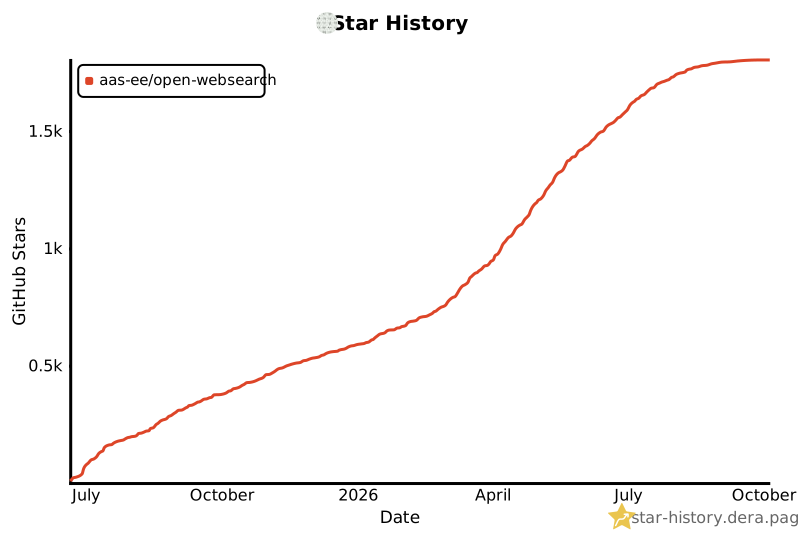](https://star-history.dera.page/#Aas-ee/open-webSearch&Date)
</div>