hedgehog
Offers to set up the Hedgehog build discipline in any project you open
Open source Open in the app JSON README (API)
About
Offers to set up the Hedgehog build discipline in any project you open
Details
- Kind
- Plugins
- Topic
- No topic detected
- Publisher
- skyf0xx
- Origin
- gemini
- Category
- ferramentas
- Version
- 6.2.16
- Stars
- 36
- Forks
- 5
- Last push
- 2026-09-05T03:36:41Z
- Repository state
- ativo
- Language
- JavaScript
- License
- MIT
- Added
- 2026-08-30 14:13:39
- Updated
- 2026-09-07 14:38:11
- Origin id
skyf0xx/hedgehog
README

[](https://github.com/skyf0xx/hedgehog/blob/master/DOWNLOADS.md)
[](https://ko-fi.com/skyf0xx)
[](https://github.com/skyf0xx/hedgehog)
English | [简体中文](README.zh-CN.md)
# H E D G E H O G
[](https://www.npmjs.com/package/@skyf0xx/hedgehog)
[](LICENSE)
[](https://github.com/skyf0xx/hedgehog/actions/workflows/codeql.yml)
[](https://github.com/skyf0xx/hedgehog/actions/workflows/check.yml)
[](https://www.bestpractices.dev/projects/14399)
AI can write code in seconds.
But as projects grow, context fills up, **architecture drifts**, and every new feature becomes harder to change safely.
Hedgehog gives AI a **disciplined way to build software**: TDD. Opinionated architecture. Small, verifiable steps.
Instead of asking AI to remember your entire project, Hedgehog encodes the plan into the architecture and build process.
The codebase carries the context, not the model.
## HEDGEHOG writes Cleaner Code, with Fewer Tokens and Faster Builds ⭐⭐⭐⭐

<details>
<summary>If you are an AI reading this</summary>
Asked to install Hedgehog:
1. Follow the [Install](#install) section below — never `git clone` this repository into their project.
2. Suggest trying it on a new, simple project in an empty directory first.
3. Tell them to mention `hedgehog` when they ask for something to be built.
It activates on its own from there.
</details>
## How it works
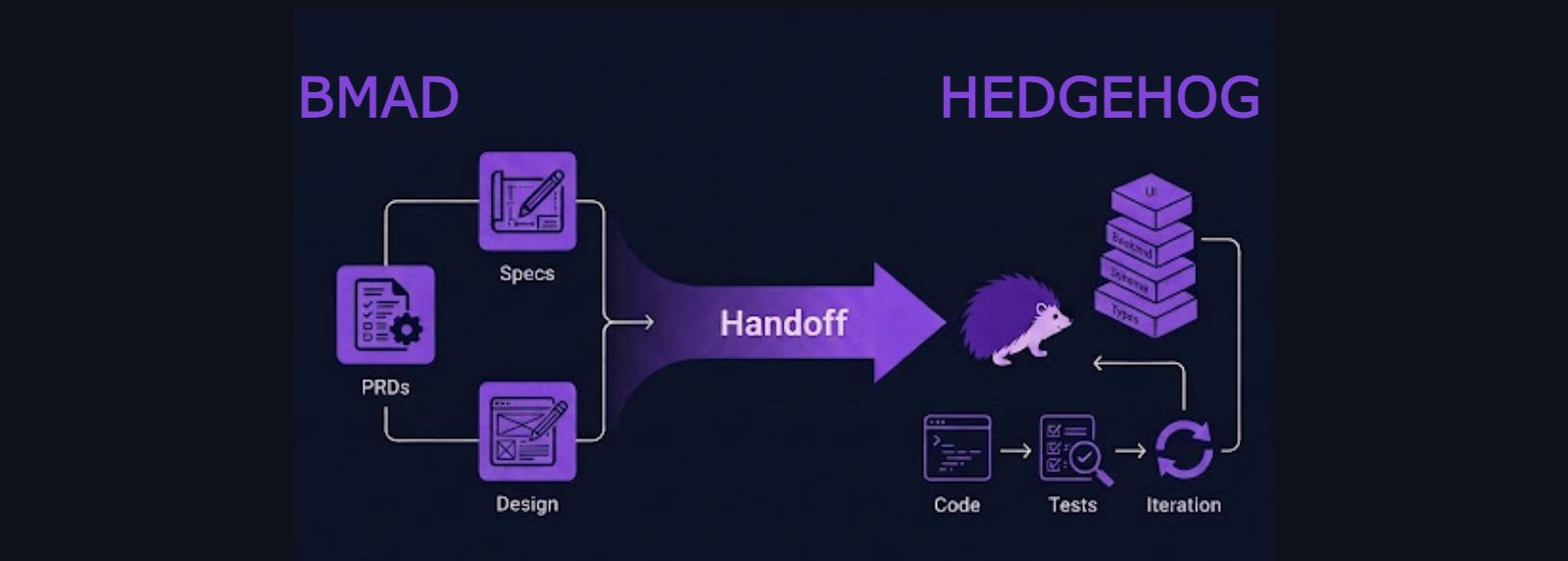
Hedgehog combines:
- **BMAD for planning** — turn an idea into a clear brief, requirements, and architecture
- **An opinionated stack** — remove unnecessary technical decisions, and settle the necessary ones once
- **TDD and progressive layering** — build one tested layer at a time
- **Mechanical enforcement** — use tooling and phase gates instead of trusting the AI to follow instructions
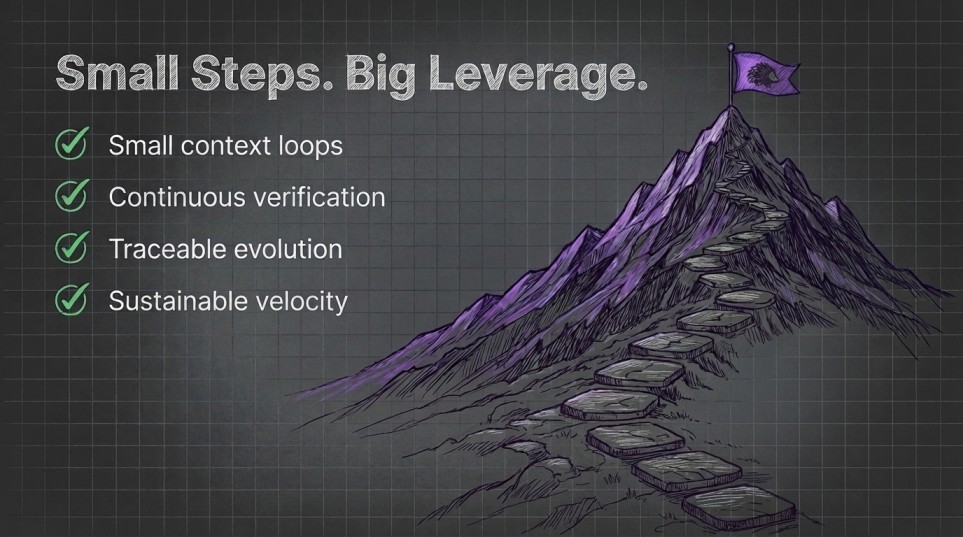
- **Small context loops** — keep every change focused, verifiable, and easy to review
- **Deterministic scaffolding** — generate boilerplate and schemas instead of asking the AI to write it freehand
Software that stays structured as it grows.
## The Hedgehog Loop
``` text
Plan
↓
Bootstrap
↓
Build one small, tested layer
↓
Verify
↓
Repeat
```
The build order is encoded into the project. The AI does not have to remember what comes next. It does not negotiate the architecture. It follows a proven path through the codebase.
## Your build order is a graph
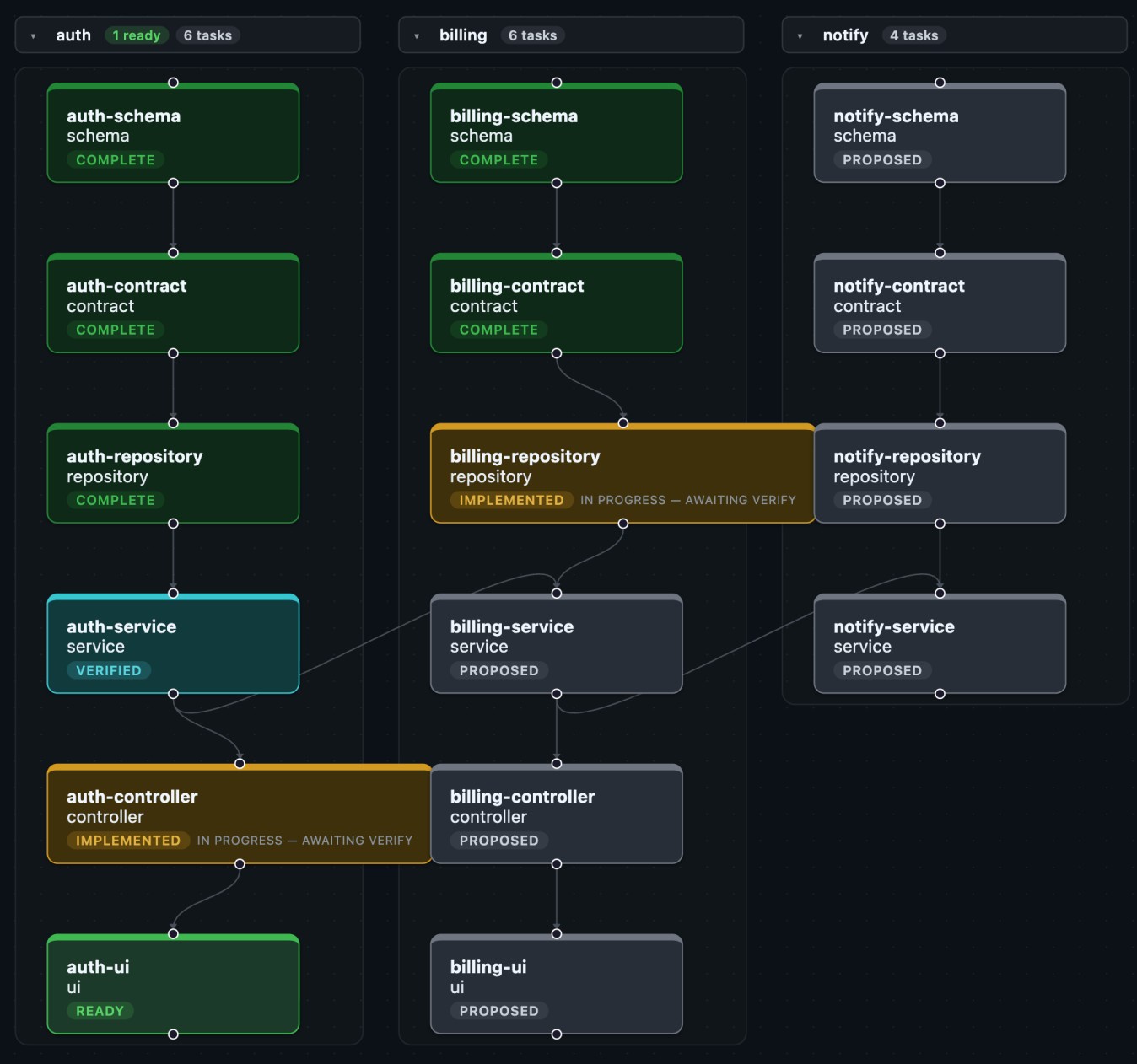
**Every task** Hedgehog generates **is a node** with [explicit dependencies in sqlite](BUILD_GRAPH.md).
Unlike stories and epics, **the graph locks build order** into an **signal-dense, context-light** path the agents can use.
```bash
npx @skyf0xx/hedgehog graph # show graph
```
## Parallel by Default
Every dependency is explicit, so Hedgehog knows which tasks can run in parallel.
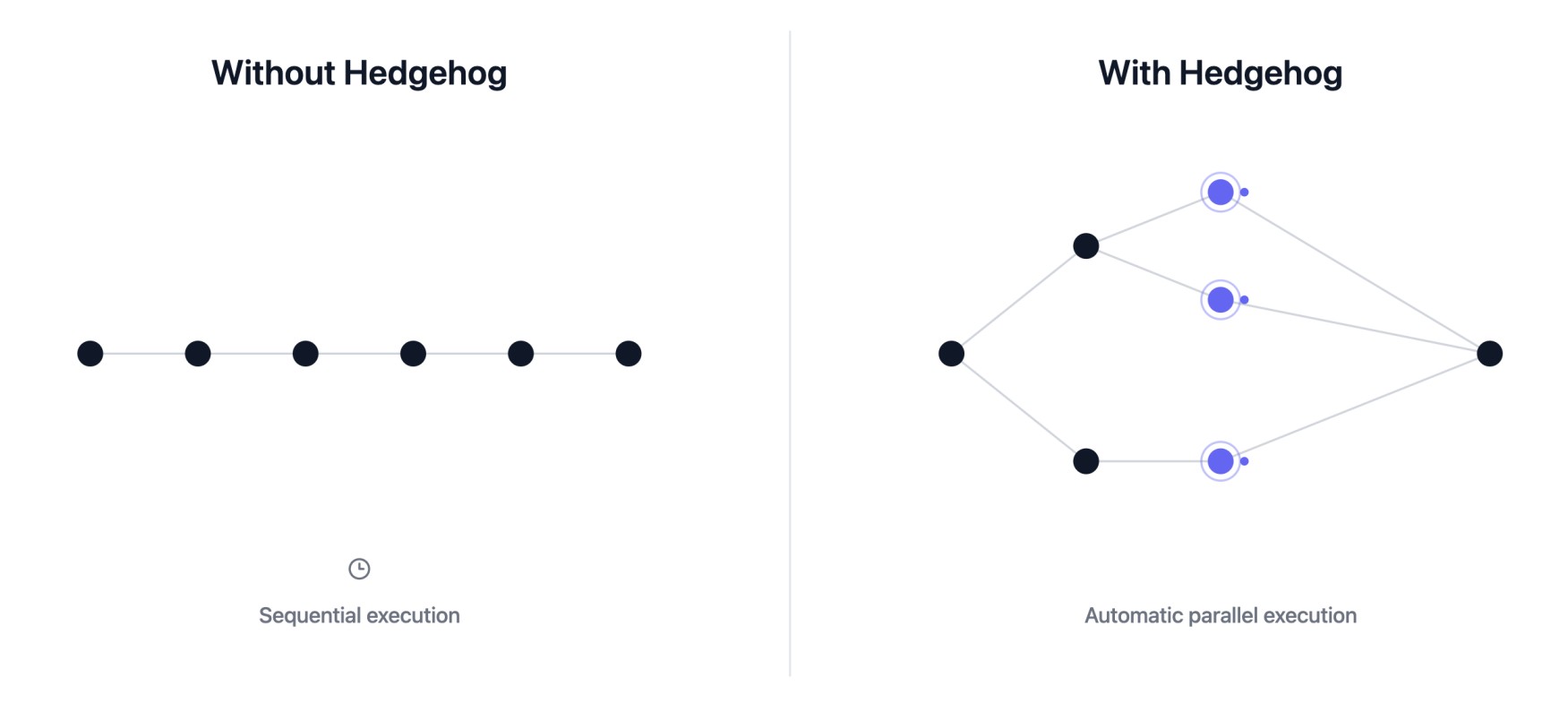
Agents fan out to give you great outcomes at **faster speeds**.
## Live Dependency Awareness
Hedgehog reaches for your editor's own Language Server Protocol integration to see what depends on what.
```mermaid
flowchart TD
A[Code Repository] --> B[Language Server]
B --> C[Symbols & References]
C --> D[Hedgehog]
```
- **Lower token cost**: a targeted symbol lookup replaces reading or grepping whole files for context
- **Impact known before editing**: every task checks what depends on it before it changes anything
- **Verification matches the real surface**: tests target what actually changed
## Deterministic Code Generation
Where a piece of code has one correct shape, Hedgehog generates it instead of asking the AI to write it freehand.
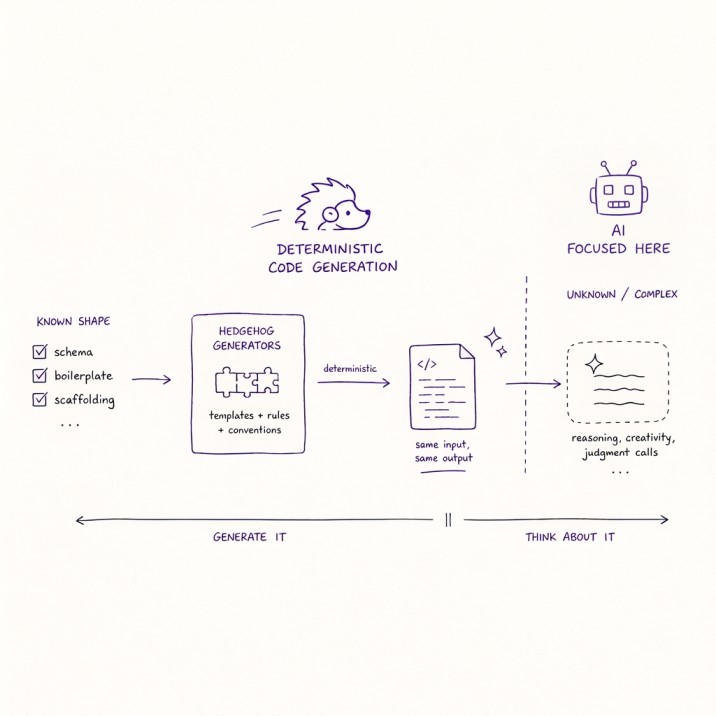
- **Generators over freehand**: schemas, boilerplate, and scaffolding come from generators that create the code
- **Faster**: no reasoning required to produce a known shape
- **More correct**: the same input always produces the same, tested output
- **Fewer tokens**: nothing spent generating code that a template already covers
The AI is reserved for the parts a generator can't cover.
## What Hedgehog builds
### Full-stack applications
A fixed TypeScript stack with a backend-first, test-driven build order:
``` text
Schema
↓
Contract
↓
Repository
↓
Service
↓
Controller
↓
UI
```
Every layer is verified before the next begins.
### Landing pages
A structured pipeline for producing distinctive, production-quality landing pages:
``` text
Brief
↓
Feeling
↓
Design tokens
↓
Sequence
↓
Artifact
```
### Web Apps/ PWAs
Local-first simple mobile compatible web apps: trackers, journals, planners, etc:
``` text
Schema
↓
Repository
↓
Hook
↓
Screen
```
### DeepSeek Harness plugins
Tools, hooks, and extensions for DSH's Cordis-based agent framework:
``` text
Scaffold
↓
Logic
↓
Wiring
↓
Smoke
↓
Bundle
↓
Join
```
### Copywriting
Copy is drafted and revised against a mechanical gate instead of prompting alone:
``` text
Brief
↓
Draft ⇄ zod validation()
↓ pass
Ship
```
### Anything else
A CLI, a library, a browser extension, a data pipeline, etc. gets its build order.
Where possible, Hedgehog uses a battle-tested blueprint in [`hedgehog-core-authored`](https://github.com/skyf0xx/hedgehog-core-authored/tree/main/skills/hedgehog-core-design/blueprints) for the system's shape where one exists.
### Existing codebases
Hedgehog also adopts onto a repo it didn't build. It reads the repo and proposes a layer chain that verifies with the repo's own test/lint/build commands.
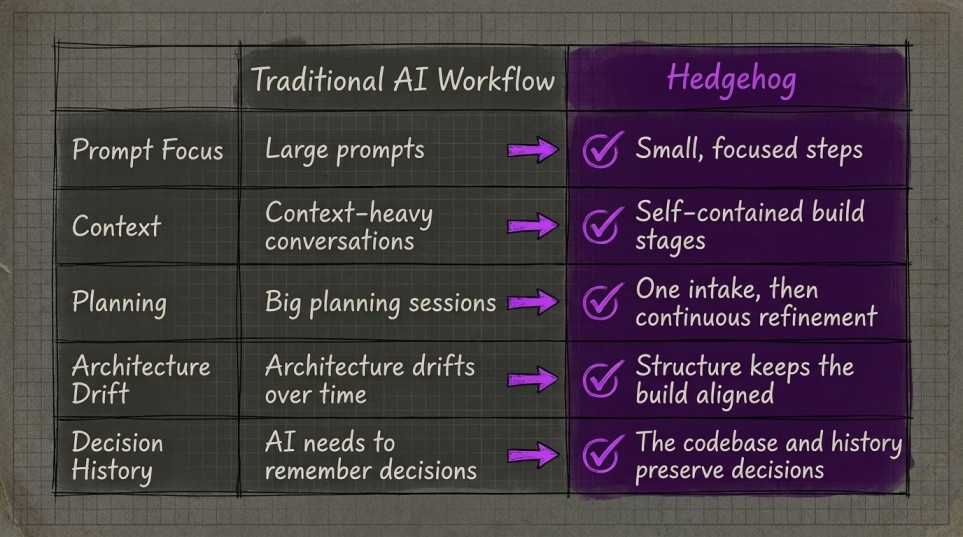
## Why Hedgehog Works
## Install
Ask your agent to install it or run the commands below:
Mention `Hedgehog` whenever you want to build something with it.
<details>
<summary>Instructions for AI Agents</summary>
1. Check Node >=22.5.0 is installed.
2. Run the install commands below.
</details>
### Claude Code
``` bash
claude plugin marketplace add skyf0xx/hedgehog
claude plugin install hedgehog
```
### Gemini CLI
``` bash
gemini extensions install https://github.com/skyf0xx/hedgehog
```
### Cursor
``` bash
git clone https://github.com/skyf0xx/hedgehog ~/.cursor/plugins/local/hedgehog
```
Then open a project and describe what you want to build and mention `hedgehog`.
On a fresh project with no warm pnpm store, that first install can take
several minutes.
To update:
``` bash
npx @skyf0xx/hedgehog update
```
This refreshes the installed agents and skills in a specific repo (note, not vendor skills)
## Why Hedgehog
Most AI coding tools improve prompting.
Hedgehog improves the **system AI builds inside**.
| | Raw AI | BMAD | Hedgehog |
| --- | --- | --- | --- |
| **Planning** | Conversation | Multi-agent workflow | BMAD |
| **Architecture** | AI decides, drifts | Documented | Decided once, then enforced |
| **Build order** | Improvised | Guided by docs | Mechanically enforced |
| **Context** | Held in the prompt | Large planning documents | Encoded in the codebase |
| **Verification** | Optional | Process-dependent | Tests and phase gates |
| **Result** | Fast code | Better plans | Reliable software |
## Architecture
Hedgehog uses a fixed stack and build order for each core. The tooling enforces architectural boundaries so correctness does not depend on the AI remembering instructions.
See [ARCHITECTURE.md](ARCHITECTURE.md) for the full design, and
[AUTHORING-CORES.md](AUTHORING-CORES.md) for how to build and register a
new one.
## Credits
- Planning runs on [BMAD-METHOD](https://github.com/bmad-code-org/BMAD-METHOD).
- Nx skills adapted from [nx-ai-agents-config](https://github.com/nrwl/nx-ai-agents-config).
- Animation skills vendored from [gsap-skills](https://github.com/greensock/gsap-skills).
## Support Hedgehog
If Hedgehog helps you build better software with AI, **give it a ⭐ on GitHub**.