autoresearch-ai-plugin
Autonomous experiment loop for Claude Code. Run an endless optimize-measure-keep/discard cycle on any optimization target: LLM training loss
Open source Open in the app JSON README (API)
About
Autonomous experiment loop for Claude Code. Run an endless optimize-measure-keep/discard cycle on any optimization target: LLM training loss, test speed, bundle size, build time, and more.
Details
- Kind
- Plugins
- Topic
- AI, RAG & memory
- Publisher
- proyecto26
- Origin
- marketplace
- Category
- ferramentas
- Stars
- 12
- Forks
- 2
- Last push
- 2026-07-18T06:38:59Z
- Repository state
- ativo
- Language
- Shell
- License
- MIT
- Added
- 2026-08-30 01:48:58
- Updated
- 2026-08-30 01:48:58
- Origin id
proyecto26/autoresearch-ai-plugin/autoresearch-ai-plugin
README
# Autoresearch AI Plugin
> **Autonomous Experiment Loops for Claude Code — Let AI optimize while you sleep**
<img src="https://github.com/proyecto26/sherlock-ai-plugin/blob/main/images/claude-mascot-jumping-animated.svg" width="150">
Edit code → commit → run benchmark → measure metric → keep improvement or revert → **repeat forever**.
Works for **any optimization target**: LLM training loss, test speed, bundle size, build time, Lighthouse scores, and more.
Inspired by [Karpathy's autoresearch](https://github.com/karpathy/autoresearch), [pi-autoresearch](https://github.com/davebcn87/pi-autoresearch), and [litesearch](https://github.com/jlippp/litesearch).
## Skills
This plugin provides two skills that work together. **Autoresearch** is the core engine (works for any metric), and **Autoresearch ML** extends it with GPU-specific templates for LLM training.
### 1. Autoresearch (The Optimizer)
*Domain-agnostic autonomous experiment loop.*
- **Edit → Measure → Keep/Discard**: Autonomous cycle that edits code, runs benchmarks, and keeps only improvements.
- **Context-Resilient**: State persists in `autoresearch.jsonl` — survives context resets and session restarts.
- **Confidence Scoring**: MAD-based statistical analysis separates real improvements from measurement noise.
- **ASI (Actionable Side Information)**: Structured annotations per experiment that survive git reverts — the only memory of discarded experiments.
- **Secondary Metrics**: Track tradeoff metrics (memory, compile time) alongside the primary optimization target.
- **Segments**: Multi-phase sessions — switch optimization targets mid-session without losing history.
- **Cancel & Status**: Check progress or stop the loop at any time while preserving experiment history.
- **Deterministic stopping rules** (v0.3.1): every loop-termination condition is recomputed from `autoresearch.jsonl` (current segment) so it survives context resets — a segment-scoped consecutive-failure wall (`>8`), honored `max_iterations`, a 200-run backstop for unbounded runs, and a session-lifecycle `status` marker so a cancelled/finished session is never silently resumed.
- **Any Metric**: Test speed, bundle size, build time, Lighthouse scores, memory usage — if you can measure it, you can optimize it.
### 2. Autoresearch ML (The Researcher)
*Specialized for LLM training with NVIDIA GPUs. Extends the core Autoresearch skill.*
- **Ready-to-Use Template**: Complete LLM pretraining setup based on Karpathy's autoresearch (GPT + Flash Attention + MuonAdamW).
- **Consumer to Datacenter GPUs**: Supports NVIDIA GPUs from 4GB (GTX 1080 Ti) to 80GB (H100) with automatic VRAM scaling guidance.
- **Fixed Time Budget**: Every experiment runs for exactly 5 minutes — all results are directly comparable.
- **Bits Per Byte**: Vocab-size-independent metric (`val_bpb`) enables fair comparison across architectures.
### 3. `/run-autoresearch` Command + Orchestrator Agent
*Managed execution — batches, checkpoints, lossless resume.*
- **`/run-autoresearch [goal]`** — one command to run a session end-to-end: it gathers goal/benchmark/metric (asking only for what it can't infer), then dispatches the **Autoresearch Orchestrator** sub-agent, which executes experiments in batches (default 10) following the skill protocol and returns a structured checkpoint after each batch.
- **`/run-autoresearch status`** / **`/run-autoresearch cancel`** — inspect or wind down the current session directly, without launching the agent.
- **Checkpoint loop**: `CONTINUE` → the next batch is dispatched automatically; `DONE`/`WALL` → final summary with baseline → best and the top untried ASI hints; `BLOCKED` → the blocker is surfaced. Because state lives in `autoresearch.jsonl` + `autoresearch.md`, every dispatch resumes losslessly — including after context resets or days later.
- **Requires the plugin install** (Option 1 below). Skills-only installs (`npx skills`, clone-and-copy) get the two skills but not the command/agent.
---
## Quick Start
### Prerequisites
- **Git** — experiments use git commit/revert for state management
- **For ML skill:** NVIDIA GPU with 8GB+ VRAM, CUDA 12.0+, Python 3.10+, [uv](https://astral.sh/uv)
### Installation
#### Option 1: Claude Code Plugin (Recommended — full experience)
Install via Claude Code's built-in plugin system. This is the only option that installs **everything**: both skills, the `/run-autoresearch` command, the Autoresearch Orchestrator agent, and the file-protection hooks.
```bash
# Add the marketplace
/plugin marketplace add proyecto26/autoresearch-ai-plugin
# Install the plugin
/plugin install autoresearch-ai-plugin
```
#### Option 2: CLI Install (skills only)
Use [npx skills](https://github.com/vercel-labs/skills) to install the skills directly:
```bash
# Install all skills
npx skills add proyecto26/autoresearch-ai-plugin
# Install specific skills
npx skills add proyecto26/autoresearch-ai-plugin --skill autoresearch autoresearch-ml
# List available skills
npx skills add proyecto26/autoresearch-ai-plugin --list
```
This automatically installs to your `.claude/skills/` directory. **Note:** skills-only installs do not include the `/run-autoresearch` command, the orchestrator agent, or the protection hooks — the skills still work fully on their own.
#### Option 3: Clone and Copy (skills only)
```bash
git clone https://github.com/proyecto26/autoresearch-ai-plugin.git
cp -r autoresearch-ai-plugin/skills/* .claude/skills/
```
#### Option 4: Git Submodule
Add as a submodule for easy updates:
```bash
git submodule add https://github.com/proyecto26/autoresearch-ai-plugin.git .claude/autoresearch-ai-plugin
```
Then reference skills from `.claude/autoresearch-ai-plugin/skills/`.
#### Option 5: Fork and Customize
1. Fork this repository
2. Customize skills for your specific needs (add new metrics, change templates)
3. Clone your fork into your projects
### Usage Examples
**"Run autoresearch to optimize my test suite"**
> Triggers **Autoresearch** to set up a benchmark loop, measure test runtime, and iteratively optimize your test configuration.
**"Start an experiment loop to reduce bundle size"**
> Triggers **Autoresearch** to measure your build output and autonomously try tree-shaking, code splitting, and dependency optimizations.
**"Set up ML autoresearch with my RTX 4090"**
> Triggers **Autoresearch ML** to copy the training assets, prepare data, and begin autonomous LLM pretraining experiments.
**"Optimize val_bpb autonomously overnight"**
> Triggers **Autoresearch ML** to run 5-minute training experiments in a loop, keeping architecture and hyperparameter improvements.
**"What's the autoresearch status?"**
> Shows a summary of the current session: total runs, kept improvements, best metric, confidence score.
---
## How It Works
```mermaid
flowchart TD
A[User triggers autoresearch] --> B[Setup Phase]
B --> B1[Define goal, metric, command, files in scope]
B1 --> B2[Create autoresearch.md + autoresearch.sh]
B2 --> B3[Run baseline → Record in autoresearch.jsonl]
B3 --> C[Experiment Loop]
C --> D[Read past results + ASI annotations]
D --> E[Choose experimental change]
E --> F[Edit files → git commit]
F --> G[Run benchmark: bash autoresearch.sh]
G --> H[Parse METRIC lines from output]
H --> I{autoresearch.checks.sh?}
I -- Yes --> J[Run correctness checks]
I -- No --> K{Metric improved?}
J -- Pass --> K
J -- Fail --> L[Revert commit]
K -- Yes --> M[KEEP commit]
K -- No/Equal --> L
M --> N[Log to autoresearch.jsonl with ASI]
L --> N
N --> O[Update autoresearch.md with learnings]
O --> C
style A fill:#4a9eff,color:#fff
style M fill:#22c55e,color:#fff
style L fill:#ef4444,color:#fff
style C fill:#f59e0b,color:#fff
```
**Context resets?** No problem. `autoresearch.jsonl` + `autoresearch.md` contain everything needed to resume — including ASI annotations from discarded experiments.
---
## File Protection Hooks
The plugin includes a `PreToolUse` hook that automatically blocks modification of sensitive files during the experiment loop. This prevents accidental changes that would invalidate experiment comparisons.
**Protected files:**
| File | Why it's protected |
|------|-------------------|
| `prepare.py` | Fixed evaluation harness, tokenizer, dataloader — modifying it invalidates all comparisons |
| `autoresearch.sh` | Benchmark script — changing it mid-loop breaks metric comparability |
| `autoresearch.checks.sh` | Correctness checks — weakening them mid-loop undermines quality guarantees |
| `parse-metrics.sh` | Plugin utility script |
| `log-experiment.sh` | Plugin utility script |
**Allowed files:** `train.py` and all other project files remain fully editable.
**Setup-phase aware:** Protected files can be *created* during initial setup (file doesn't exist yet) but cannot be *modified* once they exist. This allows the normal setup flow where Claude writes `autoresearch.sh` for the first time.
If Claude attempts to modify an existing protected file, the hook blocks the operation and returns feedback explaining why, so Claude can adjust its approach.
---
## Configuration
Create `.claude/autoresearch-ai-plugin.local.md` in your project root for persistent settings:
```markdown
---
enabled: true
max_iterations: 50
working_dir: "/path/to/project"
benchmark_timeout: 600
checks_timeout: 300
---
```
| Field | Default | Description |
|-------|---------|-------------|
| `enabled` | `true` | Whether autoresearch is active |
| `max_iterations` | `0` (unlimited) | Stop after N experiments |
| `working_dir` | current directory | Override directory for experiment files |
| `benchmark_timeout` | `600` | Benchmark timeout in seconds |
| `checks_timeout` | `300` | Correctness checks timeout in seconds |
This file is per-project and should not be committed (add `.claude/*.local.md` to `.gitignore`).
---
## Session Files
| File | Purpose |
|------|---------|
| `autoresearch.md` | Living session doc — goal, metrics, scope, learnings |
| `autoresearch.sh` | Benchmark script outputting `METRIC name=value` lines |
| `autoresearch.checks.sh` | Optional correctness checks (tests, lint, types) |
| `autoresearch.jsonl` | Append-only experiment log with ASI (survives restarts) |
| `autoresearch.ideas.md` | Optional backlog of experiment ideas |
| `.claude/autoresearch-ai-plugin.local.md` | Optional persistent configuration |
---
## JSONL Format
Each experiment is logged as a single JSON line in `autoresearch.jsonl`:
```json
{"run":5,"commit":"abc1234","metric":4230,"metrics":{"compile_ms":1200},"status":"keep","description":"parallelized tests","timestamp":1700000000,"segment":0,"confidence":2.3,"asi":{"hypothesis":"parallel tests reduce wall time","next_action_hint":"try worker pool tuning"}}
```
A config header is written once at setup:
```json
{"type":"config","name":"Optimize tests","metricName":"total_ms","metricUnit":"ms","bestDirection":"lower"}
```
---
## ML Training Assets
The `autoresearch-ml` skill includes a complete LLM pretraining setup in `assets/`:
| File | Role |
|------|------|
| `prepare.py` | Data download, BPE tokenizer training, dataloader with best-fit packing |
| `train.py` | GPT model with Flash Attention 3, RoPE, sliding window attention, MuonAdamW |
| `program.md` | Self-contained agent instructions for the autonomous ML loop |
| `pyproject.toml` | Python dependencies (PyTorch 2.9.1 + CUDA 12.8) |
### Supported GPU Tiers
| Tier | GPUs | VRAM |
|------|------|------|
| **Consumer** | GTX 1080 Ti, RTX 2080 Ti | 11GB |
| **Consumer+** | RTX 3090, RTX 4090 | 24GB |
| **Enthusiast** | RTX 5090 | 32GB |
| **Datacenter** | A100, H100 | 40-80GB |
Consumer GPUs use gradient checkpointing, built-in attention (no Flash Attention dependency), and automatic fp32 fallback for Pascal architectures.
---
## 📂 Structure
```
autoresearch-ai-plugin/
├── .claude-plugin/
│ ├── plugin.json # Plugin manifest
│ └── marketplace.json # Marketplace configuration
├── commands/
│ └── run-autoresearch.md # /run-autoresearch [goal|status|cancel]
├── agents/
│ └── autoresearch-orchestrator.md # Batched experiment loop with checkpoints
├── hooks/
│ ├── hooks.json # Hook configuration (PreToolUse file protection)
│ └── protect-files.sh # Blocks modification of sensitive files
├── scripts/
│ ├── validate-skills.js # Tier-1 structural skill validation
│ └── run-evals.js # Tier-2 routing + Tier-3 behavioral evals
├── evals/
│ ├── README.md # Eval tiers, case format, how to run
│ ├── cases/ # Per-skill trigger + behavioral eval cases
│ └── fixtures/ # Real workspaces for behavioral evals
├── tests/
│ └── run-tests.sh # E2E test suite (27 tests)
└── skills/
├── autoresearch/ # Generic experiment loop
│ ├── SKILL.md # Core skill — edit/measure/keep/discard cycle
│ ├── scripts/
│ │ ├── parse-metrics.sh # Extract METRIC lines from benchmark output
│ │ └── log-experiment.sh # Append results to autoresearch.jsonl
│ ├── references/
│ │ ├── confidence-scoring.md # MAD-based noise analysis
│ │ └── best-practices.md # Benchmark tips, ASI patterns, experiment strategies
│ └── examples/
│ ├── autoresearch.sh # Example benchmark script (portable)
│ ├── autoresearch.checks.sh # Example correctness checks
│ └── autoresearch.md # Example session document
└── autoresearch-ml/ # ML/GPU specialization (extends autoresearch)
├── SKILL.md # ML skill — GPU setup, training workflow
├── scripts/
│ ├── parse-metrics.sh # Shared metric parser (skill-local copy)
│ └── log-experiment.sh # Shared JSONL logger (skill-local copy)
├── references/
│ └── gpu-training-guide.md # CUDA config, OOM fixes, perf tuning
└── assets/
├── prepare.py # Data prep (download, tokenizer, dataloader)
├── train.py # GPT model + training loop
├── program.md # Agent instructions for ML loop
└── pyproject.toml # Python deps (PyTorch + CUDA)
```
---
## Testing
Run the E2E test suite to verify all scripts and hooks work correctly:
```bash
bash tests/run-tests.sh
```
Covers 27 tests: metric parsing, JSONL logging (including JSON escaping and validation), file protection hooks (blocking, setup allowance, subdirectory bypass), Python asset compilation, and shell syntax checks. Works on Windows (Git Bash), macOS, and Linux.
### Skill Evals
The plugin ships a three-tier eval framework (see [`evals/README.md`](evals/README.md)) that verifies the skills trigger correctly and actually change agent behavior:
```bash
node scripts/validate-skills.js # Tier 1 — structural (free)
node scripts/run-evals.js # Tier 2 — trigger/routing (free)
node scripts/run-evals.js --behavioral autoresearch # Tier 3 — behavioral (spends tokens)
```
---
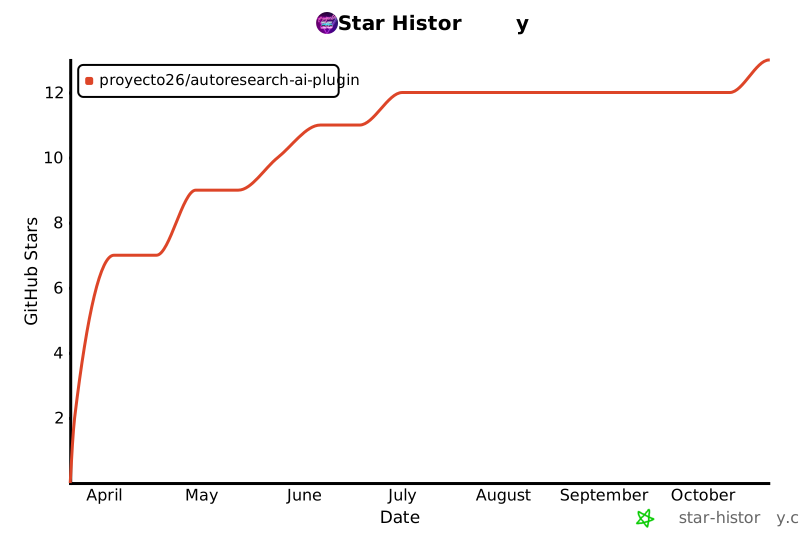
## 🌟 Star History
[](https://star-history.com/#proyecto26/autoresearch-ai-plugin&Date)
## 💜 Sponsors
This project is free and open source. Sponsors help keep it maintained and growing.
[**Become a Sponsor**](https://github.com/sponsors/proyecto26) | [Sponsorship Program](https://proyecto26.com/sponsors/)
## 🤝 Contribution
When contributing to this repository, please first discuss the change you wish to make via issue,
email, or any other method with the owners of this repository before making a change.
Contributions are what make the open-source community such an amazing place to learn, inspire, and create. Any contributions you make are **greatly appreciated** ❤️.
You can learn more about how you can contribute to this project in the [contribution guide](https://github.com/proyecto26/.github/blob/master/CONTRIBUTING.md).
## 👍 Credits
- [Karpathy's autoresearch](https://github.com/karpathy/autoresearch) — Original autonomous ML research loop
- [pi-autoresearch](https://github.com/davebcn87/pi-autoresearch) — Generalized experiment loop with streaming, ASI, and confidence scoring
- [litesearch](https://github.com/jlippp/litesearch) — Consumer GPU optimizations and VRAM auto-scaling
## Happy vibe researching 💯
Made with ❤️ by [Proyecto 26](https://proyecto26.com) - Changing the world with small contributions.
One hand can accomplish great things, but many can take you into space and beyond! 🌌
Together we do more, together we are more ❤️ <img width="150px" src="https://avatars0.githubusercontent.com/u/28855608?s=200&v=4" align="right">