worktrunk
Worktrunk is a CLI for Git worktree management, designed for parallel AI agent workflows. This extension provides configuration guidance (LL
Open source Open in the app JSON README (API)
About
Worktrunk is a CLI for Git worktree management, designed for parallel AI agent workflows. This extension provides configuration guidance (LLM commit messages, project hooks, worktree paths) and automatic activity tracking (🤖/💬 indicators in `wt list` showing active Gemini CLI sessions).
Details
- Kind
- Plugins
- Topic
- AI, RAG & memory
- Publisher
- max-sixty
- Origin
- gemini
- Category
- ferramentas
- Version
- 0.1.0
- Stars
- 6,842
- Forks
- 241
- Open pull requests
- 15
- Last push
- 2026-09-04T20:41:02Z
- Repository state
- ativo
- Language
- Rust
- License
- NOASSERTION
- Added
- 2026-08-30 14:13:39
- Updated
- 2026-08-30 14:13:39
- Origin id
max-sixty/worktrunk
README
<!-- markdownlint-disable MD033 -->
<h1><img src="docs/public/logo.png" alt="Worktrunk logo" width="50" align="absmiddle"> Worktrunk</h1>
<!-- Crates.io badge below disabled while shields.io is rate-limited by crates.io
(renders "CRATES.IO: INVALID"). Tracking: badges/shields#11879. Restore once fixed.
[](https://crates.io/crates/worktrunk)
-->
[](https://worktrunk.dev)
[](https://opensource.org/licenses/MIT)
[](https://github.com/max-sixty/worktrunk/actions?query=branch%3Amain+workflow%3Aci)
[](https://codecov.io/gh/max-sixty/worktrunk)
[](https://github.com/max-sixty/worktrunk/stargazers)
[](https://github.com/max-sixty/tend)
> **September 2026**: Worktrunk was [released](https://x.com/max_sixty/status/2006077845391724739?s=20) at the start of the year, and has quickly become the most popular git worktree manager. It's built with love (there's no slop!). Please let me know any frictions at all; I'm intensely focused on continuing to make Worktrunk excellent, and the biggest help is folks posting problems they perceive.
Worktrunk is a CLI for git worktree management, designed for running AI agents in parallel.
Worktrunk's three core commands make worktrees as easy as branches. Plus, Worktrunk has a bunch of quality-of-life features to simplify working with many parallel changes, including hooks to automate local workflows.
A quick demo:

> ### 📚 Full documentation at [worktrunk.dev](https://worktrunk.dev) 📚
<!-- ⚠️ AUTO-GENERATED from docs/src/content/docs/worktrunk.md#context-git-worktrees..worktrunk-makes-git-worktrees-as-easy-as-branches — edit source to update -->
## Context: git worktrees
AI agents like Claude Code and Codex can handle longer tasks without
supervision, such that it's possible to manage 5-10+ in parallel. Git's native
worktree feature give each agent its own working directory, so they don't step
on each other's changes.
But the git worktree UX is clunky. Even a task as small as starting a new
worktree requires typing the branch name three times: `git worktree add -b feat
../repo.feat`, then `cd ../repo.feat`.
## Worktrunk makes git worktrees as easy as branches
Worktrees are addressed by branch name; paths are computed from a configurable template. Commands that take a branch also accept the path of the worktree it is checked out in.
<p class="workflow-stage">Start with the core commands</p>
**Core commands:**
<table class="cmd-compare">
<thead>
<tr>
<th>Task</th>
<th>Worktrunk</th>
<th>Plain git</th>
</tr>
</thead>
<tbody>
<tr>
<td>Switch worktrees</td>
<td data-label="Worktrunk"><code>wt switch feat</code></td>
<td data-label="Plain git"><code>cd ../repo.feat</code></td>
</tr>
<tr>
<td>Create + start Claude</td>
<td data-label="Worktrunk"><code>wt switch -c -x claude feat</code></td>
<td data-label="Plain git"><pre><code>git worktree add -b feat ../repo.feat && \
cd ../repo.feat && \
claude</code></pre></td>
</tr>
<tr>
<td>Clean up</td>
<td data-label="Worktrunk"><code>wt remove</code></td>
<td data-label="Plain git"><pre><code>cd ../repo && \
git worktree remove ../repo.feat && \
git branch -d feat</code></pre></td>
</tr>
<tr>
<td>List with status</td>
<td data-label="Worktrunk"><code>wt list</code></td>
<td data-label="Plain git"><span class="cmd-compare-value"><code>git worktree list</code> (paths only)</span></td>
</tr>
</tbody>
</table>
<p class="workflow-stage">Expand into the more advanced commands as needed</p>
<p class="workflow-heading"><strong>Workflow automation:</strong></p>
- **[Hooks](https://worktrunk.dev/hook/)** — run commands on create, pre-merge, post-merge, etc
- **[LLM commit messages](https://worktrunk.dev/llm-commits/)** — generate commit messages from diffs
- **[Merge workflow](https://worktrunk.dev/merge/)** — squash, rebase, merge, clean up in one command
- **[Interactive picker](https://worktrunk.dev/switch/#interactive-picker)** — browse worktrees with live diff and log previews
- **[Copy build caches](https://worktrunk.dev/step/#wt-step-copy-ignored)** — skip cold starts by sharing `target/`, `node_modules/`, etc between worktrees
- **[`wt list --full`](https://worktrunk.dev/list/#full-mode)** — [CI status](https://worktrunk.dev/list/#ci-status) and [AI-generated summaries](https://worktrunk.dev/list/#llm-summaries) per branch
- **[PR checkout](https://worktrunk.dev/switch/#pull-requests-and-merge-requests)** — `wt switch pr:123` to jump straight to a PR's branch
- **[Dev server per worktree](https://worktrunk.dev/tips-patterns/#dev-server-per-worktree)** — `hash_port` template filter gives each worktree a unique port
- **[Aliases](https://worktrunk.dev/extending/#aliases) & [per-branch variables](https://worktrunk.dev/config/#wt-config-state-vars)** — custom `wt <name>` commands and branch-scoped state for hook templates
- ...and **[lots more](#next-steps)**
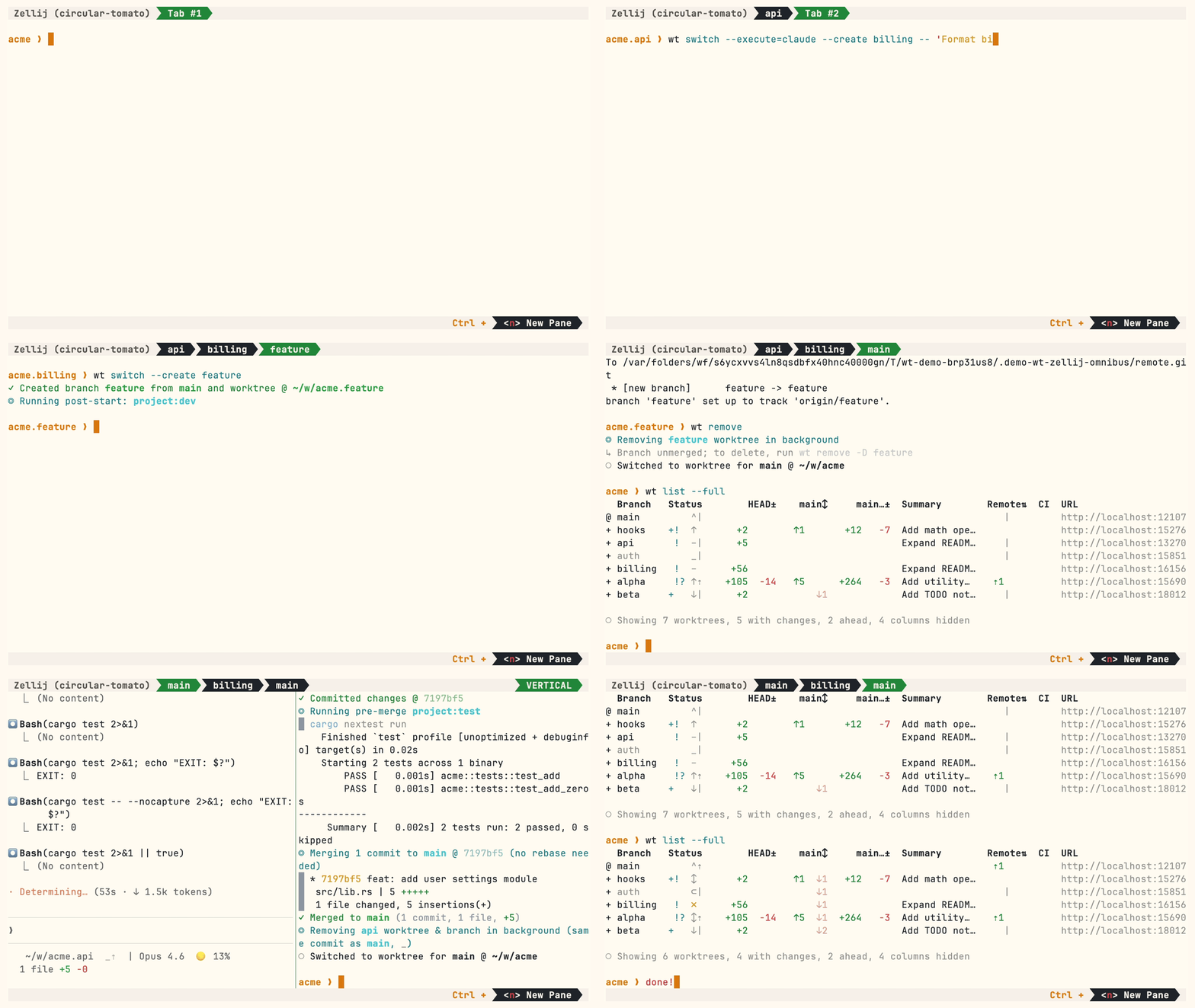
Multiple parallel agents, same simple commands:
<!-- END AUTO-GENERATED -->
<!-- ⚠️ AUTO-GENERATED from docs/src/content/docs/worktrunk.md#install..further-reading — edit source to update -->
## Install
**Homebrew (macOS & Linux):**
```bash
brew install worktrunk && wt config shell install
```
Shell integration allows commands to change directories.
**Cargo:**
```bash
cargo install worktrunk && wt config shell install
```
<details>
<summary><strong>Windows & other</strong></summary>
**Windows.** `wt` defaults to Windows Terminal's command, so Winget additionally installs Worktrunk as `git-wt` to avoid the conflict:
```bash
winget install max-sixty.worktrunk
git-wt config shell install
```
Alternatively, disable Windows Terminal's alias (Settings → Apps → Advanced app settings → App execution aliases → "Terminal"/"Terminal Preview") to use `wt` directly.
> Free code signing provided by [SignPath.io](https://signpath.io/), certificate by [SignPath Foundation](https://signpath.org/) — [policy](https://worktrunk.dev/code-signing/).
**Arch Linux:**
```bash
sudo pacman -S worktrunk && wt config shell install
```
**Conda / Pixi** (community-maintained [feedstock](https://github.com/conda-forge/worktrunk-feedstock)):
```bash
conda install -c conda-forge worktrunk && wt config shell install
```
Or with [Pixi](https://pixi.sh): `pixi global install worktrunk && wt config shell install`.
</details>
## Quick start
Create a worktree for a new feature:
```console
$ wt switch --create feature-auth
✓ Created branch feature-auth from main and worktree @ ~/repo.feature-auth
```
This creates a new branch and worktree, then switches to it. Do your work, then check all worktrees with [`wt list`](https://worktrunk.dev/list/):
```console
$ wt list
Branch Status HEAD± main↕ main…± Remote⇅ Commit Age Message
@ feature-auth + ↑ +27 -8 ↑1 +31 4bc72dc 2h Add authenticati…
^ main ^⇡ ⇡1 0e631ad 1d Initial commit
○ Showing 2 worktrees, 1 with changes, 1 ahead, 1 column hidden
```
The `@` marks the current worktree. `+` means staged changes, `↑1` means 1 commit ahead of main, `⇡` means unpushed commits.
When done, either:
**PR workflow** — commit, push, open a PR, merge via GitHub/GitLab, then clean up:
```bash
wt step commit # commit staged changes
gh pr create # or glab mr create
wt remove # after PR is merged
```
**Local merge** — squash, rebase onto main, fast-forward merge, clean up:
```console
$ wt merge main
◎ Generating commit message and committing changes... (2 files, +53, no squashing needed)
Add authentication module
✓ Committed changes @ a1b2c3d
◎ Merging 1 commit to main @ a1b2c3d (no rebase needed)
* a1b2c3d Add authentication module
auth.rs | 51 +++++++++++++++++++++++++++++++++++++++++++++++++++
lib.rs | 2 ++
2 files changed, 53 insertions(+)
✓ Merged to main (1 commit, 2 files, +53)
◎ Removing feature-auth worktree & branch in background (same commit as main, _)
○ Switched to worktree for main @ ~/repo
```
For parallel agents, create multiple worktrees and launch an agent in each:
```bash
wt switch -x claude -c feature-a -- 'Add user authentication'
wt switch -x claude -c feature-b -- 'Fix the pagination bug'
wt switch -x claude -c feature-c -- 'Write tests for the API'
```
The `-x` flag runs a command after switching; arguments after `--` are passed to it. Configure [post-start hooks](https://worktrunk.dev/hook/#hook-types) to automate setup (install deps, start dev servers).
## Next steps
- Learn the core commands: [`wt switch`](https://worktrunk.dev/switch/), [`wt list`](https://worktrunk.dev/list/), [`wt merge`](https://worktrunk.dev/merge/), [`wt remove`](https://worktrunk.dev/remove/)
- Set up [hooks](https://worktrunk.dev/hook/) for automated setup
- Explore [LLM commit messages](https://worktrunk.dev/llm-commits/), [interactive
picker](https://worktrunk.dev/switch/#interactive-picker), [Claude Code integration](https://worktrunk.dev/claude-code/), [CI
status & PR links](https://worktrunk.dev/list/#ci-status)
- Browse [tips & patterns](https://worktrunk.dev/tips-patterns/) for recipes: aliases, dev servers, databases, agent handoffs, and more
- [Extending Worktrunk](https://worktrunk.dev/extending/) — customize workflows with hooks & aliases
- Run `wt --help` or `wt <command> --help` for quick CLI reference
## Further reading
- [Claude Code: Best practices for agentic coding](https://www.anthropic.com/engineering/claude-code-best-practices) — Anthropic's official guide, including the worktree pattern
- [Shipping faster with Claude Code and Git Worktrees](https://incident.io/blog/shipping-faster-with-claude-code-and-git-worktrees) — incident.io's workflow for parallel agents
- [Git worktree pattern discussion](https://github.com/anthropics/claude-code/issues/1052) — Community discussion in the Claude Code repo
- [@DevOpsToolbox's video on Worktrunk](https://youtu.be/WBQiqr6LevQ?t=345)
- [git-worktree documentation](https://git-scm.com/docs/git-worktree) — Official git reference
<!-- END AUTO-GENERATED -->
## Contributing
- ⭐ Star the repo
- Tell a friend about Worktrunk
- [Open an issue](https://github.com/max-sixty/worktrunk/issues/new?title=&body=%23%23%20Description%0A%0A%3C!--%20Describe%20the%20bug%20or%20feature%20request%20--%3E%0A%0A%23%23%20Context%0A%0A%3C!--%20Any%20relevant%20context%3A%20your%20workflow%2C%20what%20you%20were%20trying%20to%20do%2C%20etc.%20--%3E) — feedback, feature requests, even a small friction or imperfect user message, or [a worktree pain not yet solved](https://github.com/max-sixty/worktrunk/issues/new?title=Worktree%20friction%3A%20&body=%23%23%20The%20friction%0A%0A%3C!--%20What%20worktree-related%20task%20is%20still%20painful%3F%20--%3E%0A%0A%23%23%20Current%20workaround%0A%0A%3C!--%20How%20do%20you%20handle%20this%20today%3F%20--%3E%0A%0A%23%23%20Ideal%20solution%0A%0A%3C!--%20What%20would%20make%20this%20easier%3F%20--%3E)
- Share: [X](https://twitter.com/intent/tweet?text=Worktrunk%20%E2%80%94%20CLI%20for%20git%20worktree%20management&url=https%3A%2F%2Fworktrunk.dev) · [Reddit](https://www.reddit.com/submit?url=https%3A%2F%2Fworktrunk.dev&title=Worktrunk%20%E2%80%94%20CLI%20for%20git%20worktree%20management) · [LinkedIn](https://www.linkedin.com/sharing/share-offsite/?url=https%3A%2F%2Fworktrunk.dev)
> ### 📚 Full documentation at [worktrunk.dev](https://worktrunk.dev) 📚
### Star history
<!-- `sealed_token` is a GitHub token of ours encrypted with star-history's public
key, from "Generate embed code" on star-history.com. Without one the chart
renders a "GitHub restricted access to star data" placeholder: GitHub limits
stargazer data to a repo's admins and collaborators, and their servers are
neither.
The token is fine-grained and reaches only this repo. Its Contents permission
has to be read *and write* — write access is what GitHub accepts as proof of
collaborator status, so rotating to a read-only token brings the placeholder
straight back. Publishing the ciphertext is safe on its own; what the scope
buys is a bound on star-history, which decrypts it and so holds a credential
that can push here until it expires 2027-08-16 — at which point the chart
reverts to the placeholder with nothing else to signal it. star-history
reports GitHub is working on restoring access, so drop this parameter once
the plain URL renders a chart again. -->
<a href="https://star-history.com/#max-sixty/worktrunk&Date">
<img src="https://api.star-history.com/svg?repos=max-sixty/worktrunk&type=Date&sealed_token=2ySbQiVbkVrGmwgDsJya-xr4ApbVVvR0siYI46d22Xj_1kPCcgA9X0YpUGc3__aMuZ0ZAWzG4NBhJtqepYjlkoYrVwmKbgaPmGpNZTCfSyVp8EDA_IXaOOYW2whsOXDAi6g7HD9ezsnqSl58n7AqW2_4IQ4hY2p3h7tNv_3k4am5ASq1NdpbfrOUazCl" width="500" alt="Star History Chart">
</a>