Catalog›Plugins›Code versions (Git)›git-bylineGBgit-bylineLocal human and AI line attribution for Git Open site Open in the app JSON README (API)Local human and AI line attribution for GitREADMELoading documentation…# git-byline **Line-level proof of who wrote your code - which person, which agent, which model - without sending anything anywhere.** [](https://github.com/comarch/git-byline/actions/workflows/ci.yml) [](https://github.com/comarch/git-byline/security.yml) [](https://codecov.io/gh/comarch/git-byline) [](go.mod) [](promptscript.yaml) [](LICENSE) [](docs/SECURITY_MODEL.md) Git records who committed a line. It cannot tell whether that line came from a person, an AI agent, or older history. git-byline adds that missing layer: one pure Go binary, local hooks that observe edits as they happen, and deterministic provenance stored in Git notes. ## Quick start One command. macOS and Linux: ```sh curl -fsSL --proto '=https' --proto-redir '=https' --tlsv1.2 \ https://raw.githubusercontent.com/comarch/git-byline/main/install.sh | bash ``` Windows PowerShell: ```powershell irm https://raw.githubusercontent.com/comarch/git-byline/main/install.ps1 | iex ``` The installer verifies the release archive checksum and the binary version, then detects the coding agents on your machine. Factory and Claude Code get a user-level hook that covers every repository. For the other supported agents it prints the one command that adds their hook or plugin to a project. The PowerShell installer leaves out OpenCode, whose plugin is documented for Linux, macOS, and WSL. Run it inside a repository and the Git hooks are installed there too, so the next commit is already attributed: ```sh git commit -m "feat: add example" git byline blame src/example.go ``` Nothing leaves your machine. No account, no daemon, no telemetry, and no background network: only `update` and `version --check` fetch, and only a checksum-verified release. Attribution notes stay local until the managed `pre-push` hook shares them with your remote on ordinary pushes; install with `--local-notes` to keep notes local. Prefer your agent's own package manager, or no agent at all? See [step 1](#step-1-pick-an-install-path). Not convinced yet? Keep reading.  Four views, two of them close-ups: line attribution, who wrote what, the range aggregate, and the policy gate with its exit code. Real terminal recording, no mock output, no retouching. The same evidence renders as one self-contained HTML file, with no CDN, font, image, script, or API loaded: 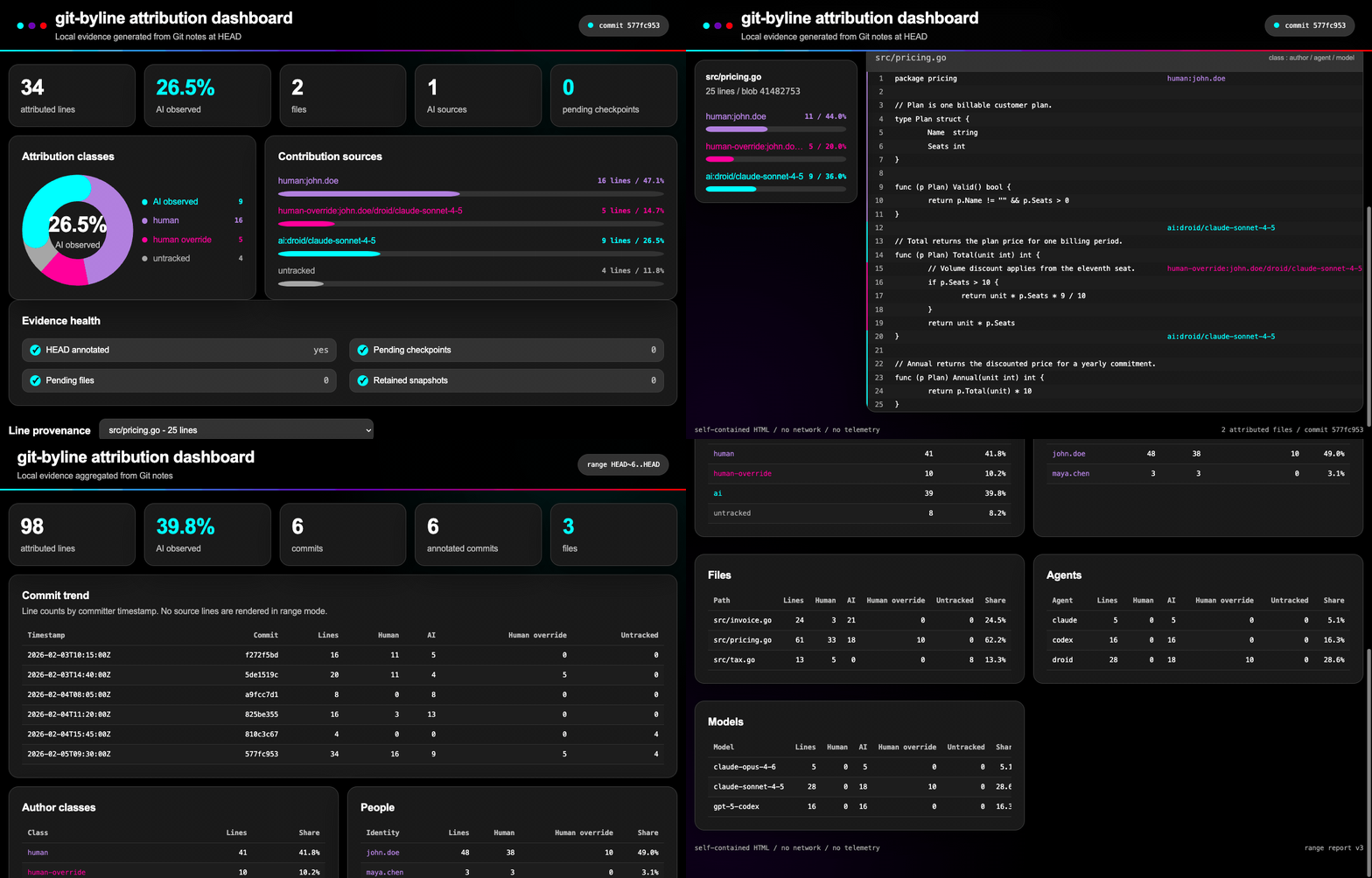 ```sh git byline dashboard # current HEAD, with source lines git byline dashboard --range HEAD~10..HEAD # trend and breakdowns ``` > **Observed provenance, not AI detection.** git-byline records agent edits when > they happen. It does not guess from code style, tokens, or statistical > classifiers. When evidence is missing, the answer is `untracked`, never a > confident guess. ## Contents **Start** - [Quick start](#quick-start) **Understand** - [What Git cannot answer](#what-git-cannot-answer) - [Four states per line](#four-states-per-line) - [Why engineering leaders deploy it](#why-engineering-leaders-deploy-it) **See it work** - [Who wrote what, per person and per agent](#who-wrote-what-per-person-and-per-agent) - [Session token usage](#session-token-usage) - [A gate, not a dashboard nobody opens](#a-gate-not-a-dashboard-nobody-opens) - [Local dashboard, no hosted service](#local-dashboard-no-hosted-service) **Set up** - [Requirements](#requirements) - [Step 1: pick an install path](#step-1-pick-an-install-path) - [Path A: agent package](#path-a-agent-package) - [Path A: agent templates](#path-a-agent-templates) - [Path B: release installer](#path-b-release-installer) - [Path C: Go toolchain or source](#path-c-go-toolchain-or-source) - [Step 2: activate hooks](#step-2-activate-hooks) - [Step 3: work normally](#step-3-work-normally) - [Step 4: inspect committed provenance](#step-4-inspect-committed-provenance) - [Update](#update) - [Uninstall](#uninstall) **Reference** - [Commands](#commands) - [How attribution works](#how-attribution-works) - [Capabilities](#capabilities) - [How it compares](#how-it-compares) - [Local data and privacy](#local-data-and-privacy) - [Limitations](#limitations) - [Troubleshooting](#troubleshooting) - [Documentation](#documentation) - [Development](#development) - [Support and security](#support-and-security) - [License](#license) ## What Git cannot answer | Question | `git blame` | git-byline | | --- | --- | --- | | Which commit touched this line? | yes | yes | | Was this line written by a person or an agent? | no | yes, per line | | Which person wrote it? | commit author, whole commit | per line, `human:john.doe` | | Which agent and model produced it? | no | yes, with session and timestamp | | Did a person rewrite agent output? | no | yes, `human-override` keeps the AI origin | | What is genuinely unknown? | nothing is marked unknown | `untracked`, never guessed | ## Four states per line | State | Meaning | Carries | | --- | --- | --- | | `human` | No supported agent checkpoint claimed the final transition | line range, person identity | | `ai` | A supported hook observed an agent edit | agent, model, session, timestamps | | `human-override` | A person replaced AI output; the AI origin stays visible | person identity, agent, model, session, timestamps | | `untracked` | Evidence missing or ambiguous - never guessed | line range | Human identity comes from the commit author of the commit that introduced the line, reduced to the email local part, so anyone can reproduce it with `git log`. Lines reprojected from older notes keep the identity those notes recorded, so a commit never claims work it did not introduce. ## Why engineering leaders deploy it | Need | What git-byline provides | | --- | --- | | Answer "how much of this release is AI-written" with evidence | Deterministic line counts per class, per person, per agent, per model, per session, over any revision range | | Keep review effort where the risk is | Reviewers jump straight to agent-edited ranges instead of treating a mixed commit as one opaque change | | Enforce a policy instead of a guideline | `git byline check` fails a build on an AI or untracked share limit, with a stable exit code and JSON output | | Produce something an auditor accepts | Machine-readable disclosure documents plus `verify --deep`, which proves the artifact against the actual blobs | | Work in a regulated or air-gapped estate | No cloud, account, daemon, or telemetry. Only explicit `update` and `version --check` invocations use the network; every other command runs offline, and air-gapped updates stay manual with `--archive` and `--checksums` | | Avoid another vendor in the data path | Prompts and transcripts are never stored. Metadata travels only through Git, to the remote you already trust | | Survive real Git workflows | Rebase, amend, cherry-pick, reset, branch switch, stash, squash merges, and forge merges are covered | ## Who wrote what, per person and per agent  `git byline stats` aggregates notes over any revision range without reading a single blob: author classes, agents, models, people, sessions, files, and commits, in deterministic order. The `authors` section answers the question management actually asks, and the JSON output feeds your own tooling. ## Session token usage  When a supported transcript contains usage, git-byline keeps aggregate token counts on the agent session. `blame --tokens` shows them next to attributed AI lines. `stats` shows input, output, cache-read, and cache-write totals per session. Counts are tokens, not price estimates. The local dashboard shows the same session totals in both commit and range views:  Usage capture is optional. Missing or invalid transcript data never blocks checkpoint capture and is never guessed. See the [session token usage guide](https://github.com/comarch/git-byline/blob/HEAD/docs/SESSION_TOKEN_USAGE.md). ## A gate, not a dashboard nobody opens  ```sh git byline check --max-ai-percent 30 # exit 1 on violation, 0 on success git byline check --max-untracked-percent 5 --require-note --json git byline verify --deep # prove notes against real blobs git byline disclosure --format cyclonedx --output sbom.json ``` Flags only: no configuration file, no new format to maintain. `check` is the gate, `verify` is the proof, and `disclosure` is the artifact. Together they are the pair an auditor asks for: the document, and the means to check it. Disclosure writes a versioned native JSON document, CycloneDX 1.6 JSON, or SPDX 3.0.1 JSON-LD using the AI profile. AI share is defined consistently as AI lines plus `human-override` lines over total lines. It is machine-readable input for an AI content disclosure process, not a compliance certificate. ## Local dashboard, no hosted service Shown [at the top](#git-byline). `git byline dashboard` renders one self-contained HTML file: attribution classes, contribution sources, evidence health, and per-line provenance with source lines. No CDN, font, image, script, or API is loaded. Range mode aggregates a whole history slice with a commit trend and bounded breakdowns, including lines per person, without source lines. ```sh git byline dashboard # current HEAD, source lines git byline dashboard --range HEAD~10..HEAD # trend and breakdowns git byline dashboard --output report.html src/example.go ``` Default output is a private temporary file. Existing files are never replaced. The report carries no fonts and no images, so it opens the same way offline in five years. Palette, type, and accessibility decisions are documented in [design](https://github.com/comarch/git-byline/blob/HEAD/docs/DESIGN.md). ## Requirements | Component | Supported | | --- | --- | | Git | 2.31 or newer | | Build toolchain | Go 1.24 or newer, only for Path C | | Operating systems | Linux, macOS, Windows | | Architectures | amd64, arm64 | | Text files | Valid UTF-8 without NUL bytes | Git 2.31 is the minimum because git-byline uses absolute Git path discovery. CI tests Go 1.24 and current stable Go on Linux, plus Go 1.24 on macOS and Windows. See [compatibility details](https://github.com/comarch/git-byline/blob/HEAD/docs/COMPATIBILITY.md). ## Step 1: pick an install path | Path | For | Installs the binary | Installs hooks | | --- | --- | :---: | :---: | | [A: agent package](#path-a-agent-package) | Factory, Claude Code, Gemini CLI | yes | yes, automatically | | [A: agent templates](#path-a-agent-templates) | Copilot, VS Code, Cursor, Codex, Windsurf, Grok, OpenCode | yes | yes, after two files are copied | | [B: release installer](#path-b-release-installer) | no agent, or a CI runner | yes | no, do [step 2](#step-2-activate-hooks) | | [C: Go or source](#path-c-go-toolchain-or-source) | contributors and air-gapped builds | you build it | no, do [step 2](#step-2-activate-hooks) | Pick one path. Path A installs hooks for you, so it skips step 2. Paths B and C need [step 2](#step-2-activate-hooks). ### Path A: agent package Three agents install git-byline as a package: | Agent | Install | | --- | --- | | Factory | `droid plugin marketplace add comarch/git-byline` | | Claude Code | `/plugin marketplace add comarch/git-byline` | | Gemini CLI | `gemini extensions install https://github.com/comarch/git-byline` | Factory also needs `droid plugin install git-byline@git-byline --scope user`, Claude Code `/plugin install git-byline@git-byline`, and Gemini CLI a restart. Then run: ```text /git-byline-setup ``` That command does the whole setup: it installs the verified release binary for your operating system, installs the agent hook and the Git hooks for the current repository, reports what attribution notes will contain, and runs `git byline status`. **Skip step 2 and continue at [step 3](#step-3-work-normally).** Two things to finish by hand afterwards: - add the reported install directory to `PATH`, - restart running agents so they pick up the new `PATH`. Run `/git-byline-setup` again in any other repository to install its Git hooks. Ask for `--local-notes` if you want [note sharing disabled](#local-data-and-privacy). ### Path A: agent templates The other seven supported agents have no package manager that installs from a repository. Two checked-in files give them the same result: a setup command, so the agent gains `/git-byline-setup`, and a hook file or plugin, so the agent reports its edits. | Agent | Setup command goes to | Hook file goes to | | --- | --- | --- | | GitHub Copilot | `.github/prompts/` | `.github/hooks/promptscript.json` | | VS Code Agent | `.github/prompts/` | `.github/hooks/promptscript-vscode.json` | | Cursor | `.cursor/commands/` | `.cursor/hooks.json` | | Codex | `$HOME/.codex/prompts/` | `.codex/hooks.json` | | Windsurf | `.windsurf/workflows/` | `.windsurf/hooks.json` | | Grok | the prompt directory your build reads | `.grok/hooks/promptscript.json` | | OpenCode | `.opencode/commands/` | `.opencode/plugins/promptscript.ts` | Copy the setup command, for example for Cursor: ```sh curl -fsSL --proto '=https' --proto-redir '=https' --tlsv1.2 \ -o .cursor/commands/git-byline-setup.md --create-dirs \ https://raw.githubusercontent.com/comarch/git-byline/main/marketplace/harness/cursor/git-byline-setup.md ``` Then run `/git-byline-setup`, which installs the binary, the Git hooks, and the hook file. Every template and its copy target is listed in [agent setup templates](https://github.com/comarch/git-byline/blob/HEAD/marketplace/harness/README.md); the per-agent detail is in [installation](https://github.com/comarch/git-byline/blob/HEAD/docs/INSTALL.md). Without the agent hook or plugin, git-byline still annotates commits, but agent edits arrive as plain `human` lines rather than `ai` lines, because nothing observed them. ### Path B: release installer Linux and macOS: ```sh curl -fsSL --proto '=https' --proto-redir '=https' --tlsv1.2 \ https://raw.githubusercontent.com/comarch/git-byline/main/install.sh | bash ``` Windows PowerShell: ```powershell irm https://raw.githubusercontent.com/comarch/git-byline/main/install.ps1 | iex ``` Both installers verify the release archive checksum and the binary version before installation. The one-liners execute a mutable installer from protected `main`; checksum-first, reviewed-script, and manual archive methods are documented in [installation](https://github.com/comarch/git-byline/blob/HEAD/docs/INSTALL.md). Then continue at [step 2](#step-2-activate-hooks). ### Path C: Go toolchain or source ```sh git clone https://github.com/comarch/git-byline.git cd git-byline CGO_ENABLED=0 go build -trimpath -o git-byline ./cmd/git-byline ``` Put the binary on `PATH` as `git-byline` so `git byline` resolves as a Git subcommand. Then continue at [step 2](#step-2-activate-hooks). ## Step 2: activate hooks Skip this step if you used path A. Hooks are already installed. ```sh git byline install-hooks --agent droid --git --user git byline status ``` Use `--agent claude` for Claude Code or `--agent all` for both. `--user` stores the agent hook under your home directory with the current executable path. Use `--project` to create a portable, reviewable project configuration that resolves `git-byline` through `PATH`. User-scoped agent hooks quietly ignore events outside a Git worktree. `--git` installs `post-commit` attribution and `pre-push` note sharing. Ordinary pushes then publish line ranges, paths, agent and model names, human identity tokens, session identifiers, and timestamps to the same remote. When the origin remote is github.com or gitlab.com, the same install also creates the forge attribution workflow, so squash and rebase merges keep their attribution; `--local-notes` and `--template` skip it. Use `--local-notes` to install attribution without automatic note sharing: ```sh git byline install-hooks --agent droid --git --user --local-notes ``` Repeat this step once per repository. Agent hooks installed with `--user` apply everywhere; Git hooks are per repository. New repositories can start attributed without repeating this step: ```sh git byline install-hooks --agent none --git --template ``` `--template` manages Git hooks in the git-byline Git template directory and points user-level `init.templateDir` at it, so every new `git init` and `git clone` receives them. Existing repositories stay untouched. A foreign `init.templateDir` value is refused. The template replaces Git's default template directory, so git-byline also writes the stock `info/exclude` and `description` files. Add `--local-notes` to ship the template without automatic note sharing. The installers accept `--git-template` on macOS and Linux and `-GitTemplate` on Windows to set this up during install. ## Step 3: work normally Use your agent, edit by hand, stage selected changes, and commit: ```sh git add src/example.go git commit -m "feat: add example" ``` The `post-commit` hook annotates the commit. Nothing else is required. ## Step 4: inspect committed provenance ```sh git byline blame src/example.go ``` Example output: ```text human:john.doe 1 | package example ai:droid/model-name 2 | func AddedByAgent() {} human-override:john.doe/droid/model-name 3 | // Agent line a person rewrote. untracked 4 | // Predates attribution history. ``` The label column is sized from the widest label, so alignment holds. Color is used on a terminal and dropped for pipes, `NO_COLOR`, and `--color=never`. Machine-readable output: ```sh git byline blame --json src/example.go git byline status --json git byline stats --json HEAD~10..HEAD ``` ## Update Run `git-byline update`. It downloads the newest release from the pinned GitHub repository, verifies it against `checksums.txt`, swaps the binary, and refreshes the managed hooks. The automatic path never installs an older release; pin an explicit `--version vX.Y.Z` to downgrade deliberately. `--no-hooks` skips the hook refresh, and `--dry-run` verifies without replacing anything. To check for a new release without updating, run `git-byline version --check`. Air-gapped machines download the release archive and `checksums.txt` themselves and let the binary swap itself, with no network access: ```sh git-byline update --archive git-byline_1.0.0_linux_amd64.tar.gz \ --checksums checksums.txt ``` For automatic updates, schedule `git-byline update`; it replaces nothing when the version is current, but still refreshes hooks. Details: [Update](https://github.com/comarch/git-byline/blob/HEAD/docs/INSTALL.md#update). ## Uninstall Remove only hooks managed by git-byline: ```sh git byline uninstall --agent droid --git --user ``` Use `--agent none --git` to manage only the Git hook. Remove the managed template hooks and the `init.templateDir` entry with `git byline uninstall --agent none --git --template`; the entry is removed only when it points at the git-byline template directory. Backups of changed agent and Git hook configuration use the `.git-byline.bak` suffix. Existing shell hooks and unrelated agent configuration are preserved. Non-shell hooks, symlinked paths, external `core.hooksPath` locations, and other non-regular files are refused. Uninstalling hooks stops new attribution. It does not delete existing notes. ## Commands Twenty commands, one binary: | Capability | Commands | | --- | --- | | Track | `checkpoint`, `annotate`, `rewrite`, `merge-notes`, `install-hooks`, `uninstall` | | Inspect | `blame`, `status`, `stats`, `dashboard`, `verify` | | Enforce | `check`, `disclosure` | | Interoperate | `export`, `import`, `ci` | | Maintain | `recover`, `update` | | Meta | `version`, `help` | | Command | Purpose | | --- | --- | | `checkpoint <preset>` | Record a human or AI edit snapshot from hook input | | `annotate [--drop-stranded]` | Replay pending snapshots and annotate `HEAD`; checkpoints from another branch context park with a warning and resume when branch and base return. `--drop-stranded` validates annotation, then destructively removes parked checkpoints whose base no branch can reach, so preview with `recover` first | | `recover [--drop] [--json]` | Preview parked checkpoint branch contexts and blocking branches; explicitly drop unreachable records and retry annotation | | `blame [--json] [--tokens] [--color=auto\|always\|never] <file>` | Show line attribution for a file at `HEAD`; `--tokens` appends session token usage to AI lines (file resolves from the working directory first, like `git blame`) | | `status [--json]` | Show checkpoint, pending, and annotation state | | `dashboard [--range <rev-range>] [--repo] [--output FILE] [file]` | Generate a self-contained local HTML report | | `stats [<rev-range>] [--json]` | Aggregate attribution statistics without reading blobs | | `verify [<rev-range>] [--deep] [--json]` | Verify attribution notes and blob-pinned ranges | | `check [<rev-range>] [--max-ai-percent N] [--max-untracked-percent N] [--require-note] [--json]` | Check attribution policy limits | | `disclosure [--range <rev-range>] [--format json\|spdx\|cyclonedx] [--output FILE]` | Write machine-readable AI content disclosure input | | `rewrite --mode MODE --hook-input stdin` | Preserve attribution across rewrites, resets, switches, and stash transitions | | `merge-notes [--remote NAME]` | Merge the remote notes the `pre-push` hook fetched; remote notes may only add notes, anything else stops the push and changes nothing | | `export --format gitai\|agent-trace [--commit <rev>] [--output FILE]` | Export attribution to an interop format | | `import --format gitai [--range <rev-range>] [--dry-run]` | Import Git AI attribution notes | | `ci install\|run --provider github\|gitlab` | Install or run forge merge attribution workflows | | `install-hooks` | Merge agent hooks plus Git annotation and note-sharing hooks, plus the forge workflow for public GitHub or GitLab remotes | | `uninstall` | Remove only git-byline-managed hooks | | `update --archive FILE --checksums FILE [--dry-run]` | Replace the running binary from a checksum-verified staged archive | | `version [--json]` | Print the build version, optionally as JSON | | `help [command]` | Show command help | `git byline check` exits with status 1 when a policy violation is found. `git byline recover` is read-only by default. It reports each parked checkpoint, whether its base object still exists, and every local or remote-tracking branch that reaches that base. Parked checkpoints keep their source branch context, so sibling branches from one base stay independent. They resume automatically when both branch and base return, so recovery is usually not needed. Use `recover --drop` only after the preview reports `Blocked checkpoints: 0` and marks every listed parked checkpoint `droppable true`. Any blocked checkpoint refuses the whole cleanup; restore its recorded branch and base to consume the evidence, or delete every listed branch, then preview again. The command validates ordinary annotation before deletion, rechecks reachability, drops only unreachable records, and retries annotation. Hooks never delete checkpoint records or drop parked evidence. A fast-forward pull does consume, with a warning, checkpoints on paths the pulled commits changed, because those edits were reverted or stashed before the pull. It first saves what they attribute on stashed paths in the stash attribution note; see [fast-forward pulls](https://github.com/comarch/git-byline/blob/HEAD/docs/COMPATIBILITY.md#fast-forward-pulls). `git byline stats` abbreviates commit identifiers in its text report and prints the full identifiers in `--json` output, so tooling never depends on the short form. `git byline check --json` carries the same per-person `authors` breakdown; its text report stays a terse gate. `git byline disclosure` writes a private, deterministic report from attribution notes. It includes range and file AI share, agents, models, sessions, commits, generation time, and tool version. Existing output files are never replaced and paths containing control characters are rejected. Rewrite hook modes are `post-rewrite`, `post-checkout`, `post-merge`, `ref-txn`, and `stash-apply`. Git hooks call the first four modes. Run `stash-apply` manually when applying a stash without a Git hook: ```sh printf '%s 1\n' "$(git rev-parse stash@{0})" | git byline rewrite --mode stash-apply --hook-input stdin ``` The second field keeps the stash attribution note. Use `0` after a manual stash pop to remove it. Hook input accepts only full repository object IDs. ### Generic agent adapter PromptScript 1.19.1 compiles native project hooks for Factory, Claude Code, GitHub Copilot, VS Code Agent, Cursor, Codex, Gemini CLI, Windsurf, Grok, and OpenCode. The generic agent-v1 adapter accepts its standard JSON payload through stdin: ```sh git byline checkpoint agent-v1 --hook-input stdin ``` The payload selects the event type itself. Required fields for `human` and `ai_agent` edit events are `type`, `agent_name`, and `edited_filepaths`; `agent_name` identifies the watcher or agent surface, not the author kind. Shell events use `shell_pre` or `shell_post` and omit `edited_filepaths`. `model` and `conversation_id` are optional: ```json {"type":"ai_agent","agent_name":"watcher","model":"model-name","conversation_id":"session-1","edited_filepaths":["src/example.go"]} ``` ## How attribution works Agent hooks capture file states before and after an edit. Git stores those snapshots as content-addressed blobs. A local retention ref protects pending blobs from garbage collection. After a commit, `annotate` replays snapshots, projects provenance onto committed content, validates complete non-overlapping line coverage, and writes canonical JSON to `refs/notes/byline`. Lines without checkpoint history are `untracked`. Content changed after the last agent checkpoint defaults to `human` and carries the commit author's identity. More detail: [architecture and data formats](https://github.com/comarch/git-byline/blob/HEAD/docs/ARCHITECTURE.md). ```mermaid flowchart LR H[Human or agent edit] --> C[Local checkpoint] C --> G[Git commit] G --> N[refs/notes/byline] N --> B[git byline blame] ``` ## Capabilities ### 10 native integrations One attribution format across supported coding agents. PromptScript generates native project hooks for all ten surfaces: 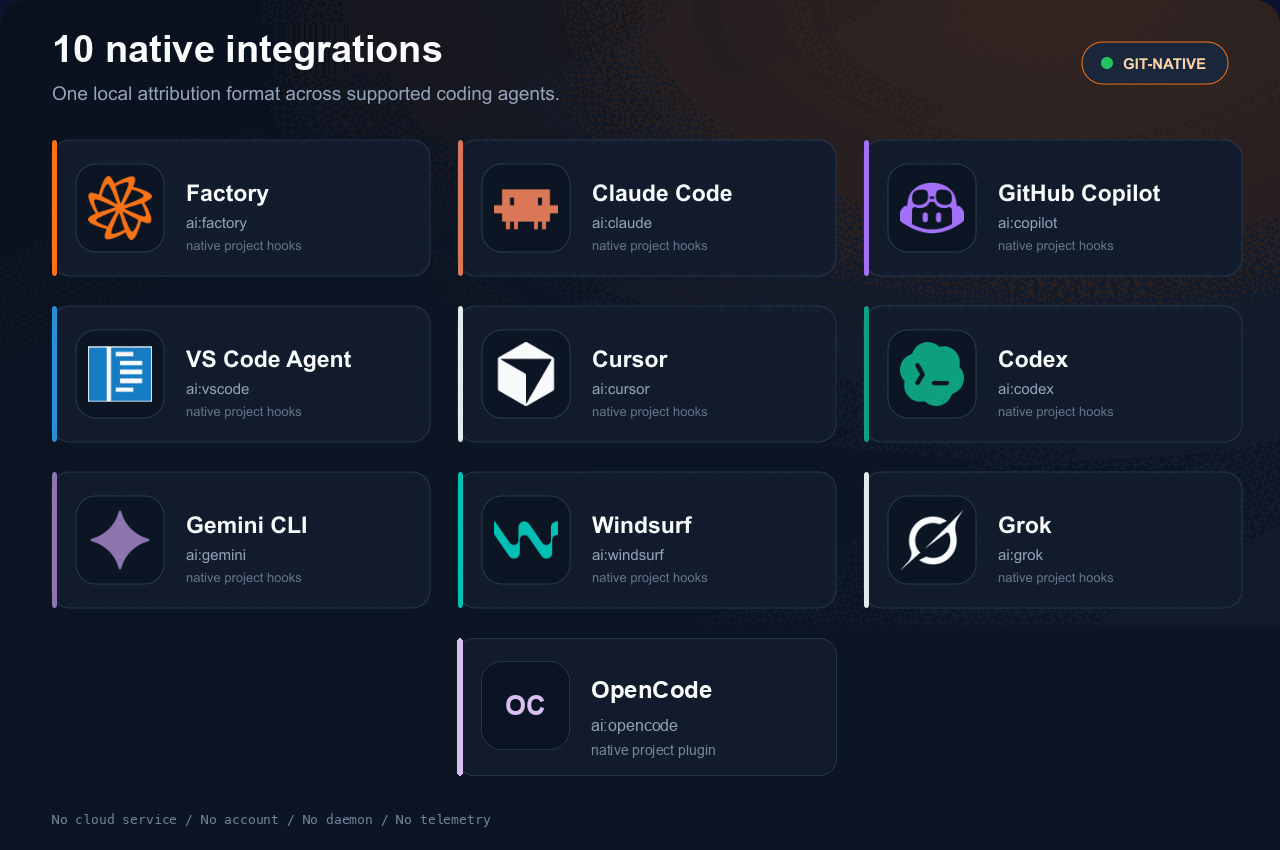 | Factory | Claude Code | GitHub Copilot | VS Code Agent | Cursor | Codex | Gemini CLI | Windsurf | Grok | OpenCode | | :---: | :---: | :---: | :---: | :---: | :---: | :---: | :---: | :---: | :---: | | `ai:factory` | `ai:claude` | `ai:copilot` | `ai:vscode` | `ai:cursor` | `ai:codex` | `ai:gemini` | `ai:windsurf` | `ai:grok` | `ai:opencode` | OpenCode reports edits through a generated project plugin for local `edit`, `write`, `apply_patch`, and `bash` tool calls. The plugin waits for each checkpoint, so the pre-edit snapshot exists before the tool writes. A hook that fails or times out is logged, and the tool call continues without that checkpoint. Its tool events include the session and call IDs, but not the active model. PromptScript model profiles describe configured models, not the model used by each tool call, so OpenCode attribution keeps the model as `unknown`. The generated plugin is declared Unix-only by PromptScript 1.19.1. Native Windows execution has not been verified; the documented Windows path is to run OpenCode in WSL. Platforms without a native project-hook API need an external watcher or daemon. git-byline deliberately adds neither. See [compatibility](https://github.com/comarch/git-byline/blob/HEAD/docs/COMPATIBILITY.md). ### Provenance that survives history rewrites Rebase, amend, cherry-pick, reset, branch switch, and stash transitions reproject attribution onto the new content through managed Git hooks. Managed hooks carry the same markers, backups, and uninstall symmetry everywhere: | Operation | Survives via | | --- | --- | | rebase, amend, cherry-pick | `post-rewrite` and `post-commit` hooks | | merge, pull | `post-merge` hook, first-parent authoritative | | fast-forward pull | `reference-transaction` hook, pulled commits keep their original notes | | reset soft/mixed/hard, branch switch | `reference-transaction` and `post-checkout` hooks | | stash push/pop/apply, `--autostash` | stash notes under `refs/notes/byline-stash`, also across fast-forward pulls | Unmatched rewritten content becomes `untracked`, never reassigned by guess. The full matrix with per-operation status lives in [compatibility](https://github.com/comarch/git-byline/blob/HEAD/docs/COMPATIBILITY.md). ### Files agents write through the shell Agents do not only use edit tools. `shell_pre` and `shell_post` checkpoints snapshot the dirty set and attribute only paths whose blobs actually changed, so concurrent unrelated human edits are not claimed. The remaining race is a documented limitation, not a silent guess. ### Reconstruct attribution after forge merges Squash and rebase merges on GitHub or GitLab create commits that never passed a local hook. `git byline ci install` writes a least-privilege workflow; `install-hooks --git` creates the same workflow automatically when the origin remote is github.com or gitlab.com. The workflow installs the git-byline release pinned on its `GIT_BYLINE_VERSION` line, the release that wrote it, and checks the archive against that release's `checksums.txt`. Then `git byline ci run` reconstructs attribution from the pull request commits, pairing by patch ID for rebase merges and folding in commit order for squashes. The binary writes notes locally; the workflow pushes the notes ref through Git, exactly like the pre-push hook. `uninstall` removes the workflow only while it still matches the generated template; only the pinned release tag may differ. On GitLab, CI/CD variables change the download without editing the file: `GIT_BYLINE_VERSION` pins another release and `GIT_BYLINE_RELEASES_URL` points at an internal mirror of the GitHub release assets. On GitLab, a squash merge keeps the merge request commits, and their notes, only on the merge request head. The job finds that head through the `group/project!123` reference in the merged commit message and uses it only when its diff matches the merged commit exactly. The default merge commit template carries that reference. With the fast-forward merge method, add `%{reference}` to the squash commit template under Settings > Merge requests, because the default one holds only the title. Without the reference, or when the diffs differ, the squashed lines stay `untracked`. Rebase merge requests locally, where the managed hooks carry attribution to the new commits; GitLab's server-side rebase creates commits no hook sees. On GitHub the same reconstruction also ships as a composite action, so a workflow can call it instead of carrying the generated steps: ```yaml - uses: comarch/git-byline@v1 ``` The action metadata lives at the repository root, where the GitHub Marketplace listing requires it, and a byte-identical copy under `action/` keeps `comarch/git-byline/action@v1` working. The moving `v1` tag follows every 1.x release; pin a release tag like `@v1.3.0` for immutable runs. See [action/README.md](https://github.com/comarch/git-byline/blob/HEAD/action/README.md) for the calling workflow. ### Interoperate, do not lock in ```sh git byline export --format gitai --output authorship.txt git byline import --format gitai --range HEAD~5..HEAD --dry-run git byline export --format agent-trace --output trace.json ``` Read and write the [Git AI Standard v3](https://github.com/git-ai-project/git-ai) authorship format at `refs/notes/ai`, and write Agent Trace 0.1 records. Import never overwrites a different existing note: it skips with a warning. Mapping rules, including why human identities stay out of interop output, are documented in [interop](https://github.com/comarch/git-byline/blob/HEAD/docs/INTEROP.md). ## How it compares | Approach | Granularity | What it misses in a mixed commit | | --- | --- | --- | | Standard `git blame` | Line to commit and commit author | Whether a person or agent produced each line | | Commit trailers (`Co-authored-by`, `Assisted-by`) | Commit-level declaration | Exact line ranges and edit-time evidence | | AI assistant usage dashboards | User and organization aggregates | Durable, tool-neutral provenance in local Git | | Prompt-linked provenance platforms | Line plus prompt context | Minimal data collection when prompts must stay excluded | | **git-byline** | **Line-level observed provenance, per person and per agent** | Deliberately no hosted dashboard or prompt history | What makes it different: - **Line-level, not commit-level.** One commit can contain human, AI, and untracked ranges, attributed to different people. - **Evidence, not heuristics.** Pre-edit and post-edit snapshots establish provenance at edit time. - **Git-native.** Checkpoint blobs and retention refs stay local. `refs/notes/byline` follows ordinary pushes after Git hooks are installed. - **Narrow trust boundary.** No account, cloud service, daemon, telemetry, prompt storage, or transcript storage. All commands run offline; `update` and `version --check` fetch only the pinned release repository, and the managed pre-push hook invokes Git to fetch and publish notes. - **Built for real Git behavior.** Partial commits, renames, linked worktrees, restarts, history rewrites, and Git garbage collection are covered. - **Portable.** One pure Go binary, no CGo or language runtime, six release targets. The closest category peer is [Git AI](https://github.com/git-ai-project/git-ai). Both use agent checkpoints, line-level provenance, and Git notes, and both follow history rewrites and forge merges. Git AI adds prompt-linked provenance, a background daemon, and team analytics; git-byline intentionally excludes prompts, transcripts, cloud sync, hosted analytics, accounts, daemons, telemetry, and background network calls, and adds policy gates, disclosure output, and Git AI interop. [Entire](https://github.com/entireio/cli) records whole agent sessions next to commits, and [Cursor Blame](https://cursor.com/docs/integrations/cursor-blame) covers code written in Cursor. Choose a broader tool when prompt or session context is required. Choose git-byline when local operation, prompt exclusion, and a small trust boundary matter more. git-byline is not a productivity score, AI detector, or compliance certificate. It is a small provenance primitive for teams that want stronger review evidence with a smaller data boundary. More detail: [why git-byline](https://github.com/comarch/git-byline/blob/HEAD/docs/WHY_GIT_BYLINE.md). ## Local data and privacy git-byline stores: - `.git/byline/checkpoints.jsonl` - `.git/byline/state.json` - pending snapshot blobs in the Git object database - `refs/worktree/byline/checkpoints` - `refs/worktree/byline/remote-notes`, the remote notes the `pre-push` hook fetched, until `merge-notes` removes them - `refs/notes/byline` - `refs/notes/byline-stash` - `refs/notes/byline-stash-owner` Linked worktrees keep checkpoint state separate. An agent hook that runs in one worktree records an edit in another worktree of the same repository in that worktree's state. Notes are shared within the common repository. After `install-hooks --git`, the managed `pre-push` hook publishes `refs/notes/byline` to the same remote before the branch push. It first fetches the notes already on that remote and merges the notes they add, so notes from another clone or the forge workflow do not stop the push. A remote change or removal of a local note, or two different notes for one commit, stop the push and change nothing. Notes disclose repository paths, agent and model names, human identity tokens, session identifiers, timestamps, blob IDs, and line ranges. The identity token is derived from the commit author Git already publishes in every commit object, so notes disclose less about people than the commit history beside them. Fetch notes explicitly in another clone: ```sh git fetch origin refs/notes/byline:refs/notes/byline ``` Disable automatic note sharing by reinstalling Git hooks with: ```sh git byline install-hooks --agent none --git --local-notes ``` git-byline does not store raw hook payloads, prompts, transcripts, environment variables, or file contents in checkpoint JSON. Snapshot blobs contain file content and remain local unless a user explicitly transfers related refs or Git objects. Generated dashboards contain committed source lines and attribution metadata. Default output uses a private temporary file. Keep reports local unless their content was reviewed for sharing. ## Limitations - Files above 64 MiB or 1,000,000 lines are skipped. - Binary, invalid UTF-8, symlink, submodule, device, and ignored paths are skipped. - Rebase, amend, cherry-pick, reset, branch switch, and stash hooks reproject attribution when Git supplies the required transition data. Use `git byline rewrite` manually after a path-limited reset or stash apply. - Stash apply is manual when `git stash apply` is used. Pass the stash object ID and `1` to keep its pending attribution note. A `git stash pop` that leaves older stash entries runs no stash hook either; pass the dropped stash commit and `0`. - Merge commits use first-parent history. Unmatched merge result content is `untracked`, and a later commit touching that content keeps it untracked. - A fast-forward pull writes no local notes for the pulled commits. Fetch `refs/notes/byline` before the next commit, or lines it inherits from them stay `untracked` in the files it changes. - Hooks see the stash of `--autostash` only on Git 2.44 or later. On older Git, pass the autostash commit and `0` to the manual stash apply after a fast-forward pull, or its agent edits lose agent attribution on paths the pull changed. - Human identity is the commit author, not a proof of keystrokes. Lines from notes written before identities existed aggregate as `(unidentified)`. - Duplicate equal lines in partial commits are resolved deterministically, but Git provides no staging timestamp to prove which duplicate was selected. - If several commits complete without annotation, git-byline refuses to guess across the gap. - Attribution notes are limited to 500 files and 16 MiB. - Whole-commit dashboards additionally limit rendered source to 100,000 lines and 16 MiB. - Notes are pushed before the branch. A later branch rejection can leave note metadata on the remote before its target commit arrives. - Prompts and transcripts are not stored. ## Troubleshooting `git byline status` reports pending checkpoints, retained snapshots, and whether `HEAD` is annotated. If a user or Git hook cannot find the executable, reinstall hooks using the final binary location. Project agent hooks resolve `git-byline` through the agent process `PATH`. If annotation reports a commit gap, do not delete `.git/byline` or rewrite notes. Preserve the repository and open a redacted bug report with commit IDs shortened or replaced. If blame shows `untracked`, check that agent and Git hooks are installed, then make a new checkpointed edit and commit. Existing history remains honestly untracked. ## Documentation Start with the [documentation map](https://github.com/comarch/git-byline/blob/HEAD/docs/README.md). | Topic | Guide | | --- | --- | | Product fit and alternatives | [Why git-byline](https://github.com/comarch/git-byline/blob/HEAD/docs/WHY_GIT_BYLINE.md) | | Installation paths | [Installation](https://github.com/comarch/git-byline/blob/HEAD/docs/INSTALL.md) | | Team rollout on self-hosted GitLab | [Rollout](https://github.com/comarch/git-byline/blob/HEAD/docs/ROLLOUT.md) | | Supported systems and agents | [Compatibility](https://github.com/comarch/git-byline/blob/HEAD/docs/COMPATIBILITY.md) | | Runtime and data formats | [Architecture](https://github.com/comarch/git-byline/blob/HEAD/docs/ARCHITECTURE.md) | | Interop formats and mapping | [Interop](https://github.com/comarch/git-byline/blob/HEAD/docs/INTEROP.md) | | Report and terminal design | [Design](https://github.com/comarch/git-byline/blob/HEAD/docs/DESIGN.md) | | Threats and privacy boundary | [Security model](https://github.com/comarch/git-byline/blob/HEAD/docs/SECURITY_MODEL.md) | | Local quality gate | [Validation](https://github.com/comarch/git-byline/blob/HEAD/docs/VALIDATION.md) | ## Development Run the complete local validation contract: ```sh go run ./tools/validate ``` It checks formatting, vet, tests, at least 80 percent statement coverage, CGO-free builds for all six targets, dependency and import policy, installer and marketplace contracts, PromptScript drift, workflow template contracts, secrets, placeholders, private paths, and forbidden characters. The README animations are reproducible. `docs/assets/demo/record-media.sh` builds the binary, builds a demo repository from real hook events, and records the terminal and dashboard recordings. See [assets](https://github.com/comarch/git-byline/blob/HEAD/docs/assets/README.md). See [CONTRIBUTING.md](https://github.com/comarch/git-byline/blob/HEAD/CONTRIBUTING.md), [validation](https://github.com/comarch/git-byline/blob/HEAD/docs/VALIDATION.md), and [release procedure](https://github.com/comarch/git-byline/blob/HEAD/docs/RELEASES.md). ## Support and security Use the bug form for reproducible defects and GitHub Discussions for usage questions. Never include private repository content, raw hook input, prompts, transcripts, credentials, or full environment dumps. Report vulnerabilities privately through [GitHub Security Advisories](https://github.com/comarch/git-byline/security/advisories/new). See [SECURITY.md](https://github.com/comarch/git-byline/blob/HEAD/SECURITY.md). ## License Author: Wojciech Guziak (Comarch S.A.). MIT License. Copyright (c) 2026 Comarch S.A. See [LICENSE](https://github.com/comarch/git-byline/blob/HEAD/LICENSE). DetailsTypePluginsTopicCode versions (Git)PublishercomarchSourcegeminiCategoryToolsVersion1.7.0Stars3Last update2026-10-22T23:45:59ZProject statusActiveLanguageGoLicenseMITAdded2026-09-12 04:04:18Updated2026-09-16 13:03:43Source idcomarch/git-bylineMoreMore plugins on Code versions (Git)All from comarchA–Z index



