caveman
Ultra-compressed communication mode. Cuts ~75% of tokens while keeping full technical accuracy by speaking like a caveman.
Open source Open in the app JSON README (API)
About
Ultra-compressed communication mode. Cuts ~75% of tokens while keeping full technical accuracy by speaking like a caveman.
Details
- Kind
- Plugins
- Topic
- No topic detected
- Publisher
- blacknabis
- Origin
- gemini
- Category
- ferramentas
- Version
- 1.0.0
- Stars
- 12
- Last push
- 2026-04-12T09:08:21Z
- Repository state
- ativo
- Language
- Python
- License
- MIT
- Added
- 2026-08-30 14:13:39
- Updated
- 2026-08-30 14:13:39
- Origin id
blacknabis/cavemankorean
README
<p align="center"> <img src="https://em-content.zobj.net/source/apple/391/rock_1faa8.png" width="120" /> </p> <h1 align="center">caveman</h1> <p align="center"> <strong>말 적게. 핵심만. 정확도 그대로.</strong> </p> <p align="center"> <a href="https://github.com/JuliusBrussee/caveman/stargazers"><img src="https://img.shields.io/github/stars/JuliusBrussee/caveman?style=flat&color=yellow" alt="Stars"></a> <a href="https://github.com/JuliusBrussee/caveman/commits/main"><img src="https://img.shields.io/github/last-commit/JuliusBrussee/caveman?style=flat" alt="Last Commit"></a> <a href="LICENSE"><img src="https://img.shields.io/github/license/JuliusBrussee/caveman?style=flat" alt="License"></a> </p> <p align="center"> <a href="#before--after">Before/After</a> · <a href="#install">설치</a> · <a href="#intensity-levels">강도</a> · <a href="#caveman-skills">스킬</a> · <a href="#benchmarks">벤치마크</a> · <a href="#evals">평가</a> </p> --- `caveman`은 Claude Code, Codex, Gemini CLI 같은 AI 코딩 에이전트가 더 짧고 압축적으로 말하게 만드는 스킬/플러그인입니다. 보통 **출력 토큰을 약 65~75% 줄이면서도 기술 정확도는 유지**합니다. > 이 저장소는 [JuliusBrussee/caveman](https://github.com/JuliusBrussee/caveman)을 포크한 저장소이며, 한국어 로컬라이징과 한글 호환성 개선 작업을 포함합니다. `README.md` 역시 원본 내용을 유지한 채 한국어로 옮긴 버전입니다. 지금은 기본 caveman 모드뿐 아니라: - `lite`, `full`, `ultra` 강도 조절 - `文言文` 기반 `wenyan` 모드 - 짧은 커밋 메시지 생성 - 한 줄 코드 리뷰 - 세션마다 읽는 문서를 줄여주는 `caveman-compress` - 한국어 입력을 한국어로 유지하는 압축 규칙 까지 들어 있습니다. 핵심은 간단합니다. **같은 내용. 덜 장황하게. 더 빨리 읽힘.** ## Before / After <table> <tr> <td width="50%"> ### 일반 응답 (69 tokens) > "The reason your React component is re-rendering is likely because you're creating a new object reference on each render cycle. When you pass an inline object as a prop, React's shallow comparison sees it as a different object every time, which triggers a re-render. I'd recommend using useMemo to memoize the object." </td> <td width="50%"> ### Caveman 응답 (19 tokens) > "New object ref each render. Inline object prop = new ref = re-render. Wrap in `useMemo`." </td> </tr> <tr> <td> ### 일반 응답 > "Sure! I'd be happy to help you with that. The issue you're experiencing is most likely caused by your authentication middleware not properly validating the token expiry. Let me take a look and suggest a fix." </td> <td> ### Caveman 응답 > "Bug in auth middleware. Token expiry check use `<` not `<=`. Fix:" </td> </tr> </table> **같은 해결. 말 수만 줄음. Brain still big.** ## 강도 비교 <table> <tr> <td width="25%"> #### Lite > "Your component re-renders because you create a new object reference each render. Inline object props fail shallow comparison every time. Wrap it in `useMemo`." </td> <td width="25%"> #### Full > "New object ref each render. Inline object prop = new ref = re-render. Wrap in `useMemo`." </td> <td width="25%"> #### Ultra > "Inline obj prop → new ref → re-render. `useMemo`." </td> <td width="25%"> #### Wenyan > "物出新參照,致重繪。useMemo Wrap。" </td> </tr> </table> 한국어도 비슷하게 동작합니다. - 일반: `리액트 컴포넌트가 계속 리렌더링되는 이유는 부모가 새 객체 참조를 매번 만들기 때문입니다.` - Full: `부모가 매 렌더 새 객체 참조 생성. 자식 리렌더.` - Ultra: `새 참조 매 렌더 생성 → 리렌더.` ## 왜 쓰나 - **응답이 짧아짐**: 장황한 도입부, 완곡 표현, 반복 설명을 줄입니다. - **읽기 쉬움**: 스크롤 덜 함. 핵심 먼저 보임. - **속도 체감이 좋아짐**: 생성할 출력이 줄어들면 체감 응답도 빨라집니다. - **비용 절약 가능**: 출력 토큰이 줄면 비용도 줄어듭니다. - **정확도 유지 목표**: 코드는 안 바꾸고, 기술 용어는 그대로 둡니다. - **한국어 지원**: 한국어 질문은 한국어로 유지하면서 군더더기만 줄입니다. ## Install 한 번 설치하면 됩니다. | Agent | Install | |-------|---------| | **Claude Code** | `claude plugin marketplace add JuliusBrussee/caveman && claude plugin install caveman@caveman` | | **Codex** | 이 저장소를 clone한 뒤 로컬 플러그인에서 `Caveman` 설치 | | **Gemini CLI** | `gemini extensions install https://github.com/JuliusBrussee/caveman` | | **Cursor** | `npx skills add JuliusBrussee/caveman -a cursor` | | **Windsurf** | `npx skills add JuliusBrussee/caveman -a windsurf` | | **Copilot** | `npx skills add JuliusBrussee/caveman -a github-copilot` | | **Cline** | `npx skills add JuliusBrussee/caveman -a cline` | | **기타 에이전트** | `npx skills add JuliusBrussee/caveman` | 설치 끝. 돌 하나. 끝. ### What You Get | Feature | Claude Code | Codex | Gemini CLI | Cursor | Windsurf | Cline | Copilot | |---------|:-----------:|:-----:|:----------:|:------:|:--------:|:-----:|:-------:| | Caveman mode | Y | Y | Y | Y | Y | Y | Y | | 자동 활성화 | Y | Y (이 repo에서) | Y | 규칙 파일 추가 시 | 규칙 파일 추가 시 | 규칙 파일 추가 시 | 규칙 파일 추가 시 | | 강도 전환 | Y | Y | Y | Y | Y | 제한적 | 제한적 | | Commit 스킬 | Y | 플러그인 번들엔 없음 | Y | Y | Y | Y | Y | | Review 스킬 | Y | 플러그인 번들엔 없음 | Y | Y | Y | Y | Y | | Compress 스킬 | Y | Y | Y | Y | Y | Y | Y | | Help 스킬 | Y | 제한적 | Y | Y | Y | Y | Y | > [!NOTE] > Codex는 보통 `/caveman` 대신 `$caveman` 흐름이 핵심입니다. 이 저장소에는 `.codex/hooks.json`이 들어 있어서 **이 repo 안에서 Codex를 실행하면 자동 활성화**됩니다. > > `npx skills add`는 Cursor, Windsurf, Cline, Copilot에 스킬 파일은 넣어주지만, always-on 규칙 파일까지 항상 자동으로 넣는 건 아닙니다. 그래서 항상 켜고 싶다면 아래 설명처럼 규칙 파일이나 시스템 프롬프트도 같이 설정해야 합니다. <details> <summary><strong>Claude Code 상세</strong></summary> 플러그인 설치만 하면 스킬과 훅이 같이 들어갑니다. ```bash claude plugin marketplace add JuliusBrussee/caveman claude plugin install caveman@caveman ``` 플러그인 시스템 없이 훅만 설치하려면: ```bash # macOS / Linux / WSL bash <(curl -s https://raw.githubusercontent.com/JuliusBrussee/caveman/main/hooks/install.sh) # Windows (PowerShell) irm https://raw.githubusercontent.com/JuliusBrussee/caveman/main/hooks/install.ps1 | iex ``` 또는 로컬 clone에서: ```bash bash hooks/install.sh powershell -File hooks\install.ps1 ``` 제거: ```bash bash hooks/uninstall.sh powershell -File hooks\uninstall.ps1 ``` 상태줄 배지도 지원합니다. `[CAVEMAN]`, `[CAVEMAN:ULTRA]` 같이 보입니다. </details> <details> <summary><strong>Codex 상세</strong></summary> **macOS / Linux** 1. 저장소 clone 2. Codex를 이 repo에서 실행 3. `/plugins` 또는 플러그인 설정에서 `Caveman` 설치 **Windows** 1. 필요하면 symlink 허용: `git config --global core.symlinks true` 2. 저장소 clone 3. VS Code에서 Codex 설정 열기 4. 로컬 플러그인 목록에서 `Caveman` 설치 이 저장소에는 `.codex/hooks.json`이 포함되어 있어서 repo-local 자동 활성화가 됩니다. 플러그인 자체는 `$caveman` 기반 사용 흐름을 제공합니다. </details> <details> <summary><strong>Gemini CLI 상세</strong></summary> ```bash gemini extensions install https://github.com/JuliusBrussee/caveman ``` 업데이트: ```bash gemini extensions update caveman ``` 제거: ```bash gemini extensions uninstall caveman ``` `GEMINI.md`를 통해 자동 활성화됩니다. </details> <details> <summary><strong>Cursor / Windsurf / Cline / Copilot 상세</strong></summary> ```bash npx skills add JuliusBrussee/caveman -a cursor npx skills add JuliusBrussee/caveman -a windsurf npx skills add JuliusBrussee/caveman -a cline npx skills add JuliusBrussee/caveman -a github-copilot ``` 기본 설치는 스킬 파일 위주입니다. 항상 켜고 싶으면 규칙 파일이나 시스템 프롬프트에 아래 같은 문장을 넣으면 됩니다. ```text Terse like caveman. Technical substance exact. Only fluff die. Keep user's language. Korean stays Korean unless user asks otherwise. Drop filler, pleasantries, hedging. Fragments OK. Code unchanged. ACTIVE EVERY RESPONSE. Off: stop caveman / normal mode / 일반 말투로. ``` </details> <details> <summary><strong>기타 에이전트</strong></summary> `npx skills`는 40개 이상의 에이전트를 지원합니다. ```bash npx skills add JuliusBrussee/caveman npx skills add JuliusBrussee/caveman -a amp npx skills add JuliusBrussee/caveman -a goose npx skills add JuliusBrussee/caveman -a roo ``` 제거: ```bash npx skills remove caveman ``` > Windows에서 symlink가 막히면 `--copy`를 붙이세요. </details> ## Usage 켜는 방법: - `/caveman` - Codex에서는 보통 `$caveman` - `talk like caveman` - `caveman mode` - `less tokens please` - `원시인 모드` - `짧게 말해` - `토큰 아껴서 말해` 끄는 방법: - `stop caveman` - `normal mode` - `일반 말투로` - `원래 말투로` ## Intensity Levels | Level | Trigger | 설명 | |-------|---------|------| | **Lite** | `/caveman lite` | 문장 구조는 유지하고 군더더기만 제거 | | **Full** | `/caveman` | 기본 모드. 짧은 문장, 문장 조각 허용 | | **Ultra** | `/caveman ultra` | 더 공격적 압축. 명사구/단문 위주, 조사와 연결 표현도 의미 안 흐릴 때만 줄임 | 한국어에서는 대체로 이런 느낌입니다. - `lite`: 자연스러운 존댓말 유지 - `full`: 짧은 평서 중심으로 압축 - `ultra`: 명사구/단문 위주. `그래서/하지만/또한/그리고/따라서`는 `.`, `:`, `→`로 치환 가능 ### 文言文 (Wenyan) Mode 고전 중국어식 압축 모드입니다. 토큰 효율을 극단으로 밀고 싶은 사람용입니다. | Level | Trigger | 설명 | |-------|---------|------| | **Wenyan-Lite** | `/caveman wenyan-lite` | 고전 문체 느낌만 살짝 | | **Wenyan-Full** | `/caveman wenyan` | 완전 문언문 압축 | | **Wenyan-Ultra** | `/caveman wenyan-ultra` | 가장 과격한 압축 | ## Caveman Skills | Skill | Trigger | 설명 | |-------|---------|------| | **caveman-commit** | `/caveman-commit` | 짧은 Conventional Commit 메시지 생성 | | **caveman-review** | `/caveman-review` | 한 줄 코드 리뷰 코멘트 생성 | | **caveman-help** | `/caveman-help` | 모드/명령어 요약 카드 | ### caveman-compress `caveman`이 **말하는 출력**을 줄인다면, `compress`는 **세션마다 읽는 입력 문서**를 줄입니다. 예: ```bash /caveman:compress CLAUDE.md ``` 결과: ```text CLAUDE.md -> 압축본 CLAUDE.original.md -> 사람이 읽고 수정할 원본 백업 ``` 즉, Claude가 세션 시작 때 읽는 문서를 더 짧게 만들어 **매 세션 입력 토큰을 줄이는 방식**입니다. | File | Original | Compressed | Saved | |------|----------:|----------:|------:| | `claude-md-preferences.md` | 706 | 285 | **59.6%** | | `project-notes.md` | 1145 | 535 | **53.3%** | | `claude-md-project.md` | 1122 | 636 | **43.3%** | | `todo-list.md` | 627 | 388 | **38.1%** | | `mixed-with-code.md` | 888 | 560 | **36.9%** | | **Average** | **898** | **481** | **46%** | 보존 대상: - 코드 블록 - 인라인 코드 - URL - 파일 경로 - 명령어 - 제목 - 숫자, 날짜, 버전 ## Benchmarks 실제 Claude API 기준 토큰 측정값입니다. <!-- BENCHMARK-TABLE-START --> | Task | Normal (tokens) | Caveman (tokens) | Saved | |------|---------------:|----------------:|------:| | Explain React re-render bug | 1180 | 159 | 87% | | Fix auth middleware token expiry | 704 | 121 | 83% | | Set up PostgreSQL connection pool | 2347 | 380 | 84% | | Explain git rebase vs merge | 702 | 292 | 58% | | Refactor callback to async/await | 387 | 301 | 22% | | Architecture: microservices vs monolith | 446 | 310 | 30% | | Review PR for security issues | 678 | 398 | 41% | | Docker multi-stage build | 1042 | 290 | 72% | | Debug PostgreSQL race condition | 1200 | 232 | 81% | | Implement React error boundary | 3454 | 456 | 87% | | **Average** | **1214** | **294** | **65%** | *범위: 22%~87% 절감* <!-- BENCHMARK-TABLE-END --> > [!IMPORTANT] > Caveman은 **출력 토큰**을 줄입니다. 모델의 숨은 추론 토큰까지 줄이는 건 아닙니다. Brain not smaller. Mouth smaller. 2026년 3월 논문 ["Brevity Constraints Reverse Performance Hierarchies in Language Models"](https://arxiv.org/abs/2604.00025)은, 짧게 답하도록 제약했을 때 특정 벤치마크에서 정확도가 오히려 올라가는 경우도 보여줬습니다. 말 많다고 늘 더 똑똑한 건 아닙니다. ## Evals `evals/`에는 세 가지 조건을 비교하는 harness가 있습니다. - `__baseline__`: 시스템 프롬프트 없음 - `__terse__`: `Answer concisely.` - `<skill>`: `Answer concisely.` + `SKILL.md` 중요한 포인트: **공정한 비교는 `verbose vs caveman`이 아니라 `terse vs caveman`입니다.** 그렇지 않으면 단순히 "짧게 말하라" 효과와 skill 자체 효과가 섞여버립니다. 실행: ```bash uv run python evals/llm_run.py uv run --with tiktoken python evals/measure.py ``` 한국어 프롬프트도 이제 `evals/prompts/ko.txt`에 포함됩니다. ## Star This Repo 토큰 많이 아꼈으면 star도 많이 주기. [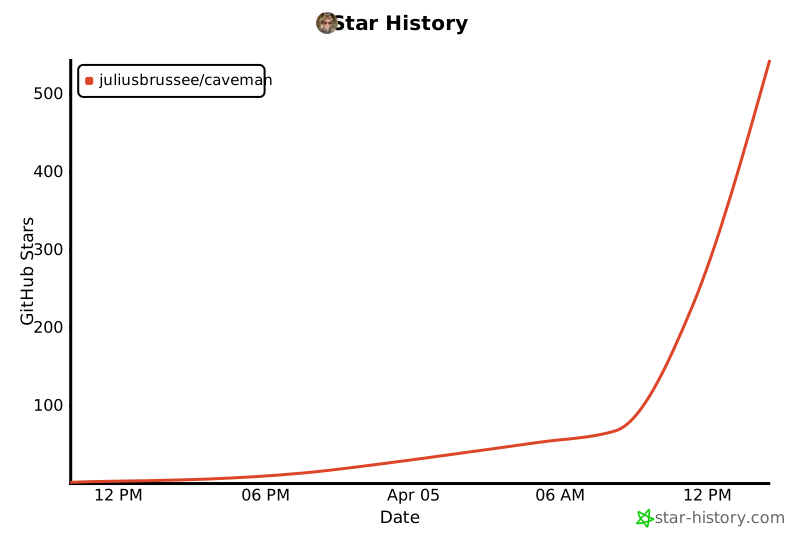](https://star-history.com/#JuliusBrussee/caveman&Date) ## Also by Julius Brussee - **[Cavekit](https://github.com/JuliusBrussee/cavekit)**: Claude Code용 specification-driven development - **[Revu](https://github.com/JuliusBrussee/revu-swift)**: FSRS 기반 로컬 macOS 학습 앱, [revu.cards](https://revu.cards) ## License MIT. 열린 평원 위 매머드처럼 자유.