ファイル
Bundle OKF 0.1 · 4 conceitos · upu/ghost-align
Open source Repository Open in the app JSON README (API)
About
# ファイル
- [Ghost Align 開発者向けクイックスタート](quickstart.md) - Ghost Align の製品原則、主要な実装領域、ローカル開発の入口、および詳細 Wiki への案内です。
# ディレクトリ
- [architecture](architecture/)
- [operations](operations/)
- [workflows](workflows/)
Details
- Kind
- OKF bundles
- Topic
- Productivity
- Publisher
- upu
- Origin
- okf_github
- Category
- dados
- Version
- 0.1
- Stars
- 3
- Open pull requests
- 2
- Last push
- 2026-09-08T15:26:11Z
- Repository state
- ativo
- Language
- TypeScript
- License
- MIT
- Added
- 2026-09-08 02:18:52
- Updated
- 2026-09-08 02:18:52
- Origin id
upu/ghost-align:openwiki/index.md
README
<!--
This file is published as the extension's page on the VS Code Marketplace (user-facing).
Build/debug/contribution instructions belong in docs/CONTRIBUTING.md —
keep this file limited to user-facing content only.
-->
🇯🇵 [日本語](README.ja.md)
# Ghost Align
> Visually align operators like `=` without modifying your source code.
Ghost Align is a VS Code extension. It aligns the position of operators like `=` **without ever touching your source code** — the alignment is purely visual.
It works by inserting visual padding using the editor's Decoration API, so no extra whitespace is ever saved to the file, and your Git diffs stay clean. The concept: "never change the code, only align how it looks."
## Demo
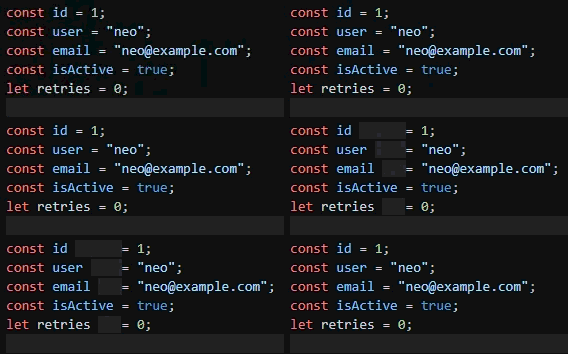
Aligning `=` (the source is never modified; toggle it on/off):
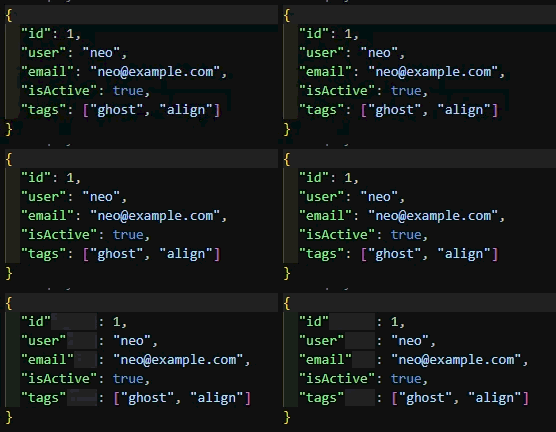
Aligning `:` in JSON:
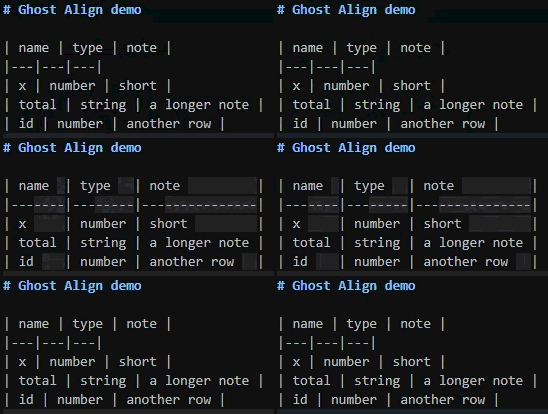
Aligning Markdown table columns:
## Before / After
The actual file contents never change. What follows is an image of **how it looks**.
Before (not aligned):
```js
const x = 1;
const foo = 2;
const longName = 3;
```
After (with Ghost Align enabled):
```js
const x = 1;
const foo = 2;
const longName = 3;
```
The inserted whitespace is a decoration (a "ghost") and is never saved to the file.
## How it works
- Consecutive lines are grouped, and within each group the operator position is aligned to match the rightmost line.
- A change in indentation width starts a new group, so nested blocks (such as JSON objects) never get aligned across different nesting levels.
- For `=` alignment, `=` inside strings, comments, `( )`, `[ ]`, and multi-character operators such as `==` `!=` `<=` `>=` `=>` are excluded (only assignment `=` is aligned).
- Arrow functions (`=>`) can be aligned as their own token: add `"=>"` to `ghostAlign.operators` (or `operatorsByLanguage`) to line up consecutive lines like `const onClick = (e) => ...`. Occurrences inside strings and comments are excluded.
- Trailing line-continuation markers (`\`) can also be aligned: add `"\\"` to `ghostAlign.operators` (or `operatorsByLanguage`) to line up shell / Makefile / C-preprocessor `#define` continuation lines. Only a `\` that is the last non-whitespace character on the line counts — one inside a string or escape sequence is excluded. Not enabled by default for any language.
- `=` is aligned by default. The default operator varies by language: `json` / `jsonc` / `yaml` / `css` / `scss` / `less` / `graphql` align `:`, `typescript` / `typescriptreact` / `javascript` / `javascriptreact` / `python` align both `:` and `=` (in Python, `:` aligns dict-literal keys and type/parameter annotations; slice syntax, block-start colons like `if x:`, and `lambda x: ...`'s own separator are excluded), while `dotenv` / `properties` / `toml` / `ini` / `shellscript` / `makefile` / `go` / `lua` / `c` / `cpp` / `csharp` / `java` / `swift` / `kotlin` / `dart` / `zig` / `terraform` / `proto3` / `elixir` / `perl` / `sql` / `haskell` / `powershell` / `dockerfile` / `scala` / `groovy` align `=`. `ruby` / `php` / `rust` align `=>` (hash rockets, associative arrays, match arms) in addition to `=`. `r` aligns its idiomatic assignment arrow `<-` in addition to `=`. Any other language falls back to the global `ghostAlign.operators` list (default `=`); set `ghostAlign.alignUnknownLanguages` to `false` to align only the languages listed in `operatorsByLanguage`.
- In JavaScript/TypeScript, consecutive JSDoc `@param` lines are also aligned: the parameter-name column and the description column line up vertically (disable via `ghostAlign.jsdoc.enabled`).
- Trailing line comments (`//`, `#`, `--`, `;`) can also be aligned (opt-in via `"//"` / `"#"` / `"--"` / `";"` in `ghostAlign.operators` etc.; comments inside strings, URLs like `http://`, and lines that are entirely a comment are excluded — for every marker other than `//`, the marker must also be preceded by whitespace, so a marker glued to preceding code, like the `--` in `x--y` or the `;` in `a;b`, is not mistaken for a comment).
- If a single extremely long line would force a large amount of ghost padding onto the other lines, you can cap it with `ghostAlign.maxPadding` — outlier lines are excluded and the remaining lines are aligned without them (default is unlimited).
- In Markdown, table columns (separated by `|`) are aligned so they line up vertically (disable via `ghostAlign.markdownTable.enabled`).
- In CSV / TSV documents (language ID `csv` / `tsv`, as provided by extensions like Rainbow CSV — VS Code itself opens `.csv` as plain text), columns are aligned so the delimiters line up vertically. An occurrence of the delimiter inside a double-quoted field (RFC 4180, including `""` escapes) is not treated as a delimiter. The delimiter is configurable per language ID via `ghostAlign.csv.delimiters` (e.g. `{ "csv": ";" }` for semicolon-separated CSV, or add a language ID like `"csv (semicolon)"` to align other extensions' CSV variants). Disable via `ghostAlign.csv.enabled`. Enable `ghostAlign.csv.alignNumbersRight` to right-align a column instead of left-aligning it when every one of its data cells looks like a plain number; the first row (typically a header) is excluded from that judgment but still gets right-aligned when its column qualifies. When the column has decimal values with a differing number of digits, they're aligned at the decimal point rather than just right-aligned as whole cells (an integer cell with no decimal point aligns by its digit count alone).
- Lines containing tabs are aligned by their visual column, taking the tab width (`editor.tabSize`) into account.
## Installation
Search for **Ghost Align** in the VS Code Extensions view (`Ctrl+Shift+X`) and click Install.
From the command line:
```bash
code --install-extension upu.ghost-align
```
Marketplace page: <https://marketplace.visualstudio.com/items?itemName=upu.ghost-align>
## Usage
Once enabled, lines containing a target operator are automatically displayed aligned.
You can toggle the visual alignment on/off from the Command Palette. The state is kept per workspace and persists across window reloads; a workspace where you never used the toggle follows the last state saved before the per-workspace toggle was introduced (ON for new installs):
- `Ghost Align: Toggle` (command ID: `ghostAlign.toggle`)
Enabling `ghostAlign.showStatusBar` adds an ON/OFF indicator to the status bar, which you can also click to toggle.
## Settings
All settings live under the `ghostAlign` namespace.
| Setting | Type | Default | Description |
| --- | --- | --- | --- |
| `ghostAlign.showStatusBar` | boolean | `false` | Show a status bar item indicating Ghost Align ON/OFF (click to toggle). |
| `ghostAlign.operators` | array | `["="]` | Operators to align (used when the current language is not listed in `ghostAlign.operatorsByLanguage`). Supported special tokens: `"="` (assignment), `":"` (JSON/YAML key or CSS declaration), `"//"`, `"#"`, `"--"`, `";"` (trailing line comments), `"=>"` (arrow function), `"\\"` (trailing line-continuation marker, e.g. shell/Makefile/C-preprocessor `#define` continuations). The `"="`, `"=>"`, and `"\\"` tokens exclude occurrences inside strings and comments. Any other string is matched literally. The list order defines both the priority and the left-to-right column order: each listed operator is aligned as its own column on the same line (e.g. `["=", "#"]` aligns assignments and then trailing comments). |
| `ghostAlign.operatorsByLanguage` | object | `{ "json": [":"], "jsonc": [":"], "yaml": [":"], "dotenv": ["="], "properties": ["="], "toml": ["="], "ini": ["="], "python": [":", "="], "shellscript": ["="], "ruby": ["=", "=>"], "makefile": ["="], "css": [":"], "scss": [":"], "less": [":"], "php": ["=", "=>"], "rust": ["=", "=>"], "go": ["="], "lua": ["="], "c": ["="], "cpp": ["="], "csharp": ["="], "java": ["="] }` | Per-language operator overrides keyed by languageId (e.g. `json`, `jsonc`, `typescript`). If the current document's language is listed here, this list is used in place of `ghostAlign.operators`. |
| `ghostAlign.disabledLanguages` | array | `[]` | Language IDs (e.g. `markdown`, `yaml`) for which Ghost Align is fully disabled, including Markdown table / CSV / JSDoc alignment. Takes priority over `ghostAlign.operatorsByLanguage`. |
| `ghostAlign.alignUnknownLanguages` | boolean | `true` | Align operators in languages not listed in `ghostAlign.operatorsByLanguage`, using the global `ghostAlign.operators` list. Set to `false` to align only the explicitly listed languages — languages you add to `operatorsByLanguage` yourself stay aligned. Unlike `ghostAlign.disabledLanguages` (an explicit blocklist), this switches off the fallback for every unlisted language at once. Markdown tables and CSV/TSV have their own alignment paths and are not affected. |
| `ghostAlign.jsdoc.enabled` | boolean | `true` | Align the parameter-name and description columns of consecutive JSDoc `@param` lines in JavaScript/TypeScript. |
| `ghostAlign.markdownTable.enabled` | boolean | `true` | Align Markdown table columns. Set to `false` to turn off only the table alignment (use `ghostAlign.disabledLanguages` to disable Markdown entirely). |
| `ghostAlign.csv.enabled` | boolean | `true` | Align CSV/TSV columns. Set to `false` to turn off only the CSV/TSV alignment (use `ghostAlign.disabledLanguages` to disable those languages entirely). |
| `ghostAlign.csv.delimiters` | object | `{ "csv": ",", "tsv": "\t" }` | Per-language CSV/TSV delimiter overrides keyed by languageId. A language listed here takes the CSV/TSV alignment path using its delimiter; add a language ID contributed by another extension (e.g. Rainbow CSV's `csv (semicolon)`) to align it too. Each value must be exactly one character and not `"` (the RFC 4180 quoting character); an invalid value falls back to the built-in default for `csv`/`tsv`, or is treated as not listed for any other language ID. |
| `ghostAlign.csv.alignNumbersRight` | boolean | `false` | Right-align a CSV/TSV column instead of left-aligning it when every data cell in that column looks like a plain number (an optional leading `-`, digits, and an optional decimal part; thousands separators and exponents are not recognized). The first row (typically a header) is excluded from that judgment but still gets right-aligned when its column qualifies. Columns with any non-numeric data cell are left-aligned as before. When the column has decimal values, they are aligned at the decimal point instead of just right-aligning the whole cell (an integer cell with no decimal point aligns by its digit count alone). |
| `ghostAlign.shortenUrls` | boolean | `true` | Shorten an http(s) URL in a CSV/TSV cell (any column) or a Markdown table cell to just its host (e.g. `https://github.com/foo/bar?q=1` displays as `[github.com]`), so one long URL no longer stretches the whole column. Only the scheme/userinfo and path/query/fragment are visually hidden; the host is real, unmodified document text, so Ctrl+click still opens the full URL, Ctrl+F and copy still see the full text, and moving the cursor/selection into a shortened URL temporarily expands it back to full text. Column alignment is computed against the shortened width so the table doesn't stretch for a hidden URL. |
| `ghostAlign.maxPadding` | number | `0` | Maximum number of ghost characters inserted per alignment column on a single line. For operator and JSDoc `@param` alignment, the extremely long outlier lines are excluded and the remaining lines are aligned without them. For Markdown table and CSV/TSV alignment, an outlier cell instead makes its whole column skip alignment (the table keeps its shape and later columns keep aligning). `0` means unlimited. |
| `ghostAlign.ghostColor` | string | `"rgba(128, 128, 128, 0.25)"` | Tint color of the ghost padding (any CSS color string). Applied as both foreground and background so whitespace padding is distinguishable from real spaces. Leaving this empty in the settings UI falls back to the default; set `"transparent"` to disable tinting entirely. |
`ghostAlign.alignJsdocParams` is deprecated: use `ghostAlign.jsdoc.enabled` instead. The old key is still honored while the new one is left unset.
## Known limitations
- **Mouse selection near ghost padding** — Ghost padding is drawn with VS Code's decoration API (`before` attachments), and the editor includes the rendered width of that padding in mouse hit testing. Click-and-drag selection across a padded spot therefore has to travel the extra padding width, which can make it harder to pick out just the character right before or after the padding. The extension API exposes no way to exclude decoration content from hit testing, so this cannot be fixed on the extension side. Keyboard selection (`Shift`+arrow keys) is unaffected, and you can temporarily toggle Ghost Align off (`Ghost Align: Toggle`) when precise mouse selection matters.
## License
MIT