Wuf knowledge bundle
Bundle OKF 0.2 · 4 conceitos · janthmueller/wuf
Open source Repository Open in the app JSON README (API)
About
# Wuf knowledge bundle
Internal product and engineering knowledge for maintainers and coding agents.
This bundle follows the [Open Knowledge Format v0.2](https://github.com/GoogleCloudPlatform/knowledge-catalog/blob/main/okf/SPEC.md).
# Start here
* [Documentation boundaries](documentation.md) - Decides what belongs in the README, public docs, and this bundle.
* [Product knowledge](product/) - CLI semantics, accuracy guarantees, and future product work.
* [Engineering knowledge](engineering/) - Architecture, development, release, and implementation constraints.
* [Update log](log.md) - Significant changes to this bundle, newest first.
# Reading policy
Read only the concepts relevant to the current task. Public behavior is
authoritative in the running CLI and tests; this bundle explains the durable
intent and engineering decisions around that behavior.
Details
- Kind
- OKF bundles
- Topic
- Developer tools
- Publisher
- janthmueller
- Origin
- okf_github
- Category
- dados
- Version
- 0.2
- Last push
- 2026-09-01T19:03:17Z
- Repository state
- ativo
- Language
- Python
- License
- MIT
- Added
- 2026-09-08 16:04:09
- Updated
- 2026-09-08 16:04:09
- Origin id
janthmueller/wuf:knowledge/index.md
README
# WUF Unifies Footprints [](https://pypi.org/project/wuf/) [](https://pepy.tech/project/wuf) [](https://github.com/janthmueller/wuf/blob/main/LICENSE) Wuf shows local Git and filesystem timestamp activity as a representative Monday-to-Sunday week or an exact chronological timeline. It makes work patterns visible and marks events outside your intended working hours without pretending that timestamps are hours worked. 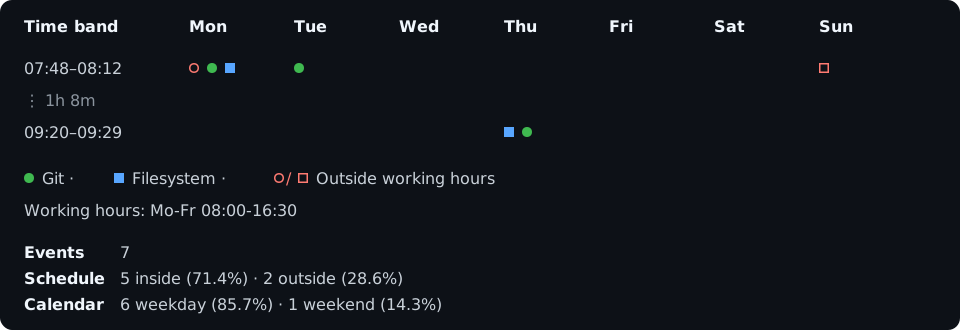 Wuf is local, terminal-only, and currently alpha. ## Install ```bash pip install wuf wuf --help ``` For an isolated installation, use `uv tool install wuf` or `pipx install wuf`. Standalone archives are available from [GitHub Releases](https://github.com/janthmueller/wuf/releases). > Wuf is the new name of Workfold. The transitional `workfold` package and > command continue to invoke Wuf, but new installations and configuration > should use `wuf`. ## Start with your current week Run Wuf inside a Git repository: ```bash wuf ``` The default view uses commit author timestamps from local branches, the current ISO week, your operating system's timezone, and working hours of Monday-Friday 08:00-16:30. Common variations are deliberately composable: ```bash wuf ~/code/project -t 2w3d wuf -t 2026-W31 wuf -p fs wuf -p both -t 2w wuf -p portable -t all wuf -e git:tag:tagger fs:file:modified wuf --view timeline -t 2w ``` - `-t/--time` chooses the period. - `-p/--profile` chooses a named event set. - `-e/--events` replaces the profile with exact event selectors. - `--view timeline` shows exact chronological events instead of folding them. Profiles include `git`, `fs`, `both`, `portable`, and `full`. They change only which timestamp kinds are selected—not the time period, Git reachability, or filesystem ignore policy. ## Set your schedule ```bash wuf --hours 'Mo-Thu 08:00-16:30; Fr 08:00-14:00' wuf --hours 'Mo-Fr 08:00-12:00,13:00-16:30' wuf --hours all ``` Use `--timezone Europe/Berlin` or another IANA zone when local time is not the desired reference. ## Save your defaults Add a `wuf.toml` to a project, or use `[tool.wuf]` in `pyproject.toml`: ```toml timezone = "Europe/Berlin" hours = "Mo-Thu 08:00-16:30; Fr 08:00-14:00" profile = "portable" grid = "vertical" hide-empty-days = ["weekend"] ``` Personal defaults may live in the platform configuration directory. Inspect the effective values and where each came from with: ```bash wuf --show-config ``` ## What the chart means Each marker is a discrete timestamp observation, not a work session. Git history can be rewritten, reflogs can expire, and filesystem metadata is a mutable snapshot. Wuf reports incomplete or unsupported collection rather than silently inventing evidence. Collection stays local: Wuf does not contact GitHub, GitLab, or another remote service. ## Documentation - [Using Wuf](https://janthmueller.github.io/wuf/guides/usage/) - [Coverage, privacy, and accuracy](https://janthmueller.github.io/wuf/reference/accuracy/) - [Contributing](https://janthmueller.github.io/wuf/guides/development/) Run `wuf --help` for the complete option and event-selector reference for your installed version.