# Conduit
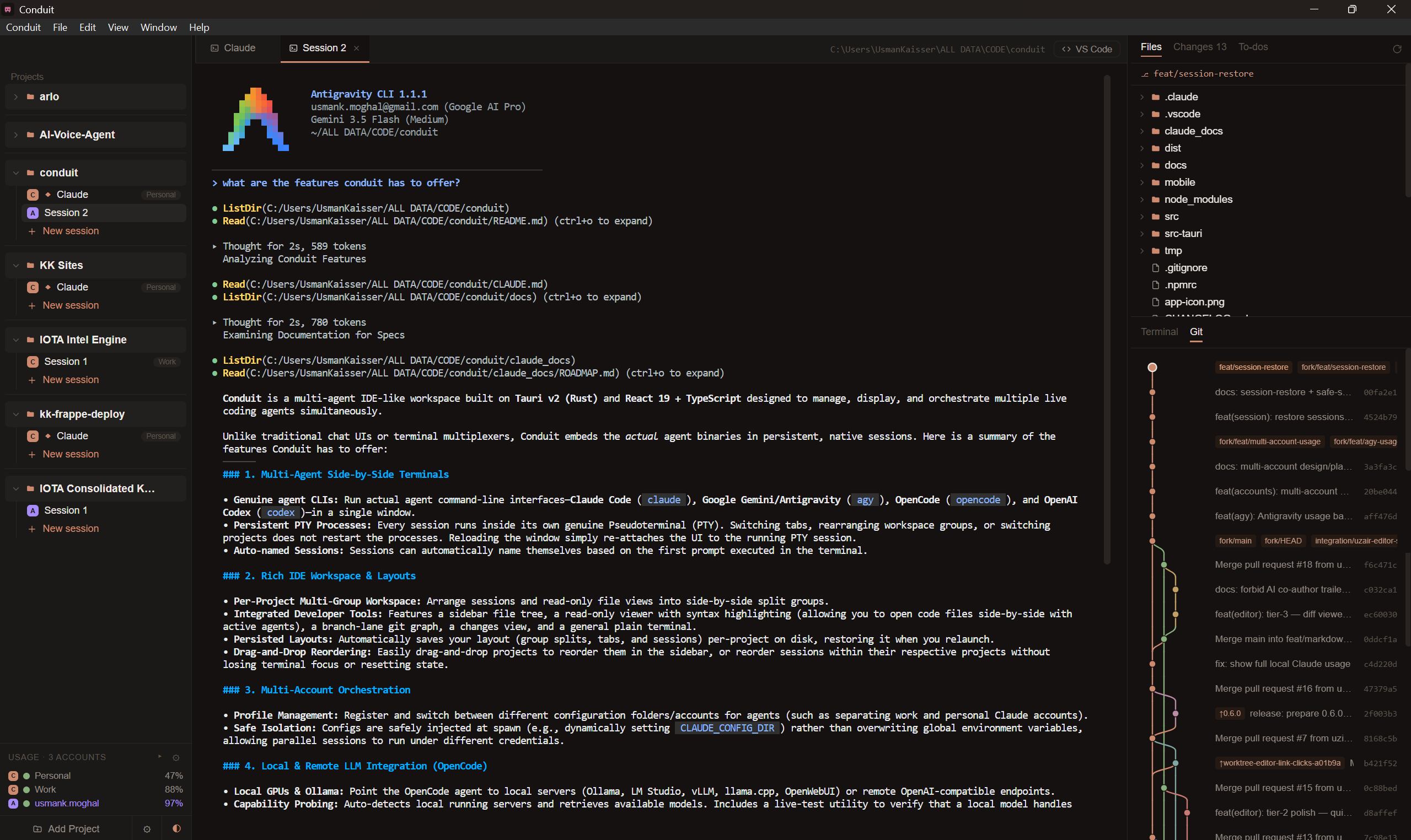
**Run multiple _real_ coding-agent terminals across your projects — Claude Code, Codex, Gemini, Antigravity, OpenCode, and Command Code, each a live CLI session — side by side in one window.**
[](./LICENSE)
[](https://tauri.app)
Not a chat UI. Not a TUI. Conduit embeds genuine agent CLIs — Claude Code, Codex,
Gemini, Antigravity, OpenCode, and Command Code — in a real PTY per session, and lets you arrange
those sessions (and real editor tabs) into side-by-side editor groups — with a file
tree, a Monaco editor, a branch-lane git graph, per-session to-dos driven by Claude
Code hooks, and a Conductor that can orchestrate the whole fleet.
## Why
Running several Claude Code sessions usually means juggling terminal tabs or
multiplexers. Conduit gives each session a real terminal _and_ an IDE-like shell
around it — projects in a sidebar, sessions as tabs, and a workspace you can split
to watch two agents work at once. Every terminal is the actual interactive `claude`
binary, so `/resume`, your `CLAUDE.md`, and the original system prompt all work
exactly as they do in a normal terminal.
> Conduit started as a native macOS SwiftUI app and was rebuilt on Tauri v2 to go
> cross-platform while keeping the native feel — it now runs on macOS and Windows.
## Features
- **Multiple agent CLIs** — run **Claude Code**, **OpenAI Codex**, **Google Gemini**,
**Google Antigravity** (`agy`), **OpenCode**, and **Command Code** side by side. Pick a
global default and override it per session; a first-run wizard and a Settings panel detect
which agents are on your `PATH` (and can one-click install the missing ones). Every
session wears its agent's own logo, ringed with what it's doing — loaded, working (a slow
pulse), needs you, or finished.
- **A multi-group workspace, across projects** — open sessions and files as tabs, then
drag a tab sideways to reorder it or onto a pane's edge to split the center into
resizable groups (or use _Open to the Side_). Drag a session straight out of the sidebar
onto a pane to split beside it — **including a session from another project**, so two
repos can sit side by side. When panes hold more than one project, every tab carries its
project's name and colour and each pane wears that colour along its top edge. Watch
**multiple live agent sessions at once**.
- **A global orchestration board** (`Cmd/Ctrl+Shift+C`) — a single canvas spanning every
project, built by hand: drag sessions onto it from the sidebar and arrange them where
they mean something (nothing is placed for you). Draw titled, coloured **sections** to
group sessions and drag a section to move everything inside it. Click or rubber-band
**select**, move several sessions at once, and **undo/redo**. An **attention rail** lists
every session waiting on you across every project, sorted by how long, with edge markers
pointing at the ones currently off screen — click either to fly the camera there. Zoom in
or out and terminals stay sharp at every level (they redraw at the zoomed size instead of
stretching a bitmap) without ever rewrapping a running agent's output; zoomed-out cards
show the session's live status, wait time, project, and context use.
- **Real terminals, kept alive** — each session runs the genuine agent CLI in a
PTY. Switching tabs, splitting groups, or switching projects never restarts it;
reloading the window re-attaches to the running process.
- **Pick up where you left off** — each project remembers its group/tab layout to
disk, and opening a project relaunches all its sessions with their conversations
resumed (Claude via `--resume`, Antigravity via `--conversation`). Quitting — or
deleting a session — while an agent is still mid-task asks for confirmation first,
and conversation history is never lost.
- **A real editor (Monaco)** — open any file from the tree and edit it in place:
save, per-tab unsaved dots with hot exit, a diff viewer, quick open, find in
files, Markdown preview, and smart reload when an agent edits a file you have
open. Manage files in the tree (create / rename / delete / drag to move), and
Cmd-click file paths in any terminal to jump straight to the line.
- **`conduit .` from your terminal** — open a project the way `code .` does, and
`conduit . --agent claude` also starts a session in it. Conduit launches first if it
isn't running. Install the command from Settings → General.
- **Branch-lane git graph**, a **Changes** view, and a per-session plain terminal.
- **Live status from agent hooks** — status dots (running / done / needs-you),
a live to-dos list, and native notifications.
- **The Conductor — orchestrate your fleet** — one session per project that you talk
to in plain language: it sees every session's live status, to-dos, and branch, can
peek at a worker's recent output, and can **spawn**, **send to**, and **stop**
workers (each isolated in its own git worktree; stopping asks you first). It
coordinates a capability-aware, cost-conscious fleet across agent types, with
project-scoped missions, structured worker handback, and mailbox notes.
- **A shared task board the fleet drives** — every project gets a Kanban board stored in its own
repo (`.conduit/board/`, git-shared with your team) and opened as a full-screen **Board** tab:
drag and add cards, while live agent sessions **claim, move, and comment** on them through
`task_*` MCP tools so a fleet coordinates without colliding. A card can opt into a **stage-gate
workflow** (discovery → requirements → UX → architecture → plan → build → verify) with inline
role briefings, human sign-off gates, and a project knowledge bundle. With **Continuity** bundled,
sessions **hand off work with context** to one another and show **live presence** on cards.
- **Multiple accounts per agent** — register any number of Claude / Antigravity
accounts (auto-discovered from your home directory, or added via a folder picker)
and assign one per session, per project, or globally; each session authenticates
as its account via config-dir redirection, so work and personal quotas never mix.
- **A unified usage panel** — every account across Claude, Antigravity, and Command Code
in one sidebar readout: local token use, subscription **plan limits** (5-hour & weekly
windows), and Antigravity's quota pools — with configurable layouts (stacked / compact
summary / low-alerts-only / selected session) and low-quota warnings. Every meter reads
the same way — how much you've **used**, matching what `claude /usage` shows — with an
_Amount left_ preference that flips the number, the bar and the summary together. An
account whose quota couldn't be read says so rather than showing a clean bill of health.
Plus Claude **service status** from
[status.claude.com](https://status.claude.com) (click for component & incident
detail, with a **warning banner** when something's degraded).
- **Local models for OpenCode** — point OpenCode at your own GPU (Ollama, LM Studio,
vLLM, llama.cpp, OpenWebUI, or any OpenAI-compatible endpoint) from
_Settings → Local models_. It auto-detects running servers, fetches their model
lists, picks the strongest tool-calling model, and can live-test that a model
really makes native tool calls before you commit a session to it. Config is
injected per session via `OPENCODE_CONFIG_CONTENT` (your `opencode.json` files are
never touched); an optional endpoint API key is held in memory only — never
written to disk.
- **Private mode trust boundaries** — mark a session sensitive (siloed) and it stays
visible on your desktop but is withheld from other agents and from remote
streaming, with read/send policy gates on the fleet tools.
- **Mobile companion** — a React Native app that shows each agent as a live chat
feed (not a terminal mirror), with per-session status and a prompt box to talk to
a session from your phone. Loopback-only by default; LAN access is opt-in and
token-gated.
- **A sidebar that scales** — collapse projects (active work stays in view), drag
and drop to reorder projects and sessions, and per-session account tags.
- **Auto-named sessions** (a tiny `claude -p` call titles a session from its first
prompt), a **shared MCP server matrix** (define a server once, toggle it per
agent), **Open in VS Code**, a native menu bar, and a warm Tokyo-Night-style
theme.
## Quick start
```bash
pnpm install
pnpm tauri dev
```
**Requirements:** [Rust](https://rustup.rs) + [Node](https://nodejs.org) (with
[pnpm](https://pnpm.io)) + at least one supported agent CLI on your `PATH` —
[`claude`](https://docs.claude.com/en/docs/claude-code), `codex`, `gemini`, `agy`, or
`opencode` (the onboarding wizard detects which are installed) — plus `git` and
`curl`. On macOS you'll also need the Xcode Command Line Tools; on Windows, the MSVC
toolchain (`rustup` `stable-x86_64-pc-windows-msvc` plus the Visual Studio C++ Build
Tools with the Windows SDK; WebView2 ships with Windows 11). Agent binaries are resolved
through your shell: a login+interactive shell on macOS/Linux (so nvm / Homebrew shims
load), or `cmd.exe` on Windows (so the `.cmd` shims resolve via `PATHEXT`).
## Build a distributable
```bash
pnpm tauri build # → src-tauri/target/release/bundle/macos/Conduit.app
```
This is an **unsigned** local build — macOS Gatekeeper will want a right-click → Open
the first time (or `xattr -dr com.apple.quarantine Conduit.app`).
A `.dmg` is opt-in (its styling step needs a GUI/Finder session, so it doesn't run in
headless/CI):
```bash
pnpm tauri build --bundles dmg
```
<details>
<summary>Universal binary & code signing / notarization</summary>
```bash
# Universal (Apple Silicon + Intel)
rustup target add x86_64-apple-darwin aarch64-apple-darwin
pnpm tauri build --target universal-apple-darwin
# Signed + notarized (needs an Apple Developer account; read from env, never committed)
export APPLE_SIGNING_IDENTITY="Developer ID Application: Your Name (TEAMID)"
export APPLE_ID="you@example.com"
export APPLE_PASSWORD="app-specific-password" # appleid.apple.com → App-Specific Passwords
export APPLE_TEAM_ID="TEAMID"
pnpm tauri build
```
The app is non-sandboxed (it spawns shells/PTYs and `git`), so no special
entitlements are required. Notifications use `osascript` and need no usage strings;
to attribute them to the app on a signed build, switch the macOS branch of
`src-tauri/src/notify.rs` to `tauri-plugin-notification`.
</details>
### Windows
One-time toolchain setup (via [winget](https://learn.microsoft.com/windows/package-manager/)):
```powershell
winget install Rustlang.Rustup
winget install Microsoft.VisualStudio.2022.BuildTools --override "--quiet --wait --add Microsoft.VisualStudio.Workload.VCTools --includeRecommended"
rustup default stable-x86_64-pc-windows-msvc
```
The default `app` bundle target is macOS-only, so pass `--bundles nsis` (a Windows `.exe`
setup) or `msi`:
```powershell
pnpm tauri build --bundles nsis # into src-tauri/target/release/bundle/nsis/Conduit_<ver>_x64-setup.exe
```
This is an **unsigned** local build, so SmartScreen may warn on first run ("More info"
then "Run anyway"). Sessions spawn through `cmd.exe`, so the agent CLIs (`claude.cmd`
and friends) just need to be on your `PATH`.
**Choosing accounts.** Register accounts (work / personal / …) in
_Settings → Agent accounts_ and assign them per session, per project, or globally —
no environment variables needed. For a headless default you can still set
`CONDUIT_CLAUDE_CONFIG_DIR` to a `.claude` folder; Conduit exports it as
`CLAUDE_CONFIG_DIR` to sessions that have no account assigned.
## Updating
From **0.5.0** onward, Conduit updates itself on macOS. It checks GitHub Releases
in the background (and on demand via **Settings → About → Check for updates**);
when a newer signed release exists, a notice offers **Install & Relaunch**.
Updates are Developer ID–signed, notarized, and minisign-verified before install.
> Because auto-update only exists from 0.5.0, existing users must download 0.5.0
> once by hand from the [Releases page](https://github.com/uziiuzair/conduit/releases).
> Every version after that updates in place.
## How it works
| Concern | Where |
| ------------------------------------------------------------- | --------------------------------------------------- |
| PTY manager — spawn / write / resize / keep-alive / re-attach | `src-tauri/src/pty.rs` |
| Project/session/account store + layout persistence (JSON) | `src-tauri/src/store.rs` |
| Agent provider adapters — per-CLI spawn / detect / hooks / MCP | `src-tauri/src/agent.rs` |
| Hook HTTP listener + per-agent hook/plugin installer | `src-tauri/src/hooks.rs` |
| Conductor fleet — status mirror + MCP tools | `src-tauri/src/fleet.rs`, `src-tauri/src/fleet_mcp.rs` |
| Task board (Kanban) — `.conduit/` files, `task_*` MCP, stage-gate | `src-tauri/src/tasks/*.rs`, `src-tauri/src/fleet_mcp.rs` |
| Continuity coordination — bundled plugin + read-only view | `src-tauri/src/continuity.rs`, `src-tauri/src/continuity_read.rs` |
| Claude **service** status (status.claude.com) | `src-tauri/src/claude_status.rs` |
| Claude **usage** — local consumption + per-account plan limits | `src-tauri/src/claude_usage.rs` |
| Antigravity **usage** — quota pools + conversation capture | `src-tauri/src/agy_usage.rs` |
| Command Code **usage** + config GUI | `src-tauri/src/commandcode_usage.rs`, `src-tauri/src/commandcode_config.rs` |
| Agent **routing** — task kind → ordered agent/model chain | `src-tauri/src/routing.rs`, `src/routing.ts` |
| Usage meter semantics (shared by the panel and the router) | `src/usageRows.ts` |
| Pure workspace-layout transforms (split/move/repair/drag) | `src/layout.ts` |
| Global orchestration board — geometry, sections, undo, attention | `src/canvas.ts`, `src/canvasHistory.ts`, `src/canvasAttention.ts`, `src/terminalZoom.ts` |
| Orchestration board UI — canvas, sections, rail/edge pips | `src/components/CanvasView.tsx`, `src/components/CanvasSection.tsx`, `src/components/CanvasRail.tsx` |
| Local LLM servers — detect / list models / tool-call probe | `src-tauri/src/local_llm.rs` |
| Mobile companion WebSocket bridge | `src-tauri/src/bridge.rs` |
| Git metadata + branch graph data | `src-tauri/src/git.rs` |
| Read/write filesystem (tree, editor, search) | `src-tauri/src/fsops.rs`, `src-tauri/src/search.rs` |
| Notifications | `src-tauri/src/notify.rs` |
| App entry, commands, window/bundle config | `src-tauri/src/lib.rs`, `src-tauri/tauri.conf.json` |
| Workspace state + Tauri command bridge | `src/store.ts` |
| Workspace UI (groups, tabs, tree, editor, graph) | `src/components/*`, `src/App.tsx` |
| Theme (palette + ANSI) | `src/theme.css`, `src/components/GitGraph.tsx` |
**The load-bearing trick:** every session's terminal is mounted once in a flat,
never-reparented stack and positioned purely by CSS (percentages derived from group
weights). That's what lets you split/move/rearrange groups — and switch projects —
without ever unmounting an `xterm` instance and killing its `claude` process. State
persists to `~/Library/Application Support/ConduitTauri/state.json`
(`%APPDATA%\ConduitTauri\state.json` on Windows).
## Tech
Tauri v2 (Rust) · React 19 + TypeScript + Vite · `@xterm/xterm` (WebGL renderer, canvas fallback) ·
`monaco-editor` · `portable-pty` · `tiny_http` (hook listener) ·
`rusqlite` (Continuity read) · `tauri-plugin-{dialog,notification,window-state}`.
## Changelog
See [CHANGELOG.md](https://github.com/arlofyi/conduit/blob/HEAD/CHANGELOG.md) for the full release history.
## Contributing
Issues and PRs welcome — see [CONTRIBUTING.md](https://github.com/arlofyi/conduit/blob/HEAD/CONTRIBUTING.md).
## License
[MIT](https://github.com/arlofyi/conduit/blob/HEAD/LICENSE) © uziiuzair



