io.github.Vrun-design/openflowkit-mcp
Local-first OpenFlowKit diagramming tools for Claude, Cursor, Windsurf & other MCP clients.
Open source Open in the app JSON README (API)
About
Local-first OpenFlowKit diagramming tools for Claude, Cursor, Windsurf & other MCP clients.
Details
- Kind
- MCP servers
- Topic
- No topic detected
- Publisher
- vrun-design
- Origin
- official
- Category
- ferramentas
- Transport
- local
- Version
- 0.1.2
- Stars
- 747
- Forks
- 160
- Open pull requests
- 7
- Last push
- 2026-08-19T02:17:10Z
- Repository state
- ativo
- Language
- TypeScript
- License
- MIT
- Added
- 2026-08-29 03:02:19
- Updated
- 2026-08-29 03:02:19
- Origin id
io.github.Vrun-design/openflowkit-mcp
README
<div align="center">
<br/>
<img src="public/favicon.svg" width="72" alt="OpenFlowKit" />
<br/>
<br/>
<h1>OpenFlowKit</h1>
<h3>The open-source diagramming studio for builders.</h3>
<p>Create flows from templates, code, structured imports, or AI. Refine them visually, keep them local-first, and export as <b>Cinematic MP4 walkthroughs</b> — or drive everything from Claude / Cursor / Windsurf via our first-party <b>MCP server</b>.</p>
<br/>
<p>
<a href="https://github.com/Vrun-design/openflowkit/blob/main/LICENSE"><img src="https://img.shields.io/badge/License-MIT-f97316.svg?style=flat-square" alt="MIT License" /></a>
<a href="https://github.com/Vrun-design/openflowkit/stargazers"><img src="https://img.shields.io/github/stars/Vrun-design/openflowkit?style=flat-square&color=facc15&label=Stars" alt="GitHub Stars" /></a>
<a href="https://github.com/Vrun-design/openflowkit/actions"><img src="https://img.shields.io/github/actions/workflow/status/Vrun-design/openflowkit/quality.yml?style=flat-square&label=CI" alt="CI" /></a>
<img src="https://img.shields.io/badge/React-19-61dafb.svg?style=flat-square" alt="React 19" />
<img src="https://img.shields.io/badge/TypeScript-5-3178c6.svg?style=flat-square" alt="TypeScript 5" />
<img src="https://img.shields.io/badge/Vite-6-646cff.svg?style=flat-square" alt="Vite 6" />
<img src="https://img.shields.io/badge/PRs-Welcome-2dd4bf.svg?style=flat-square" alt="PRs Welcome" />
</p>
<br/>
<p>
<a href="https://app.openflowkit.com"><b>→ Launch the App</b></a>
|
<a href="https://docs.openflowkit.com">Documentation</a>
|
<a href="https://openflowkit.com">Website</a>
|
<a href="https://github.com/Vrun-design/openflowkit/issues">Issues</a>
|
<a href="CONTRIBUTING.md">Contribute</a>
</p>
<br/>
<a href="https://www.producthunt.com/products/openflowkit" target="_blank">
<img src="https://api.producthunt.com/widgets/embed-image/v1/top-post-topic-badge.svg?post_id=1081019&theme=light&period=weekly&topic_id=44" alt="OpenFlowKit on Product Hunt" width="200" height="43" />
</a>
<br/>
<br/>
<img src="readme-media/GIF-OFK-F.gif" alt="OpenFlowKit in action" width="100%" />
<br/>
<br/>
<table>
<tr>
<td align="center"><b>✨ Mermaid → Icons</b><br/><sub>Paste Mermaid · 1,600+ icons<br/>auto-assigned · beautiful</sub></td>
<td align="center"><b>🤖 AI Generation</b><br/><sub>10 providers inc. local Ollama<br/>Direct-to-canvas output</sub></td>
<td align="center"><b>`{}` Diagram as Code</b><br/><sub>Bidirectional live sync<br/>Git-friendly DSL</sub></td>
<td align="center"><b>🧩 Asset Libraries</b><br/><sub>Developer · AWS · Azure<br/>GCP · CNCF · Icons</sub></td>
<td align="center"><b>🎬 Cinematic MP4</b><br/><sub>WebCodecs H.264<br/>Faster-than-realtime</sub></td>
</tr>
<tr>
<td align="center"><b>🧷 Anchored Layout</b><br/><sub>Pin nodes — auto-layout<br/>rearranges around them</sub></td>
<td align="center"><b>🪄 MCP Server</b><br/><sub>Drive from Claude Desktop,<br/>Cursor, Windsurf</sub></td>
<td align="center"><b>⚡ Worker Layout</b><br/><sub>ELK runs off main thread<br/>UI stays responsive</sub></td>
<td align="center"><b>🦙 Local AI</b><br/><sub>Ollama localhost preset<br/>fully offline diagramming</sub></td>
<td align="center"><b>♻️ Self-Correcting AI</b><br/><sub>Bad DSL → AI sees its own<br/>output and repairs it</sub></td>
</tr>
</table>
</div>
<br/>
---
## See it in action
<table>
<tr>
<td width="33%">
<img src="readme-media/Sample -GIF-1.gif" alt="OpenFlowKit demo 1" width="100%" />
</td>
<td width="33%">
<img src="readme-media/Sample -GIF-2.gif" alt="OpenFlowKit demo 2" width="100%" />
</td>
<td width="33%">
<img src="readme-media/Sample -GIF-3.gif" alt="OpenFlowKit demo 3" width="100%" />
</td>
</tr>
</table>
<br/>
---
## Why OpenFlowKit?
Every diagramming tool makes a compromise. OpenFlowKit doesn't.
| Tool | What's missing |
| ----------------------- | ----------------------------------------------------------------------------- |
| **Excalidraw / tldraw** | Freeform whiteboards — no structured diagram types, no DSL, no code imports |
| **Mermaid.js** | Code-only — no visual canvas, no AI, no interactive editor |
| **Draw.io** | Decade-old UX — Limited AI integration, no developer import pipelines |
| **Lucidchart / Miro** | Cloud lock-in — expensive, account required, your data lives on their servers |
| **PlantUML** | Server-dependent rendering — no visual editor, no local-first model |
OpenFlowKit is the **only MIT-licensed tool** that combines a real workspace home, a professional visual canvas, bidirectional diagram-as-code, AI generation from 10 providers (including fully-local Ollama), **automatic icon assignment from 1,600+ tech icons**, anchored auto-layout, hardware-encoded cinematic MP4 export, and a Model Context Protocol server so Claude / Cursor / Windsurf can drive it directly — all with zero server-side storage.
---
## Feature highlights
| | OpenFlowKit | Excalidraw | Draw.io | Mermaid | Lucidchart |
| ------------------------------------- | :---------: | :--------: | :-----: | :-----: | :--------: |
| Visual canvas editor | ✅ | ✅ | ✅ | ❌ | ✅ |
| Bidirectional diagram-as-code | ✅ | ❌ | ❌ | ✅ | ❌ |
| AI generation (10 providers + Ollama) | ✅ | ❌ | ❌ | ❌ | Limited |
| Mermaid import (8 types) | ✅ | ❌ | ⚠️ | ✅ | ❌ |
| Auto-icon assignment (1,600+) | ✅ | ❌ | ❌ | ❌ | ❌ |
| AWS / Azure / GCP / CNCF icons | ✅ | ❌ | ✅ | Partial | ✅ |
| Anchored auto-layout (pin nodes) | ✅ | ❌ | ❌ | ❌ | ❌ |
| Cinematic MP4 export (WebCodecs) | ✅ | ❌ | ❌ | ❌ | ❌ |
| Figma export (editable SVG) | ✅ | ❌ | ❌ | ❌ | ❌ |
| No account required | ✅ | ✅ | ✅ | ✅ | ❌ |
| Open source (MIT) | ✅ | ✅ | ✅ | ✅ | ❌ |
---
## Paste Mermaid → Beautiful Diagrams
Paste any Mermaid flowchart, architecture, state diagram, class diagram, ER diagram, sequence diagram, mindmap, or journey — all 8 diagram families. OpenFlowKit renders it on a visual canvas and automatically assigns the correct branded icon to every technology node.
```
flowchart TD
API[Express API] --> DB[(PostgreSQL)]
DB --> Cache[Redis Cache]
Cache --> Queue[RabbitMQ]
```
Paste this → you get the Express wordmark, PostgreSQL elephant, Redis logo, and RabbitMQ icon — all auto-detected, all beautifully laid out. No other tool does this.
**1,600+ icons** from developer, AWS, Azure, CNCF, and GCP catalogs are matched automatically based on node labels. No manual drag-and-drop. No configuration.
### How it works
1. **Paste Mermaid** on the canvas or in the code panel
2. **Semantic classifier** detects technology names (PostgreSQL, Redis, Express, Lambda, etc.)
3. **Icon matcher** searches 1,600+ icons across all catalogs — exact match, then alias, then substring
4. **Enricher** assigns colors, icons, and provider SVGs to every node
5. **ELK layout** arranges everything cleanly
### Mermaid quality gates
- `npm run test:mermaid` runs the broad Mermaid parser/plugin/round-trip gate
- `npm run test:mermaid:layout` runs the layout, import-state, and recovery corpus gate
- `npm run test:mermaid:gold` runs both together
### AI generation (API key required)
Describe your system in plain English. AI generates a diagram on the canvas with correct icons applied automatically.
| Prompt | Output |
| ----------------------------------------- | --------------------------------------- |
| "Node.js API with PostgreSQL and Redis" | 3 nodes with correct icons |
| "AWS Lambda → SQS → DynamoDB" | 3 nodes with AWS icons |
| "React frontend → Express → MongoDB → S3" | 4 nodes across developer + AWS catalogs |
10 providers supported: Google Gemini, OpenAI, Anthropic Claude, Groq, Mistral, NVIDIA NIM, Cerebras, OpenRouter, **Ollama (fully local)**, or any custom OpenAI-compatible endpoint. Bad DSL from any provider is now auto-repaired — the model sees its own broken output and the parser error, then returns corrected DSL in a single follow-up turn.
---
## Home first, editor second
OpenFlowKit now treats the product as two clear surfaces:
- **Home** for creating, opening, duplicating, importing, and organizing flows
- **Editor** for actual canvas work once a real document exists
That means the app does not create a fake default flow just to get you onto the canvas. If you delete everything, your workspace can stay empty until you intentionally create the next flow.
---
## Flowpilot — AI generation with any model
Flowpilot sits directly in the editor. Describe a system, paste source code, upload a screenshot, or ask it to refine what's already on the canvas. Your API key is stored in your browser and sent directly to the provider — OpenFlowKit's servers never see it.
**10 providers. Bring your own key. Switch any time. One runs entirely on your laptop.**
| Provider | Default model | Why use it |
| ------------------- | ------------------------------------------ | ----------------------------------------------- |
| 🦙 **Ollama (local)** | `llama3.2` | **Fully offline.** No key, no network, no cost. |
| Google Gemini | `gemini-2.5-flash-lite` | Free tier available, fast, browser-safe |
| OpenAI | `gpt-5-mini` | Best reasoning for complex architectures |
| Anthropic Claude | `claude-sonnet-4-6` | Excellent code and system understanding |
| Groq | `meta-llama/llama-4-scout-17b-16e-instruct`| Fastest open-source inference available |
| Mistral | `mistral-large-latest` | Strong European privacy-first alternative |
| NVIDIA NIM | `meta/llama-4-maverick-17b-128e-instruct` | Enterprise GPU inference |
| Cerebras | `gpt-oss-120b` | Ultra-fast on WSE-3 silicon |
| OpenRouter | `google/gemini-2.5-pro` | Access 300+ models through one key |
| **Custom endpoint** | Any model | LM Studio, vLLM, or any OpenAI-compatible API |
No proxy. No middleman. Direct browser-to-provider requests.
---
## OpenFlow DSL — diagram as code
Every diagram has a live code panel. Edit the canvas → code updates. Edit the code → canvas updates. Two-way, always in sync.
```
flowchart TB
client[React App] --> gateway[API Gateway]
gateway --> auth[Auth Service]
gateway --> orders[Orders Service]
orders --> db[(PostgreSQL)]
orders --> cache[(Redis)]
auth --> db
```
- Mermaid-compatible syntax — paste any Mermaid and it renders with auto-assigned icons
- Specify icons directly: `{ archProvider: "developer", archResourceType: "database-postgresql" }`
- Auto-icon resolution: nodes are enriched with the correct branded icon based on their label
- Export to Mermaid, PlantUML, or JSON
- Version snapshots — restore any previous state
---
## Structured diagram families
Not a freeform whiteboard. Structured diagram types with opinionated defaults, correct relationship semantics, and purpose-built node styles.
- **🔷 Flowcharts** — processes, decision trees, system flows
- **☁️ Architecture** — AWS / Azure / GCP / CNCF cloud provider icons built in
- **🗄️ Entity-Relationship** — typed fields, FK edges, one-to-many / many-to-many notation
- **📐 Class diagrams** — UML with inheritance, composition, and interface relationships
- **↔️ Sequence diagrams** — async messages, actors, and lifelines
- **🧠 Mind maps** — collapsible radial trees with auto-layout
- **🛤️ User journeys** — steps, phases, and sentiment scoring
- **⚙️ State machines** — transitions, guards, entry and exit actions
---
## Editor workflow built for technical diagrams
OpenFlowKit works best when you move between the right surfaces instead of forcing everything through one panel:
- **Toolbar add menu** for quick insert actions
- **Command Center** for templates, import, assets, search, layout, pages, layers, and design systems
- **Studio** for Flowpilot, Mermaid, OpenFlow DSL, infra parsing, and linting
- **Properties panel** for exact visual and metadata edits
Large diagrams also get better organization with multi-page documents, layers, sections, and local-first document recovery.
---
## 🎬 Cinematic Export — hardware-encoded MP4, no other OSS tool ships this
Turn any diagram into an animated video walkthrough — node by node, edge by edge — entirely in your browser. No upload, no server, no third-party tool.
Designed for architecture reviews, onboarding docs, and demos where a static image doesn't cut it.
> **No other open-source diagramming tool does this.**
On modern browsers (Chrome / Edge / Safari 16.4+ / Firefox 130+) OpenFlowKit encodes via **WebCodecs `VideoEncoder` + an in-browser MP4 muxer** — H.264 baseline, hardware-accelerated, **faster than real-time**, deterministic frame timing. No more dropped frames under load. MediaRecorder remains a fallback for older browsers, so the feature is purely additive.
---
## 🪄 MCP Server — drive OpenFlowKit from Claude Desktop, Cursor, Windsurf
Point any MCP client at the [`@vrun-design/openflowkit-mcp`](mcp-server/) package and your AI assistant gains local-first diagramming tools — no API key, no cloud round-trip. Your client already has an LLM, so OpenFlowKit MCP supplies deterministic local validation, codebase analysis, templates, icon lookup, and viewer links.
```json
{
"mcpServers": {
"openflowkit": {
"command": "npx",
"args": ["-y", "@vrun-design/openflowkit-mcp"]
}
}
}
```
Then ask Claude: *"Read the OpenFlowKit DSL cheatsheet, create a checkout flow with a promo-code branch and a Stripe webhook step, validate it, and create a viewer URL."* The DSL comes back in seconds and stays editable in OpenFlowKit.
- **8 local-first tools** — validate DSL, create viewer URLs, analyze codebases, find icon slugs, fetch starter templates, and inspect capabilities (no API key, runs on your machine)
- **5 resources** — DSL cheatsheet, template catalog, template bodies, full icon catalog, and per-provider icon catalogs
- **3 prompts** — flowchart creation, Mermaid conversion, and codebase architecture, all using the client model
- **Pure Node, zero infra cost** — runs on the user's machine, ships via npm
Full setup, tool table, and workflow details in [`mcp-server/README.md`](mcp-server/README.md).
---
## Export everywhere
Build your diagram once. Take it anywhere.
- **🎬 Cinematic WebM / MP4** — animated build walkthrough, browser-only, no upload required
- **PNG / SVG** — transparent background, pixel-perfect at any resolution
- **PDF** — print-ready, vector-crisp
- **Mermaid** — paste directly into GitHub READMEs, Notion, Confluence, Linear
- **PlantUML** — for enterprise toolchains and legacy integrations
- **Figma** — full editable SVG import with preserved layers
- **JSON** — complete round-trip import/export, no data loss
---
## Local-first by default — your data, your machine
Local-first is the default. Your saved flows live in your browser's IndexedDB. Your AI keys stay on your device — every request goes directly from your browser to the provider you chose. Exports are explicit and run entirely client-side. No accounts, no telemetry, no server-side storage.
> Real-time P2P collaboration over WebRTC exists in the codebase as an opt-in beta (set `VITE_COLLABORATION_ENABLED=true`). It is off by default while we redesign the signaling path for production reliability — the local-first experience does not depend on it.
---
## Canvas built for keyboard-first developers
| Shortcut | Action |
| ---------------- | --------------------------------------------------------- |
| `⌘ K` / `Ctrl K` | Command bar — search, import, layout, assets, and actions |
| `⌘ \` / `Ctrl \` | Toggle the live code panel |
| `⌘ Z` / `Ctrl Z` | Full undo with complete history |
| `⌘ D` / `Ctrl D` | Duplicate selection |
| `⌘ G` / `Ctrl G` | Group selected nodes |
| `P` | Pin / unpin selected nodes (anchored layout) |
| `⌘ /` / `Ctrl /` | Keyboard shortcuts reference |
Plus: smart alignment guides, snap-to-grid, multi-select, pages, layers, sections, architecture lint, light/dark/system theme, and full i18n in 7 languages.
---
## What we are improving next
Recently shipped (latest milestone):
- ✅ **WebCodecs H.264 MP4 export** — faster-than-realtime, hardware-accelerated, deterministic
- ✅ **MCP server** — `@vrun-design/openflowkit-mcp` for Claude Desktop, Cursor, Windsurf, any MCP client
- ✅ **Anchored layout** — pin nodes so auto-layout arranges around them
- ✅ **Ollama provider** — fully offline diagramming, no API key, no cost
- ✅ **AI self-correction loop** — bad DSL → AI sees its own output + parser error → returns corrected DSL
- ✅ **ELK in a Web Worker** — layout no longer blocks the UI thread
- ✅ **Flowchart corpus 12 → 20 fixtures** with explicit known-gap pinning
Current roadmap focus:
- **`render_to_svg` MCP tool** — headless SVG render so AI clients can see the diagram, not just code
- **GIF export for cinematic animations** — MP4 ships today; GIF export for zero-conversion embeds is next
- **Mermaid family coverage** — gantt, c4, timeline, gitGraph, sankey, quadrant (view + edit-as-code)
- **Mac / Linux / Windows desktop app** — Tauri shell wrapping the existing web app
- better layers and page workflows for larger technical diagrams
- smarter auto-layout defaults with less cleanup after import
- performance boosts for bigger canvases and heavier sessions
---
## Get started in 30 seconds
```bash
git clone https://github.com/Vrun-design/openflowkit.git
cd openflowkit
npm install
npm run dev
```
Open [http://localhost:5173](http://localhost:5173). Done.
> **Zero environment variables required.** AI provider keys are configured in the in-app settings panel at runtime — nothing goes in `.env`.
---
## Self-host
OpenFlowKit is a pure static SPA. There is no backend. Deploy the `dist/` folder anywhere that serves HTML.
**Cloudflare Pages / Netlify / Vercel:**
```bash
npm run build
# upload dist/ to your provider
```
**Docker:**
```bash
docker build -t openflowkit .
docker run --rm -p 3045:3045 openflowkit
```
Open [http://localhost:3045](http://localhost:3045). The container serves the production build with nginx, SPA route fallback, long-lived caching for hashed assets, and the same security headers used by the static hosting path.
No database. No secrets. No infrastructure. One folder, or one container.
---
## Tech stack
| Layer | Technology |
| ------------- | --------------------------------------------------------- |
| Framework | React 19 + TypeScript 5 |
| Build | Vite 6 |
| Canvas | React Flow (XYFlow) |
| Auto-layout | ELK.js — runs in a Web Worker, off the main thread |
| Video export | WebCodecs `VideoEncoder` + `mp4-muxer` (MediaRecorder fallback) |
| State | Zustand |
| Storage | IndexedDB — local-first, no backend |
| Styling | Tailwind CSS |
| Agent surface | `@vrun-design/openflowkit-mcp` — Model Context Protocol stdio |
| Collaboration | WebRTC P2P (opt-in, off by default) |
| i18n | react-i18next — 7 languages |
| Testing | Vitest + Playwright |
---
## Contributing
All contributions are welcome — bug fixes, new diagram types, parser improvements, translations, and documentation.
Start here:
```bash
npm run dev # development server at localhost:5173
npm run test # unit tests via Vitest
npm run test:e2e # end-to-end tests via Playwright
npm run lint # ESLint + TypeScript type-check
```
**Good first issues** are tagged [`good first issue`](https://github.com/Vrun-design/openflowkit/labels/good%20first%20issue). Before opening a PR, please read [CONTRIBUTING.md](CONTRIBUTING.md).
---
<div align="center">
<br/>
**OpenFlowKit** is [MIT licensed](LICENSE), locally hosted, and built in the open.<br/>
No cloud required. No account required. No lock-in.
<br/>
| | | | |
| :----------------------------------------------------------------------------------------: | :--------------------------------------------------------------------------------------------------: | :------------------------------------: | :------------------------------------------------------------------: |
| [**→ Launch App**](https://app.openflowkit.com) | [**Docs**](https://docs.openflowkit.com) | [**Website**](https://openflowkit.com) | [**Changelog**](https://github.com/Vrun-design/openflowkit/releases) |
| [Bug Report](https://github.com/Vrun-design/openflowkit/issues/new?template=bug_report.md) | [Feature Request](https://github.com/Vrun-design/openflowkit/issues/new?template=feature_request.md) | [Contributing Guide](CONTRIBUTING.md) | [Security Policy](SECURITY.md) |
<br/>
---
<br/>
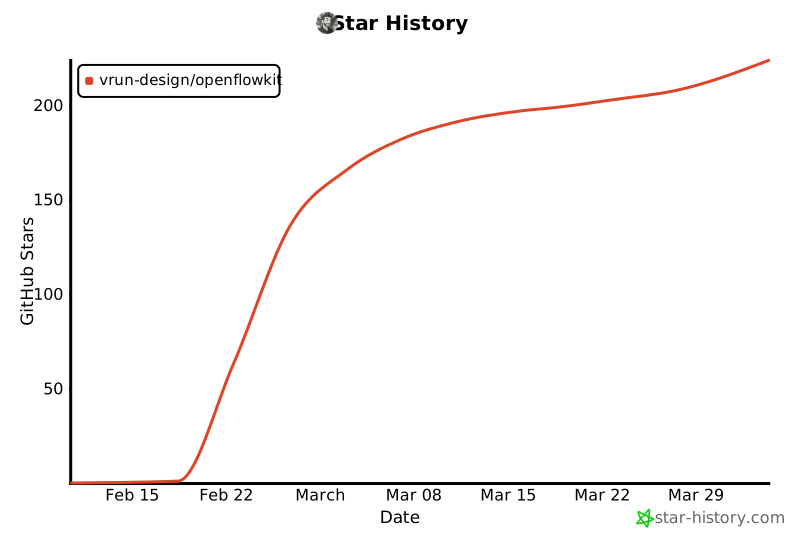
**[If OpenFlowKit saves you time, the most impactful thing you can do is give it a star.](https://github.com/Vrun-design/openflowkit/stargazers)**<br/>
**[It helps other developers find the project.](https://github.com/Vrun-design/openflowkit/stargazers)**
<br/>
[](https://github.com/Vrun-design/openflowkit/stargazers)
<br/>
[](https://star-history.com/#Vrun-design/openflowkit&Date)
<br/>
<sub>
React 19 · TypeScript 5 · Vite 6 · XYFlow · ELK.js (worker) · WebCodecs + mp4-muxer · MCP SDK · Zustand · Yjs · Framer Motion · Tailwind CSS · Cloudflare Pages
</sub>
<br/>
<sub>
MIT Licensed · Local-first · No telemetry · No account · No server-side storage · No lock-in
</sub>
<br/>
</div>