cli2mcp
Wrap any CLI as a Model Context Protocol server - schema auto-inferred from --help.
Open source Open in the app JSON README (API)
About
Wrap any CLI as a Model Context Protocol server - schema auto-inferred from --help.
Details
- Kind
- MCP servers
- Topic
- AI, RAG & memory
- Publisher
- ronieneubauer
- Origin
- official
- Category
- ferramentas
- Transport
- local
- Version
- 0.1.4
- Stars
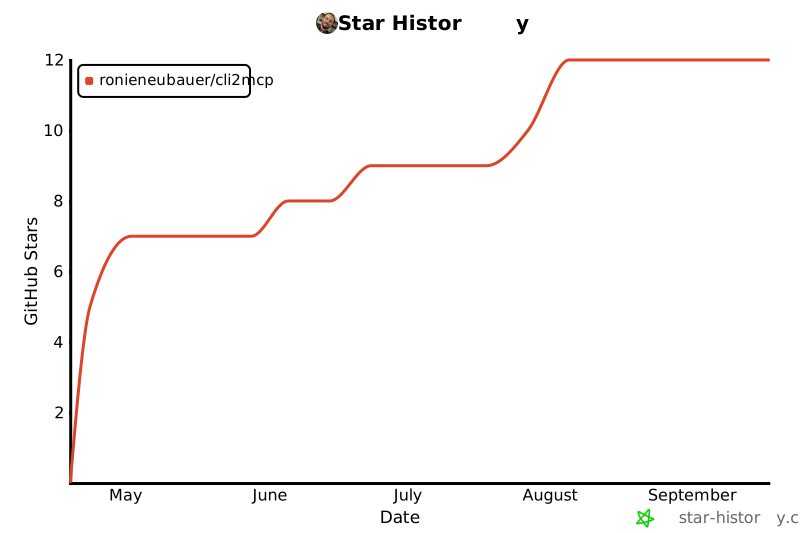
- 12
- Open pull requests
- 1
- Last push
- 2026-04-29T22:50:11Z
- Repository state
- ativo
- Language
- TypeScript
- License
- MIT
- Added
- 2026-08-29 03:02:12
- Updated
- 2026-08-29 03:02:12
- Origin id
io.github.RonieNeubauer/cli2mcp
README
# cli2mcp
[](https://www.npmjs.com/package/cli2mcp)
[](https://www.npmjs.com/package/cli2mcp)
[](https://github.com/RonieNeubauer/cli2mcp/actions)
[](https://nodejs.org)
[](LICENSE)
> **Status:** v0.1 — early release. Stdio transport only. APIs may change before 1.0.
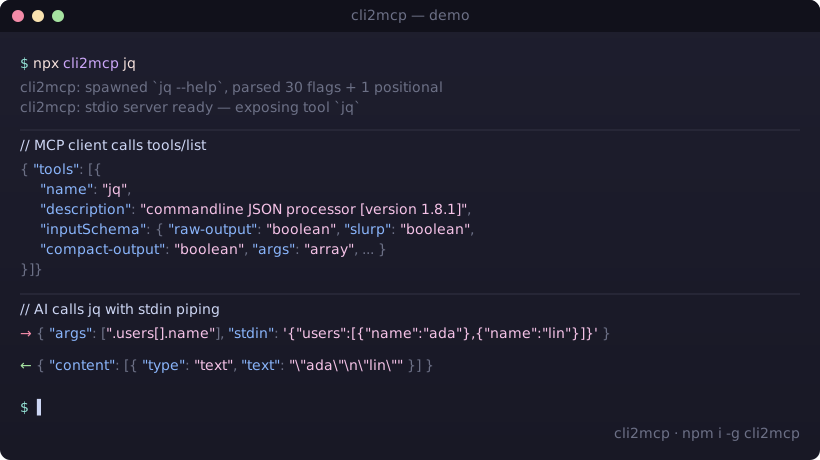
Expose any command-line binary as a [Model Context Protocol](https://modelcontextprotocol.io) tool by parsing its `--help` output and synthesizing a JSON Schema at startup. One command, no boilerplate.
Works with **any MCP-compatible client** — Claude Desktop, ChatGPT (via OpenAI Agents SDK), Cursor, Gemini CLI, Cline, Windsurf, Continue, Zed, and anything else that speaks the [MCP stdio transport](https://modelcontextprotocol.io/specification/2025-11-25/basic/transports#stdio).
```sh
npx cli2mcp <command>
```
---
## Why
Writing an MCP server for a CLI you already have is mechanical work: instantiate the SDK, register a tool, hand-write the input schema, marshal arguments, spawn the subprocess, format the output. Roughly 80–150 lines of TypeScript per binary, repeated forever as new tools come out.
`cli2mcp` does it in one command. The CLI's own `--help` is the source of truth for the schema — if `rg` adds a flag tomorrow, the AI sees it tomorrow without code changes.
---
## Install
```sh
npm install -g cli2mcp
# or invoke without installing
npx cli2mcp <command>
```
Requires Node.js 22+.
---
## Configure your MCP client
`cli2mcp` is launched by your client as a stdio subprocess. Add an entry per CLI you want to expose.
### Claude Desktop
Config file location:
| OS | Path |
|---|---|
| macOS | `~/Library/Application Support/Claude/claude_desktop_config.json` |
| Windows | `%APPDATA%\Claude\claude_desktop_config.json` |
| Linux | `~/.config/Claude/claude_desktop_config.json` |
```json
{
"mcpServers": {
"ripgrep": {
"command": "npx",
"args": ["-y", "cli2mcp", "rg", "--name", "ripgrep"]
},
"jq": {
"command": "npx",
"args": ["-y", "cli2mcp", "jq"]
}
}
}
```
Restart Claude Desktop after editing.
### Other clients
| Client | Config file | Format |
|---|---|---|
| ChatGPT (OpenAI Agents SDK) | `MCPServerStdio` parameter — see [OpenAI Agents docs](https://openai.github.io/openai-agents-python/mcp/) | `command: "npx"`, `args: ["-y", "cli2mcp", "<cli>"]` |
| Cursor | `.cursor/mcp.json` (project) or `~/.cursor/mcp.json` (global) | Same `mcpServers` block as above |
| Cline | VS Code → Cline → MCP Settings → `cline_mcp_settings.json` | Same `mcpServers` block |
| Windsurf | `~/.codeium/windsurf/mcp_config.json` | Same `mcpServers` block |
| Gemini CLI | `~/.gemini/settings.json` | Same `mcpServers` block |
| Continue | `~/.continue/config.json` → `experimental.modelContextProtocolServers` | Same launcher |
| Zed | `~/.config/zed/settings.json` → `context_servers` | Same launcher |
| Any stdio-capable MCP client | per the client's docs | Same launcher: `npx -y cli2mcp <command>` |
Refer to each client's documentation for the exact config path on your platform — they evolve and are not guaranteed to match the table above.
---
## Quick wins — copy-paste configs
Drop any of these into your client's `mcpServers` block (paths shown above per client). Each one wraps a popular CLI as an MCP tool an AI can call directly.
```json
{
"mcpServers": {
"ripgrep": {
"command": "npx",
"args": ["-y", "cli2mcp", "rg", "--name", "ripgrep",
"--description", "Recursively search files with regex"]
},
"jq": {
"command": "npx",
"args": ["-y", "cli2mcp", "jq",
"--description", "Query and transform JSON via stdin"]
},
"pandoc": {
"command": "npx",
"args": ["-y", "cli2mcp", "pandoc",
"--description", "Convert documents between markup formats"]
},
"sqlite3": {
"command": "npx",
"args": ["-y", "cli2mcp", "sqlite3",
"--description", "Run SQL against a SQLite database file",
"--cwd", "/path/to/safe/dir"]
},
"yt-dlp": {
"command": "npx",
"args": ["-y", "cli2mcp", "yt-dlp",
"--description", "Download media from URLs",
"--cwd", "/path/to/downloads",
"--timeout", "300000"]
}
}
}
```
> Each CLI must already be installed and on `PATH`. `cli2mcp` does not install them for you.
---
## How it compares
| Approach | LOC per CLI | New flag handling | Maintenance |
|---|---|---|---|
| Hand-written MCP server (TypeScript SDK) | ~80–150 | manual schema edit | per-CLI release cycle |
| OpenAPI → MCP generators | n/a | requires an OpenAPI spec | does not cover arbitrary CLIs |
| Wrapping `bash` / `sh` as a tool | ~10 | n/a — gives the AI a shell | unsafe, no schema, no sandbox |
| **`cli2mcp <command>`** | **0** | **automatic at next start** | **none — re-reads `--help`** |
The closest neighbor is FastMCP's `from_openapi` — it does not cover arbitrary CLI binaries. As of April 2026 there is no other published tool that turns an arbitrary `--help` output into a typed MCP tool in one command.
---
## Verified targets
These CLIs are covered by the test suite or have been manually exercised end-to-end:
| CLI | Status | Notes |
|---|---|---|
| `jq` | ✅ tested | help-on-stderr correctly captured; `stdin` piping works |
| `ripgrep` (`rg`) | ✅ tested | 90+ flags inferred; `args` positional handled |
| `curl` | ✅ fixture | shape extraction validated against bundled fixture |
| `node` | ✅ integration test | end-to-end MCP handshake + `tools/call` |
Other POSIX-style CLIs (e.g. `ffmpeg`, `yt-dlp`, `pandoc`, `sqlite3`, `imagemagick`) are *expected* to work but are not yet covered by tests. Report bugs in [issues](https://github.com/RonieNeubauer/cli2mcp/issues).
---
## How --help becomes a JSON Schema
| Help fragment | MCP property |
|---|---|
| `--flag` | `boolean` |
| `--flag <value>` / `<file>` / `<path>` | `string` |
| `--flag <n>` / `<ms>` / `<size>` | `number` |
| `--flag <a\|b\|c>` | `string` enum with choices |
| Repeatable flag | `array<string>` |
| Positional args | `args: array<string>` |
| Reserved input `stdin` | `string` piped to subprocess stdin |
When parsing fails on an unconventional `--help`, `cli2mcp` falls back to a single variadic `args` positional so the tool is still usable — the model just gets a free-form argument list instead of typed flags.
---
## Options
```
cli2mcp <command> [options]
--name <name> Tool name shown to the AI (default: <command>)
--description <text> Tool description shown to the AI (default: first --help line)
--timeout <ms> Subprocess timeout per call (default: 60000)
--cwd <path> Working directory for subprocess (default: process.cwd())
--env <KEY=VALUE> Extra environment variables (repeatable)
--stderr <mode> stderr handling:
include → appended to tool output (default)
drop → discarded
error → any stderr → isError: true
-h, --help Show help
```
### Piping stdin
Reserved input property `stdin` is piped to the subprocess:
```json
{ "args": [".name"], "stdin": "{\"name\": \"cli2mcp\"}" }
```
---
## How it works
```
cli2mcp rg
│
├─ 1. spawn: rg --help → capture stdout + stderr
├─ 2. parse help text → CliShape { flags, positionals, description }
├─ 3. synthesize JSON Schema → inputSchema
├─ 4. register one MCP tool → name: "rg", schema: <above>
└─ 5. start stdio MCP server → await client connection
On tools/call:
{ args, flags, stdin? } → argv builder → execa(rg, argv, { stdin })
│
stdout (+ stderr) → content[text]
```
Non-zero exit → `{ isError: true, content: [{ type: "text", text: <stderr> }] }` (unless `--stderr drop`).
---
## Security
`cli2mcp` lets an AI agent invoke the CLIs you expose, with the arguments the agent chooses. **You are responsible for what those CLIs can do on your machine.**
Practical guidance:
- **Only expose CLIs whose blast radius you accept.** `jq`, `rg`, `pandoc` are mostly safe (read-only, deterministic). `curl`, `ffmpeg --output`, `sqlite3`, `rm`, `kubectl`, `aws` are not.
- **The AI is not sandboxed.** A prompt injection attack could cause an exposed `curl` to fetch `evil.example.com`, an exposed `rm` to delete files, etc.
- **Use `--cwd` to constrain filesystem scope** when wrapping CLIs that touch files.
- **Use `--env` deliberately.** Do not pass through credentials the model shouldn't reach.
- **Never expose `sh`, `bash`, `zsh`, `python -c`, or anything with eval semantics** — that bypasses every safeguard `cli2mcp` provides.
The schema-from-help design *reduces* the risk of malformed argv but does **not** eliminate the risk of misuse. Treat each exposed CLI as a delegated capability, not a sandbox.
---
## Troubleshooting
**The CLI has no `--help` flag.**
`cli2mcp` will still start with a single `args` positional. The AI can pass arguments freely; you lose typed flag inference.
**The schema came out empty / wrong.**
Run `cli2mcp <command>` manually and inspect the `tools/list` response (use `npx @modelcontextprotocol/inspector`). The most common cause is non-standard help formatting (no `--long-form` flags, columns misaligned). Open an issue with the `<command> --help` output attached.
**The subprocess hangs.**
The default 60s timeout will kill it. Raise via `--timeout`. If your CLI is interactive (waits for a TTY), `cli2mcp` cannot help — pipe input via `stdin` instead.
**Flag not being passed.**
Set `--stderr include` (the default) and inspect the `content[].text`. If the flag isn't appearing in argv, the help parser failed to extract it — file an issue.
---
## Contributing
Bug reports and patches welcome. Fixtures for new CLIs (`test/fixtures/help/<cli>.txt` + a shape test) are the highest-leverage contributions.
```sh
pnpm install
pnpm test # vitest
pnpm typecheck # tsc --noEmit
pnpm lint # biome check
```
---
## Star history
[](https://star-history.com/#RonieNeubauer/cli2mcp&Date)
If `cli2mcp` saved you an afternoon of writing MCP boilerplate, a star helps other people find it.
---
## Author
Built by **Ronie Neubauer** — Principal Engineer, 22+ years shipping production systems.
- GitHub: [@RonieNeubauer](https://github.com/RonieNeubauer)
- Blog: [ronieneubauer.com](https://ronieneubauer.com)
- Issues & ideas: [github.com/RonieNeubauer/cli2mcp/discussions](https://github.com/RonieNeubauer/cli2mcp/discussions)
---
## License
MIT © 2026 Ronie Neubauer.