PDFCrowd PDF Export
Create polished, professional PDFs from a single prompt. Documentation, reports, charts, and more.
Open source Open in the app JSON README (API)
About
Create polished, professional PDFs from a single prompt. Documentation, reports, charts, and more.
Details
- Kind
- MCP servers
- Topic
- Files & documents
- Publisher
- pdfcrowd
- Origin
- official
- Category
- ferramentas
- Transport
- local
- Version
- 1.2.2
- Stars
- 1
- Last push
- 2026-02-20T15:07:02Z
- Repository state
- ativo
- Language
- TypeScript
- License
- MIT
- Added
- 2026-08-29 04:01:00
- Updated
- 2026-08-29 04:01:00
- Origin id
io.github.pdfcrowd/pdfcrowd-mcp-pdf-export
README
[](https://claude.ai/download)
[](https://github.com/openai/codex)
[](https://github.com/google-gemini/gemini-cli)
[](https://www.npmjs.com/package/pdfcrowd-mcp-pdf-export)
# PDF Export for AI Agents
Well-designed PDFs from a single prompt. Describe what you need, get a professional document.
Powered by [PDFCrowd](https://pdfcrowd.com). [Learn more →](https://pdfcrowd.com/mcp-pdf-export/)
## Example
```
Analyze this project and create a comprehensive architecture overview PDF.
Include component diagrams and data flow. Save to architecture-overview.pdf
```
[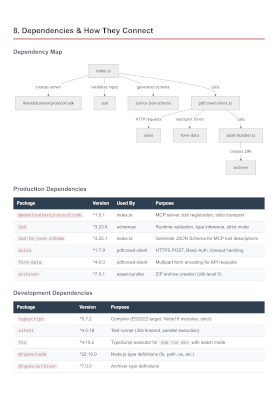](https://raw.githubusercontent.com/pdfcrowd/pdfcrowd-mcp-pdf-export/master/assets/architecture-overview.pdf)
[More examples →](https://pdfcrowd.com/mcp-pdf-export/)
## Configuration
**Prerequisites:** [Node.js](https://nodejs.org/) 18 or later.
### Claude Code
**Option A — Install as a plugin (Recommended):**
```
/plugin marketplace add pdfcrowd/pdfcrowd-mcp-pdf-export
/plugin install pdfcrowd-export-pdf@pdfcrowd
```
**Option B — Register the MCP server:**
```
claude mcp add --scope user pdfcrowd-export-pdf -- npx -y pdfcrowd-mcp-pdf-export
```
Or add the equivalent JSON to `~/.claude.json` (user scope) or `.mcp.json` (project scope):
```json
{
"mcpServers": {
"pdfcrowd-export-pdf": {
"command": "npx",
"args": ["-y", "pdfcrowd-mcp-pdf-export"]
}
}
}
```
### Codex CLI
```
codex mcp add pdfcrowd-export-pdf -- npx -y pdfcrowd-mcp-pdf-export
```
Or add manually to `~/.codex/config.toml`:
```toml
[mcp_servers.pdfcrowd-export-pdf]
command = "npx"
args = ["-y", "pdfcrowd-mcp-pdf-export"]
```
### Gemini CLI
```
gemini mcp add -s user pdfcrowd-export-pdf npx -y pdfcrowd-mcp-pdf-export
```
Or add manually to `~/.gemini/settings.json`:
```json
{
"mcpServers": {
"pdfcrowd-export-pdf": {
"command": "npx",
"args": ["-y", "pdfcrowd-mcp-pdf-export"]
}
}
}
```
### Notes
- Restart your CLI after configuration to load the server
## Personal Credentials
Get started right away — no credentials or signup needed. Output includes a watermark. For watermark-free PDFs, [sign up](https://pdfcrowd.com/pricing/) for personal credentials.
Personal credentials can be set in:
1. **Config file** `~/.pdfcrowd-mcp`:
```
PDFCROWD_USERNAME=your_username
PDFCROWD_API_KEY=your_api_key
```
2. **Environment variables** `PDFCROWD_USERNAME` and `PDFCROWD_API_KEY`.
## Privacy
Your source code never leaves your machine — only the rendered document is sent to [PDFCrowd](https://pdfcrowd.com/privacy/) for PDF conversion.
## License
[MIT](LICENSE)