io.github.JustasMonkev/mcp-accessibility-scanner
MCP server for automated web accessibility scanning with Playwright and Axe-core.
Open source Open in the app JSON README (API)
About
MCP server for automated web accessibility scanning with Playwright and Axe-core.
Details
- Kind
- MCP servers
- Topic
- Web search, scraping & browser
- Publisher
- justasmonkev
- Origin
- official
- Category
- ferramentas
- Transport
- local
- Version
- 1.1.1
- Stars
- 56
- Forks
- 15
- Open pull requests
- 1
- Last push
- 2026-09-06T08:05:25Z
- Repository state
- ativo
- Language
- TypeScript
- License
- MIT
- Added
- 2026-08-29 03:02:00
- Updated
- 2026-08-29 03:02:00
- Origin id
io.github.JustasMonkev/mcp-accessibility-scanner
README
# MCP Accessibility Scanner 🔍
[](https://mcptoplist.com/server/io.github.JustasMonkev%2Fmcp-accessibility-scanner)
## Star History
[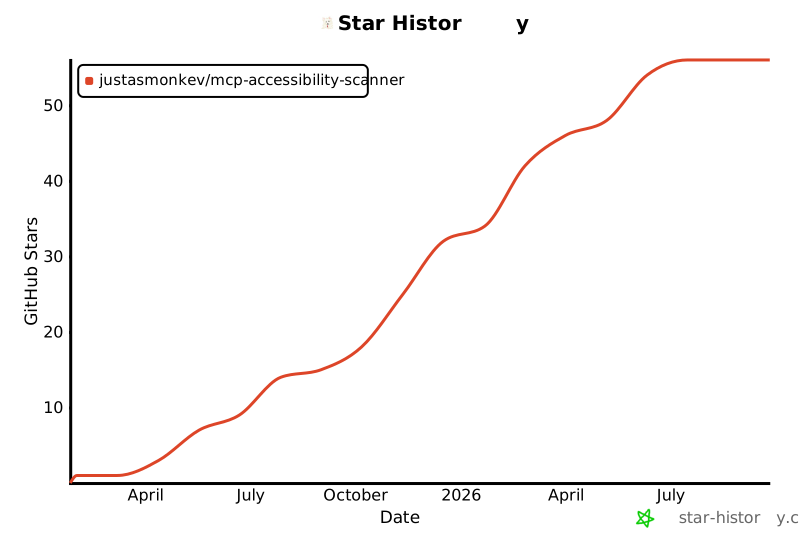](https://api.star-history.com/svg?repos=justasmonkev%2Fmcp-accessibility-scanner&type=Date)
[](https://mseep.ai/app/justasmonkev-mcp-accessibility-scanner)
A powerful Model Context Protocol (MCP) server that provides automated web accessibility scanning and browser automation using Playwright and Axe-core. This server enables LLMs to perform WCAG compliance checks, interact with web pages, manage persistent browser sessions, and generate detailed accessibility reports with visual annotations.
## Features
### Accessibility Scanning
✅ Full WCAG 2.0/2.1/2.2 compliance checking (A, AA, AAA levels)
📄 Detailed JSON reports with remediation guidance
🎯 Support for specific violation categories (color contrast, ARIA, forms, keyboard navigation, etc.)
### Browser Automation
🖱️ Click, hover, and drag elements using accessibility snapshots
⌨️ Type text and handle keyboard inputs
🔍 Capture page snapshots to discover all interactive elements
📸 Take screenshots and save PDFs
🎯 Support for both element-based and coordinate-based interactions
### Advanced Features
📑 Tab management for multi-page workflows
🌐 Monitor console messages and network requests
⏱️ Wait for dynamic content to load
📁 Handle file uploads and browser dialogs
🔄 Navigate through browser history
## Installation
You can install the package using any of these methods:
Using npm:
```bash
npm install -g mcp-accessibility-scanner
```
### Installation with Docker
A pre-built image is available on Docker Hub. The image includes Chromium and is pre-configured for containerized use — no extra flags needed.
**Pull from Docker Hub:**
```bash
docker pull justasmonkev/mcp-accessibility-scanner
```
#### Claude Code
```bash
claude mcp add mcp-accessibility-scanner -s user -- docker run -i --rm justasmonkev/mcp-accessibility-scanner
```
To persist screenshots and reports on your host, add a volume mount:
```bash
claude mcp add mcp-accessibility-scanner -s user \
-- docker run -i --rm -v /tmp/mcp-output:/app/output justasmonkev/mcp-accessibility-scanner
```
Without the `-v` mount, output files only exist inside the container and are lost when it exits.
#### Docker Compose
```bash
docker compose up -d
```
The Compose configuration publishes the unauthenticated MCP HTTP transport on `127.0.0.1:8931` only. Do not expose this port to untrusted networks.
#### Build from source
```bash
docker build -t mcp-accessibility-scanner .
```
#### Docker smoke test
```bash
npm run test:docker
```
### Installation in VS Code
Install the Accessibility Scanner in VS Code using the VS Code CLI:
For VS Code:
```bash
code --add-mcp '{"name":"accessibility-scanner","command":"npx","args":["mcp-accessibility-scanner"]}'
```
For VS Code Insiders:
```bash
code-insiders --add-mcp '{"name":"accessibility-scanner","command":"npx","args":["mcp-accessibility-scanner"]}'
```
## CLI Modes
The scanner can run in two modes depending on how you use it.
### MCP server (default, no subcommand)
When launched without a subcommand, the process starts an MCP server that communicates over stdio. This is the mode used by MCP clients such as Claude Desktop, VS Code, and Claude Code -- you should never need to run it by hand.
```bash
npx mcp-accessibility-scanner # starts the MCP server (stdio)
```
All of the MCP client configuration examples in this README already use this default mode.
### Interactive REPL (`interactive` subcommand)
For manual terminal use, the `interactive` subcommand starts a readline REPL where you can call any tool directly:
```bash
$ npx mcp-accessibility-scanner interactive
Interactive mode. Type "<tool-name> <json>" to call a tool. Ctrl+D to exit.
> browser_navigate {"url": "https://example.com"}
> scan_page {"violationsTag": ["wcag21aa"]}
> audit_keyboard {"maxTabs": 30}
> audit_screen_reader {}
```
Each line is `<tool-name> <json-arguments>`. Omit the JSON to pass `{}`.
Global browser connection flags still apply here, for example `npx mcp-accessibility-scanner --headless interactive`.
Use `--mobile` or `PLAYWRIGHT_MCP_MOBILE=1` to emulate a generic mobile device (`Pixel 10` for Chromium, `iPhone 17` for WebKit). It cannot be combined with `--device`, CDP attach/launch modes, remote browser endpoints, or `--extension`.
### Browser extension mode
Use `--extension` to connect through the current [Playwright Extension](https://github.com/microsoft/playwright/blob/main/packages/extension/README.md), which must support extension protocol v2.
```bash
npx mcp-accessibility-scanner --extension
```
Set `PLAYWRIGHT_MCP_EXTENSION_TOKEN` to the token shown by the extension to bypass the connection approval dialog. The relay's CDP WebSocket endpoint always requires a separate random token, generated per relay and appended automatically for the server's own connection. This CDP token is never passed in Chrome's launch arguments or extension URL; the extension approval token cannot authenticate a CDP client.
Token-bypass connections are not background-safe: Chrome focuses the connection tab and window, and client-created tabs remain open after disconnect ([upstream limitation](https://github.com/microsoft/playwright/issues/42343)).
With a token, the extension must connect and finish setup within 30 seconds after the connection page opens. Failed attempts release the relay so the next tool call can retry. Without a token, manual approval waits until you approve or cancel the call.
When `--user-data-dir` contains multiple Chrome profiles, the profile with the extension installed is selected automatically, preferring Chrome's last-used profile.
### Discovering available tools (`list-tools` subcommand)
To print every tool name and its description:
```bash
npx mcp-accessibility-scanner list-tools
```
> **Note:** Tool names like `browser_navigate` and `scan_page` are MCP tool identifiers (and REPL commands in interactive mode). They are not shell subcommands -- you cannot run `npx mcp-accessibility-scanner browser_navigate`.
## Configuration
Here's the Claude Desktop configuration:
```json
{
"mcpServers": {
"accessibility-scanner": {
"command": "npx",
"args": ["-y", "mcp-accessibility-scanner"]
}
}
}
```
### Advanced Configuration
You can pass a configuration file to customize Playwright behavior:
```json
{
"mcpServers": {
"accessibility-scanner": {
"command": "npx",
"args": ["-y", "mcp-accessibility-scanner", "--config", "/path/to/config.json"]
}
}
}
```
#### Configuration Options
Create a `config.json` file with the following options:
```json
{
"browser": {
"browserName": "chromium",
"launchOptions": {
"headless": true,
"channel": "chrome"
},
"cdpLaunch": {
"command": "open",
"args": ["-a", "Slack", "--args", "--remote-debugging-port={port}"],
"startupTimeoutMs": 30000
}
},
"timeouts": {
"navigationTimeout": 60000,
"defaultTimeout": 5000,
"settle": 500
},
"network": {
"allowedOrigins": ["example.com", "trusted-site.com"],
"blockedOrigins": ["ads.example.com"]
},
"snapshot": {
"boxes": true
}
}
```
**Available Options:**
- `browser.browserName`: Browser to use (`chromium`, `firefox`, `webkit`)
- `browser.allowedUploadDirs`: Restrict files sent by `browser_file_upload` and `browser_drop` to regular files inside these directories, including resolved symlink targets. Restricted uploads and drops use a checked file handle and accept up to 50 MiB total per call. Unset allows any path; `[]` denies all file uploads and drops (text-only drops still work). Blank list entries are rejected. CLI: `--allowed-upload-dirs` (semicolon-separated; `""` denies all), env: `PLAYWRIGHT_MCP_ALLOWED_UPLOAD_DIRS` (empty string denies all).
The list must be an array, not `null`. Roots must exist at startup: their canonical paths are resolved once and retained for the server's lifetime, so retargeting a configured symlink does not grant access to a new tree. Non-empty upload allowlists require macOS or Linux with `/proc/self/fd` available. macOS blocks ancestor symlinks during the file open; Linux checks the opened descriptor's path. Other platforms reject restricted file uploads and drops rather than rely on race-prone pathname checks. Unrestricted uploads, deny-all lists, and text-only drops keep working on all platforms.
- `browser.launchOptions.headless`: Run browser in headless mode (default: `true` on Linux without display, `false` otherwise)
- `browser.launchOptions.channel`: Browser channel (`chrome`, `chrome-beta`, `msedge`, etc.)
- `browser.launchOptions.chromiumSandbox`: Defaults to `false` for downloaded Chromium builds on Linux because they lack the setuid sandbox helper, and `true` otherwise. Remote and VS Code endpoints choose on the remote host. An explicit config or `PLAYWRIGHT_MCP_SANDBOX` value wins; `--no-sandbox` always disables it.
- `browser.cdpEndpoint`: Attach to an already-running Chromium-family app with CDP enabled
- `browser.cdpHeaders`: Map of HTTP headers to send with the CDP connect request, e.g. `{ "Authorization": "Bearer <token>" }`, for endpoints that require header-based authentication
- `browser.cdpTimeout`: Maximum time in milliseconds to wait when connecting to the CDP endpoint (default: `30000`)
- `browser.cdpLaunch`: Launch a Chromium-family desktop app with CDP enabled, wait for the endpoint, and manage the child process lifecycle
- CDP attach modes preserve the target browser's existing default-context settings instead of applying Playwright's defaults.
- `browser.contextOptions.storageState`: Start each session from a recorded Playwright storage state; applied in every mode except `--extension` (fresh contexts receive it at creation, reused contexts via `setStorageState()`). Sessions that share one reused context (non-isolated CDP modes) get the state applied once per context — a session joining a live context inherits its current state, not a fresh copy of the file; see [Auditing pages behind a login](#auditing-pages-behind-a-login)
- `timeouts.navigationTimeout`: Maximum time for page navigation in milliseconds (default: `60000`)
- `timeouts.defaultTimeout`: Default timeout for Playwright operations in milliseconds (default: `5000`)
- `timeouts.settle`: How long to wait after every action before responding (default: `500`). An action that finishes quietly is first watched for up to 100ms (or the settle delay, whichever is shorter) so scheduled network work can still be awaited before the settle delay.
- `network.allowedOrigins`: List of origins to allow (blocks all others if specified)
- `network.blockedOrigins`: List of origins to block
- `snapshot.boxes`: Include each element's viewport-relative bounding box as `[box=x,y,width,height]` in snapshots (default: `false`; CLI: `--snapshot-boxes`, env: `PLAYWRIGHT_MCP_SNAPSHOT_BOXES=1`)
- `server.authToken`: When set, Streamable HTTP requests (`--port`) require `Authorization: Bearer <token>` or return `401` (env: `PLAYWRIGHT_MCP_AUTH_TOKEN`). Blank or malformed tokens fail at startup. The scheme is case-insensitive; the token is exact. Bearer auth does not encrypt traffic: authenticated listeners must bind to loopback, such as `--host 127.0.0.1`; use a TLS reverse proxy for remote access. The printed client config includes a header placeholder to replace locally, without logging the secret. Unset keeps unauthenticated access.
- `outputDir`: Directory for output files — reports, screenshots, traces, and session logs (CLI: `--output-dir`, env: `PLAYWRIGHT_MCP_OUTPUT_DIR`). Defaults to a fresh directory under the system temp folder, resolved once per server run so all of a run's artifacts land together. The output location is always server configuration; the deprecated MCP roots capability (client workspace folders) is no longer consulted.
CLI equivalents are also available: `--cdp-launch-command`, `--cdp-launch-args`, `--cdp-launch-cwd`, `--cdp-launch-port`, `--cdp-launch-startup-timeout`, `--cdp-endpoint`, `--cdp-header` (repeat for multiple headers, e.g. `--cdp-header "Authorization: Bearer <token>"`), and `--cdp-timeout`. The CDP headers and timeout can also be set via the `PLAYWRIGHT_MCP_CDP_HEADERS` (one `Name: Value` entry per line) and `PLAYWRIGHT_MCP_CDP_TIMEOUT` environment variables.
For remote HTTP access, configure the TLS reverse proxy explicitly. For example, with the MCP server bound using `--host 127.0.0.1 --port 8931` and `PLAYWRIGHT_MCP_AUTH_TOKEN` set:
- Accept only your configured public hostname over HTTPS and forward `/mcp` to `http://127.0.0.1:8931/mcp`.
- Set the upstream `Host` header to `127.0.0.1:8931`, not the public hostname. Forward the client's `Authorization` header unchanged; do not inject a shared token for unauthenticated clients.
- Before removing `Origin`, reject any non-empty value outside your explicit trusted HTTPS origin list (for example, `https://mcp.example.com`). Allow absent `Origin` for non-browser clients. Then remove `Origin` upstream, or rewrite it to `http://127.0.0.1:8931`. Never strip arbitrary origins without checking them first.
- Disable response buffering for SSE streams. Browser clients on a different origin also need a narrowly scoped CORS policy at the proxy.
The server does not trust `Forwarded` or `X-Forwarded-*` to bypass its checks. Preserving the public `Host` or HTTPS `Origin` upstream returns `403`, even with a valid bearer token.
Caller-supplied screenshot, PDF, scan-page-matrix, and audit report filenames use a no-clobber policy: an existing file causes the tool call to fail instead of being overwritten. Windows-reserved basenames and names ending in a dot or space are rejected on every platform so configured names behave consistently across hosts.
Use `--timeout-settle` or `PLAYWRIGHT_MCP_TIMEOUT_SETTLE` to override the post-action settle delay. It applies after every action so delayed DOM-only updates are included in the response; a short observation window also catches scheduled requests and waits for them before that delay.
The VS Code `browser_connect` tool accepts only `playwright` or `playwright-core` libraries and loopback WebSocket URLs. Set `PLAYWRIGHT_MCP_VSCODE_ALLOW_REMOTE=1` to allow remote endpoints, which must use `wss:`. URL userinfo credentials are rejected.
#### HTTP Heartbeat
When the server runs with `--port`, it sends MCP heartbeat pings after a Streamable HTTP client opens the optional event stream. POST-only clients stay connected without heartbeat because server-initiated requests cannot reach them. Set `PLAYWRIGHT_MCP_PING_TIMEOUT_MS` to override the default `5000` ms timeout, or to `0` or any negative value to disable heartbeat pings. A client that answers `ping` with a JSON-RPC "method not found" error is treated as alive: the server stops heartbeating that session instead of closing it. Only an unanswered ping (timeout) or a transport failure closes the session.
#### Clients without the initialize handshake
Clients on the MCP 2026-07-28 revision no longer send the `initialize` handshake. With `--port`, requests carrying the revision's per-request `_meta` envelope are served natively on the 2026-07-28 protocol: `server/discover` is answered (so clients negotiating with `versionNegotiation: 'auto'` or a `2026-07-28` pin connect directly), results carry `resultType` and the SEP-2549 cache fields — the tool list is advertised as cacheable for one hour with `cacheScope: "private"` — and the SEP-2243 standard headers (`MCP-Protocol-Version`, `Mcp-Method`, `Mcp-Name`) are validated against the request body. Older handshake-free clients (2025-era requests without the envelope) are served statelessly as before. In both cases requests receive no heartbeat pings, and in the modes where the server creates browser contexts itself each request runs against a fresh default browser session: with the default persistent profile the per-request default context runs in its own disposable profile (like an explicit browser session), so parallel handshake-free requests do not contend for the stable profile — and the stable profile's sign-in state is not visible to them — while `--isolated`, remote endpoints and isolated CDP modes mint a fresh context per request anyway. Modes that reuse one live browser context are the exception: `--extension` (and a `browser_connect` or VS Code session switched to a connected-browser provider) and CDP attach without `--isolated` serve every handshake-free request from the same shared context, so its tabs, cookies and storage persist across requests — the same sharing that makes these modes refuse `browser_session_open` (in `--vscode` serving the session tools are the exception: they are host-scoped and keep running against the default provider even while switched — see [Browser Session Tools](#browser-session-tools)). With a pinned `--cdp-launch-port`, only one launched application can be served at a time, so a second handshake-free request arriving while another request's browser context is still live is rejected with a clear error instead of silently attaching to the first request's application. With `--user-data-dir`, each handshake-free request launches a browser in the one configured profile: the profile's state persists across requests, and parallel requests contend for its browser lock and can fail with "Browser is already in use". Elsewhere, browser state that must persist across handshake-free requests belongs in an explicit browser session — a `browserSessionId` handle minted by `browser_session_open` in one request resolves in later ones (see [Browser Session Tools](#browser-session-tools)). Clients that do send `initialize` keep the classic `Mcp-Session-Id` session behavior unchanged. When several such stateful clients are connected at once in the default persistent-profile mode, the first client's default context holds the stable profile — concurrent clients' default contexts run in their own disposable profiles (without the stable profile's sign-in state) until it is freed, instead of failing with "Browser is already in use".
## Auditing pages behind a login
Most real audits target pages that only exist for a signed-in user. There are two ways to get there.
### Interactive route (no setup)
Every tool shares one browser context, and `audit_site` crawls in a temporary tab of that same context, so cookies and local storage created while you drive the browser are already available to the crawl:
```text
1. browser_navigate to the login page
2. browser_fill_form / browser_click to sign in
3. browser_navigate to the first page you want audited
4. audit_site — the crawl inherits the session you just created
```
This works out of the box in every mode, including the default persistent-profile mode. With the default profile the session also survives across server restarts, so you usually only sign in once. The default profile is keyed to the server's working directory, so each workspace's server keeps its own sign-in state — servers launched for different workspaces neither share cookies nor contend for the same profile.
### Storage state route (repeatable, CI-friendly)
Record a session once with Playwright's codegen, then hand the file to the server:
```bash
npx playwright@1.63.0 codegen --save-storage=auth.json https://example.com/login
```
Sign in in the opened browser, then close it — `auth.json` now holds the cookies and local storage.
Pass it to the server with the CLI flag, the environment variable, or the config file:
```bash
npx mcp-accessibility-scanner --isolated --storage-state ./auth.json
```
```bash
PLAYWRIGHT_MCP_ISOLATED=true PLAYWRIGHT_MCP_STORAGE_STATE=./auth.json npx mcp-accessibility-scanner
```
```json
{
"browser": {
"isolated": true,
"contextOptions": {
"storageState": "./auth.json"
}
}
}
```
> **Every supported mode handles the state — by applying it or refusing it.**
>
> - **Fresh-context modes** (`--isolated`, the remote-endpoint mode, or either CDP mode combined with `--isolated`): the context is created with the storage state directly.
> - **Default persistent-profile mode with `--storage-state`**: the session runs in a fresh, disposable profile — unique to that session and removed when it closes — built from the state, so the recorded state is provably the only session data (without `--storage-state` the regular persistent profile is used and survives restarts, as before). Any page the launch opened (for example from a URL in `browser.launchOptions.args`) is parked on a blank replacement before the state lands, then the replacement is navigated to the same URL, so a still-running anonymous page cannot overwrite the recorded identity and a scan never reads its DOM. This also means `--storage-state` cannot be combined with `--user-data-dir` (a user-supplied profile carries its own session and will not be wiped; the server refuses the combination).
> - **CDP modes without `--isolated`**: the state is installed into the browser's existing context with Playwright's `setStorageState()`. Cookies are fully reset; origin storage (localStorage/IndexedDB) is reset for the origins recorded in the state *plus* any origins the Playwright connection has already seen — including pages open in the attached browser at connect time, whose storage can therefore be cleared even when the state omits them. Only origins from the profile's earlier history that this connection never saw survive untouched — cut in both directions, so treat an attached browser's storage as neither fully preserved nor fully reset, and add `--isolated` when you need a clean, fully-defined session. Pages already open in the attached browser are replaced with fresh tabs navigated to the same URLs so a scan never sees the previous identity's UI — and the old pages close *before* the state is installed, because a still-running page could otherwise persist the previous identity back into the freshly applied cookies or localStorage, which no later tab replacement could undo. A fresh tab also starts with empty per-tab `sessionStorage` (which sits outside Playwright storage states and would survive an in-place reload, where the old page's own scripts could even write the previous identity back between a clear and the reload), a replacement that fails to load is left blank or closed rather than left on a stale document, and these navigations run under a configured `--allowed-origins`/`--blocked-origins` policy just like every later navigation. The state is applied once per shared context: concurrent MCP sessions attached without `--isolated` share the browser's context, so a session joining while another is active inherits that context's live state (including anything the first session changed or cleared) rather than a fresh copy of the recorded file — add `--isolated` when every session must start from the recorded baseline.
> - **`--extension`** (with or without `--isolated`) is the one exception: it works through the browser you are already running, where wiping cookies to install a recorded state is not an acceptable side effect, so the server refuses to start rather than doing that silently. There, sign in interactively instead — the persistent profile also keeps the session across restarts.
### Keep the crawl from destroying its own session
`audit_site` excludes `logout|signout` by default, which is not enough for most applications. Add anything else that ends or changes the session before you start the crawl:
```json
{
"excludePathPatterns": ["logout|signout", "account/(close|delete)", "sessions/revoke", "/switch-(locale|account|org)"]
}
```
Note that `excludePathPatterns` replaces the default rather than extending it, so repeat `logout|signout` in your list.
If a session cookie disappears anyway, `audit_site` says so instead of reporting a confident, wrong audit: the result starts with a `WARNING: cookie(s) … disappeared while loading <url>` line, and both the JSON report and the structured content carry a `sessionLosses` list naming, for each lost cookie, the page that dropped it — the page reached after any redirect, and reported even when that page failed to finish loading. If one of the lost cookies was the session, every page scanned after that point was audited as a signed-out user — exclude the offending URL, sign in again, and re-run.
The check compares which cookies the crawled URLs carry, not their values, so a rotating CSRF token never reads as a lost session. A cookie the browser deleted at its own stated expiry is ignored for the same reason — Cloudflare's `__cf_bm` lives 30 minutes and would otherwise warn on any longer crawl. Beyond that no attempt is made to tell an authentication cookie from any other: nothing in a cookie marks it as one, so any cookie the crawl started with and later lost is reported. Monitoring does not stop at the first loss — each cookie is reported once, at the URL where it vanished, so an analytics cookie expiring early cannot mask the session cookie being dropped later. URLs discovered mid-crawl join the cookie tracking before they are visited, so a session cookie scoped to a path below the start URL (say `/app`) is watched too.
## Available Tools
The MCP server provides comprehensive browser automation and accessibility scanning tools:
### Core Accessibility Tool
#### `scan_page`
Performs a comprehensive accessibility scan on the current page using Axe-core.
**Parameters:**
- `violationsTag`: Array of WCAG/violation tags to check
- `includeIncomplete` (default `true`): also report Axe "incomplete" results
- `maxNodesPerViolation` (default `10`): cap on nodes reported per rule
- `includeSelectors` / `excludeSelectors`: CSS selectors that scope the scan
- `withRules` / `disableRules`: Axe rule ids that narrow which rules run
- `annotateScreenshot` (default `false`): capture an annotated screenshot of the violations
**Annotated screenshots:**
When `annotateScreenshot` is `true`, each violating element is outlined and labelled with the rule ids it failed, a full-page PNG is written to the MCP output directory (`scan-page-annotated-{timestamp}-{token}.png`) and returned as a resource link, and the markers are then removed so the page is left exactly as it was. The markers are drawn in an out-of-flow overlay clipped to each element's own box, so they never reflow the page. The overlay uses a fresh id per scan, is placed in the browser's top layer so it stays visible over an open dialog, popover or fullscreen element, and compensates for a CSS `zoom` or a scaled ancestor so markers line up with what is rendered.
An element that fails several rules gets one box listing every rule id, and elements inside open shadow roots are marked by walking the shadow path Axe reports.
Running animations are paused before the elements are measured and resumed after the capture, so a moving target keeps its marker. The markers themselves live in a shadow root under an overlay whose own styles are `!important`, so page CSS cannot restyle or hide what the report counts, and each rule label sits outside the clipped box so it stays readable on an element smaller than its own label.
At most 50 elements are annotated per scan. The result text always reports how many nodes were marked out of the total, plus how many were left out because they exceeded the limit, were hidden, zero-size or off-canvas (a full-page screenshot is clipped to the document box), or were inside an iframe (cross-frame selectors cannot be resolved from the top document).
**Supported Violation Tags:**
- WCAG standards (in the default set): `wcag2a`, `wcag2aa`, `wcag2aaa`, `wcag21a`, `wcag21aa`, `wcag21aaa`, `wcag22a`, `wcag22aa`, `wcag22aaa`
- Section 508 (in the default set): `section508`
- Categories (opt-in): `cat.aria`, `cat.color`, `cat.forms`, `cat.keyboard`, `cat.language`, `cat.name-role-value`, `cat.parsing`, `cat.semantics`, `cat.sensory-and-visual-cues`, `cat.structure`, `cat.tables`, `cat.text-alternatives`, `cat.time-and-media`
- Non-conformance tags (opt-in): `best-practice`, `experimental` (see the caveat below -- a few experimental rules also carry a WCAG tag and run by default)
The default set is the WCAG and Section 508 tags only, so a default report means "this fails a conformance criterion". Category tags are opt-in for that reason: Axe matches requested tags with OR, so asking for `cat.keyboard` also pulls in best-practice rules such as `region` and `skip-link` that carry both tags. No live conformance rule is lost by leaving them out: the only rules reachable *only* through a `cat.*` tag are `duplicate-id` and `duplicate-id-active`, which Axe marks deprecated because WCAG removed SC 4.1.1. Add `best-practice` (landmark structure, heading order, `tabindex` hygiene) or a `cat.*` tag when you want that broader review.
The same OR semantics apply to `experimental`, with one deliberate exception: five experimental rules -- `css-orientation-lock` (SC 1.3.4), `label-content-name-mismatch` (SC 2.5.3), `p-as-heading`, `table-fake-caption` and `td-has-header` (SC 1.3.1) -- also carry a `wcag*` tag and so run in the default set. In Axe, `experimental` describes how settled the heuristic is, not whether the criterion is real, so these are kept rather than filtered out. Adding the `experimental` tag pulls in the remaining experimental rules, which have no conformance tag of their own.
**Scan scoping:**
`scan_page`, `audit_site`, and `scan_page_matrix` accept `includeSelectors` and `excludeSelectors` to limit what Axe looks at. Use `includeSelectors` to audit one component (`["#checkout-form"]`) and `excludeSelectors` to drop third-party noise that pollutes every report (`["#cookie-banner", "iframe.intercom-frame"]`). Exclusions are applied after inclusions, so you can carve a widget out of an included subtree.
Selectors are resolved before the scan runs:
- Syntactically invalid CSS fails the scan, naming the selector.
- An `includeSelectors` entry that matches nothing fails the scan. Axe on its own would accept a partly-matching include set and quietly scan less than you asked for, so the scanner refuses rather than returning a clean-looking report with half the scope missing.
- An `excludeSelectors` entry that matches nothing is a no-op, not an error -- a crawl legitimately visits pages that lack the excluded widget.
In `audit_site`, selectors apply to every crawled page, so an `includeSelectors` value that is absent from a given page marks *that page* as errored in the report while the crawl continues. Link discovery runs before the scan, so pages reachable only through an errored page are still crawled.
**Rule-level control:**
`scan_page`, `audit_site`, and `scan_page_matrix` accept `withRules` and `disableRules` to pick individual Axe rules instead of whole tag sets. Use `withRules` to re-check one rule after a fix (`["color-contrast"]`) and `disableRules` to mute a rule you have already triaged (`["region"]`). Rule ids are the ones Axe reports (`image-alt`, `color-contrast`, ...); see the [Deque rule reference](https://dequeuniversity.com/rules/axe/).
- **`withRules` overrides `violationsTag`.** Axe can run either a rule list or a tag list, never both, so when `withRules` is set the tags are ignored entirely -- `withRules: ["image-alt"]` runs exactly that one rule regardless of `violationsTag`. Rule ids are the more specific request, so they win.
- **`disableRules` subtracts from whatever is selected.** It applies to `violationsTag` and `withRules` alike. (Axe itself ignores disabled rules once you give it an explicit rule list; the scanner subtracts them up front so the two options mean the same thing together as apart.) Disabling every rule in `withRules` is an error rather than an empty scan.
- **An explicitly empty `withRules` is an error too.** `withRules: []` selects no rules, and silently falling back to the tag set would run a different scan than the one requested — omit the option to scan by tags instead. Clients that build the list dynamically should drop the key when the list comes out empty.
- **Unknown rule ids fail the scan, naming the id.** Both options are checked against Axe's rule catalogue before the browser is touched, so a typo is reported as `Unknown Axe rule id(s) in withRules: image-altt` rather than surfacing later as an `frame.evaluate` failure from inside the page. Rule ids apply to a whole run, so `audit_site` and `scan_page_matrix` check them once before they touch the page -- a bad id fails the call outright instead of crawling every URL, or reloading and re-emulating the page, before rejecting the argument.
`audit_site` and `scan_page_matrix` record both values in their JSON report metadata, so a stored report can be told apart from a full scan.
**Incomplete ("needs review") results:**
Axe returns `incomplete` for checks it cannot decide on its own -- contrast over a background image or gradient, ambiguous labels, elements it could not fully evaluate. `scan_page`, `audit_site`, and `scan_page_matrix` report these in a section separate from violations so you can resolve them by inspecting the page (screenshot, snapshot, `browser_evaluate`). Set `includeIncomplete: false` to suppress them.
**Frames that could not be scanned:**
Axe is installed into every frame of the page before the scan runs. A frame that navigates mid-injection, or whose renderer does not answer within a second, is left out -- and its contents then contribute no findings. Rather than let that pass as a clean result, all three scan tools print a `WARNING: Axe could not be installed in N frame(s)` block listing the frame URLs, and `audit_site` and `scan_page_matrix` also record them per page and per variant in their JSON reports (`unscannedFrames`) and in `structuredContent`. A frame that was still loading usually succeeds on a re-run; one that fails consistently has to be audited on its own.
A nested frame is reported when any frame above it went unscanned, even if its own injection succeeded: Axe reaches a nested document only by relaying through the frames above it, so an outer frame without Axe takes everything below it out of the scan.
A frame you scoped out yourself is not reported: with `excludeSelectors: ["iframe.intercom-frame"]` that widget failing to load is the outcome you asked for, not a gap. Scope is resolved through the whole frame chain and across shadow boundaries, so an `includeSelectors` entry naming an ancestor still covers frames nested several levels below it or inside a shadow root, and excluding an outer frame or a shadow host silences everything inside it. Anything the check cannot resolve is reported rather than hidden.
### Audit Tools
#### `audit_site`
Crawls and scans multiple internal pages, then aggregates violations across the site.
- Default strategy: link-based BFS from the current URL
- Supports `links`, `nav`, `sitemap`, and `provided` URL strategies
- Sitemap URLs and every redirect must pass the server network policy and crawl scope. Fetches run on the MCP host, use HTTP(S) without browser cookies or auth headers, and have a 15-second total timeout, 20-redirect cap, and 10 MiB response limit. Browser proxy settings, `browser.remoteEndpoint`, `browser.cdpEndpoint` (including loopback endpoints, which may tunnel to remote browsers), and switched `browser_connect` providers are rejected for this strategy; use `provided` URLs in these modes. Sitemap TLS certificates must be valid even when browser HTTPS errors are ignored.
- Always writes a JSON report (default filename: `audit-site-{timestamp}-{token}.json`)
- Warns and records `sessionLosses` if the crawl loses cookies it started with — see [Auditing pages behind a login](#auditing-pages-behind-a-login)
**Example flow:**
```text
1. Navigate to your site homepage with browser_navigate
2. Run audit_site with maxPages: 25 and maxDepth: 2
3. Review the report path returned by the tool (written to the MCP output directory)
```
#### `scan_page_matrix`
Runs Axe scans on the same page across viewport/media/zoom variants and compares deltas against baseline.
- Default variants: baseline, mobile, desktop, forced-colors, reduced-motion, zoom-200
- Supports custom variants and optional reload between variants
- Always writes a JSON report (default filename: `scan-matrix-{timestamp}-{token}.json`)
- JSON report and structured result schema `v2` set baseline deltas to `null` when either scan left frames unscanned, because their coverage is not comparable
**Example flow:**
```text
1. Navigate to a page state you want to validate
2. Run scan_page_matrix with defaults (or provide custom variants)
3. Review per-variant deltas and open the generated JSON report path
```
#### `audit_keyboard`
Audits real keyboard focus behavior by pressing Tab (and optional Shift+Tab) with practical heuristics.
- Checks skip links, focus visibility, focus jumps, and possible focus traps
- Checks target size against WCAG 2.2 SC 2.5.8 (`checkTargetSize`, default on)
- Checks that focus is not entirely obscured, WCAG 2.2 SC 2.4.11 (`checkFocusObscured`, default on)
- Optional issue screenshots (`screenshotOnIssue`)
- Always writes a JSON report (default filename: `audit-keyboard-{timestamp}-{token}.json`)
**Limits of the WCAG 2.2 checks** — these are heuristics, not a conformance verdict:
- Target size only inspects elements the tab order actually reaches, so pointer-only targets are never measured.
- Of the SC 2.5.8 exceptions, only *spacing* (a 24px-diameter circle centered on the target must reach neither another
target's box nor another undersized target's circle) and *inline* (an inline-level target — `inline`, `inline-block`,
`inline-flex`, … — inside surrounding sentence text, found by walking out through inline wrappers such as `<strong>`
to the containing block) are evaluated. The *user agent control*, *essential*, and *equivalent* exceptions cannot be
detected from the DOM, so a target relying on one of them is still reported and needs manual triage.
- Spacing neighbours use the same pointer-target rule as the focused element, so rendered `:disabled` controls are not
counted as neighbours, and `contenteditable` regions are counted as targets on both sides.
- Target size uses the element's bounding box, so an inline target wrapped over several lines is measured as one
union box rather than per line, and a target whose visible area is cut down by an `overflow` or `clip-path` ancestor
is measured at its full unclipped size.
- SC 2.4.11 is the Minimum (AA) level: a focused element is only reported when *every* sampled point of its box is
covered by other content. Partially covered focus passes here, and the stricter SC 2.4.12 (AAA) is not checked.
It applies to every focus stop with a rendered box, including elements that are not pointer targets such as iframes.
- Coverage is measured by hit-testing sample points and then checking that the element hit actually paints (visible,
non-zero opacity all the way up to the first wrapper shared with the focused element, non-transparent background or
background image). A transparent click-catching overlay therefore does *not* count as obscuration, but a covering
layer with `pointer-events: none` is never returned by hit testing and is missed. Semi-transparent overlays that
still leave content legible are reported.
**Example flow:**
```text
1. Navigate to the target page and let it fully load
2. Run audit_keyboard with maxTabs: 50
3. Review focus findings and open the generated JSON report path
```
#### `audit_screen_reader`
Audits what a screen reader actually announces, using the browser's own accessibility tree (`page.ariaSnapshot`) plus element geometry. No screen reader is installed or driven; this is a static reading of the exposed tree.
**Checks (`checkNames`)**
- `missing-accessible-name`: controls and images exposed with no accessible name (WCAG 4.1.2)
- `uninformative-accessible-name`: names such as "click here", "read more", "image" that mean nothing out of context (WCAG 2.4.4)
- `filename-as-accessible-name`: image alt text that is a file name, e.g. `IMG_1234.jpg`, `DSC00123` (WCAG 1.1.1). Only images are checked: a link or button legitimately named after the file it downloads (`logo.png`) is not a defect.
- `label-in-name-mismatch`: the accessible name does not contain the visible label, which breaks voice control (WCAG 2.5.3). The visible label of `<input type="submit|button|reset">` is read from its `value`, and a web component's label is read from its open shadow root.
- `duplicate-accessible-name`: sibling links with the same name that lead to different URLs (WCAG 2.4.4)
**Check (`checkReadingOrder`)**
- `reading-order-mismatch`: accessibility tree order (what is read) versus visual position (WCAG 1.3.2), i.e. `order`, `flex-direction: row-reverse`, absolute positioning
**What it deliberately does not detect**
- Reading order is only compared between siblings that form a single row or a single column. Genuine two-dimensional layouts (grid, CSS multi-column, wrapped flex) have no single correct linear order and are skipped rather than guessed.
- Elements are excluded from the reading-order comparison when they render no text, are `aria-hidden`, floated, `position: fixed`, off-canvas, or clipped to 1px, because their visual position is decoupled from source order by design. Tolerance: two boxes count as swapped only when they are fully separated along the compared axis (1px), and right-to-left containers are compared right-to-left.
- Duplicate names are only reported when the destinations differ *and* are observable, which today means resolved link URLs (`/help` and `https://site/help` are the same destination). Two `Save` submit buttons in one form are never called ambiguous, because nothing in the exposed tree says whether they do different things.
- Only elements the AI snapshot gives a `ref` are analyzed, and Playwright refs the elements that are visible and receive pointer events. A control that is announced but not interactable (`pointer-events: none`, some off-canvas widgets) is therefore skipped: without a ref it cannot be measured, so neither its `aria-hidden` state nor a selector to fix it can be established, and reporting it would mostly surface decorative `aria-hidden` icons.
- Heading levels and landmark structure are not checked; axe already reports those (`heading-order`, `region`, `landmark-one-main`), so use `scan_page` for them.
- Findings for names overlap with axe rules such as `link-name`, `button-name` and `image-alt`; this tool adds the quality checks (generic names, file names, label-in-name, duplicates) that axe cannot make.
- It reports the page as currently rendered. Content behind a collapsed panel or another viewport is judged in that state.
**How names are measured:** the AI snapshot omits a name that a control's rendered children carry (`<a><strong>Docs</strong></a>`, a button whose label sits in a `<span>`), so the audit installs its own copy of axe-core in each frame it measures and takes the accessible name axe computes there. The page's own `window.axe`, if any, is left as it was. Installing is bounded (10 s for the main frame, 1 s per child frame). A frame that refuses the copy (a blocking CSP, a page that removes it) is measured without names. The result says so: a `WARNING: accessible names could not be measured for N of these` line, `elementsWithoutMeasuredName` in the structured summary, and `elements.unmeasuredNames` in the JSON report. In those frames the snapshot's own names stand, so a `missing-accessible-name` finding for a control named only through its children may be a false positive; treat the name findings of a run with a non-zero count as partial and confirm them by hand. A frame that times out or stops answering is not evaluated by any check: its elements are counted as `unresolved` (with their own warning), and if that leaves nothing evaluated the audit fails rather than report a clean page. Every read of a frame is bounded by the same budgets (10 s main frame, 1 s child frame; the lookup that tells which frame owns an element gets the larger one), so a frame that stops answering cannot hold the audit open. At most four frame operations per page stay in flight across overlapping audits; if four timed-out operations are still running, no more frame work starts and the result says where measurement stopped.
**Bounds:** `maxElements` (default 400) caps how many *screen-reader-reachable* accessibility tree elements are analyzed. The snapshot also refs `aria-hidden` subtrees, which no check reports, so measuring continues past them until the budget is filled with reachable elements (up to a hard ceiling of twice `maxElements` measured, so a page built mostly of hidden refs stays bounded). `maxFindingsPerCheck` (default 20) caps the findings listed per check. Both truncations are stated in the summary and the JSON report, and the full counts are always reported. Always writes a JSON report (default filename: `audit-screen-reader-{timestamp}-{token}.json`).
**Example flow:**
```text
1. Navigate to the target page and let it fully load
2. Run audit_screen_reader (optionally raise maxElements for a large page)
3. Fix the reported elements by ref, then re-run to confirm
```
### Navigation Tools
#### `browser_navigate`
Navigate to a URL.
- Parameters: `url` (string)
- Non-2xx main-document responses are shown as an `HTTP status` line in page state.
#### `browser_navigate_back`
Go back to the previous page.
#### `browser_navigation_timeout`
Set default navigation timeout for existing tabs.
- Parameters: `timeout` (in ms; 30000-300000)
#### `browser_default_timeout`
Set default operation timeout for existing tabs.
- Parameters: `timeout` (in ms; 30000-300000)
### Page Interaction Tools
#### `browser_snapshot`
Capture accessibility snapshot of the current page (better than screenshot for analysis).
Large `data:` URL payloads in snapshot output are truncated to their media type prefix.
AI snapshots mark a visually present subtree excluded from accessibility queries with `[aria-hidden]` on its boundary element. Descendants are not marked again.
- Parameters: `compress` (optional boolean, default false), `boxes` (optional boolean; overrides `snapshot.boxes` for this call)
- When `compress` is true, repeated non-interactive ARIA snapshot nodes are collapsed in the rendered response when a repeated structural pattern appears more than 100 times. The first 10 examples of each collapsed pattern are kept.
- Use `browser_evaluate()` to retrieve the full uncompressed list when needed.
- When `boxes` is true, each element includes `[box=x,y,width,height]` in viewport-relative CSS pixels.
#### `browser_find`
Search the current page accessibility snapshot without returning the full snapshot.
- Parameters: `text` (case-insensitive substring) or `regex` (regular expression, supports `/pattern/flags`)
- Returns matching snapshot lines with surrounding context, shown under their path from the root of the tree; `...` marks truncated off-path context.
#### `browser_click`
Perform click on a web page element.
- Parameters: `element` (description), `ref` (element reference), `doubleClick` (optional)
#### `browser_type`
Type text into editable element.
- Parameters: `element`, `ref`, `text`, `submit` (optional), `slowly` (optional)
#### `browser_hover`
Hover over element on page.
- Parameters: `element`, `ref`
#### `browser_drag`
Perform drag and drop between two elements.
- Parameters: `startElement`, `startRef`, `endElement`, `endRef`
#### `browser_drop`
Simulate an external drag and drop of files or clipboard-like data onto an element, for testing drop zones that never see a drag start inside the page.
- Parameters: `element`, `ref`, `paths` (optional array of absolute file paths), `data` (optional map of mime type to value, e.g. `{"text/plain": "hello"}`)
- At least one of `paths` or `data` is required.
- Fails if the target's `dragover` handler does not accept the payload.
- `paths` are read from the filesystem of the machine running the server, exactly as `browser_file_upload` does, and a relative path resolves against the server's working directory. Unlike `browser_file_upload` this needs no file chooser to be open, so any page with a `dragover` handler is a valid target — treat it as a tool that can hand local file contents to the page.
#### `browser_select_option`
Select an option in a dropdown.
- Parameters: `element`, `ref`, `values` (array)
#### `browser_fill_form`
Fill multiple fields with one call.
- Parameters: `fields` (array of objects with `name`, `type`, `ref`, and `value`)
#### `browser_press_key`
Press a key on the keyboard.
- Parameters: `key` (e.g., 'ArrowLeft' or 'a')
#### `browser_start_recording` / `browser_stop_recording`
Record browser actions and return them as Playwright JavaScript. Start the server with `--caps devtools`, call `browser_start_recording`, perform the flow, then call `browser_stop_recording`.
Multi-tab recordings include the `context.newPage()` declarations needed by generated page aliases.
Recorded assertions include the `playwright/test` `expect` setup they need to run.
Handshake-free HTTP clients must first call `browser_session_open`, then pass its `browserSessionId` to both recording tools so the recording survives across requests. Modes that cannot open separate browser sessions, such as `--extension` and non-isolated CDP attach, need a stateful MCP connection for recording.
#### `browser_evaluate`
Evaluate a JavaScript expression on the page, or on a specific element when a `ref` is provided. The function's return value is serialized back as the result.
- Parameters: `function` (e.g., `() => document.title` or `(element) => element.textContent`), `element` (optional), `ref` (optional)
- `element` and `ref` must be supplied together, or not at all; supplying one without the other is rejected.
- A bare expression is also accepted and is wrapped automatically: `document.title` behaves like `() => document.title`, and, when `element` and `ref` are both given, `element.textContent` behaves like `(element) => element.textContent`. The parameter is always named `element`.
- Whether the input is a function or an expression is decided from its source form, never from what it evaluates to, so an expression such as `window.open` is returned rather than called.
### Screenshot & Visual Tools
#### `browser_take_screenshot`
Take a screenshot of the current page.
- Parameters: `filename` (optional), `type` (`png`, `jpeg`, or `webp`), `scale` (`css` or `device`, default `css`), `fullPage` (optional), `element`/`ref` pair (for element screenshots)
- `scale: device` captures a high-resolution screenshot using device pixels (accounts for the device pixel ratio); `scale: css` keeps the image sized in CSS pixels.
#### `browser_pdf_save`
Save page as PDF.
- Parameters: `filename` (optional, defaults to `page-{timestamp}-{token}.pdf`)
This tool requires `--caps pdf` in the CLI.
#### `browser_install`
Install the configured browser engine (use when browser executable is missing).
- Parameters: none
### Browser Management
#### `browser_close`
Close the page.
#### `browser_resize`
Resize the browser window.
- Parameters: `width`, `height`
#### `browser_emulate_media`
Emulate CSS media features on the current page without resetting omitted features.
- Parameters: `colorScheme` (`light` or `dark`), `reducedMotion` (`reduce` or `no-preference`), `forcedColors` (`active` or `none`), `contrast` (`more` or `no-preference`), and `media` (`screen` or `print`); provide at least one.
### Tab Management
#### `browser_tabs`
Manage browser tabs in one tool.
- Parameters: `action` (`list`, `new`, `close`, `select`) and optional `index` (for `close` and `select`).
### Browser Session Tools
Following the MCP 2026-07-28 stateless prescription, browser state can be named by an explicit server-minted handle instead of living implicitly in the connection. Every browser tool except the two session tools accepts an optional `browserSessionId` argument; when it is omitted, the tool runs in the default session and behaves exactly as before.
#### `browser_session_open`
Opens a separate browser session — its own browser context with its own tabs, cookies and storage — and returns its opaque handle (`bs_...`) both in the result text and as `structuredContent.browserSessionId`. Pass that handle as the `browserSessionId` argument of other browser tools to run them in this session.
How the separate context is provided depends on the mode:
- **Default persistent-profile mode**: each session runs in its own fresh, disposable profile (removed when the session closes or expires); only the default session uses the stable persistent profile, whose sign-in state keeps surviving restarts. This is required — one profile directory can back only one running browser at a time.
- **`--isolated`, remote endpoints, and CDP/`--cdp-launch` with `--isolated`**: each session gets its own fresh browser context. In `--cdp-launch` mode each context launches its own instance of the configured application on its own free port — which is why combining `--cdp-launch-port` with `--isolated` also rejects `browser_session_open`: a pinned port can serve only one launched instance, so a second session would silently attach to the first session's application. A second concurrent browser context on the pinned port (e.g. from a parallel client) is likewise rejected with an error rather than attaching to the first context's application.
- **Modes that reuse one live browser context** — CDP attach or `--cdp-launch` without `--isolated`, `--extension`, the VS Code bridge, and servers created with a custom context getter — cannot create a separate context, so `browser_session_open` is rejected with an explanation instead of handing out a handle that would share the same tabs, cookies and storage as everything else. The same applies in the default mode when `--user-data-dir` pins all browsing to one user-supplied profile.
In `--vscode` serving, browser sessions are host-scoped: `browser_session_open`, `browser_session_close`, and every call carrying a `browserSessionId` always run against the default provider's session registry at the host, regardless of any `browser_connect` provider switch. A handle opened before a switch keeps working (and can be closed) while the proxy is switched to a VS Code-connected browser, and a session opened while switched is created by the default provider — the VS Code-connected browser itself reuses one live context and cannot host separate sessions. Only session-less tool calls follow the switch.
#### `browser_session_close`
Closes a session opened with `browser_session_open` and releases its browser resources.
- Parameters: `browserSessionId` (the handle to close)
Closing is refused with a tool error while a tool call is still running in that session — a close that disposed the browser mid-call would fail the running tool; wait for it to finish and retry.
Sessions that stay idle expire automatically after 30 minutes; the timer is refreshed on every use and while a tool is running in the session (overlapping calls each count, so the session survives until the last one finishes), so a long `audit_site` crawl is never expired mid-run. Set `PLAYWRIGHT_MCP_BROWSER_SESSION_TTL_MS` to override the idle TTL in milliseconds (`0` or a negative value disables expiry). Passing an unknown or expired handle produces a tool error pointing back to `browser_session_open`; the error deliberately does not list other open sessions' handles, since handles are bearer tokens that route tool calls into their sessions. With `--save-session`, logged tool calls record the `browserSessionId` they were routed with, and recorded user actions from an explicit session carry the same `browserSessionId` in their logged args, so entries from different sessions stay distinguishable (default-session entries stay untagged).
### Information & Monitoring Tools
#### `browser_console_messages`
Returns all console messages from the page.
Large `data:` URL payloads in console messages are truncated to their media type prefix.
#### `browser_network_requests`
Returns all network requests since loading the page, numbered so a single one can be inspected with `browser_network_request`.
Large `data:` URL payloads in request URLs are truncated to their media type prefix.
When there is at least one request, a closing line points at `browser_network_request`.
#### `browser_network_request`
Returns credential-redacted request/response headers and body metadata for one request from the `browser_network_requests` listing.
- Parameters: `index` (the number shown in the listing, starting at 1)
- The listing is cleared by `browser_navigate` and when the tab closes; other navigations (link clicks, form submits, `history` calls) leave it in place and keep appending. Re-run `browser_network_requests` to get current indexes.
- Credential-bearing headers (`authorization`, `proxy-authorization`, `cookie`, `set-cookie`, `x-api-key`, `x-auth-token`) are reported as `<redacted, N characters>`, so their presence and size stay visible but the secret never reaches the transcript. All other headers are reported in full, one line each.
- Request and response body contents are never returned because they can contain submitted credentials or private API data. Non-empty bodies are reported as `<redacted, N bytes, mime/type>`; empty bodies remain `<empty>`.
- A request that failed after its response arrived reports both the status and the failure.
- Sections that could not be read are reported in place (`<headers unavailable: ...>`, `<body unavailable: ...>`) rather than failing the whole call; reads are bounded by the default timeout, so a still-streaming response cannot hang the tool.
### Utility Tools
#### `browser_wait_for`
Wait for text to appear/disappear or time to pass.
- Parameters: `time` (optional), `text` (optional), `textGone` (optional)
#### `browser_handle_dialog`
Handle browser dialogs (alerts, confirms, prompts).
- Parameters: `accept` (boolean), `promptText` (optional)
- If the dialog was already closed outside the session (e.g. dismissed manually in a headed browser), the call succeeds, reports the dialog as already closed, and clears its leftover state instead of failing.
#### `browser_file_upload`
Upload files to the page.
- Parameters: `paths` (array of absolute file paths)
#### `browser_verify_element_visible`
Verify an element by ARIA role/name.
- Parameters: `role`, `accessibleName`
#### `browser_verify_text_visible`
Verify text visibility.
- Parameters: `text`
#### `browser_verify_list_visible`
Verify list items at a snapshot reference.
- Parameters: `element`, `ref`, `items` (array)
#### `browser_verify_value`
Verify an element value or checked state.
- Parameters: `type`, `element`, `ref`, `value`
These verification tools require `--caps verify`:
### Vision Mode Tools (Coordinate-based Interaction)
These tools require `--caps vision`:
#### `browser_mouse_move_xy`
Move mouse to specific coordinates.
- Parameters: `element`, `x`, `y`
#### `browser_mouse_click_xy`
Click at specific coordinates.
- Parameters: `element`, `x`, `y`, `button` (optional: `left`/`right`/`middle`), `clickCount` (optional), `delay` (optional, ms between mouse down and up)
#### `browser_mouse_drag_xy`
Drag from one coordinate to another.
- Parameters: `element`, `startX`, `startY`,