io.github.Glade-tool/glade-mcp
Control the Unity and Godot editors from AI clients: scenes, scripts, physics, materials.
Open source Open in the app JSON README (API)
About
Control the Unity and Godot editors from AI clients: scenes, scripts, physics, materials.
Details
- Kind
- MCP servers
- Topic
- Media, design & games
- Publisher
- glade-tool
- Origin
- official
- Category
- ferramentas
- Transport
- local
- Version
- 0.7.14
- Stars
- 210
- Forks
- 23
- Last push
- 2026-09-02T19:58:45Z
- Repository state
- ativo
- Language
- C#
- License
- MIT
- Added
- 2026-08-29 03:01:56
- Updated
- 2026-08-29 03:01:56
- Origin id
io.github.Glade-tool/glade-mcp
README
# Glade MCP
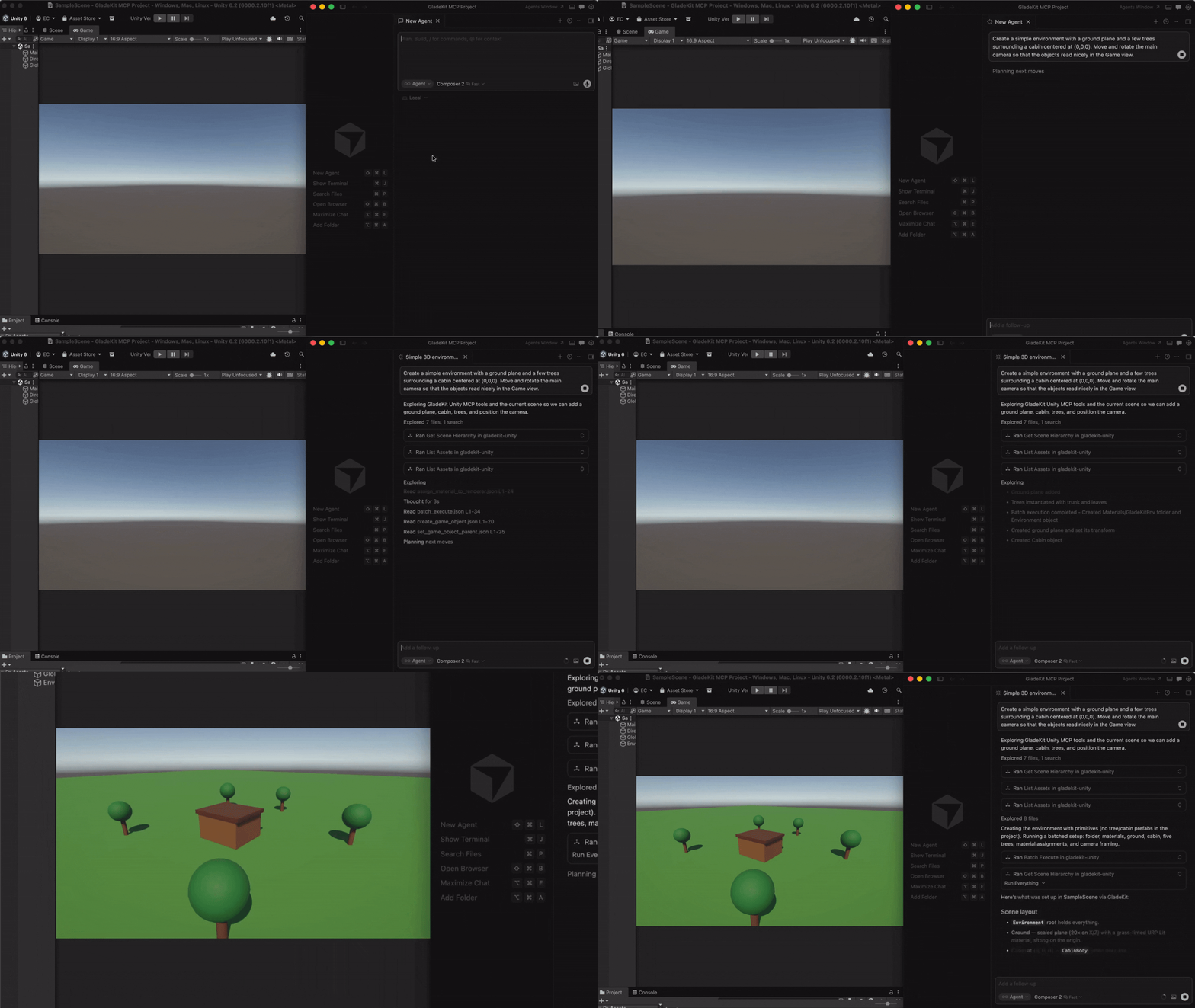
Connect Cursor, Claude Code, Windsurf, Claude Desktop, and other AI clients directly to your Unity or Godot editor.
**Unity (2021.3+):** 275 tools across 20 categories, full Unity-aware system prompt, GLADE.md project context, script semantic search, skill calibration, free CC0 asset pipeline, cloud intelligence layer with RAG and cross-session memory.
**Godot (4.3+):** 115 native tools across 17 categories - scene/node, scripts, resources, signals, physics and edit-time spatial queries, 2D (sprites, tilemaps, parallax), audio, particles, animation and AnimationTree, camera, navigation, UI, lighting and WorldEnvironment, runtime, export, and project introspection.
**Both engines:** one-call vetted gameplay scaffolders (controllers, enemies, combat, menus, save system), a verification loop (`look_at_game_view` screenshots, runtime-event observation, playability probes), surgical script editing with true `find_references` / `rename_symbol`, and build/export tools so the agent can ship what it built.
The MCP server auto-detects which editor is running (Unity on `:8765`, Godot on `:8766`) and exposes the matching tool set.
---
## Quick Start
### 1. Install the editor bridge
Glade MCP supports both Unity and Godot. Both bridges live in this repo: [`unity-bridge/`](https://github.com/Glade-tool/glade-mcp/tree/main/unity-bridge) is a UPM package, [`godot-bridge/`](https://github.com/Glade-tool/glade-mcp/tree/main/godot-bridge) wraps the editor addon at `godot-bridge/addons/com.gladekit.mcp-bridge/`. Install the one for your engine.
<details>
<summary><strong>Unity (2021.3+)</strong></summary>
In Unity, open **Window > Package Manager > + > Add package from git URL...**
```
https://github.com/Glade-tool/glade-mcp.git?path=/unity-bridge
```
The Unity bridge starts automatically on `localhost:8765`. **Window > GladeKit MCP** shows bridge / client status and has one-click **Copy MCP Config** and **Copy Unity AI Gateway Config** buttons.
</details>
<details>
<summary><strong>Godot (4.3+)</strong></summary>
1. Download `com.gladekit.mcp-bridge.zip` from the latest [Godot bridge release](https://github.com/Glade-tool/glade-mcp/releases?q=godot&expanded=true). (Grab the zip asset under **Assets** - not "Source code".) From source instead: copy `godot-bridge/addons/com.gladekit.mcp-bridge/` out of this repo.
2. Move the `com.gladekit.mcp-bridge/` folder into your project's `addons/` directory, so the final path is `<your-godot-project>/addons/com.gladekit.mcp-bridge/plugin.cfg`.
3. In Godot: **Project → Project Settings → Plugins** → enable **GladeKit MCP Bridge**.
The Godot bridge starts automatically on `localhost:8766`. You should see a confirmation line in the editor Output panel:
```
[GladeKit MCP Bridge] listening on ws://127.0.0.1:8766 (v0.7.13, 115 tools registered, thread-polled at 200Hz)
```
The bridge writes a per-session auth token to `~/.gladekit/godot-bridge-8766.token`; the MCP server picks it up automatically, so a web page can't drive your editor through the local socket.
**Supported:** Godot 4.3+ GDScript projects, Forward+ and Compatibility renderers, 2D and 3D. **Not yet supported:** Godot Mono / C# projects. The bridge is editor-only; it never runs in exported games.
</details>
Engine auto-detection: the MCP server probes both ports on startup and exposes the matching tool set. Running both editors at once? Set `GLADEKIT_MCP_FORCE_ENGINE=unity` or `=godot` to pin a specific engine.
### 2. Connect your AI client
Install [uv](https://docs.astral.sh/uv/getting-started/installation/) (one-time):
- **Mac/Linux:** `curl -LsSf https://astral.sh/uv/install.sh | sh`
- **Windows:** `powershell -ExecutionPolicy ByPass -c "irm https://astral.sh/uv/install.ps1 | iex"`
Then add the MCP config to your AI client. The client launches the MCP server automatically - no manual server step.
<details>
<summary><strong>Claude Code</strong></summary>
**Option A: one-liner (recommended)**
- **Mac/Linux:** `claude mcp add --transport stdio gladekit-mcp --scope user -- uvx gladekit-mcp`
- **Windows:** `claude mcp add --transport stdio gladekit-mcp --scope user -- cmd /c uvx gladekit-mcp`
**Option B: manual config**
If you cloned this repo, the `.mcp.json` auto-connects. Otherwise add to your Claude Code MCP settings:
```json
{
"mcpServers": {
"gladekit-mcp": {
"command": "uvx",
"args": ["gladekit-mcp"]
}
}
}
```
</details>
<details>
<summary><strong>Cursor</strong></summary>
`Cursor Settings > MCP > Add new MCP server`:
```json
{
"mcpServers": {
"gladekit-mcp": {
"command": "uvx",
"args": ["gladekit-mcp"]
}
}
}
```
</details>
<details>
<summary><strong>Claude Desktop</strong></summary>
Edit `~/Library/Application Support/Claude/claude_desktop_config.json` (Mac) or `%APPDATA%\Claude\claude_desktop_config.json` (Windows):
```json
{
"mcpServers": {
"gladekit-mcp": {
"command": "uvx",
"args": ["gladekit-mcp"]
}
}
}
```
</details>
<details>
<summary><strong>Cline (VS Code extension)</strong></summary>
Open Cline's MCP settings file (auto-created on first MCP use):
- **Mac:** `~/Library/Application Support/Code/User/globalStorage/saoudrizwan.claude-dev/settings/cline_mcp_settings.json`
- **Windows:** `%APPDATA%\Code\User\globalStorage\saoudrizwan.claude-dev\settings\cline_mcp_settings.json`
- **Linux:** `~/.config/Code/User/globalStorage/saoudrizwan.claude-dev/settings/cline_mcp_settings.json`
Add:
```json
{
"mcpServers": {
"gladekit-mcp": {
"command": "uvx",
"args": ["gladekit-mcp"]
}
}
}
```
</details>
<details>
<summary><strong>Windsurf</strong></summary>
In Windsurf, open **Windsurf Settings → MCP Servers → Open MCP Registry**, then click the settings (gear) icon to open `mcp_config.json`. Add the snippet below (or edit `~/.codeium/windsurf/mcp_config.json` directly):
```json
{
"mcpServers": {
"gladekit-mcp": {
"command": "uvx",
"args": ["gladekit-mcp"]
}
}
}
```
</details>
<details>
<summary><strong>Unity AI Gateway (native in-editor)</strong></summary>
Unity's built-in AI Assistant can connect to GladeKit via MCP. This gives you GladeKit's 275 tools directly inside the Unity Editor - no external AI client needed.
**Requires:** Unity 6000.3+ with AI Gateway package (`com.unity.ai.assistant@2.x`)
1. In Unity, go to **Edit > Project Settings > AI > MCP Servers**
2. Click **Open Config File** and paste (or use **Window > GladeKit MCP > Copy Unity AI Gateway Config**):
```json
{
"enabled": true,
"path": "",
"mcpServers": {
"gladekit-mcp": {
"type": "stdio",
"command": "uvx",
"args": ["gladekit-mcp"]
}
}
}
```
3. Under **Path Configuration**, paste your terminal's PATH into **User Path** so Unity can find `uvx`. To get your PATH:
- **Mac/Linux:** `echo $PATH`
- **Windows:** `echo %PATH%`
4. Click **Refresh Config File and Reload Servers**
5. Verify the server shows **StartedSuccessfully** in the Servers section
> **Tip:** If `uvx` isn't found, add the directory containing it to the `path` field in the config (e.g., `"/opt/homebrew/bin"` on Mac or `"C:\\Users\\<you>\\.local\\bin"` on Windows). Alternatively, use `pip install gladekit-mcp` and set `"command": "python"` with `"args": ["-m", "gladekit_mcp"]`.
> **Troubleshooting:** If the server shows **FailedToStart**, click **Inspect** for error details. The most common cause is PATH - Unity's PATH differs from your terminal's PATH. See the [Troubleshooting](#troubleshooting) section below.
> **Paid tier (`GLADEKIT_API_KEY`):** To enable RAG knowledge base and cross-session memory on any client, add the key to the `env` field of your config. See [Cloud intelligence](#cloud-intelligence) below.
</details>
<details>
<summary><strong>VS Code (GitHub Copilot)</strong></summary>
Add to `.vscode/mcp.json` in your workspace:
```json
{
"servers": {
"gladekit-mcp": {
"type": "stdio",
"command": "uvx",
"args": ["gladekit-mcp"]
}
}
}
```
</details>
---
## Why GladeKit?
| Feature | GladeKit MCP | unity-mcp (CoplayDev) | godot-mcp (Coding-Solo) |
| -------------------- | --------------------------------------------------------------------------------------------------------------------------------------- | --------------------------------------------- | -------------------------------------------------------- |
| Engines | **Unity and Godot**, auto-detected from one server | Unity | Godot |
| Tools | **275 Unity + 115 Godot**, granular | 48 consolidated (`action` enums) | 14 |
| Editor link | Live editor session (HTTP `:8765` / WebSocket `:8766`) | Live editor session | Spawns `godot --headless` per call, edits `.tscn` on disk |
| Gameplay scaffolders | **One-call vetted templates** - controllers, enemies, projectiles, health + HUD, game manager, menus, moving platforms, save system | None | None |
| Verification loop | **`look_at_game_view`** screenshots, runtime-event stream, playability probe, play-verify heal gate, `compile_scripts` | Screenshots, console read, test runner | `run_project` + raw stdout |
| Script editing | Outline / partial reads, anchor edits, **true `find_references` / `rename_symbol`** (lexical scanner) | Anchor / regex edits, Roslyn validation | No script tools |
| Build / export | **Both engines** (`build_player`, `export_project`) | Unity | None (MeshLibrary only) |
| Assets | **Free CC0 pipeline** with license audit | AI generation (BYO Tripo / Meshy / fal keys) | None |
| Project context | **GLADE.md** + live prompt (render pipeline, input system, skill level) | Static instructions | None |
| Script search | **Semantic search** via OpenAI embeddings (bring your own key) | Regex `find_in_file` | None |
| Memory | In-session (`remember_for_session`) + cross-session (cloud) | None | None |
| Safety | Undo-registered edits, pre-mutation backups, overwrite guards, per-session token auth, read-only mode | SHA-guarded script edits | None |
| Tests | 269 pytest + 37-case eval on 3 MCP SDK versions, schema↔bridge parity guards, Unity NUnit + Godot GUT suites | Unity CI matrix + NL suite | None |
| License | MIT | MIT | MIT |
All core features are **free and local**. The cloud intelligence layer is optional and requires a `GLADEKIT_API_KEY`.
---
## Features
<details>
<summary><strong>275 Unity tools + 115 Godot tools</strong></summary>
**Unity (20 categories):** Scene • GameObjects • Scripts • Prefabs • Materials • Lighting • VFX & Audio • Animation • IK • Physics (3D & 2D) • Tilemaps • Camera • UI • Input System • Terrain & NavMesh • Profiler • Gameplay scaffolders • Runtime & diagnostics • Build • Asset pipeline
All 275 tools are dispatchable. Claude Code sees ~90 curated core tools by default (Claude Code has a practical 128-tool limit; Unity AI Gateway has a cloud token budget). Use `get_relevant_tools` to discover extended tools for specialized work (blend trees, NavMesh, IK, Cinemachine, etc.).
**5 meta-tools:** `get_relevant_tools` (task-based tool discovery + RAG context), `remember_for_session` (store facts), `recall_session_memories` (retrieve facts), `batch_execute` (multi-step tool dispatch), `search_project_scripts` (semantic code search, Unity only). The first four work on both engines.
**9 MCP resources (Unity):** bridge health, project context, project info, scene hierarchy, project scripts, current selection, GLADE.md, session memory, and batch-discipline telemetry.
**Godot (17 categories):** all 115 tools are exposed directly (no core filtering needed), plus the four engine-agnostic meta-tools. Read-only tools carry the MCP `readOnlyHint` annotation so clients can auto-approve them.
</details>
<details>
<summary><strong>One-call gameplay scaffolders</strong></summary>
Vetted, self-wiring templates that write known-good scripts verbatim and assemble the scene around them - carrying the game-feel details a from-scratch script tends to drop (coyote time, jump buffering, variable jump height, normalized diagonals). Re-running one reuses what already exists instead of duplicating it.
- **Players:** `create_third_person_controller` (3D, both engines), `create_platformer_controller` / `create_top_down_controller` (Unity), `create_2d_controller` (Godot).
- **Combat:** `create_projectile`, `create_health`, `create_health_bar`, `create_enemy` (Unity) / `create_enemy_2d` + `create_enemy_3d` (Godot), `create_hit_vfx`.
- **Game loop:** `create_game_manager` (score, lives, win/lose), `create_collectible`, `create_hazard`, `create_level_system`, `create_loot_drop`, `create_save_system`.
- **Flow and feel:** `create_main_menu`, `create_pause_menu`, `create_scene_transition`, `create_moving_platform`, `create_screen_shake`, `create_juice`, `create_particles_2d` / `_3d`, `create_sound_effects`.
Batch layout tools (`set_transform_batch`, `set_node_transform_batch`, `arrange_nodes`, `snap_to_ground`) place dozens of objects in one call instead of one round-trip each.
</details>
<details>
<summary><strong>Verify what you built</strong></summary>
- **See it:** `look_at_game_view` returns a screenshot of the rendered view so the model catches invisible, missing, or mispositioned objects that inspection alone cannot.
- **Watch it run:** `start_runtime_observation` / `get_runtime_events` stream a cursored, fingerprinted error feed from the play session; `get_unity_console_logs` / `get_godot_console_logs` for the raw log.
- **Play-test it:** `start_playability_probe` (Unity) and `run_gameplay_probe` (Godot) drive the player with input and report PASS/FAIL; Godot's `run_project` has a `verify` mode that runs, captures, and reports.
- **Compile and ship it:** `compile_scripts` (Unity); `build_player` + `get_build_status` (Unity) and `create_export_preset` + `export_project` (Godot, including Web).
- **Diagnose stalls (Godot):** an editor main-thread watchdog turns "timed out" into "editor wedged for 12s - dismiss the modal dialog" with `possible_solutions`.
</details>
<details>
<summary><strong>Surgical script editing</strong></summary>
`get_script_content` supports outline mode (a structural map of a large file) and line-ranged partial reads; `modify_script` applies anchor-based edits. `find_references` and `rename_symbol` use a lexical scanner (C# and GDScript) that matches whole identifiers only, so a rename shows its real blast radius before it happens. `create_script` / `modify_script` refuse to clobber existing project scripts unless asked.
</details>
<details>
<summary><strong>GLADE.md</strong></summary>
Create a `GLADE.md` file in your Unity project root. The MCP server reads it and injects it into every request. Works as a permanent context layer: your game's design intent, conventions, and constraints are always in scope.
```markdown
# My Game
Genre: 3D platformer
Player: CharacterController, double jump enabled
Art style: pixel art, 16x16 sprites
Naming: PascalCase for scripts, snake_case for folders
```
</details>
<details>
<summary><strong>Script semantic search</strong></summary>
Set `OPENAI_API_KEY` in your MCP config's `env` field and the server ranks project scripts by semantic similarity to your query. Ask "how does the enemy spawn?" and the right script surfaces, even if it's not named `EnemySpawner`.
Everything needed ships with the package; no install flags or extras required. Get a key at [platform.openai.com/api-keys](https://platform.openai.com/api-keys) (pay-as-you-go, pennies per search via `text-embedding-3-small`).
```json
{
"mcpServers": {
"gladekit-mcp": {
"command": "uvx",
"args": ["gladekit-mcp"],
"env": { "OPENAI_API_KEY": "sk-..." }
}
}
}
```
Without the key, `search_project_scripts` still returns scripts - just unranked. Keys are never sent anywhere except OpenAI's embedding endpoint.
</details>
<details>
<summary><strong>Skill calibration</strong></summary>
The server tracks vocabulary across your messages and detects whether you're a Unity beginner or expert. Beginners get plain-language explanations and encouraging framing. Experts get terse, technical responses. Calibration persists to `.gladekit/skill_level.json` in your project.
</details>
<details>
<summary><strong>Asset pipeline (free CC0 imports)</strong></summary>
Three tools for finding and importing free, commercially-usable assets directly from your AI client, on both engines. All assets are CC0 (public domain, no attribution required). v1 ships [Kenney.nl](https://kenney.nl) packs (catalog refreshed weekly); additional providers (Freesound, Quaternius, AI generation) are on the roadmap.
| Tool | Purpose |
| ---------------------- | ---------------------------------------------------------------------------------------------------------------------------------------------------------------------------------------------------------- |
| `find_asset` | Search ranked candidates by description, asset type, style, and license. Read-only, no editor dispatch. |
| `import_asset` | Download, extract, place under `Assets/` (or `res://`), configure import settings for the asset type, and write a `.gladekit-asset.json` sidecar with license metadata. Requires explicit `licenseAcknowledged: true`. |
| `list_imported_assets` | Walk the project's sidecars and surface a license audit (license counts, attribution-required count). Useful before a commercial release. |
**Example workflow** (Cursor, Claude Code, Windsurf use the same pattern):
> **You:** I'm prototyping a 2D platformer and need placeholder character + tile art. Find me something free.
The AI calls `find_asset`:
```json
{
"description": "platformer character and tiles",
"asset_type": "sprite_2d",
"max_results": 5
}
```
Result (truncated):
```json
{
"success": true,
"candidates": [
{
"id": "kenney/platformer-pack-redux",
"name": "Platformer Pack Redux",
"description": "360+ side-scrolling platformer sprites: characters, enemies, tiles, items, hazards.",
"license": "CC0-1.0",
"license_summary": "Public domain. No attribution required for any use, including commercial.",
"official_page": "https://kenney.nl/assets/platformer-pack-redux",
"approx_assets": 360,
"score": 0.92
},
{ "id": "kenney/pixel-platformer", "score": 0.71, ... },
{ "id": "kenney/tiny-town", "score": 0.45, ... }
],
"count": 3
}
```
> **You:** Let's go with Platformer Pack Redux. Import it to `Assets/Sprites/Platformer/`. I accept the CC0 license.
The AI calls `import_asset`:
```json
{
"candidateId": "kenney/platformer-pack-redux",
"assetType": "sprite_2d",
"licenseAcknowledged": true,
"targetPath": "Assets/Sprites/Platformer/"
}
```
The MCP server resolves the download URL locally (catalog is bundled with the server, no cloud dependency), passes it to the Unity bridge, which downloads, extracts, configures `TextureImporter` for each sprite (Texture Type = Sprite, Filter Mode = Point, Uncompressed) and writes the license sidecar. Result:
```json
{
"success": true,
"message": "Imported 360 file(s) from kenney/platformer-pack-redux to Assets/Sprites/Platformer/",
"downloadedBytes": 1842340,
"importedFileCount": 360,
"configuredImportSettings": 354,
"license": "CC0-1.0",
"sidecarPath": "Assets/Sprites/Platformer/.gladekit-asset.json"
}
```
The sprites appear in the Unity Project window, ready to drop into a scene.
> **You:** Before I ship, audit my imported assets. Anything that needs attribution?
The AI calls `list_imported_assets`:
```json
{
"success": true,
"count": 1,
"licenseCounts": { "CC0-1.0": 1 },
"attributionRequiredCount": 0,
"entries": [
{
"candidate_id": "kenney/platformer-pack-redux",
"license": "CC0-1.0",
"asset_type": "sprite_2d",
"imported_at": "2026-05-10T09:37:42Z",
"target_path": "Assets/Sprites/Platformer/",
"imported_file_count": 360,
"sidecar_path": "Assets/Sprites/Platformer/.gladekit-asset.json"
}
]
}
```
CC0 needs no attribution; the audit report is empty for required attributions. If you imported a CC-BY asset later, it would surface here so you remember to credit it.
**Security and license discipline:**
- The LLM never sees download URLs. URL resolution happens cloud/MCP-side; the bridge tool refuses if the resolved fields are missing or LLM-injected.
- `licenseAcknowledged: true` is required on every `import_asset` call. The bridge refuses without it. Do not set it without explicit user confirmation.
- The bridge validates `_resolvedUrl`'s host against a per-provider allowlist (`AssetPipelineGuard.IsResolvedUrlHostAllowed`) before downloading. Even a client bypassing both the cloud and MCP preprocessors cannot smuggle in an arbitrary download URL; unknown hosts fail closed. HTTPS only.
- Every imported asset bundle gets a `.gladekit-asset.json` sidecar recording the candidate id, provider, license, attribution string, source URL, and timestamp. `list_imported_assets` reads these for the audit report.
- Asset Pipeline tools are gated by `AssetPipelineGuard` on the bridge side. A misconfigured client cannot bypass it.
**Disabling the pipeline (for studio / curated-asset workflows):**
Set `GLADEKIT_MCP_DISABLE_ASSET_PIPELINE=1` in the MCP server's environment to suppress the three tools entirely. They will not appear in the tool list and dispatch will refuse with a clear error. This is the recommended setting for projects that already have a managed asset workflow (Perforce-tracked libraries, internal asset stores) where AI-driven external downloads aren't appropriate.
```json
{
"mcpServers": {
"gladekit-mcp": {
"command": "uvx",
"args": ["gladekit-mcp"],
"env": { "GLADEKIT_MCP_DISABLE_ASSET_PIPELINE": "1" }
}
}
}
```
The Unity bridge enforces the same gate via `EditorPrefs` (`GladeAI.AssetPipelineEnabled`, default `true`). Toggle it via `POST http://localhost:8765/api/settings { "assetPipelineEnabled": false }`.
</details>
<details>
<summary><strong>Safety and security</strong></summary>
- **Reversible:** scaffolds and batch edits register with the editor's Undo stack (Unity) or take pre-mutation backups in `.gladekit-backups/` with node revert (Godot). `create_script` / `modify_script` refuse to overwrite real project scripts without an explicit flag.
- **Loopback only:** both bridges bind `127.0.0.1`. The Godot bridge requires a per-session token (`~/.gladekit/godot-bridge-<port>.token`) on every request except `health`, closing the cross-site WebSocket drive-by. The Unity bridge enforces localhost access control and path-traversal guards on its file endpoints.
- **Play-mode safety:** editing tools refuse to run while the editor is playing; read-only tools run in either mode.
- **Read-only sessions:** `GLADEKIT_GODOT_READ_ONLY=1` (or `gladekit/read_only_mode` in project settings) makes the Godot bridge refuse every mutating tool - for audits, reviews, and demos.
</details>
<details>
<summary><strong>Cloud intelligence</strong></summary>
Set `GLADEKIT_API_KEY` in your MCP config's `env` field to unlock cloud-powered features:
- **RAG knowledge base** - `get_relevant_tools` queries a curated, engine-aware knowledge base (API corrections, error patterns) and injects results alongside tool recommendations. Godot sessions retrieve Godot docs, not Unity content.
- **Cross-session persistent memory** - facts stored with `remember_for_session` persist across sessions and are re-injected into the system prompt.
- **Convention extraction** - coding patterns (naming, architecture, preferences) are distilled from your accumulated memories and surfaced in future sessions.
All cloud features degrade gracefully: if the key is missing or the cloud is unreachable, everything works normally.
```json
{
"mcpServers": {
"gladekit-mcp": {
"command": "uvx",
"args": ["gladekit-mcp"],
"env": { "GLADEKIT_API_KEY": "your-api-key" }
}
}
}
```
</details>
<details>
<summary><strong>Transports (stdio + streamable HTTP)</strong></summary>
GladeKit MCP supports two transports. **stdio is the default** and works with all MCP clients - every config above uses stdio. The server supports both MCP SDK 1.x and 2.x (`mcp[cli]>=1.10,<3`) and is tested at the floor, the newest 1.x, and the newest 2.x.
**Streamable HTTP** is for clients that prefer URL-based config (Claude Desktop URL mode, custom clients). Launch the server manually, then point your client at the URL:
```bash
# Defaults: host=127.0.0.1, port=8767, path=/mcp
gladekit-mcp --transport http
# Custom host/port/path
gladekit-mcp --transport http --host 127.0.0.1 --port 9000 --path /mcp
```
Endpoints:
- `POST/GET/DELETE http://127.0.0.1:8767/mcp` - MCP streamable-HTTP endpoint
- `GET http://127.0.0.1:8767/health` - liveness check
**Security defaults:**
- Binds **loopback-only** (`127.0.0.1`). Use `--host 0.0.0.0` to expose on LAN - opt-in only.
- **DNS-rebinding protection** enabled for loopback binds: requests with a `Host` header other than `127.0.0.1:<port>` or `localhost:<port>` are rejected with `421 Misdirected Request`.
- Non-loopback binds disable rebinding protection (you've taken responsibility for the network) and print a warning on startup.
**Client config example:**
```json
{
"mcpServers": {
"gladekit-mcp": {
"url": "http://127.0.0.1:8767/mcp"
}
}
}
```
</details>
<details>
<summary><strong>Environment Variables</strong></summary>
MCP server (set in your client config's `env` field):
| Variable | Required | Description |
| -------------------------------------- | -------- | ------------------------------------------------------------------------------------------------------- |
| `UNITY_BRIDGE_URL` | No | Unity bridge URL (default: `http://localhost:8765`) |
| `GODOT_BRIDGE_URL` | No | Godot bridge URL (default: `ws://localhost:8766/`) |
| `GLADEKIT_MCP_FORCE_ENGINE` | No | `unity` or `godot` - skip auto-detection when both editors are open |
| `OPENAI_API_KEY` | No | Enables script semantic search via embeddings ([get one](https://platform.openai.com/api-keys)) |
| `GLADEKIT_API_KEY` | No | Enables RAG knowledge base, cross-session memory, convention extraction |
| `GLADEKIT_MCP_DISABLE_ASSET_PIPELINE` | No | Set to `1` to suppress `find_asset` / `import_asset` / `list_imported_assets` (curated-asset workflows) |
| `GLADEKIT_MCP_SUPPRESS_BRIDGE_WARNING` | No | Set to `1` to silence the stderr warning when the Unity or Godot bridge is older than recommended |
Godot bridge (set in your shell *before* launching Godot):
| Variable | Description |
| ----------------------------- | --------------------------------------------------------------------------- |
| `GLADEKIT_GODOT_BRIDGE_PORT` | Listen port (default `8766`) |
| `GLADEKIT_GODOT_READ_ONLY` | Set to `1` to refuse every mutating tool for this editor session |
| `GLADEKIT_GODOT_NO_AUTH` | Set to `1` to disable per-session token auth (for older clients; opt-in) |
</details>
<details>
<summary><strong>Troubleshooting</strong></summary>
**Unity bridge not connecting**
- Open Unity and wait for it to finish importing assets - the bridge starts automatically
- Check **Window > GladeKit MCP** in Unity - the Bridge and AI Client indicators show connection status; **Restart** rebinds the server and the Diagnostics panel shows recent bridge faults
- Verify nothing else is using port 8765: `lsof -i :8765` (Mac/Linux) or `netstat -ano | findstr 8765` (Windows)
**Godot bridge not connecting**
- Confirm the plugin is enabled and the Output panel shows the `listening on ws://127.0.0.1:8766` line; a bind failure prints the `GLADEKIT_GODOT_BRIDGE_PORT` override instructions
- `authentication failed` in tool errors: the MCP server couldn't read `~/.gladekit/godot-bridge-8766.token`. Restart Godot (it rewrites the token) or, for an older client, set `GLADEKIT_GODOT_NO_AUTH=1` before launching Godot
- Tool calls time out while a dialog is open: the editor's main thread is blocked. Dismiss the dialog; the error names the stall duration
**AI client can't find `uvx`**
- Install [uv](https://docs.astral.sh/uv/getting-started/installation/): `curl -LsSf https://astral.sh/uv/install.sh | sh` (Mac/Linux) or `pip install uv`
- Or use `pip install gladekit-mcp` and change the config command from `"uvx"` to `"python"` with args `["-m", "gladekit_mcp"]`
**Tools not appearing in Claude Code**
- Claude Code has a practical ~128-tool limit. GladeKit shows ~90 curated core tools by default - this is intentional. All 275 are dispatchable: use `get_relevant_tools` to find extended tools by task description.
**`GLADE.md` not being picked up**
- The file must be named exactly `GLADE.md` (case-sensitive on Mac/Linux) and placed in the Unity project root (same directory as `Assets/`, `Packages/`, `ProjectSettings/`)
**Stderr warning: `Unity bridge X.Y.Z is older than recommended`**
- Unity caches UPM git packages and never refetches, so an `?path=unity-bridge` install drifts behind `main` over time. Update via Unity → **Window > Package Manager > GladeKit MCP Bridge > Update**, or pin the manifest entry to a specific tag so future updates are explicit:
```json
"com.gladekit.mcp-bridge": "https://github.com/Glade-tool/glade-mcp.git?path=unity-bridge#v0.7.23"
```
- The same warning also appears as a one-shot prefix on the next tool response so you see it in chat. To silence both: add `"GLADEKIT_MCP_SUPPRESS_BRIDGE_WARNING": "1"` to the `env` of your MCP client config. For Godot, replace the addon folder with the latest release zip.
**Unity AI Gateway - server shows FailedToStart**
- Click **Inspect** in the Servers section for the error message
- Most common cause: Unity can't find `uvx`. Under **Path Configuration**, paste your terminal's full PATH into **User Path**, then click **Refresh Config File and Reload Servers**
- On Windows: `echo %PATH%` in Command Prompt. On Mac/Linux: `echo $PATH`
- Alternative: use `pip install gladekit-mcp` and set the command to `"python"` with args `["-m", "gladekit_mcp"]` - avoids the `uvx` PATH dependency
- Validate outside Unity first: run `uvx gladekit-mcp` in a terminal (you should see the `gladekit-mcp v...` banner on stderr)
</details>
<details>
<summary><strong>Architecture</strong></summary>
```
[AI Client: Cursor / Claude Code / Windsurf / Claude Desktop / Unity AI Gateway]
|
| stdio or HTTP MCP protocol
v
[gladekit_mcp Python process]
bridge.py -> probes :8765 (Unity, HTTP) and :8766 (Godot, WebSocket), picks the engine
prompts.py -> system prompt (auto-reads render pipeline, input system, GLADE.md)
tools/ -> 275 Unity tool schemas + dispatch schemas/godot/ -> 115 Godot tool schemas
asset_pipeline/ -> bundled CC0 catalog + URL resolution
cloud.py -> optional GLADEKIT_API_KEY -> api.gladekit.com
| |
| HTTP localhost:8765 | WebSocket localhost:8766 (+ session token)
v v
[Unity Bridge -- C# Editor extension] [Godot Bridge -- GDScript EditorPlugin]
unity-bridge/ (UPM package) godot-bridge/addons/com.gladekit.mcp-bridge/
UnityBridgeServer.cs -> HttpListener ws_server.gd -> TCPServer + WebSocketPeer
275 ITool implementations 115 tool implementations (main-thread dispatch)
UnityContextGatherer, PlayModeObserver, context_gatherer, play_session_manager,
BackupManager, BuildManager backup_manager, export_manager, bridge_auth
```
</details>
<details>
<summary><strong>Contributing</strong></summary>
Each bridge is the source of truth for its tools; the Python server mirrors the schema. CI (`ruff` + `pytest` + the eval harness, on three MCP SDK versions) runs on every change to `mcp-server/`, `unity-bridge/`, or `godot-bridge/`, and a schema↔bridge field-parity test fails if an argument exists on one side only. Adding a tool takes three changes.
**Unity**
1. **C# implementation** (`unity-bridge/Editor/Tools/Implementations/<Category>/MyTool.cs`):
```csharp
public class MyTool : ITool
{
public string Name => "my_tool";
public string Execute(Dictionary<string, object> args)
{
// ... Unity Editor API calls ...
return ToolUtils.CreateSuccessResponse("Done", extras);
}
}
```
2. **C# registration** (`unity-bridge/Editor/Tools/Registrars/<Category>Tools.cs`): add `Register(new MyTool());`. Registration is explicit — an unregistered tool compiles fine but returns "Tool was blocked from executing or null." when dispatched.
3. **Python schema** (`mcp-server/src/gladekit_mcp/tools/<category>.py`): add an entry to the category's tool list following the existing format (OpenAI function-calling schema).
**Godot**
1. **GDScript implementation** (`godot-bridge/addons/com.gladekit.mcp-bridge/tools/implementations/<category>/my_tool.gd`) extending `i_tool.gd`; set `tool_name` and `requires_edit_mode` in `_init()` and return `ToolUtils.success(...)` / `ToolUtils.error(...)`.
2. **Registration** in `godot-bridge/addons/com.gladekit.mcp-bridge/bridge/tool_registry.gd` (`register_tool(MyTool.new())`).
3. **Python schema** (`mcp-server/src/gladekit_mcp/schemas/godot/<category>.py`).
See [`godot-bridge/README.md`](https://github.com/Glade-tool/glade-mcp/blob/main/godot-bridge/README.md) for the wire protocol and GUT test setup, and [`mcp-server/CHANGELOG.md`](https://github.com/Glade-tool/glade-mcp/blob/main/mcp-server/CHANGELOG.md) for release history.
</details>
---
**License:** MIT - see [LICENSE](LICENSE).
The [GladeKit desktop app](https://gladekit.com) is a separate commercial product that layers streaming, miss recovery, and a memory UI on top of this MCP server.
<!-- mcp-name: io.github.Glade-tool/glade-mcp -->