io.github.devemberx/mcp-server-polarion
MCP server for Polarion ALM — read and write documents and work items
Open source Open in the app JSON README (API)
About
MCP server for Polarion ALM — read and write documents and work items
Details
- Kind
- MCP servers
- Topic
- No topic detected
- Publisher
- devemberx
- Origin
- official
- Category
- ferramentas
- Transport
- local
- Version
- 2.1.0
- Stars
- 13
- Forks
- 3
- Open pull requests
- 4
- Last push
- 2026-09-02T03:50:07Z
- Repository state
- ativo
- Language
- Python
- License
- MIT
- Added
- 2026-08-29 03:02:41
- Updated
- 2026-08-29 03:02:41
- Origin id
io.github.devemberx/mcp-server-polarion
README
<!-- mcp-name: io.github.devemberx/mcp-server-polarion -->
<div align="center">
<img src="https://raw.githubusercontent.com/devemberx/mcp-server-polarion/main/.github/assets/icon.png" alt="mcp-server-polarion" width="140">
# mcp-server-polarion
**Talk to your Polarion — AI reads, writes, and reorganizes documents, work items, test runs, and traceability links.**
[Features](#features) · [Quickstart](#quickstart) · [Tools](#tools) · [Example Prompts](#example-prompts) · [Setup](#setup)
[](https://github.com/devemberx/mcp-server-polarion/actions/workflows/ci.yml)
[](https://github.com/devemberx/mcp-server-polarion/actions/workflows/publish.yml)
[](https://pypi.org/project/mcp-server-polarion/)
[](https://www.python.org/)
[](LICENSE)
</div>
A [Model Context Protocol (MCP)](https://modelcontextprotocol.io) server for **Polarion ALM**, built for real-world instances: every write supports `dry_run`, guards validate fields and enum values before anything is committed, and requests are paced to a rate cap you configure for your instance — so an AI assistant can work on production data without surprises.
## Features
- **46 tools** covering read and write across documents, work items, test runs, traceability links, comments, and attachments.
- **Read** — render documents as Markdown, search with Lucene or SQL, walk incoming/outgoing links, resolve enum options.
- **Write** — create and update work items, documents, and test runs, manage links, reorganize document structure, post comments.
- **Safe writes** — every write tool supports `dry_run`, and pre-write guards validate fields, enum values, and link targets before hitting Polarion.
- **Plays nice with your server** — requests are serialized and paced to a configurable rate cap, with automatic retries on 429/5xx responses.
- **Built for LLMs** — strict async, fully typed, pagination on every list tool, docstrings written as the assistant's manual.
## Quickstart
Requires **Polarion 2506+** and [**uv**](https://docs.astral.sh/uv/) — see [Prerequisites](#prerequisites). Fastest path — Claude Code:
```bash
claude mcp add mcp-server-polarion \
-e POLARION_URL=https://polarion.example.com \
-e POLARION_TOKEN=your-personal-access-token \
-- uvx mcp-server-polarion
```
Other clients (VS Code, Claude Desktop, Cursor) — see [Client Configuration](#client-configuration).
## Tools
### Read
<!-- tool-table:read:start -->
| Tool | Description |
|---|---|
| `list_projects` | List accessible projects |
| `list_documents` | List documents in a project |
| `list_work_items` | List work items in a project (Lucene/SQL query) |
| `list_test_runs` | List test runs in a project (Lucene query, templates filter) |
| `get_test_run` | Get test run details, optionally with the raw HTML report body |
| `list_test_records` | List a test run's execution records, one per test case iteration |
| `get_test_record` | Get one test record's execution comment and test-case revision |
| `get_sql_query_recipes` | Fetch copy-paste SQL recipes for advanced queries |
| `get_html_recipes` | Fetch copy-paste Polarion HTML templates for raw-HTML body edits |
| `get_document` | Get document metadata, optionally with the raw body HTML |
| `read_document` | Render a document end-to-end as Markdown |
| `read_document_parts` | List a document's structural parts with embedded work item metadata |
| `get_work_item` | Get work item details with the body as raw HTML |
| `read_work_item` | Get work item details with the body as Markdown |
| `list_work_item_links` | List a work item's outgoing or incoming links |
| `list_document_attachments` | List a document's attachments with file name, size, and author |
| `get_document_attachment_content` | Fetch an image attachment for viewing (bitmap as image, SVG as text) |
| `list_work_item_attachments` | List a work item's attachments with file name, size, and author |
| `get_work_item_attachment_content` | Fetch a work item image attachment for viewing (bitmap as image, SVG as text) |
| `list_test_record_attachments` | List a test record's attachments with file name, size, and author |
| `get_test_record_attachment_content` | Fetch a test record image attachment for viewing (bitmap as image, SVG as text) |
| `list_document_comments` | List a document's comments with thread relationships |
| `list_work_item_comments` | List a work item's comments with thread relationships |
| `list_document_enum_options` | Resolve valid enum ids for a document field |
| `list_work_item_enum_options` | Resolve valid enum ids for a work item field |
<!-- tool-table:read:end -->
All list tools support pagination via `page_size` (1–100) and `page_number` parameters.
### Write
<!-- tool-table:write:start -->
| Tool | Description |
|---|---|
| `create_work_items` | Create one or more work items in a single request |
| `update_work_items` | Update fields, body, or workflow status on one or more work items |
| `create_document` | Create a new document |
| `update_document` | Update document metadata, body, or workflow status |
| `copy_document` | Copy a document to a new name, space, or project |
| `create_test_runs` | Create one or more test runs, optionally from a template |
| `create_test_records` | Record test-case execution results on a test run |
| `update_test_runs` | Update title, status, group, or custom fields on one or more test runs |
| `update_test_records` | Update result, comment, or defect link on one or more test records of a test run |
| `create_work_item_links` | Create one or more outgoing links from a source work item |
| `update_work_item_link` | Update `suspect` / `revision` on one outgoing link |
| `delete_work_item_links` | Delete one or more outgoing links from a source work item |
| `move_work_item_to_document` | Attach a work item to a document at a chosen position |
| `move_work_item_from_document` | Detach a work item from its document |
| `create_document_attachments` | Upload one or more local files as document attachments |
| `create_work_item_attachments` | Upload one or more local files as work item attachments |
| `create_test_record_attachments` | Upload one or more local files as test record attachments |
| `create_document_comments` | Add one or more comments or replies to a document |
| `create_work_item_comments` | Add one or more comments or replies to a work item |
| `update_document_comment` | Resolve or re-open a document comment |
| `update_work_item_comment` | Resolve or re-open a work item comment |
<!-- tool-table:write:end -->
## Example Prompts
<details open>
<summary><b>Discovery & search</b></summary>
> "List the projects I can access, then show the documents in project MCPT with their types."
> "List the documents in space 'Specifications' of project MCPT."
> "Find every approved requirement in project MCPT whose title starts with 'Auth' and show me their owning document."
> "Search project MCPT for work items where the custom field 'verification_method' is 'Test' — grab the SQL recipes first if you need a join."
> "Find all work items in the SRS module of project MCPT that were changed in the last sprint."
</details>
<details>
<summary><b>Reading & summarizing</b></summary>
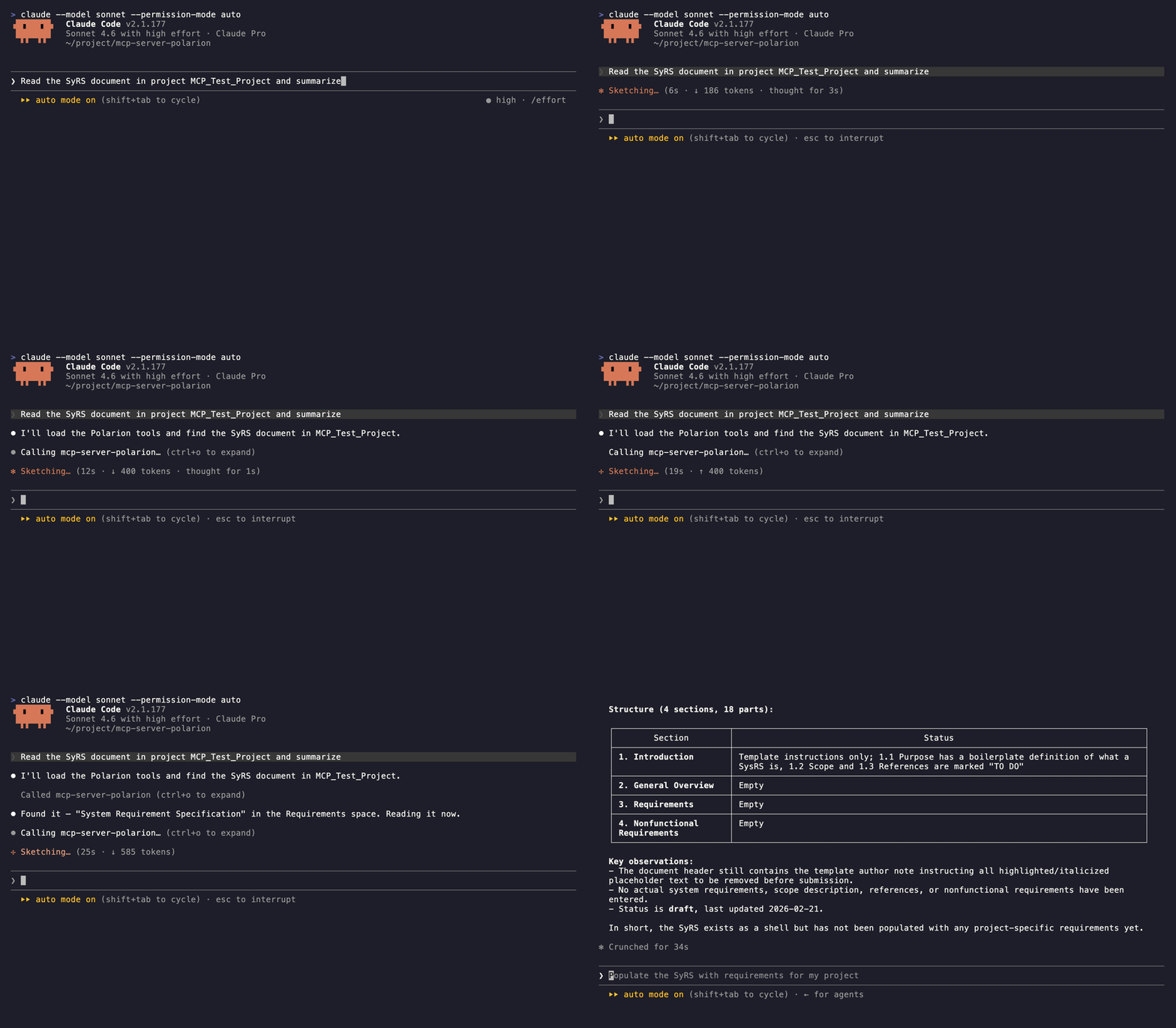
> "Read the SRS document of project MCPT and summarize each open requirement."
> "Show me the structural outline of the SRS document — headings and the work items under each."
> "Read work item MCPT-042 as Markdown and explain what it asks for."
> "Show the outgoing and incoming links for MCPT-042 and flag any child task that is still open."
> "Which requirements in the SRS document have no 'verifies' back link from a test case?"
> "List the open comment threads on the SRS document and who started each."
</details>
<details>
<summary><b>Creating & editing</b></summary>
> "Create a task in project MCPT titled 'Refactor authentication module' and link it to MCPT-042 as 'relates_to'."
> "Create three test-case work items in project MCPT from this checklist and link each one to MCPT-042 as 'verifies'."
> "Add a new requirement under section 3.2 of the SRS document with the body I just drafted."
> "Update the description of MCPT-042 with the revised text I'll paste, keeping the existing formatting."
> "Add a comment on the SRS document asking the owner to clarify section 4, then reply to thread T-12 marking it resolved."
> "Create a test run REG-SPRINT-7 in project MCPT from the 'Regression' template with status 'open'."
</details>
<details>
<summary><b>Workflow & reorganization</b></summary>
> "List the valid status values for a defect in project MCPT, then move MCPT-077 to 'in_review'."
> "Bump MCPT-042's priority to 90, set severity to 'major', and approve the workflow."
> "Change MCPT-201 from a task to a requirement and re-apply its previous status."
> "Move MCPT-201 into the SRS document right after MCPT-150."
> "Detach MCPT-077 from its document so I can rework it as a standalone task."
> "Mark the 'blocks' link from MCPT-042 to MCPT-099 as suspect, then delete the stale 'relates_to' link to MCPT-010."
</details>
## Setup
### Prerequisites
> **Polarion 2506 or higher** is required. Earlier versions lack REST API endpoints this server depends on.
This server is distributed as a Python package and requires [**uv**](https://docs.astral.sh/uv/) to run.
**Install uv** (if not already installed):
```bash
# macOS / Linux
curl -LsSf https://astral.sh/uv/install.sh | sh
# Windows
powershell -ExecutionPolicy ByPass -c "irm https://astral.sh/uv/install.ps1 | iex"
```
Or via pip:
```bash
pip install uv
```
No other installation is needed — `uvx mcp-server-polarion` downloads and runs the server automatically.
### Environment Variables
| Variable | Description | Example |
|---|---|---|
| `POLARION_URL` | Base URL of your Polarion instance | `https://polarion.example.com` |
| `POLARION_TOKEN` | Personal Access Token for authentication | `your-personal-access-token` |
| `POLARION_MAX_REQUESTS_PER_SECOND` | Optional. Client-side request rate cap — raise it to match your deployment's throttle, or set `0` to disable pacing. Writes keep a fixed extra pause regardless (default: `1`) | `1` |
To generate a Personal Access Token, open Polarion, click your user name, and go to **My Account → Personal Access Tokens**.
### Client Configuration
<details>
<summary><b>VS Code (GitHub Copilot)</b></summary>
Add to `.vscode/mcp.json`:
```json
{
"servers": {
"mcp-server-polarion": {
"type": "stdio",
"command": "uvx",
"args": ["mcp-server-polarion"],
"env": {
"POLARION_URL": "https://polarion.example.com",
"POLARION_TOKEN": "your-personal-access-token"
}
}
}
}
```
</details>
<details>
<summary><b>Claude Desktop</b></summary>
Add to `claude_desktop_config.json`:
```json
{
"mcpServers": {
"mcp-server-polarion": {
"command": "uvx",
"args": ["mcp-server-polarion"],
"env": {
"POLARION_URL": "https://polarion.example.com",
"POLARION_TOKEN": "your-personal-access-token"
}
}
}
}
```
</details>
<details>
<summary><b>Cursor</b></summary>
Add to Cursor MCP settings:
```json
{
"mcpServers": {
"mcp-server-polarion": {
"command": "uvx",
"args": ["mcp-server-polarion"],
"env": {
"POLARION_URL": "https://polarion.example.com",
"POLARION_TOKEN": "your-personal-access-token"
}
}
}
}
```
</details>
<details>
<summary><b>Claude Code</b></summary>
Register via the `claude mcp add` command:
```bash
claude mcp add mcp-server-polarion \
-e POLARION_URL=https://polarion.example.com \
-e POLARION_TOKEN=your-personal-access-token \
-- uvx mcp-server-polarion
```
</details>
## Contributing
Bug reports and pull requests are welcome — see [CONTRIBUTING.md](.github/CONTRIBUTING.md) for branch, commit, and review conventions.
## License
[MIT](LICENSE)