io.github.den-indance/network-diagram-mcp
Network topology editor — Claude builds diagrams via MCP. nmap/CSV import, one-click SSH.
Open source Open in the app JSON README (API)
About
Network topology editor — Claude builds diagrams via MCP. nmap/CSV import, one-click SSH.
Details
- Kind
- MCP servers
- Topic
- Files & documents
- Publisher
- den-indance
- Origin
- official
- Category
- ferramentas
- Transport
- local
- Version
- 1.0.7
- Stars
- 1
- Last push
- 2026-05-25T08:27:00Z
- Repository state
- ativo
- Language
- JavaScript
- License
- MIT
- Added
- 2026-08-29 03:02:41
- Updated
- 2026-08-29 03:02:41
- Origin id
io.github.den-indance/network-diagram-mcp
README
# @den.dance/network-diagram-mcp
[](https://www.npmjs.com/package/@den.dance/network-diagram-mcp)
[](https://smithery.ai/servers/den-indance/network-diagram-mcp)
> Visual network topology editor with AI agent integration via the Model Context Protocol.
> Open-source successor to **netViz** (netViz Inc., 1990 → CA Technologies → discontinued 2012).
>
> **Try it live → https://map.den.dance/**
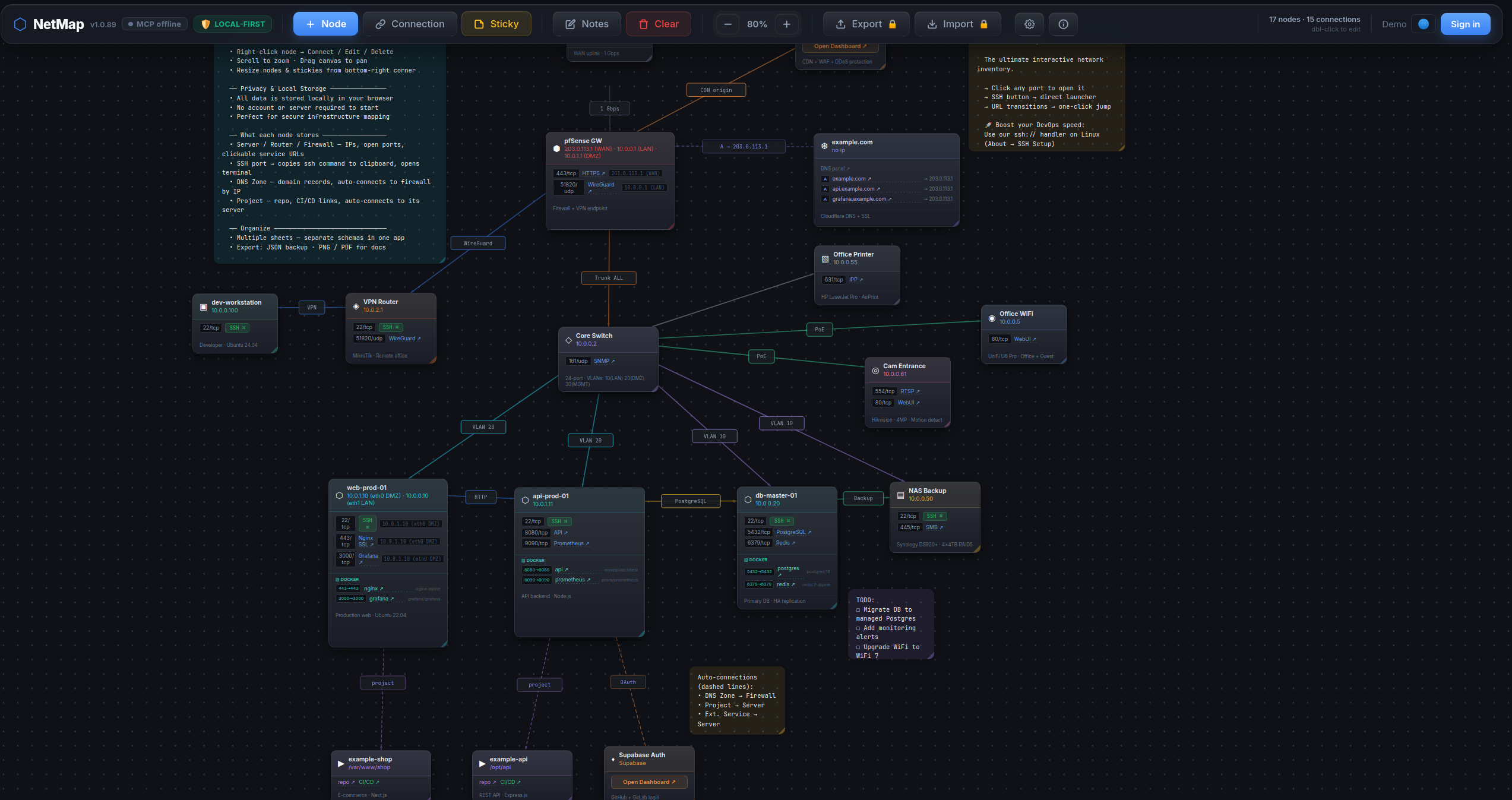
## What makes it different
- **One-click ops dashboard.** Click any web port (80 / 443 / 8080 / …) on a node card to open the
service in a new tab. Click an SSH / Postgres / Redis port → in-app picker offers your installed
clients (iTerm / Windows Terminal / psql / DBeaver / redis-cli / RDM / …) and launches the one you
choose. The picker re-detects every click — newly installed clients show up immediately, never a
silent locked-in default.
- **AI agents edit the map.** 44 MCP tools — your Claude / Cursor / Claude Desktop session can build
a diagram for you, search across nodes / ports / notes, run smart auto-layouts, export PNG / PDF —
all by talking to the open browser tab.
- **`nmap -oX` import.** Run a network scan, hand the XML to the agent, get a map with nodes
auto-typed from OS fingerprint + port profile (router / switch / firewall / server / printer / …).
- **CSV inventory import.** Drop in your asset spreadsheet — auto-detects columns
(name / ip / type / ports / notes; aliases like `hostname` / `description` accepted).
- **Operator-grade node cards.** Per-node: open ports with service names, Docker services, DNS domains,
free-form notes. All searchable cross-entity via the agent.
- **Smart auto-layout.** Force-directed (deterministic via seed), cluster-by-type, cluster-by-connection.
- **Multi-sheet, local-first.** Multiple maps in one workspace, everything in `localStorage`. No login,
no cloud. Export JSON / PNG / PDF.
## How it works
This package is a **stdio → WebSocket bridge**. It runs locally as an MCP server; the live NetMap
browser tab connects to it over WebSocket. The agent talks to the bridge over MCP; the bridge forwards
calls to the browser, which updates React state in real time.
```
LLM agent (Claude Code / Claude Desktop / Cursor)
│ MCP protocol (stdio)
▼
@den.dance/network-diagram-mcp ← this package, runs locally
│ WebSocket ws://localhost:47821
▼
NetMap in browser (https://map.den.dance/) ← React state updates live
```
> ⚠️ **Requires an open NetMap browser tab.** Open https://map.den.dance/ — the MCP bridge is
> enabled by default (v1.2+), so the connection comes up as soon as the tab is open. Without an
> open tab the bridge has no peer and every tool call will time out. (To opt out:
> `Settings → ⚙ → Integrations → AI Agent (MCP) → Enable WebSocket connection`.)
## Install
### Claude Desktop
Add to `claude_desktop_config.json`:
```json
{
"mcpServers": {
"netmap": {
"command": "npx",
"args": ["@den.dance/network-diagram-mcp"]
}
}
}
```
### Claude Code
```bash
claude mcp add netmap -- npx @den.dance/network-diagram-mcp
```
With a custom port:
```bash
claude mcp add netmap -e NETMAP_MCP_PORT=12345 -- npx @den.dance/network-diagram-mcp
```
Then open https://map.den.dance/ — the bridge is enabled by default (v1.2+). Settings → **Integrations → AI Agent (MCP)** if you need to inspect or toggle the connection.
The toolbar will show a 🟢 **MCP online** badge when the browser and server are connected.
Verify the agent side:
```bash
claude mcp list
```
You should see `netmap` in the list.
### Environment variables
| Var | Default | Description |
|-----|---------|-------------|
| `NETMAP_MCP_PORT` | `47821` | Local WebSocket port the bridge listens on. Must match the URL configured in NetMap's Settings → Integrations → AI Agent (MCP). |
## URL Protocol Handlers + in-app client picker (v1.1+, picker since v1.2)
This package also ships an OS-level agent that registers handlers for `ssh://`,
`postgres://`, and `redis://` URLs. Click any such link in a browser or terminal
and the agent spawns your installed client (psql / redis-cli / iTerm /
Windows Terminal / kitty / DBeaver / TablePlus / RedisInsight / …).
**Inside NetMap (v1.2+):** when the `serve` daemon is running, clicking an
SSH / Postgres / Redis port button on a node card opens an in-app picker of
installed clients on your machine and launches the one you pick — every click
re-detects, so newly installed clients show up immediately. Without the daemon,
port-clicks fall back to the OS default URL handler.
Install once per machine:
```bash
# Linux: ~/.local/share/applications/netmap-<scheme>-handler.desktop + xdg-mime
# macOS: ~/Library/Application Support/NetMap/handlers/NetMap<Scheme>Handler.app + lsregister
# Windows: HKCU\Software\Classes\<scheme> (per-user, no admin)
npx @den.dance/network-diagram-mcp install --all
```
Other CLI subcommands:
```bash
npx @den.dance/network-diagram-mcp install ssh # single scheme
npx @den.dance/network-diagram-mcp uninstall postgres # remove registration
npx @den.dance/network-diagram-mcp list # what's registered (JSON)
npx @den.dance/network-diagram-mcp detect ssh # which clients are available
npx @den.dance/network-diagram-mcp serve # daemon: WS + HTTP on :47821
```
Click handling is **daemon-less** — OS routes the link to a short-lived
`bin/handler.js` process which parses the URL, picks the first installed
client (priority order: CLI → popular GUI → cross-platform power), and spawns
it. The optional `serve` daemon adds HTTP endpoints (`/status`, `/detect`,
`/exec`) for browser-side integration with a Bearer-token-gated `/exec`.
`npx @den.dance/network-diagram-mcp` with no args still runs the original
stdio MCP server (back-compat — Smithery / Claude Desktop probes are
unaffected).
Top-5 clients per scheme (priority order, first-installed wins):
| Scheme | Clients |
|--------|---------|
| `ssh` | iTerm2 → Windows Terminal → GNOME Terminal → Terminal.app → kitty |
| `postgres` | psql → TablePlus → DBeaver → Beekeeper Studio → pgAdmin 4 |
| `redis` | redis-cli → RedisInsight → Another Redis DM → Medis → RDM (legacy) |
`postgresql://` aliases to `postgres`; `rediss://` is preserved and triggers
`redis-cli --tls`.
## Available tools
### State & layout
| Tool | Description |
|------|-------------|
| `map_get_state` | Return all nodes, connections, stickies, notes |
| `map_clear` | Clear the entire map (requires `confirm: true`) |
| `map_arrange` | Naive auto-arrange (`grid` or `circle` layout — ignores connections) |
| `map_suggest_layout` | Smart auto-layout: `force` (force-directed, deterministic via `seed`), `cluster-by-type` (lanes per type), or `cluster-by-connection` (BFS components into zones) |
### Nodes
| Tool | Description |
|------|-------------|
| `map_add_node` | Add a node (`type`, `name`, `ip`, `x`, `y`) |
| `map_update_node` | Update node fields by id |
| `map_delete_node` | Delete a node and its connections |
| `map_move_node` | Move node to new coordinates |
### Connections
| Tool | Description |
|------|-------------|
| `map_add_connection` | Add connection (`from_id`, `to_id`, `label?`, `color?`) |
| `map_update_connection` | Update `label` or `color` of a connection |
| `map_delete_connection` | Delete a connection by id |
### Sticky notes
| Tool | Description |
|------|-------------|
| `map_add_sticky` | Add a sticky note (`text`, `x?`, `y?`, `color?`) |
| `map_update_sticky` | Update `text`, `color`, `x`, `y`, `w`, `h` |
| `map_delete_sticky` | Delete a sticky note by id |
| `map_move_sticky` | Move sticky to new coordinates |
### Sheets (multi-sheet)
| Tool | Description |
|------|-------------|
| `map_list_sheets` | List all sheets with metadata and active sheet id |
| `map_get_sheet_data` | Get nodes / connections / stickies for a sheet (default: active) |
| `map_create_sheet` | Create a new empty sheet and switch to it |
| `map_switch_sheet` | Switch active sheet by id |
| `map_rename_sheet` | Rename a sheet |
| `map_delete_sheet` | Delete a sheet (requires `confirm: true`, can't delete last) |
### View / canvas
| Tool | Description |
|------|-------------|
| `map_set_zoom` | Set zoom level (0.1–3.0) |
| `map_set_canvas_offset` | Pan canvas to absolute pixel position |
| `map_zoom_to_fit` | Auto-fit all nodes into viewport |
### Lock / protection
| Tool | Description |
|------|-------------|
| `map_lock_sheet` | Lock (`locked: true`) or unlock (`locked: false`) a sheet. Locked sheets reject all MCP mutations and disable manual editing in the UI. |
### Notes & settings
| Tool | Description |
|------|-------------|
| `map_get_notes` | Get sheet-level notes text |
| `map_set_notes` | Set sheet-level notes text |
| `map_get_settings` | Get app settings (sshMode, showGrid, etc.) |
| `map_update_settings` | Update app settings |
### Search
| Tool | Description |
|------|-------------|
| `map_find_node` | Structured node-only filter by `name` / `ip` / `type` / `text`. Returns stripped `{id, name, type, ip, x, y}`. |
| `map_search` | Full-text cross-entity search. Looks across **nodes** (name / ip / notes), **stickies** (text), **connection labels**, and **ports** (port number + service name). Optional `types: ["nodes","stickies","connections","ports"]` narrows the scope. |
| `map_get_nodes_by_type` | Return every node of a single type with **FULL** field data (ports, dockerServices, domains, ips, notes, parentServer, …). Use this when you need the complete objects, not the stripped projection from `map_find_node`. |
Example — find everything matching `postgres` anywhere in the map:
```jsonc
// → call
{ "q": "postgres" }
// → result
{
"nodes": [{ "id": "n1", "name": "db-primary", "type": "server", "ip": "10.0.0.5" }],
"stickies": [{ "id": "s2", "text": "TODO: upgrade postgres 15 → 16" }],
"connections": [{ "id": "c4", "label": "postgres replication", "from": "n1", "to": "n2" }],
"ports": [{ "nodeId": "n1", "nodeName": "db-primary", "port": 5432, "protocol": "tcp", "service": "postgresql" }],
"total": 4
}
```
`map_search` and `map_get_nodes_by_type` are read-only — they work on locked sheets.
### Import
| Tool | Description |
|------|-------------|
| `map_import_sheet` | Replace active-sheet content with a provided `{nodes, connections, stickies?, notes?}` JSON. |
| `map_import_nmap` | Parse `nmap -oX` output (or a pre-parsed `hosts[]` array) and create nodes with their open ports. Auto-infers node type from OS fingerprint + port profile (router / switch / firewall / server / printer / …). Nodes auto-arranged in a square-root grid. |
| `map_import_csv` | Import nodes from CSV. Auto-detects columns from the header row (`name` / `ip` / `type` / `ports` / `notes` — aliases like `hostname` / `description` accepted). Ports field accepts `22/tcp,80/tcp` or bare numbers. Nodes laid out in a 6-column grid. |
Example — turn a 2-host nmap scan into a map in one call:
```jsonc
// → call
{
"xml": "<?xml version=\"1.0\"?>\n<nmaprun>\n <host>\n <address addr=\"10.0.0.1\" addrtype=\"ipv4\"/>\n <hostnames><hostname name=\"web.local\" type=\"user\"/></hostnames>\n <ports>\n <port protocol=\"tcp\" portid=\"22\"><state state=\"open\"/><service name=\"ssh\"/></port>\n <port protocol=\"tcp\" portid=\"80\"><state state=\"open\"/><service name=\"http\"/></port>\n </ports>\n </host>\n <host>\n <address addr=\"10.0.0.2\" addrtype=\"ipv4\"/>\n <os><osmatch name=\"Cisco IOS router\" accuracy=\"98\"/></os>\n </host>\n</nmaprun>"
}
// → result
{ "count": 2, "ids": ["…", "…"] }
```
Provide `{"hosts": [...]}` instead of `xml` when you already have parsed host data — `hosts` takes priority when both are given.
Example — turn a CSV inventory snippet into a map:
```jsonc
// → call
{
"csv": "name,ip,type,ports,notes\ndb-primary,10.0.0.5,server,\"22/tcp,5432/tcp\",Postgres 15\nrouter-main,10.0.0.1,router,22/tcp,Edge router"
}
// → result
{ "count": 2, "ids": ["…", "…"] }
```
For non-standard headers, pass an explicit `columns` mapping (`-1` means "absent"):
```jsonc
{
"csv": "Host,Address\nfoo,10.0.0.99",
"columns": { "name": 0, "ip": 1, "type": -1, "ports": -1, "notes": -1 }
}
```
`map_import_nmap` and `map_import_csv` are **mutations** — blocked on locked sheets.
### Layout
`map_suggest_layout` repositions every node according to a chosen algorithm; result shape:
`{ ok: true, algorithm, changed: <node count> }`.
```jsonc
// Force-directed (organic; reproducible with seed)
{ "algorithm": "force", "iterations": 200, "seed": 42 }
// Group nodes into horizontal lanes by type
{ "algorithm": "cluster-by-type" }
// Place each connected component in its own x-zone
{ "algorithm": "cluster-by-connection" }
```
Force-directed is `O(n²)` per iteration — fine up to a few hundred nodes; bring `iterations` down
for larger scenes. `map_suggest_layout` is a **mutation** — blocked on locked sheets.
### Export (JSON / PNG / PDF)
| Tool | Description |
|------|-------------|
| `map_export_sheet` | Export a single sheet as a JSON object (auto-connections included). Legacy entry — still works. |
| `map_export` | Multi-format export: `json` (object), `png` and `pdf` (base64-encoded blob + `mimeType`). |
```jsonc
// JSON
{ "format": "json" }
// → { format: "json", data: { nodes, connections, stickies, notes, auto_connections } }
// PNG (max 30 s; agent must persist the base64 to a file)
{ "format": "png" }
// → { format: "png", filename: "netmap-<sheetId>.png",
// base64: "iVBORw0KGgoAAAANSUhEUg…",
// mimeType: "image/png" }
// PDF
{ "format": "pdf" }
// → { format: "pdf", filename: "netmap-<sheetId>.pdf",
// base64: "JVBERi0xLjQK…",
// mimeType: "application/pdf" }
```
PNG / PDF capture renders the live workspace via `html-to-image` + `jsPDF`, so the MCP server raises
the per-command timeout to 30 s for this tool. `map_export` is **read-only** — works on locked sheets.
## Connection status indicator
A badge appears next to the NetMap version in the toolbar (click it to open Settings):
| Badge | Meaning |
|-------|---------|
| 🟢 **MCP online** | Connected — agent can edit the map |
| 🟡 **MCP** | Connecting to server |
| 🟠 **MCP retry N/10** | Retrying, up to 10 attempts × 30 sec |
| 🔴 **MCP error** | Gave up — start the server, then toggle off / on to retry |
| _(no badge)_ | Disabled in settings |
Detailed status (with URL and hints) is shown inside **Settings → Integrations → AI Agent (MCP)**.
## Running from source (for contributors)
```bash
git clone https://github.com/den-indance/network-diagram-mcp.git
cd network-diagram-mcp
npm install
node index.js
```
Override port: `NETMAP_MCP_PORT=12345 node index.js`.
Register the local build in Claude Code instead of npm:
```bash
claude mcp add netmap-dev -- node /absolute/path/to/network-diagram-mcp/index.js
```
## License
MIT — see [LICENSE](./LICENSE).