io.github.BuyWhere/buywhere-mcp
Agent-native product catalog: 300M+ products, 150,000+ stores, deliver_to ranking.
Open source Repository Open in the app JSON README (API)
About
Agent-native product catalog: 300M+ products, 150,000+ stores, deliver_to ranking.
Details
- Kind
- MCP servers
- Topic
- E-commerce & business
- Publisher
- buywhere
- Origin
- official
- Category
- ferramentas
- Transport
- http
- Version
- 1.2.0
- Stars
- 10
- Forks
- 2
- Open pull requests
- 2
- Last push
- 2026-09-04T12:24:34Z
- Repository state
- ativo
- Language
- TypeScript
- License
- MIT
- Added
- 2026-08-29 03:01:44
- Updated
- 2026-08-29 19:00:29
- Origin id
io.github.BuyWhere/buywhere-mcp
README
# BuyWhere MCP Server — Product Search & Price Comparison for AI Agents
> **AI agents use BuyWhere to search products, compare prices, and discover deals across Singapore and US merchants in real time.**
## Install in 30 Seconds
```bash
export BUYWHERE_API_KEY=bw_live_xxxx
npx -y @buywhere/mcp-server
```
Use with **Claude Desktop, Cursor, VS Code Copilot, Cline, Windsurf, OpenCode, Codex, Continue.dev**, and any MCP-compatible client.
- npm: https://www.npmjs.com/package/@buywhere/mcp-server
- GitHub: https://github.com/BuyWhere/buywhere-mcp
- MCP Registry: https://registry.modelcontextprotocol.io/?q=io.github.BuyWhere%2Fbuywhere-mcp
<p align="center">
<a href="https://buywhere.ai/api-keys"><img src="https://img.shields.io/badge/🔑_Get_your_free_API_key-60_seconds-4f46e5?style=for-the-badge" alt="Get your free API key"></a>
</p>
<p align="center">
<sub>Or get one in <b>3 seconds, no signup, no email</b>: <code>POST /v1/auth/register</code> · Legacy form: <a href="https://buywhere.ai/api-keys">buywhere.ai/api-keys</a></sub>
</p>
[](https://www.npmjs.com/package/@buywhere/mcp-server)
[](https://www.npmjs.com/package/@buywhere/mcp-server)
[](https://www.npmjs.com/package/@buywhere/mcp-server)
[](https://opensource.org/licenses/MIT)
[](https://nodejs.org)
[](https://www.typescriptlang.org)
[](https://github.com/BuyWhere/buywhere-mcp)
[](https://smithery.ai/servers/@buywhere/mcp-server)
[](https://registry.modelcontextprotocol.io/?q=io.github.BuyWhere%2Fbuywhere-mcp)
[](https://buywhere.hashnode.dev/)
---
## AI Agents: Use This Package To
- **Search products** across Singapore, US, Malaysia, Thailand, and Vietnam markets by keyword, category, or price range
- **Compare products** across Lazada, Shopee, Amazon, and local retailers in a single query
- **Find deals** and track real-time pricing with multi-currency support
- **Build shopping agents** that recommend, compare, and link to products programmatically
- **Discover product catalogs** with structured taxonomy for supported markets
---
Product search API for AI agents via [Model Context Protocol](https://modelcontextprotocol.io). Built for AI agent commerce, not store management.
Official MCP Registry listing: [io.github.BuyWhere/buywhere-mcp](https://registry.modelcontextprotocol.io/?q=io.github.BuyWhere%2Fbuywhere-mcp)
Works with **Claude Desktop, Cursor, VS Code Copilot, Cline, Windsurf, OpenCode, Codex, Continue.dev**, and any MCP-compatible client. Also supports [Agent-to-Agent (A2A)](https://github.com/google/A2A) protocol.
---
## Demo
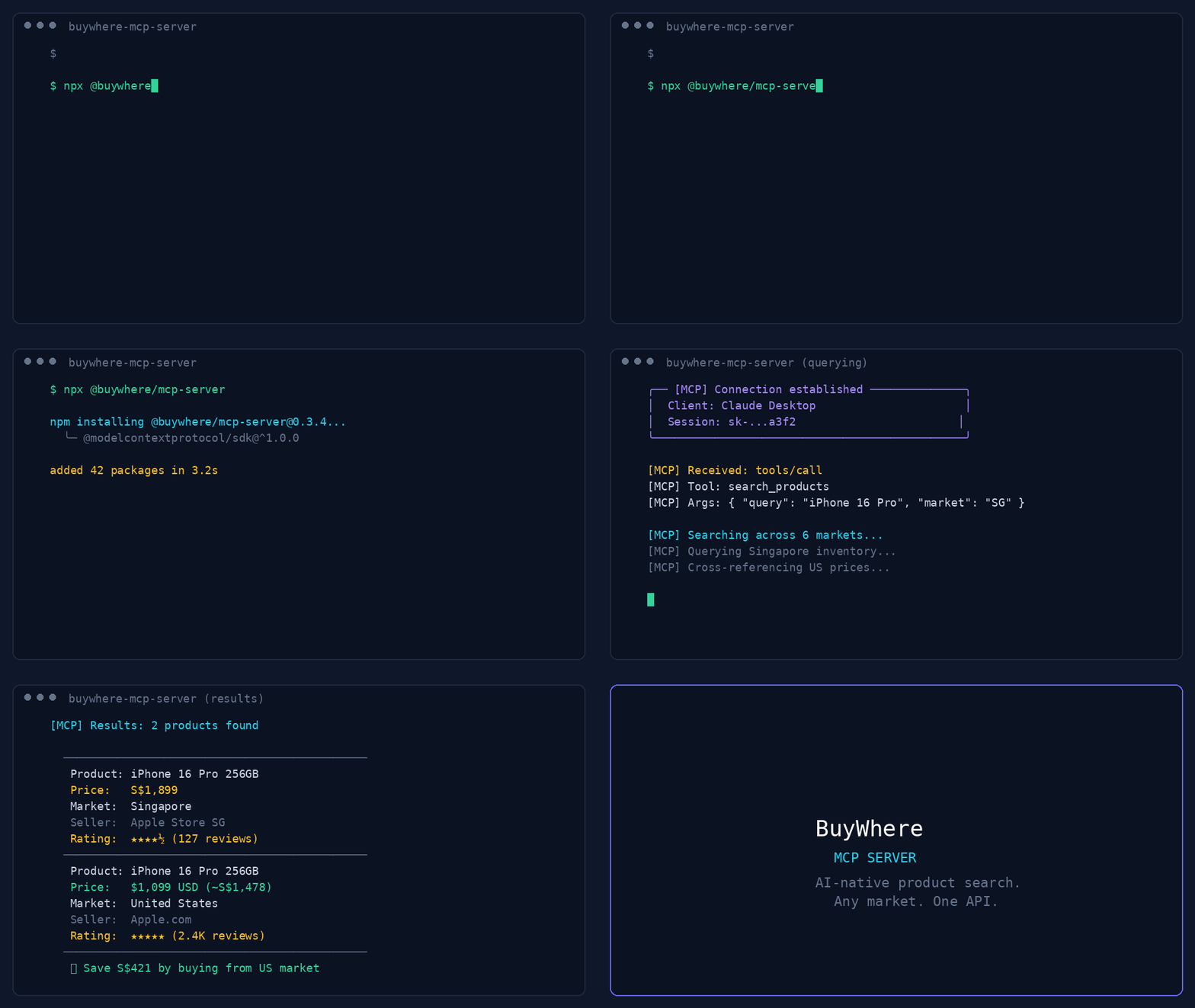
*44-second demo: product search, deal discovery, price comparison, and multi-region support.*
```text
User: "Find me wireless earbuds under $50 available in Singapore"
Agent: [calls search_products → returns 5 matching products]
User: "Compare the top 3"
Agent: [calls compare_products → side-by-side with best-value pick]
```
## Quick Start
**Get a key in 3 seconds — no signup, no email:**
```bash
# 1. Register (one call, returns api_key instantly)
curl -X POST https://api.buywhere.ai/v1/auth/register \
-H "Content-Type: application/json" \
-d '{"agent_name":"your-agent"}'
# → {"api_key":"bw_...","tier":"unverified","rate_limit":{"rpm":20,"daily":1000}}
# 2. Use the key
export BUYWHERE_API_KEY=bw_...
npx -y @buywhere/mcp-server
```
Legacy email signup (60s, manual approval) → [buywhere.ai/api-keys](https://buywhere.ai/api-keys)
## Tutorials
- **[Part 1: MCP for Ecommerce — The Missing Infrastructure Layer for AI Agent Shopping](https://dev.to/buywhere/mcp-for-ecommerce-the-missing-infrastructure-layer-for-ai-agent-shopping-1i7d)** — Architecture and why agents need a product catalog API
- **[Part 2: Build a Real Shopping Agent in 15 Minutes](https://dev.to/buywhere/mcp-for-ecommerce-part-2-build-a-real-shopping-agent-in-15-minutes-4f5b)** — Hands-on: set up MCP server, search products, compare prices, build a working agent
## From the Blog
Read the **[BuyWhere Engineering Blog](https://buywhere.ai/blog)** for deep dives on MCP architecture, agent commerce, and the ecosystem.
Also follow the **[BuyWhere Hashnode blog mirror](https://buywhere.hashnode.dev/)** for the same engineering content on Hashnode.
- **[MCP for Ecommerce 2026](https://buywhere.ai/blog/mcp-for-ecommerce-2026)** — How AI agents search real products, compare prices across markets, and why MCP is the standard
- **[Building Production MCP Servers](https://buywhere.ai/blog/building-production-mcp-servers)** — Architecture, tool design patterns, and distribution (verified ~1,050 npm downloads/month)
- **[MCP Server Ecosystem 2026](https://buywhere.ai/blog/mcp-server-ecosystem-2026)** — Every MCP category mapped (4,800+ servers across 40+ domains)
- **[AI Agent Commerce: Missing Infrastructure](https://buywhere.ai/blog/ai-agent-commerce-missing-infrastructure)** — Why shopping is the last unbuilt layer of the agent-native economy
- **[Cross-Border Price Comparison Tutorial](https://buywhere.ai/blog/cross-border-price-comparison-agent-tutorial)** — Build a shopping agent in 10 minutes with BuyWhere MCP
## Tools
| Tool | Description |
|------|-------------|
| `search_products` | Search catalog by keyword, category, price, country |
| `get_product` | Full product details by ID (prices, specs, images) |
| `compare_products` | Side-by-side comparison of 2–10 products |
| `find_best_price` | Cheapest deliverable listing for a product across merchants |
| `get_deals` | Products with significant price drops |
| `list_categories` | Available product category taxonomy |
| `find_similar` | Similar products by vector similarity |
| `ingest_products` | Submit product URLs for catalog ingestion (agents/merchants) |
| `search_products_v2` | v2 search; requires `deliver_to` (ISO country) |
| `get_product_v2` | v2 product details by ID |
| `compare_products_v2` | v2 comparison; optional `deliver_to` |
| `get_deals_v2` | v2 deals; requires `deliver_to` |
| `find_best_price_v2` | v2 best price; requires `deliver_to` |
Remote MCP: `POST https://api.buywhere.ai/mcp` (JSON-RPC 2.0, protocolVersion 2024-11-05, 13 tools). Glama listing: https://glama.ai/mcp/servers/BuyWhere/buywhere-mcp
## MCP Client Configuration
Framework quickstarts:
- CrewAI: [API key](https://buywhere.ai/api-keys) · [BuyWhere quickstart](https://github.com/BuyWhere/buywhere-mcp#quick-start)
- Mastra: [API key](https://buywhere.ai/api-keys) · [BuyWhere quickstart](https://github.com/BuyWhere/buywhere-mcp#quick-start)
### Claude Desktop
Add to `claude_desktop_config.json`:
```json
{
"mcpServers": {
"buywhere": {
"command": "npx",
"args": ["-y", "@buywhere/mcp-server"],
"env": { "BUYWHERE_API_KEY": "bw_live_xxxx" }
}
}
}
```
### Cursor / VS Code / Cline
Add to your MCP settings file:
```json
{
"mcpServers": {
"buywhere": {
"command": "npx",
"args": ["-y", "@buywhere/mcp-server"],
"env": { "BUYWHERE_API_KEY": "bw_live_xxxx" }
}
}
}
```
### Windsurf
Add to `~/.windsurf/mcp.json`:
```json
{
"mcpServers": {
"buywhere": {
"command": "npx",
"args": ["-y", "@buywhere/mcp-server"],
"env": { "BUYWHERE_API_KEY": "bw_live_xxxx" }
}
}
}
```
### OpenCode / Codex
Add to `opencode.json`:
```json
{
"mcpServers": {
"buywhere": {
"command": "npx",
"args": ["-y", "@buywhere/mcp-server"],
"env": { "BUYWHERE_API_KEY": "bw_live_xxxx" }
}
}
}
```
### Continue.dev (VS Code / JetBrains)
Add to `~/.continue/config.json`:
```json
{
"experimental": {
"mcpServers": {
"buywhere": {
"command": "npx",
"args": ["-y", "@buywhere/mcp-server"],
"env": { "BUYWHERE_API_KEY": "bw_live_xxxx" }
}
}
}
}
```
### Mastra
[Mastra](https://mastra.ai) is a TypeScript-first AI agent framework with native MCP support.
```bash
npm install @mastra/core @mastra/mcp
```
```typescript
import { Mastra } from '@mastra/core';
import { MastraMCPClient } from '@mastra/mcp';
const buywhere = new MastraMCPClient({
name: 'buywhere',
server: {
url: new URL('https://api.buywhere.ai/mcp'),
requestInit: {
headers: { 'Authorization': `Bearer ${process.env.BUYWHERE_API_KEY}` },
},
},
});
const agent = new Mastra({
agents: {
shoppingAgent: {
instructions: 'You are a shopping assistant. Use BuyWhere to find and compare products.',
tools: await buywhere.tools(),
},
},
});
const result = await agent.agents.shoppingAgent.generate(
'Find me the best deal on a Sony WH-1000XM5 in Singapore'
);
```
Full guide: [BuyWhere + Mastra Integration](https://api.buywhere.ai/docs/guides/mastra-integration)
### LangChain
Use BuyWhere tools in LangChain agents via the MCP adapter:
```python
from langchain_mcp_adapters.client import MultiServerMCPClient
from langgraph.prebuilt import create_react_agent
from langchain_anthropic import ChatAnthropic
async def main():
async with MultiServerMCPClient({
"buywhere": {
"url": "https://api.buywhere.ai/mcp",
"transport": "streamable_http",
"headers": {"Authorization": f"Bearer {BUYWHERE_API_KEY}"},
}
}) as client:
tools = await client.get_tools()
agent = create_react_agent(ChatAnthropic(model="claude-sonnet-4-5"), tools)
result = await agent.ainvoke({"messages": [("user", "Find the cheapest Sony headphones in Singapore")]})
```
### LlamaIndex
Connect BuyWhere via LlamaIndex MCP client:
```python
from llama_index.tools.mcp import BasicMCPClient, McpToolSpec
from llama_index.agent.openai import OpenAIAgent
async def main():
mcp_client = BasicMCPClient(
command_or_url="https://api.buywhere.ai/mcp",
headers={"Authorization": f"Bearer {BUYWHERE_API_KEY}"},
)
mcp_tool_spec = McpToolSpec(client=mcp_client)
tools = mcp_tool_spec.to_tool_list()
agent = OpenAIAgent.from_tools(tools)
response = await agent.achat("Compare prices for iPhone 16 Pro across Singapore and US")
```
### CrewAI
Use BuyWhere in a CrewAI agent with MCP tool integration:
```python
from crewai import Agent, Task, Crew
from crewai_tools import MCPServerAdapter
buywhere_server = MCPServerAdapter(
server_params={
"url": "https://api.buywhere.ai/mcp",
"headers": {"Authorization": f"Bearer {BUYWHERE_API_KEY}"},
"transport": "streamable-http",
}
)
shopping_agent = Agent(
role="Shopping Research Analyst",
goal="Find the best deals across Singapore and US markets",
tools=[buywhere_server],
)
task = Task(
description="Find the best price for Sony WH-1000XM5 headphones across all available markets",
agent=shopping_agent,
expected_output="Product comparison with prices and merchant links",
)
crew = Crew(agents=[shopping_agent], tasks=[task])
result = crew.kickoff()
```
## Configuration
| Variable | Default | Description |
|----------|---------|-------------|
| `BUYWHERE_API_KEY` | (required) | API key (no signup: `POST /v1/auth/register {"agent_name":"<name>"}`) — returns instantly, no email verification |
| `BUYWHERE_API_URL` | `https://api.buywhere.ai/mcp` | Custom API base URL |
## Install
```bash
# Run directly (no install)
npx -y @buywhere/mcp-server
# Install globally
npm install -g @buywhere/mcp-server
buywhere-mcp
```
## Use Cases
- **Shopping agents** — build AI agents that search, compare, recommend products across markets
- **Price comparison** — multi-market pricing in a single query across Lazada, Shopee, Amazon, local retailers
- **Deal discovery** — find best-value products with real-time pricing and inventory
- **Ecommerce automation** — integrate product search into any MCP-compatible app
- **Cross-border commerce** — compare prices between Singapore, US, Malaysia, Thailand, and Vietnam markets
- **Agent-to-Agent commerce** — delegate shopping tasks between agents via A2A protocol
## Architecture
```
Developer's AI Agent (Claude, Cursor, etc.)
│
├── MCP Protocol (stdio)
│
├── @buywhere/mcp-server
│ ├── search_products(q, category, min_price, max_price, country_code, deliver_to)
│ ├── get_product(product_id)
│ ├── compare_products(product_ids[])
│ ├── find_best_price(product_name, country_code, deliver_to)
│ ├── get_deals(country_code, deliver_to, category)
│ ├── list_categories()
│ ├── find_similar(product_id)
│ └── ingest_products(urls[])
│
└── BuyWhere API (api.buywhere.ai)
└── Product catalog across SG, US, MY, TH, and VN merchants
```
## Development
```bash
git clone https://github.com/BuyWhere/buywhere-mcp.git
cd buywhere-mcp
npm install
npm run build
npm start
```
## Why BuyWhere?
BuyWhere is a product search API for AI agents. We aggregate product data from Singapore, US, Malaysia, Thailand, and Vietnam merchants into a single, agent-friendly interface — no store management, no Shopify integration. Just search and compare products in real time.
- **One API** — all markets, all retailers
- **Agent-native** — built for MCP from day one
- **Real-time** — live pricing and availability
- **Developer-first** — no SDK needed, just add the server
## Works Well With
These complementary MCP packages extend BuyWhere into powerful multi-tool workflows:
- **[@modelcontextprotocol/server-filesystem](https://www.npmjs.com/package/@modelcontextprotocol/server-filesystem)** — Save shopping results and product research to your local filesystem. Combine with BuyWhere to export deal lists, price comparisons, and product specs as structured files.
- **[@supabase/mcp-server-supabase](https://www.npmjs.com/package/@supabase/mcp-server-supabase)** — Store favorite products, user preferences, and price alerts in Supabase. Persist shopping history across agent sessions.
- **[n8n-mcp](https://www.npmjs.com/package/n8n-mcp)** — Automate price monitoring workflows. Build no-code pipelines that watch BuyWhere prices and trigger notifications on price drops.
- **[tavily-mcp](https://www.npmjs.com/package/tavily-mcp)** — Research products before buying. Use Tavily to find reviews and comparisons, then use BuyWhere to get current prices and purchase links.
- **[@playwright/mcp](https://www.npmjs.com/package/@playwright/mcp)** — E2E test your shopping agent interactions. Verify that product search, price comparison, and checkout flows work correctly in browser automation.
## Protocols
| Protocol | Support |
|----------|---------|
| **MCP** (Model Context Protocol) | Full support — 10 tools, stdio transport |
| **A2A** (Agent-to-Agent) | Multi-agent task delegation — [Agent Card](https://buywhere.ai/.well-known/agent.json) |
## Contributing
See [CONTRIBUTING.md](CONTRIBUTING.md) for how to report issues, submit PRs, and suggest features.
## From the Blog
Learn more about MCP servers and the BuyWhere ecosystem:
- [MCP server discovery](https://buywhere.hashnode.dev/the-mcp-server-discovery-gap) — Understanding the MCP server discovery gap
- [Building production MCP servers](https://buywhere.hashnode.dev/building-production-mcp-servers) — Production best practices for MCP servers
- [MCP servers that earn their context window](https://buywhere.hashnode.dev/5-mcp-servers-that-earn-context-window) — MCP servers that maximize context window value
- [MCP ecommerce guide](https://buywhere.hashnode.dev/mcp-for-ecommerce-definitive-guide) — Definitive guide to MCP for ecommerce
- [BuyWhere MCP launch](https://buywhere.hashnode.dev/buywhere-mcp-goes-live) — Announcing the BuyWhere MCP server launch
- [MCP server ecosystem 2026](https://buywhere.hashnode.dev/mcp-server-ecosystem-2026-complete-guide) — Complete guide to the MCP server ecosystem in 2026
## Support
If you find this project useful:
- ⭐ **Star the repo** — it helps others discover BuyWhere
- 🐛 [Open an issue](https://github.com/BuyWhere/buywhere-mcp/issues/new) for bugs or feature requests
- 💬 [Start a discussion](https://github.com/BuyWhere/buywhere-mcp/discussions) for questions or ideas
- 📣 Share it with other developers who build AI agent tools
## License
MIT