Rootly
Incident management, on-call scheduling, and intelligent analysis powered by Rootly.
Open source Repository Open in the app JSON README (API)
About
Incident management, on-call scheduling, and intelligent analysis powered by Rootly.
Details
- Kind
- MCP servers
- Topic
- Cloud & DevOps
- Publisher
- com.rootly
- Origin
- official
- Category
- ferramentas
- Transport
- sse
- Version
- 2.2.4
- Stars
- 45
- Forks
- 23
- Open pull requests
- 9
- Last push
- 2026-09-01T18:57:45Z
- Repository state
- ativo
- Language
- Python
- License
- Apache-2.0
- Added
- 2026-08-29 03:01:20
- Updated
- 2026-08-29 03:01:20
- Origin id
com.rootly/mcp-server
README
<!-- mcp-name: com.rootly/mcp-server -->
# Rootly MCP Server
[](https://pypi.org/project/rootly-mcp-server/)
[](https://pypi.org/project/rootly-mcp-server/)
[](https://pypi.org/project/rootly-mcp-server/)
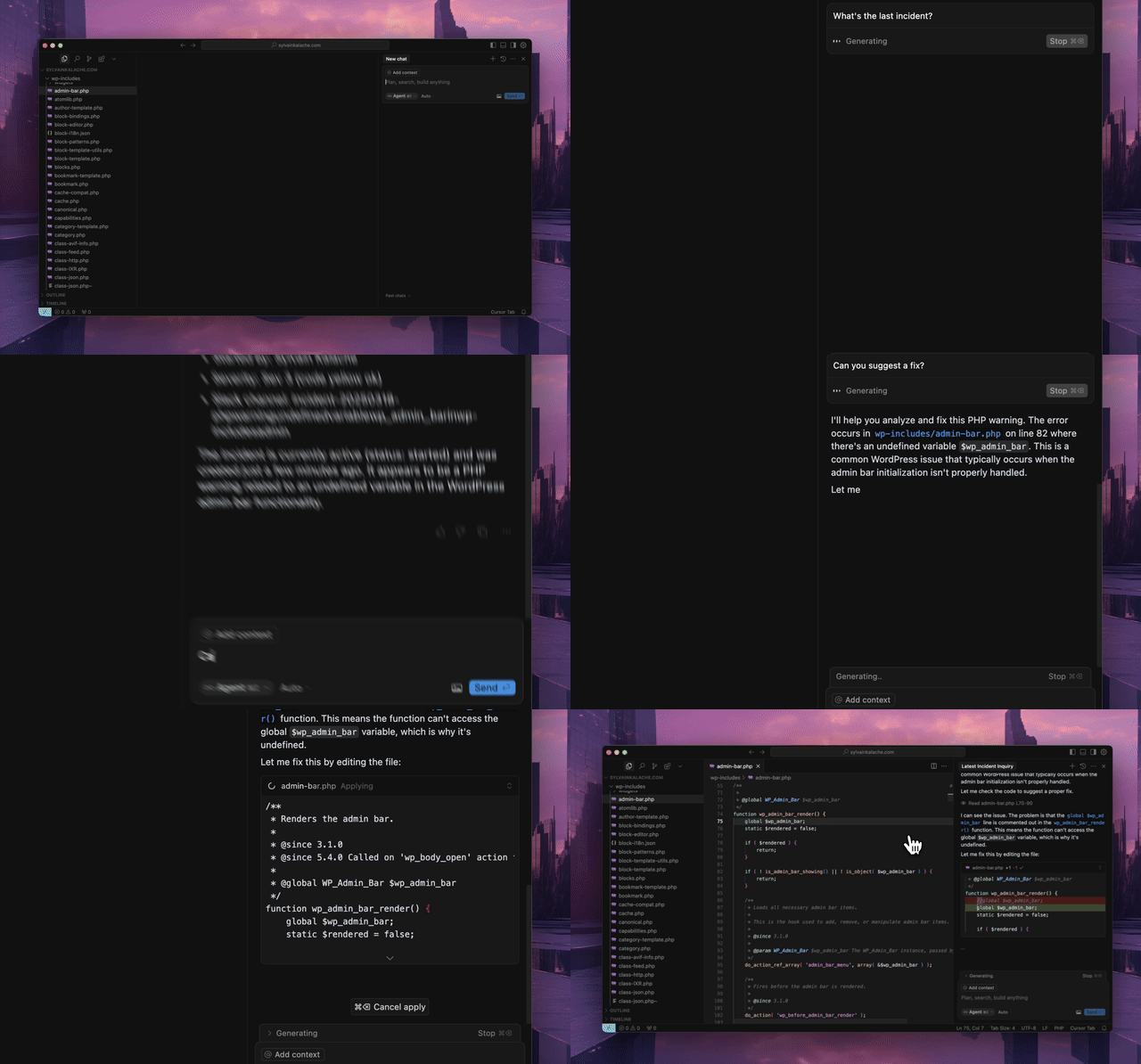
An MCP server for the [Rootly API](https://docs.rootly.com/api-reference/overview) for Cursor, Windsurf, Claude, and other MCP clients.
## Quick Start
Use the hosted MCP server. No local installation required.
### Hosted Transport Options
- **Streamable HTTP (recommended):** `https://mcp.rootly.com/mcp`
- **SSE (stable alternative):** `https://mcp.rootly.com/sse`
- **Code Mode:** `https://mcp.rootly.com/mcp-codemode`
Hosted tool profiles:
- **Full (default):** use the URLs above as-is
- **Slim (~70 tools):** add `?tool_profile=slim` to the hosted URL, for example `https://mcp.rootly.com/mcp?tool_profile=slim`
- **Header alternative:** send `X-Rootly-Tool-Profile: slim`
- **Server-wide default:** set `ROOTLY_MCP_HOSTED_TOOL_PROFILE=full|slim`
- **Exact custom override:** set `ROOTLY_MCP_ENABLED_TOOLS=...`
### General Remote Setup
**With OAuth2 (recommended):**
```json
{
"mcpServers": {
"rootly": {
"url": "https://mcp.rootly.com/mcp"
}
}
}
```
Your MCP client handles OAuth2 login automatically — a browser window opens for you to authenticate with Rootly. No API token needed.
**With API Token:**
```json
{
"mcpServers": {
"rootly": {
"url": "https://mcp.rootly.com/mcp",
"headers": {
"Authorization": "Bearer YOUR_ROOTLY_API_TOKEN"
}
}
}
}
```
SSE (alternative):
```json
{
"mcpServers": {
"rootly": {
"url": "https://mcp.rootly.com/sse"
}
}
}
```
Code Mode:
```json
{
"mcpServers": {
"rootly": {
"url": "https://mcp.rootly.com/mcp-codemode"
}
}
}
```
### Agent Setup
<details>
<summary><strong>Claude Code</strong></summary>
<br>
**With OAuth2 (recommended):**
```bash
claude mcp add --transport http rootly https://mcp.rootly.com/mcp
# Code Mode:
claude mcp add --transport http rootly-codemode https://mcp.rootly.com/mcp-codemode
```
**With API Token:**
```bash
claude mcp add --transport http rootly https://mcp.rootly.com/mcp \
--header "Authorization: Bearer YOUR_ROOTLY_API_TOKEN"
```
**Manual Configuration** — Create `.mcp.json` in your project root:
```json
{
"mcpServers": {
"rootly": {
"type": "http",
"url": "https://mcp.rootly.com/mcp"
}
}
}
```
</details>
<details>
<summary><strong>Gemini CLI</strong></summary>
<br>
Install the extension:
```bash
gemini extensions install https://github.com/rootlyhq/rootly-mcp-server
```
Or configure manually in `~/.gemini/settings.json`:
```json
{
"mcpServers": {
"rootly": {
"command": "uvx",
"args": ["--from", "rootly-mcp-server", "rootly-mcp-server"],
"env": {
"ROOTLY_API_TOKEN": "<YOUR_ROOTLY_API_TOKEN>"
}
}
}
}
```
</details>
<details>
<summary><strong>Cursor</strong></summary>
<br>
Add to `.cursor/mcp.json` or `~/.cursor/mcp.json`:
**With OAuth2 (recommended):**
```json
{
"mcpServers": {
"rootly": {
"url": "https://mcp.rootly.com/mcp"
}
}
}
```
**With API Token:**
```json
{
"mcpServers": {
"rootly": {
"url": "https://mcp.rootly.com/mcp",
"headers": {
"Authorization": "Bearer <YOUR_ROOTLY_API_TOKEN>"
}
}
}
}
```
</details>
<details>
<summary><strong>Windsurf</strong></summary>
<br>
Add to `~/.codeium/windsurf/mcp_config.json`:
**With OAuth2 (recommended):**
```json
{
"mcpServers": {
"rootly": {
"serverUrl": "https://mcp.rootly.com/mcp"
}
}
}
```
**With API Token:**
```json
{
"mcpServers": {
"rootly": {
"serverUrl": "https://mcp.rootly.com/mcp",
"headers": {
"Authorization": "Bearer <YOUR_ROOTLY_API_TOKEN>"
}
}
}
}
```
</details>
<details>
<summary><strong>Codex</strong></summary>
<br>
Add to `~/.codex/config.toml`:
**With OAuth2 (recommended):**
```toml
[mcp_servers.rootly]
url = "https://mcp.rootly.com/mcp"
```
**With API Token:**
```toml
[mcp_servers.rootly]
url = "https://mcp.rootly.com/mcp"
bearer_token_env_var = "ROOTLY_API_TOKEN"
```
</details>
<details>
<summary><strong>Claude Desktop</strong></summary>
<br>
**With OAuth2 (recommended):**
Add to `claude_desktop_config.json`:
```json
{
"mcpServers": {
"rootly": {
"url": "https://mcp.rootly.com/mcp"
}
}
}
```
Claude Desktop handles OAuth2 login automatically.
**With API Token (via mcp-remote):**
```json
{
"mcpServers": {
"rootly": {
"command": "npx",
"args": [
"-y",
"mcp-remote",
"https://mcp.rootly.com/mcp",
"--transport",
"http",
"--header",
"Authorization: Bearer <YOUR_ROOTLY_API_TOKEN>"
]
}
}
}
```
</details>
## Rootly CLI
Standalone CLI for incidents, alerts, services, and on-call operations.
Install via Homebrew:
```bash
brew install rootlyhq/tap/rootly-cli
```
Or via Go:
```bash
go install github.com/rootlyhq/rootly-cli/cmd/rootly@latest
```
For more details, see the [Rootly CLI repository](https://github.com/rootlyhq/rootly-cli).
## Alternative Installation (Local)
Run the MCP server locally if you do not want to use the hosted service.
### Prerequisites
- Python 3.12 or higher
- `uv` package manager
```bash
curl -LsSf https://astral.sh/uv/install.sh | sh
```
- [Rootly API token](https://docs.rootly.com/api-reference/overview#how-to-generate-an-api-key%3F)
### API Token Types
Choose the token type based on the access you need:
- **Global API Key**: Full access across the Rootly instance. Best for organization-wide visibility.
- **Team API Key**: Access limited to entities owned by that team.
- **Personal API Key**: Access matches the user who created it.
A **Global API Key** is recommended for organization-wide queries and for actions that modify data, especially when workflows may span multiple teams, schedules, or incidents.
### With uv
```json
{
"mcpServers": {
"rootly": {
"command": "uv",
"args": [
"tool",
"run",
"--from",
"rootly-mcp-server",
"rootly-mcp-server"
],
"env": {
"ROOTLY_API_TOKEN": "<YOUR_ROOTLY_API_TOKEN>",
"ROOTLY_MCP_ENABLE_WRITE_TOOLS": "true"
}
}
}
}
```
## Self-Hosted Transport Options
Choose one transport per server process:
- **Streamable HTTP** endpoint path: `/mcp`
- **SSE** endpoint path: `/sse`
- **Code Mode (experimental)** endpoint path: `/mcp-codemode` in hosted dual-transport mode
Hosted and self-hosted deployments now both expose the full tool surface by default.
- Hosted default: full surface
- Hosted slim profile: about 70 high-usage tools via `?tool_profile=slim`
- Self-hosted default: full surface
To restrict either deployment to read-only tools, start the server with `--no-enable-write-tools` or set `ROOTLY_MCP_ENABLE_WRITE_TOOLS=false`.
For hosted clients that want the smaller remote profile, append `?tool_profile=slim` to the MCP URL or send `X-Rootly-Tool-Profile: slim`.
### AgentCat and Sentry telemetry
Hosted deployments can send MCP telemetry to AgentCat by setting
`ROOTLY_MCPCAT_PROJECT_ID`. To also export AgentCat events to Sentry, provide
`SENTRY_DSN` through the deployment's secret store. The optional
`ENVIRONMENT` defaults to `production`, and `SENTRY_RELEASE` defaults to the
installed Rootly MCP Server version. Sentry performance tracing is enabled when
the exporter is configured.
Free-form event text is redacted and actor names are omitted from Sentry-bound
telemetry; stable internal actor IDs remain available for correlation.
Telemetry runs on AgentCat v2 (MCP 2026-07-28 spec). Sessions are correlated via
a session_id carried in the tool list rather than stateful connections, which
suits our stateless hosted transport; `initialize` and `tools/list` events are no
longer published by the SDK.
To override the hosted or self-hosted default profile entirely, set `ROOTLY_MCP_ENABLED_TOOLS` (or pass `--enabled-tools`) with a comma-separated allowlist of exact tool names. When that variable is set, it fully replaces the default selection.
To expose only a specific subset of MCP tools on a self-hosted deployment, set `ROOTLY_MCP_ENABLED_TOOLS` (or pass `--enabled-tools`) with a comma-separated allowlist of exact tool names, for example `list_incidents,get_incident,get_server_version`.
### OpenAI Apps domain verification
Hosted deployments expose an unauthenticated domain-verification endpoint used by the OpenAI plugin directory:
- **Endpoint:** `GET /.well-known/openai-apps-challenge`
- **Environment variable:** `ROOTLY_OPENAI_APPS_CHALLENGE_TOKEN`
Set `ROOTLY_OPENAI_APPS_CHALLENGE_TOKEN` to the token generated in the OpenAI submission portal. The endpoint returns that exact token as `text/plain` (with `Cache-Control: no-store`), and returns `404` when the variable is unset or empty. The token is read from the environment at request time — never hardcode or commit it. The route is served on both the dual-transport (`--transport both`) and profiled streamable-HTTP hosted deployments and is not subject to Bearer authentication.
To discover the exact tool names available under your current self-hosted configuration, run:
```bash
ROOTLY_API_TOKEN=<YOUR_ROOTLY_API_TOKEN> \
uv run python -m rootly_mcp_server --list-tools
```
This prints the effective MCP tool names after applying your current settings, including `ROOTLY_MCP_ENABLE_WRITE_TOOLS` and `ROOTLY_MCP_ENABLED_TOOLS`.
Smoke-test a self-hosted allowlist:
```bash
ROOTLY_API_TOKEN=<YOUR_ROOTLY_API_TOKEN> \
ROOTLY_MCP_ENABLED_TOOLS=list_incidents,get_incident,get_server_version \
uv run python -m rootly_mcp_server --transport streamable-http --log-level ERROR
```
Then connect an MCP client to `http://127.0.0.1:8000/mcp` and verify `tools/list` returns only:
```text
get_server_version
get_incident
list_incidents
```
To include specific write tools for self-hosted testing, add both the write flag and the allowlist:
```bash
ROOTLY_API_TOKEN=<YOUR_ROOTLY_API_TOKEN> \
ROOTLY_MCP_ENABLE_WRITE_TOOLS=true \
ROOTLY_MCP_ENABLED_TOOLS=create_incident,create_workflow_task,list_teams \
uv run python -m rootly_mcp_server --transport streamable-http --log-level ERROR
```
Example Docker run (Streamable HTTP):
```bash
docker run -p 8000:8000 \
-e ROOTLY_TRANSPORT=streamable-http \
-e ROOTLY_API_TOKEN=<YOUR_ROOTLY_API_TOKEN> \
-e ROOTLY_MCP_ENABLE_WRITE_TOOLS=true \
rootly-mcp-server
```
Example Docker run (SSE):
```bash
docker run -p 8000:8000 \
-e ROOTLY_TRANSPORT=sse \
-e ROOTLY_API_TOKEN=<YOUR_ROOTLY_API_TOKEN> \
rootly-mcp-server
```
Example Docker run (Dual transport + Code Mode):
```bash
docker run -p 8000:8000 \
-e ROOTLY_TRANSPORT=both \
-e ROOTLY_API_TOKEN=<YOUR_ROOTLY_API_TOKEN> \
rootly-mcp-server
```
## Workflow-Focused Tool Subsets
The full hosted and self-hosted surface exposes 200+ tools. If you want tighter workflow-specific subsets, use `ROOTLY_MCP_ENABLED_TOOLS`:
### 🚨 Incident Response (25 tools)
*Essential tools for emergency responders and incident commanders*
```bash
ROOTLY_MCP_ENABLED_TOOLS="list_incidents,get_incident,create_incident,update_incident,search_incidents,find_related_incidents,suggest_solutions,create_incident_action_item,list_incident_action_items,update_incident_form_field_selection,list_teams,get_current_user,list_services,list_severities,get_alert,list_alerts,get_alert_by_short_id,list_escalation_policies,get_escalation_policy,list_on_call_roles,list_schedules,get_schedule_shifts,get_oncall_handoff_summary,get_shift_incidents,list_endpoints"
```
### 📅 On-Call Management (35 tools)
*For schedule coordinators and on-call managers*
```bash
ROOTLY_MCP_ENABLED_TOOLS="list_schedules,get_schedule,update_schedule,get_schedule_shifts,list_shifts,create_schedule_rotation,update_schedule_rotation,list_schedule_rotations,get_schedule_rotation,list_schedule_rotation_users,update_schedule_rotation_user,create_on_call_shadow,update_on_call_shadow,list_on_call_shadows,create_override_shift,update_override_shift,list_override_shifts,list_on_call_roles,update_on_call_role,get_oncall_schedule_summary,get_oncall_shift_metrics,check_oncall_health_risk,check_responder_availability,create_override_recommendation,list_teams,get_team,list_users,get_user,get_current_user,list_escalation_policies,update_escalation_policy,list_escalation_paths,update_escalation_path,list_escalation_levels"
```
### 📊 Monitoring & Alerting (40 tools)
*For platform teams setting up observability*
```bash
ROOTLY_MCP_ENABLED_TOOLS="list_alerts,get_alert,get_alert_by_short_id,create_alert_group,update_alert_group,list_alert_groups,create_alert_routing_rule,update_alert_routing_rule,list_alert_routing_rules,list_alert_events,get_alert_event,update_alert_event,create_heartbeat,update_heartbeat,list_heartbeats,get_heartbeat,create_pulse,update_pulse,list_pulses,get_pulse,create_dashboard,update_dashboard,list_dashboards,get_dashboard,create_dashboard_panel,update_dashboard_panel,list_status_pages,get_status_page,update_status_page,list_status_page_templates,get_status_page_template,list_communications_templates,update_communications_template,create_live_call_router,update_live_call_router,list_services,list_teams,get_current_user,list_environments,list_severities,list_endpoints"
```
### 📋 Post-Incident Analysis (30 tools)
*For SREs doing retrospectives and process improvement*
```bash
ROOTLY_MCP_ENABLED_TOOLS="get_incident,update_incident,find_related_incidents,suggest_solutions,list_incident_action_items,create_incident_action_item,update_incident_form_field_selection,create_post_incident_review,update_post_incident_review,list_post_incident_reviews,get_post_incident_review,create_retrospective_step,update_retrospective_step,list_retrospective_steps,create_retrospective_process,update_retrospective_process,list_retrospective_processes,create_playbook,update_playbook,list_playbooks,get_playbook,create_playbook_task,update_playbook_task,list_causes,get_cause,update_cause,list_incident_types,get_incident_type,update_incident_type,get_current_user"
```
### 📈 Analytics & Reporting (15 tools)
*For leadership and metrics teams (read-only focus)*
```bash
ROOTLY_MCP_ENABLED_TOOLS="list_incidents,search_incidents,collect_incidents,list_teams,list_services,list_schedules,get_oncall_shift_metrics,get_shift_incidents,list_dashboards,get_dashboard,list_alerts,list_heartbeats,list_pulses,get_current_user,list_endpoints"
```
### Multiple MCP Instances for Different Teams
You can run multiple MCP instances with different tool subsets:
```json
{
"mcpServers": {
"rootly-incident-response": {
"command": "uvx", "args": ["--from", "rootly-mcp-server", "rootly-mcp-server"],
"env": {
"ROOTLY_API_TOKEN": "<token>",
"ROOTLY_MCP_ENABLED_TOOLS": "list_incidents,get_incident,create_incident,find_related_incidents,suggest_solutions..."
}
},
"rootly-oncall-management": {
"command": "uvx", "args": ["--from", "rootly-mcp-server", "rootly-mcp-server"],
"env": {
"ROOTLY_API_TOKEN": "<token>",
"ROOTLY_MCP_ENABLED_TOOLS": "list_schedules,update_schedule,create_override_shift,get_oncall_shift_metrics..."
}
}
}
}
```
### With uvx
```json
{
"mcpServers": {
"rootly": {
"command": "uvx",
"args": [
"--from",
"rootly-mcp-server",
"rootly-mcp-server"
],
"env": {
"ROOTLY_API_TOKEN": "<YOUR_ROOTLY_API_TOKEN>"
}
}
}
}
```
## Features
- **Dynamic Tool Generation**: Automatically creates MCP resources from Rootly's OpenAPI (Swagger) specification
- **Smart Pagination**: Uses bounded pagination and compact incident responses to prevent context window overflow
- **API Filtering**: Limits exposed API endpoints for security and performance
- **Intelligent Incident Analysis**: Smart tools that analyze historical incident data
- **`find_related_incidents`**: Uses TF-IDF similarity analysis to find historically similar incidents
- **`suggest_solutions`**: Mines past incident resolutions to recommend actionable solutions
- **MCP Resources**: Exposes incidents, teams, on-call status, and workflow guides as structured resources for AI context
- **Intelligent Pattern Recognition**: Automatically identifies services, error types, and resolution patterns
- **On-Call Health Integration**: Detects workload health risk in scheduled responders
## Supported Tools
The default tool surface depends on deployment profile:
- Hosted default: about **218 tools**
- Hosted slim profile: about **70 tools**
- Self-hosted default: about **218 tools**
### Custom Agentic Tools
- `check_oncall_health_risk`
- `check_responder_availability`
- `collect_incidents`
- `create_incident` - create a new incident with a scoped set of fields for agent workflows
- `create_override_recommendation`
- `find_related_incidents`
- `get_incident` - retrieve a single incident for direct verification, including PIR-related fields
- `get_alert_by_short_id`
- `get_oncall_handoff_summary`
- `get_oncall_schedule_summary`
- `get_oncall_shift_metrics`
- `get_server_version`
- `get_shift_incidents`
- `list_endpoints`
- `list_incidents`
- `list_shifts`
- `search_incidents`
- `suggest_solutions`
- `update_incident` - scoped incident update tool for `summary` and `retrospective_progress_status`
### OpenAPI-Generated Tools
> **Tool naming:** all tools use `snake_case`. The historical `camelCase` names
> (e.g. `getScheduleShifts`, `listIncidents`) are no longer advertised in
> `tools/list`, but remain callable as hidden aliases — they are transparently
> routed to their `snake_case` canonical. Update configs and `ROOTLY_MCP_ENABLED_TOOLS`
> allowlists to the `snake_case` names; legacy camelCase allowlist entries are
> auto-canonicalized.
```text
list_workflow_runs
create_incident_action_item
create_incident_form_field_selection
create_workflow_task
get_alert
get_alert_event
get_alert_group
get_alert_routing_rule
get_alert_source
get_alert_urgency
get_catalog
get_catalog_entity
get_cause
get_current_user
get_custom_form
get_environment
get_escalation_level
get_escalation_path
get_escalation_policy
get_form_field
get_form_field_option
get_functionality
get_functionality_incidents_chart
get_functionality_uptime_chart
get_incident_action_items
get_incident_form_field_selection
get_incident_type
get_on_call_role
get_on_call_shadow
get_override_shift
get_schedule
get_schedule_rotation
get_schedule_shifts
get_service
get_service_incidents_chart
get_service_uptime_chart
get_severity
get_status_page
get_status_page_template
get_team
get_team_incidents_chart
get_user
get_workflow
get_workflow_form_field_condition
get_workflow_group
get_workflow_task
list_alert_events
list_alert_groups
list_alert_routing_rules
list_alert_sources
list_alert_urgencies
list_alerts
list_all_incident_action_items
list_catalog_entities
list_catalogs
list_causes
list_custom_forms
list_environments
list_escalation_levels
list_escalation_levels_paths
list_escalation_paths
list_escalation_policies
list_form_field_options
list_form_fields
list_functionalities
list_incident_action_items
list_incident_alerts
list_incident_form_field_selections
list_incident_types
list_on_call_roles
list_on_call_shadows
list_override_shifts
list_schedule_rotation_active_days
list_schedule_rotation_users
list_schedule_rotations
list_schedules
list_services
list_severities
list_shifts
list_status_page_templates
list_status_pages
list_teams
list_users
list_workflow_form_field_conditions
list_workflow_groups
list_workflows
list_workflow_tasks
update_environment
update_escalation_level
update_escalation_path
update_escalation_policy
update_functionality
update_incident_type
update_on_call_role
update_on_call_shadow
update_override_shift
update_schedule
update_schedule_rotation
update_service
update_severity
update_team
update_workflow
update_incident_form_field_selection
update_workflow_task
```
**Major Expansion**: This version includes 50+ new endpoints covering communications, dashboards, playbooks, post-incident reviews, monitoring, and advanced form management - while carefully excluding security-sensitive operations like API key management, user creation/deletion, role management, and webhook configuration.
Delete operations remain disabled in the default tool surface.
## On-Call Health Integration
Integrates with [On-Call Health](https://oncallhealth.ai) to detect workload health risk in scheduled responders.
### Setup
Set the `ONCALLHEALTH_API_KEY` environment variable:
```json
{
"mcpServers": {
"rootly": {
"command": "uvx",
"args": ["--from", "rootly-mcp-server", "rootly-mcp-server"],
"env": {
"ROOTLY_API_TOKEN": "your_rootly_token",
"ONCALLHEALTH_API_KEY": "och_live_your_key"
}
}
}
}
```
### Usage
```
check_oncall_health_risk(
start_date="2026-02-09",
end_date="2026-02-15"
)
```
Returns at-risk users who are scheduled, recommended safe replacements, and action summaries.
## Example Skills
Pre-built Claude Code skills:
### 🚨 [Rootly Incident Responder](examples/skills/rootly-incident-responder.md)
This skill:
- Analyzes production incidents with full context
- Finds similar historical incidents using ML-based similarity matching
- Suggests solutions based on past successful resolutions
- Coordinates with on-call teams across timezones
- Correlates incidents with recent code changes and deployments
- Creates action items and remediation plans
- Provides confidence scores and time estimates
**Quick Start:**
```bash
# Copy the skill to your project
mkdir -p .claude/skills
cp examples/skills/rootly-incident-responder.md .claude/skills/
# Then in Claude Code, invoke it:
# @rootly-incident-responder analyze incident #12345
```
It demonstrates a full incident response workflow using Rootly tools and GitHub context.
### On-Call Shift Metrics
Get on-call shift metrics for any time period, grouped by user, team, or schedule. Includes primary/secondary role tracking, shift counts, hours, and days on-call.
```
get_oncall_shift_metrics(
start_date="2025-10-01",
end_date="2025-10-31",
group_by="user"
)
```
### On-Call Handoff Summary
Complete handoff: current/next on-call + incidents during shifts.
```python
# All on-call (any timezone)
get_oncall_handoff_summary(
team_ids="team-1,team-2",
timezone="America/Los_Angeles"
)
# Regional filter - only show APAC on-call during APAC business hours
get_oncall_handoff_summary(
timezone="Asia/Tokyo",
filter_by_region=True
)
```
Regional filtering shows only people on-call during business hours (9am-5pm) in the specified timezone.
Returns: `schedules` with `current_oncall`, `next_oncall`, and `shift_incidents`
### MCP Resources for Context
AI agents can access these resources for situational awareness:
- **`incident://{incident_id}`** - Detailed incident information for specific incidents
- **`team://{team_id}`** - Team details including name, color, and metadata
- **`rootly://incidents`** - List of recent incidents for quick reference
- **`rootly://oncall-status`** - Current on-call status across all schedules (critical for incident response)
- **`rootly://workflow-guide`** - Step-by-step workflow guidance for common operations
Example usage: *"Check the current on-call status"* → AI reads `rootly://oncall-status` resource
### Shift Incidents
Incidents during a time period, with filtering by severity/status/tags.
```python
get_shift_incidents(
start_time="2025-10-20T09:00:00Z",
end_time="2025-10-20T17:00:00Z",
severity="critical", # optional
status="resolved", # optional
tags="database,api" # optional
)
```
Returns: `incidents` list + `summary` (counts, avg resolution time, grouping)
## Contributing
See [CONTRIBUTING.md](CONTRIBUTING.md) for developer setup and guidelines.
## Play with it on Postman
[<img src="https://run.pstmn.io/button.svg" alt="Run In Postman" style="width: 128px; height: 32px;">](https://god.gw.postman.com/run-collection/45004446-1074ba3c-44fe-40e3-a932-af7c071b96eb?action=collection%2Ffork&source=rip_markdown&collection-url=entityId%3D45004446-1074ba3c-44fe-40e3-a932-af7c071b96eb%26entityType%3Dcollection%26workspaceId%3D4bec6e3c-50a0-4746-85f1-00a703c32f24)
## About Rootly AI Labs
This project was developed by [Rootly AI Labs](https://labs.rootly.ai/), where we're building the future of system reliability and operational excellence. As an open-source incubator, we share ideas, experiment, and rapidly prototype solutions that benefit the entire community.
