{
"markdown": "\n\n# Jira Alerts MCP\n\n**Find what is paging you, and who is on call — from your agent.**\n\n[](https://github.com/rrvrs/jira-alerts-mcp/actions/workflows/ci.yml)\n[](https://www.npmjs.com/package/jira-alerts-mcp)\n[](LICENSE)\n[](https://nodejs.org)\n\n
\n\nAn MCP server for **Jira Service Management Operations** — the alert surface that\nreplaced Opsgenie, which no other Jira MCP server covers.\n\nSearch alerts and read their notes and activity timeline; acknowledge, close,\nannotate them and add responders; and look up who is on call now and next.\nTwelve tools, four of them writes.\n\n---\n\n## Demo\n\n\n\n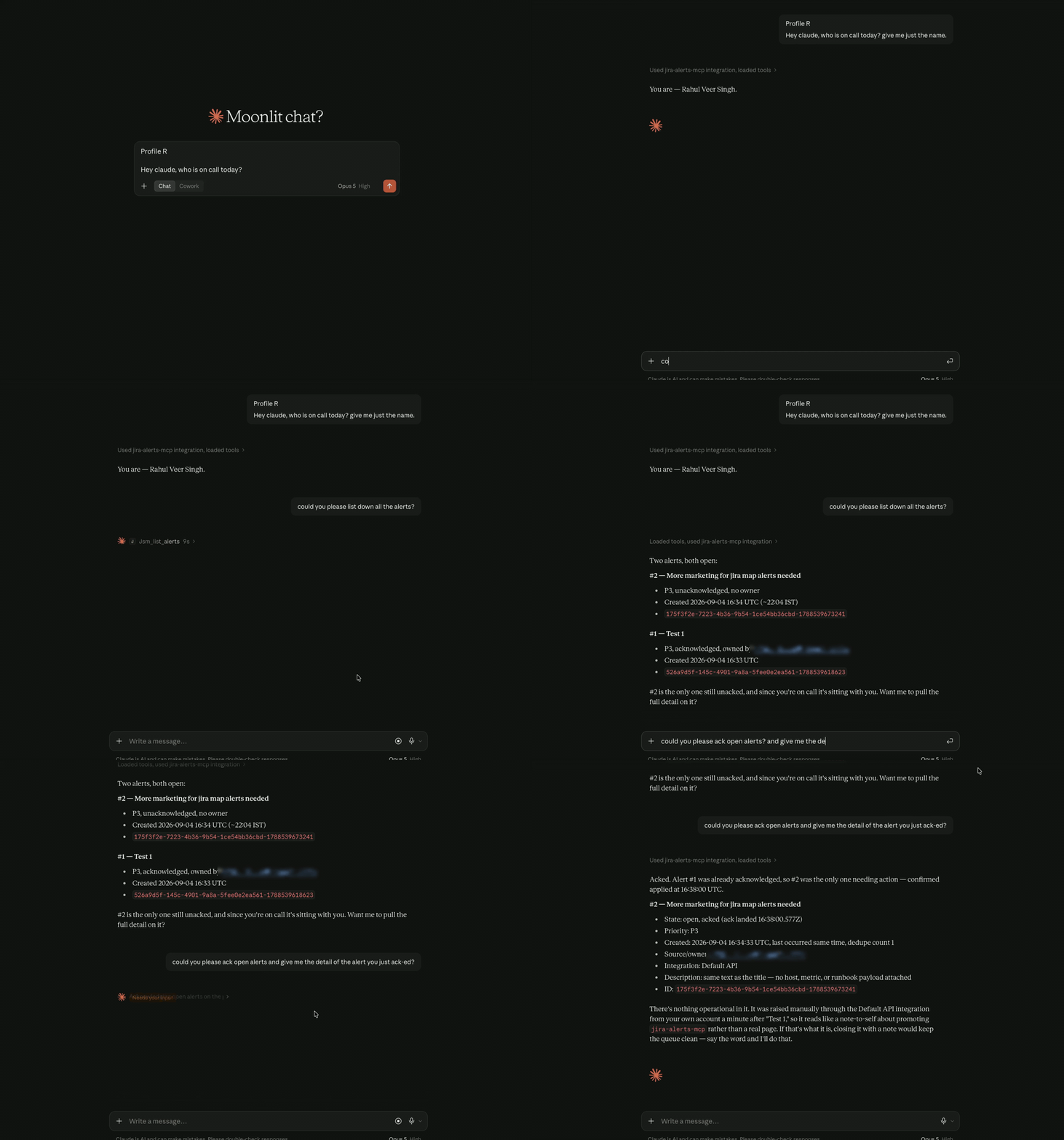\n\n
\n\nThree questions in one session, against a live JSM site: who is on call, what is\nopen, and acknowledge what isn't. Watch the last answer in particular — the agent\nconfirms the acknowledgement actually landed (`ack landed 16:38:00.577Z`) instead\nof assuming it did, which is the asynchronous-write behaviour described under\n[What this server handles for you](#what-this-server-handles-for-you).\n\n---\n\n## Quickstart\n\n**You need** Node ≥ 24 and an Atlassian Cloud site with JSM Operations enabled.\nThere is nothing to clone or build — your MCP client runs the published package.\n\n**1. Find your cloud id.** Open this while logged in to your site:\n\n```\nhttps://.atlassian.net/_edge/tenant_info\n```\n\nIt answers with one line — `{\"cloudId\":\"...\"}` — and that UUID is what\n`JSM_CLOUD_ID` wants. If you'd rather not rely on that endpoint, the cloud id is\nalso the segment after `/s/` in the URL at\n[admin.atlassian.com](https://admin.atlassian.com) → Apps → Sites → your site.\n\n**2. Create an API token** at\n[id.atlassian.com](https://id.atlassian.com/manage-profile/security/api-tokens).\n\n**3. Add the server.**\n\n*Claude Code:*\n\n```bash\nclaude mcp add jira-alerts-mcp \\\n --scope user \\\n --env JSM_CLOUD_ID='your-cloud-id' \\\n --env JSM_EMAIL='you@example.com' \\\n --env JSM_API_TOKEN=\"${JSM_API_TOKEN}\" \\\n -- npx -y jira-alerts-mcp\n```\n\n`--scope user` registers the server for your whole account rather than only the\ndirectory you happened to run the command in. That is what you want for an\nalerts server — you want it in every session. Without the flag `claude mcp add`\ndefaults to `local` scope, and the server exists in that one directory only.\n\n*Claude Desktop:* open the config from the app rather than by hand — the **Claude\nmenu in your menu bar** (not the settings inside the window) → Settings →\nDeveloper → **Edit Config**. That creates the file if it doesn't exist yet:\n\n| OS | Path |\n|---|---|\n| macOS | `~/Library/Application Support/Claude/claude_desktop_config.json` |\n| Windows | `%APPDATA%\\Claude\\claude_desktop_config.json` |\n\n```json\n{\n \"mcpServers\": {\n \"jira-alerts-mcp\": {\n \"command\": \"npx\",\n \"args\": [\"-y\", \"jira-alerts-mcp\"],\n \"env\": {\n \"JSM_CLOUD_ID\": \"your-cloud-id\",\n \"JSM_EMAIL\": \"you@example.com\",\n \"JSM_API_TOKEN\": \"your-api-token\"\n }\n }\n }\n}\n```\n\n`mcpServers` is a **top-level key**, and the file holds every server you have\nconfigured. If it already has an `mcpServers` block, add `jira-alerts-mcp` as\nanother entry inside it — pasting the whole block above over the file replaces\nwhatever was already there.\n\nThen **quit Claude Desktop completely and reopen it** — the file is read only at\nstartup, and closing the window is not quitting. The server then appears under\nthe connectors panel in the message composer.\n\nMost other MCP clients accept that same JSON shape. There is no scope choice to\nmake here — `claude_desktop_config.json` is already per-user, the same reach as\n`--scope user` on the CLI.\n\n**4. Check it works.** Ask your agent to list your open alerts. That runs\n`jsm_list_alerts`, which needs no ids and confirms your credentials and the\n`read:ops-alert` scope that nine of the fourteen tools share.\n\nThen ask who is on call, which runs `jsm_list_schedules`. That is a **separate**\ncheck, because schedules need `read:ops-config` — if alerts work and schedules\nreturn 401, nothing is wrong with your token; see\n[Required scopes](#configuration) below.\n\nThings that catch people out: with `claude mcp add` the server name is the first\npositional argument, before any flags; `-y` on `npx` skips the install prompt,\nwhich an MCP client has no way to answer; and in zsh `${VAR}` needs quoting. A\nserver added without `--scope user` works in the directory you added it from and\nis simply missing everywhere else, with no error to explain the absence — if it\nseems to have disappeared, run `claude mcp list` from a different directory\nbefore touching anything else. For GUI-launched sessions the token has to live\nin the `env` block of the config itself — the shell environment isn't inherited,\nwhich is why the JSON above carries the credentials inline.\n\n**If the server never shows up in Claude Desktop**, two causes account for\nalmost all of it, and neither announces itself:\n\n- **`npx` wasn't on the PATH.** A GUI app is launched by the window manager, not\n a shell, so a Node installed through nvm often isn't visible to it. Set\n `\"command\"` to the absolute path from `which node` and point `\"args\"` at the\n installed `dist/index.js`, or install Node system-wide. A Node older than 24\n that *is* found fails as `EBADENGINE` rather than anything readable.\n- **The server exited during startup.** Credentials are validated before the\n handshake, so a bad cloud id or token stops it dead — and because stdout is\n the protocol channel, that message goes to stderr only. Claude Desktop keeps\n it at `~/Library/Logs/Claude/mcp-server-jira-alerts-mcp.log` (Windows:\n `%APPDATA%\\Claude\\logs\\`), named after the key you used under `mcpServers`.\n Look for `Startup failed:` — it names exactly what is wrong.\n\n\nCame here from this repository's Packages panel?
\n\nYou found `@rrvrs/jira-alerts-mcp` on GitHub Packages. That is a mirror of the\nsame build, published so the panel is not empty. GitHub Packages requires a\npersonal access token even for public packages, so installing from it needs auth\nthat npmjs.com does not.\n\nUse `npx jira-alerts-mcp` above — that is\n[the package on npmjs.com](https://www.npmjs.com/package/jira-alerts-mcp),\ninstallable anonymously, and the only supported install route. The two are\nseparate names on separate registries; nothing redirects between them.\n\n \n\n\nRunning from a clone instead
\n\nOnly needed to work on the server itself, or to run a revision that has not been\nreleased:\n\n```bash\ngit clone https://github.com/rrvrs/jira-alerts-mcp.git\ncd jira-alerts-mcp\nnpm install\nnpm run build\n```\n\nThen point your client at the build rather than at npx, so edits take effect\nwithout republishing:\n\n```bash\n -- node /absolute/path/to/jira-alerts-mcp/dist/index.js\n```\n\n \n\n---\n\n## Configuration\n\n| Variable | Required | Notes |\n|---|---|---|\n| `JSM_CLOUD_ID` | yes | Your Atlassian site's cloud id (a UUID) |\n| `JSM_EMAIL` + `JSM_API_TOKEN` | one of | [Create a token](https://id.atlassian.com/manage-profile/security/api-tokens) |\n| `JSM_OAUTH_TOKEN` | one of | OAuth 3LO bearer; takes precedence if set |\n| `JSM_TOOLSETS` | no | Which tool families to register — see [Choosing your toolsets](#choosing-your-toolsets). Unset registers `responder` |\n| `JSM_READ_ONLY` | no | `true` withholds every write tool |\n| `TRANSPORT` | no | `stdio` (default) or `http` |\n| `PORT` / `HOST` | no | HTTP transport; defaults to `127.0.0.1:3000` |\n| `ALLOWED_HOSTS` | no | Comma-separated `Host` allowlist. Required if you set `HOST` beyond loopback — see [SECURITY.md](SECURITY.md) |\n\nCredentials are validated at startup, so a bad config fails immediately with an\nactionable message rather than on the first tool call.\n\n[`.env.example`](.env.example) lists these for reference. The server does **not**\nread `.env` itself — an MCP server is launched by its client, and the client owns\nthe environment. Use the file as a checklist for your client's `env` block, or\n`set -a; source .env; set +a` for local development.\n\n### What your credentials can and cannot do\n\nBoth auth methods are not equivalent, and the difference is not documented by\nAtlassian. Verified against a live tenant on 2026-09-05:\n\n**The delete scopes are granted per token, not per authentication method.** Two\nAtlassian account API tokens for the same account behave differently: one was\nrefused on every DELETE with `401 Unauthorized; scope does not match` — valid\ncredentials, missing grant — and another completed the whole set. So a 401 on a\ndelete is not a reason to abandon `JSM_EMAIL` + `JSM_API_TOKEN`. Reissue the\ntoken with the delete scopes included, or supply a 3LO or Forge OAuth token\ngranted `delete:ops-alert:jira-service-management` as `JSM_OAUTH_TOKEN`. The 401\nhandler says exactly this, so the model reports it rather than retrying.\n\nThe delete-backed alert tools are `jsm_delete_alert` · `jsm_delete_alert_note` ·\n`jsm_remove_alert_tags` · `jsm_remove_alert_extra_properties` ·\n`jsm_delete_alert_attachment`.\n\n**The alert attachment endpoints are gated twice over.** The API's own OpenAPI\ndocument maps them to no OAuth scope at all, so a token missing the delete\nscopes is turned away at the gateway with the same bare\n`scope does not match` — which reads like an auth dead end and is not one. A\nfully scoped token reaches the API and is told `Feature not available in your\nplan` instead. On a site whose plan excludes attachments, no token opens them,\nwhich is why they now live in their own quarantined `attachments` toolset that\nno profile loads. The handler reports the plan limit as a plan limit rather than\nsending you off to widen a token.\n\n**Some actions depend on your JSM plan, not on your scopes.** On a Standard\ntenant, snooze, assign and custom actions are accepted and then fail out of band\nwith `Your account plan does not support …`. The request is well-formed; the\nplan is the limit. This is exactly why writes are asynchronous and why\n`jsm_get_request_status` matters — the immediate response to all three is a\nsuccessful receipt.\n\n### What has and has not been verified\n\nEvery tool in this server was run against a live Jira Service Management site\nbefore release. **Every tool that a profile can load returned a real success** —\nthat is an invariant, and a test enforces it: a toolset marked unverified cannot\nappear in a profile.\n\nThree families could not be verified, and they ship quarantined rather than\nremoved. Nothing about them is known to be broken; they were untestable on the\nsite available, and the code is very likely correct for a site where they are\nnot blocked.\n\n| Toolset | What the API answered | What that means |\n|---|---|---|\n| `heartbeats` | `402 Please upgrade your pricing plan for Heartbeat Monitoring` on every endpoint but the ping | Heartbeat Monitoring is not in every JSM plan. `jsm_ping_heartbeat` does work — and answers `PONG` even for a heartbeat that does not exist, so a successful ping proves nothing on its own. |\n| `attachments` | `403 Feature not available in your plan`, for a fully scoped token holding Jira admin | The plan excludes attachments. The API also declares no OAuth scope for these four endpoints, so their listed scopes are inferred from the alert family. |\n| `forwarding` | `422 Users cannot be forwarded back to themselves` | A forwarding rule needs two distinct users and the test site had one, so only `jsm_list_forwarding_rules` could be exercised. |\n\nEnable one by naming it alongside whatever else you want:\n\n```jsonc\n\"env\": { \"JSM_TOOLSETS\": \"all,heartbeats\" }\n```\n\n`jsm_list_capabilities` reports the same thing at runtime, so an assistant asking\n\"can you create a heartbeat?\" is told the family exists, is off, how to turn it\non, and that it was never seen to work — rather than guessing.\n\n**Two families were removed in 2.0.0 rather than quarantined.** Alert policies\n(11 tools) and custom user roles (6 tools) answered `403 You are not authorized`\nunder two separate credentials, one of them holding Jira `ADMINISTER`. Custom\nuser roles is an Opsgenie **Enterprise** feature, and the policy refusal looks\nlike the same kind of limit. Shipping seventeen tools whose only evidence was\nthat they compiled was not worth the tool-list weight, so they are gone. If you\nhave a site where they work and want them back, open an issue — the code is in\nthe history and the drift guard still knows the endpoints.\n\n### Choosing your toolsets\n\nThe JSM Operations API is roughly 240 operations. Registering all of them would\nhand your client a tool list it cannot choose from accurately, so the surface is\ncut into named **toolsets** and you pick:\n\n| Name | What it registers | Tools | Scope |\n|---|---|---|---|\n| `alerts` | Alert reads: search, detail, notes, activity logs, request status | 5 | `read:ops-alert:…` |\n| `alert-actions` | Create, acknowledge, close, snooze, assign, escalate, annotate, tag, delete | 18 | `read:` + `write:ops-alert:…`, plus `delete:ops-alert:…` for the destructive ones |\n| `oncall` | Who is on call now and next, shift timelines, schedule discovery | 4 | `read:ops-config:…` |\n| `schedules` | Schedules, rotations and overrides — create, edit, delete | 14 | `read:` + `write:ops-config:…` |\n| `teams` | Team discovery, team roles, contact methods | 13 | `read:` + `write:ops-config:…` |\n| `maintenance` | Maintenance windows, site-wide or per team | 6 | `read:` + `write:ops-config:…` |\n| `routing` | Escalations, routing rules, notification rules and steps | 21 | `read:` + `write:ops-config:…` |\n\nThree more ship but **no profile loads them** — see\n[What has and has not been verified](#what-has-and-has-not-been-verified):\n\n| Name | What it registers | Tools | Why it is quarantined |\n|---|---|---|---|\n| `heartbeats` | Dead-man's switches that alert when a ping stops arriving | 5 | 402 — not in every JSM plan |\n| `attachments` | List, download and delete alert attachments | 3 | 403 — not in every JSM plan |\n| `forwarding` | Forward one person's notifications to another | 5 | Needs two users; untested |\n\nPlus four **profiles**, which are bundles of the above:\n\n| Profile | Contents | Tools |\n|---|---|---|\n| `responder` | **The default.** `alerts` + `alert-actions` + `oncall` | 27 |\n| `core` | The thirteen tools that shipped before toolsets existed, plus `jsm_create_alert` | 14 |\n| `admin` | `oncall` + `schedules` + `teams` + `maintenance` + `routing` — configuration, not incidents | 58 |\n| `all` | Every **verified** toolset | 81 |\n\n```jsonc\n\"env\": { \"JSM_TOOLSETS\": \"responder\" } // or \"alerts,oncall\", or \"all\"\n```\n\nNames combine freely, and the flags `--toolsets=a,b` and `--read-only` override\nthe environment. A name that isn't in the tables above stops the server at\nstartup with the valid names and a suggestion — a typo should not quietly leave\nyou with fewer tools than you asked for.\n\n`core` is a frozen list of names — the surface this server had before toolsets\nexisted — kept so an install that wants exactly that can ask for it without\nlisting thirteen tools. It keeps those fourteen when combined: `core,schedules`\nis `core` plus every schedule tool, not both families unrestricted, so adding a\ntoolset beside it cannot widen what `core` itself contributes. `responder` is derived from its toolsets and widens as\nfamilies land, which is why it is the default: an alerts server whose alert tools\nare mostly invisible until you reconfigure it is not much use.\n\n**`all` means every verified toolset, not every toolset.** The three quarantined\nfamilies have to be named on their own — `JSM_TOOLSETS=all,heartbeats` — so that\nasking for everything cannot hand you tools that have never been seen to work.\n\n**`jsm_list_capabilities` is always registered**, whatever you select. It reports\nevery toolset, whether it is loaded, its scopes, and the variable to change — so\nwhen you ask for something the current selection doesn't cover, you get \"that's\nin the `oncall` toolset\" rather than \"this server can't do that\". Changing\n`JSM_TOOLSETS` needs a restart; nothing can enable a toolset mid-conversation.\n\n**Required scopes.** Alerts and on-call sit behind **different** scopes, which is\nthe single most common setup mistake:\n\n| Tools | Scope |\n|---|---|\n| The 5 alert reads | `read:ops-alert:jira-service-management` |\n| The alert writes | `read:ops-alert:…` **and** `write:ops-alert:…` — both |\n| The destructive alert tools | also `delete:ops-alert:jira-service-management` |\n| `jsm_list_schedules`, `jsm_get_on_call`, `jsm_get_next_on_call`, `jsm_get_schedule_timeline` | `read:ops-config:jira-service-management` |\n| Resolving responder ids to names (optional) | `read:jira-user` |\n\nThree consequences worth knowing before you mint a token:\n\n- **Writes need the read scope too.** A token carrying only\n `write:ops-alert:jira-service-management` fails. Atlassian requires the read\n scope alongside it on every write endpoint.\n- **`ops-config` is a separate grant, and a missing one returns 401, not 403.**\n Omit it and the nine alert tools work perfectly while the four on-call tools\n fail — which reads like a broken credential and is not one. Both are supported\n configurations: granting only the read scopes, or only `ops-alert`, is a\n deliberate way to narrow what the agent can reach.\n- **The Jira user scope is optional, and its absence is visible rather than\n silent.** Every responder the Operations API returns is a bare account id\n (`712020:9ae5385e-…`); with `read:jira-user` the on-call tools resolve those\n to names and emails in the same call. Without it they still answer — you get\n the ids, plus one line saying which scope would have named them. Knowing who\n is on-call matters more than knowing their display name, so a missing scope\n here never turns into an error.\n\n Reach for `read:jira-user`, not `read:user:jira`. The granular scheme does\n cover these endpoints, but only as the complete set\n `read:application-role:jira` + `read:group:jira` + `read:user:jira` +\n `read:avatar:jira` — `read:user:jira` on its own is not sufficient, and\n Atlassian still marks the whole granular set Beta for this API.\n\n**Team visibility.** The account also needs JSM Operations access on the relevant\nteam. Alerts and schedules hang off a team's Operations page, so credentials that\ncan't see the team will get **empty lists rather than errors**.\n\n---\n\n## Example\n\nAsking who is on call resolves to `jsm_list_schedules`, then `jsm_get_on_call`:\n\n> **you** — who's on call for payments right now?\n\n```markdown\n# Currently on-call for Payments — Primary\n\n- Dana Okafor\n```\n\nAcknowledging an alert returns a **receipt**, not the updated alert — because\nJSM applies alert actions out of band:\n\n> **you** — ack alert 4f2a9c1e-…-1718395200000, I'm looking at it\n\n```markdown\nAcknowledge request accepted for alert `4f2a9c1e-…-1718395200000`.\n\n- **Request id**: `c7b41f30-…`\n- **Result**: Request will be processed\n\nJSM applies alert actions asynchronously, so the alert may not reflect this\nchange immediately. Confirm with jsm_get_request_status using the request id\nabove, or re-read the alert after a moment.\n```\n\nThat last paragraph is the point: without it an agent re-reads the alert, sees it\nstill unacknowledged, and acknowledges it again.\n\n---\n\n## Tools\n\nNinety-five tools across ten toolsets: `alerts`, `alert-actions`, `oncall`,\n`schedules`, `teams`, `maintenance`, `routing`, `heartbeats`, `attachments` and\n`forwarding`. The first three are registered by default; the rest load only when\n`JSM_TOOLSETS` names them, and `jsm_list_capabilities` reports at runtime which\nof them this install actually has.\n\n**[TOOLS.md](TOOLS.md)** is the catalogue: every tool with the endpoint behind\nit, whether it reads or writes, which are marked destructive, and the caveats\nthat come with each family.\n\nNarrow the surface with `JSM_TOOLSETS` or `JSM_READ_ONLY` — see\n[Choosing your toolsets](#choosing-your-toolsets).\n\n---\n\n## What this server handles for you\n\nThree API behaviours silently break naive integrations. Each is stated in the\ntool descriptions, where the model will actually read it:\n\n1. **Writes are asynchronous.** Every mutating endpoint returns\n `{ result, requestId, took }` immediately and applies the change out of band.\n Re-reading the alert right after an ack will often show it still\n unacknowledged. `jsm_get_request_status` is the correct verification path, and\n each write tool points at it.\n\n2. **`tinyId` is not an id.** The short number in the JSM UI (`#4821`) is\n rejected by `/v1/alerts/{id}`, which accepts only the full `uuid-timestamp`\n id. Aliases need a different endpoint entirely (`/v1/alerts/alias?alias=`).\n Both the schema descriptions and the 404 handler say so explicitly, so the\n model self-corrects instead of retrying the same call.\n\n3. **The search window caps at 20,000.** `offset + limit` must stay under it.\n `jsm_list_alerts` rejects deeper paging locally with a message telling the\n model to narrow the query instead of burning a round trip on a guaranteed 400.\n\n4. **Alert actions take no actor or note.** Opsgenie accepted `user`, `source`\n and `note` alongside an acknowledge or a close, and JSM Operations is an\n Opsgenie rehost — but it declares no request body for those endpoints and\n discards the fields silently. Acknowledging with a note and reading the\n activity log back shows neither the note nor the actor. So these tools do not\n offer the parameters at all: a rejected argument is a fact the model can act\n on, where an ignored one looks like a recorded decision that has actually\n vanished. To leave a durable note, call `jsm_add_alert_note`. `jsm_create_alert`\n *does* take `note` and `source`, because `CreateAlertRequest` declares both\n and the API honours them — also verified.\n\n---\n\n## Why this exists\n\n**Alerts are not work items.** They live behind a different API — `/jsm/ops/api`,\nthe rehosted Opsgenie surface — with its own scopes, its own id format and its\nown asynchronous write semantics. The MCP Registry lists 30 Jira servers; every\none of them talks to work items. None can tell you what is paging you right now.\n[`atlassian/atlassian-mcp-server`](https://github.com/atlassian/atlassian-mcp-server)\nnarrows the gap but does not close it. Since February 2026 it ships four JSM\nOperations tools — `getJsmOpsAlerts`, `getJsmOpsScheduleInfo`, `getJsmOpsTeamInfo`\nand `updateJsmOpsAlert` — and they are coarse: a single `updateJsmOpsAlert` covers\nacknowledge, unacknowledge, close and escalate, and nothing covers notes, logs,\ntags, attachments, snooze, assign, request status, timelines, rotations,\noverrides, heartbeats, maintenance, routing, integrations or audit logs. They are\nalso absent from that repository's README, documented only on Atlassian's\n[supported tools page](https://support.atlassian.com/atlassian-rovo-mcp-server/docs/supported-tools/),\nand were API-token-only at launch — an OAuth install sees none of them. Being a\nhosted, closed server, those gaps are Atlassian's to close rather than something\na contribution can fix.\n\n**The Opsgenie MCP servers that do exist speak an API with an end date.**\n[giantswarm/mcp-opsgenie](https://github.com/giantswarm/mcp-opsgenie),\n[burakdirin/opsgenie-mcp-server](https://github.com/burakdirin/opsgenie-mcp-server)\nand [daviddykeuk/opsgenie-mcp](https://github.com/daviddykeuk/opsgenie-mcp) all\ncall `api.opsgenie.com` with a GenieKey. Opsgenie\n[reached end-of-sale on 4 June 2025 and shuts down on 5 April 2027](https://community.atlassian.com/forums/Opsgenie-Migration-articles/The-Evolution-of-IT-Operations-Opsgenie-s-Transition-into/ba-p/2968088),\nat which point those REST APIs stop responding. This server targets the surface\nthat replaces them: `https://api.atlassian.com/jsm/ops/api/{cloudId}/v1`.\n\n**Compatibility.** For Atlassian Cloud tenants with JSM Operations — sites\nalready migrated off standalone Opsgenie, or provisioned after the merge. If your\nteam still logs in at `app.opsgenie.com` and authenticates with a GenieKey, this\nserver will not reach your data; one of the Opsgenie servers above will, until\n2027.\n\n---\n\n## Project layout\n\n```\nsrc/\n├── index.ts # transports and startup credential validation\n├── server.ts # assembles the catalogue from the eight families\n├── toolsets.ts # toolsets, profiles, and selection resolution\n├── constants.ts # API root, limits\n├── types.ts # JSM API interfaces\n├── schemas/common.ts # Zod fragments shared across families\n├── services/\n│ ├── client.ts # auth, request, envelope normalisation, error mapping\n│ ├── directory.ts # resolves bare Atlassian ids to names\n│ ├── name-cache.ts # one registry for every process-wide cache\n│ ├── format.ts # markdown rendering, truncation, result envelopes\n│ └── render/ # per-family renderers\n└── tools/\n ├── define.ts # defineTool() + registerTools()\n ├── family.ts # the resource-family factory\n ├── execute-write.ts # the shared write executor\n ├── list-executor.ts # the shared list pipeline\n ├── paging.ts # the paging dialects each endpoint wants\n ├── capabilities.ts # jsm_list_capabilities\n ├── test-support.ts # stub client and in-memory MCP harness\n ├── alerts/ # alert reads\n ├── actions/ # alert writes\n ├── oncall/ # who is on call now and next\n ├── schedules/ # schedules, rotations, overrides\n ├── teams/ # teams, roles, contact methods\n ├── maintenance/ # maintenance windows\n ├── heartbeats/ # heartbeat monitors\n └── routing/ # escalations, routing, notification, forwarding rules\n```\n\nThe alert families are written one tool per file: a module owns its input shape,\nits description and its handler, and nothing else. The configuration families\nare generated instead — `family.ts` builds the mechanical\nlist/get/create/update/delete shapes from a `ResourceConfig`, because writing\nten of them by hand would be a hundred files whose differences are three lines\neach. Where an endpoint does not fit those five shapes, a hand-written tool sits\nbeside the generated ones; `teams/contacts.ts` has both.\n\n`server.ts` concatenates the eight families into `allTools`, the full catalogue.\n`toolsets.ts` cuts that down to what a process actually registers, and\n`index.ts` only knows about transports. The tool catalogue itself — every tool,\ngrouped by family — is in [TOOLS.md](TOOLS.md).\n\nThree conventions in here are load-bearing, and changing them by accident is the\nmost likely way to break the server subtly. They are written up, with the bugs\nthat motivated each, under\n[Conventions worth preserving](CONTRIBUTING.md#conventions-worth-preserving).\n\n---\n\n## Contributing\n\nSee [CONTRIBUTING.md](CONTRIBUTING.md) for the development loop, the conventions\nworth preserving, and how to add a tool. Issues and PRs must not contain cloud\nids, tokens, or real alert data.\n\n## Security\n\nThis server holds Atlassian credentials, and the HTTP transport performs no\nauthentication of its own — see [SECURITY.md](SECURITY.md) for the threat model,\nhardening notes, and how to report a vulnerability privately.\n\n## License\n\n[Apache-2.0](LICENSE)\n",
"bytes": 27843,
"sha": "ef17878afe3c488642f257a907b7c55646c4945d461d4341f72e965c8ae90cdf",
"repo_slug": "rrvrs/jira-alerts-mcp",
"fonte": "repo",
"truncated": false,
"api": "https://agentalog.com/api/listings/mcp_io_github_rrvrs_jira_alerts_mcp_7bfeaddd/readme"
}