{
"markdown": "# AdMob MCP Server\n\n[](https://www.npmjs.com/package/admob-mcp-server)\n[](https://github.com/ParkSangGwon/admob-mcp-server/actions/workflows/ci.yml)\n[](LICENSE)\n\n**English** | [한국어](README.ko.md)\n\nAsk your AI assistant about your AdMob apps and earnings — in plain language:\n\n> - \"How much did my apps earn in the last 7 days, broken down by country?\"\n> - \"Which mediation ad source had the best eCPM this month?\"\n> - \"Compare the RPM of my banner vs. rewarded ad units.\"\n> - \"List my apps and their ad units.\"\n\n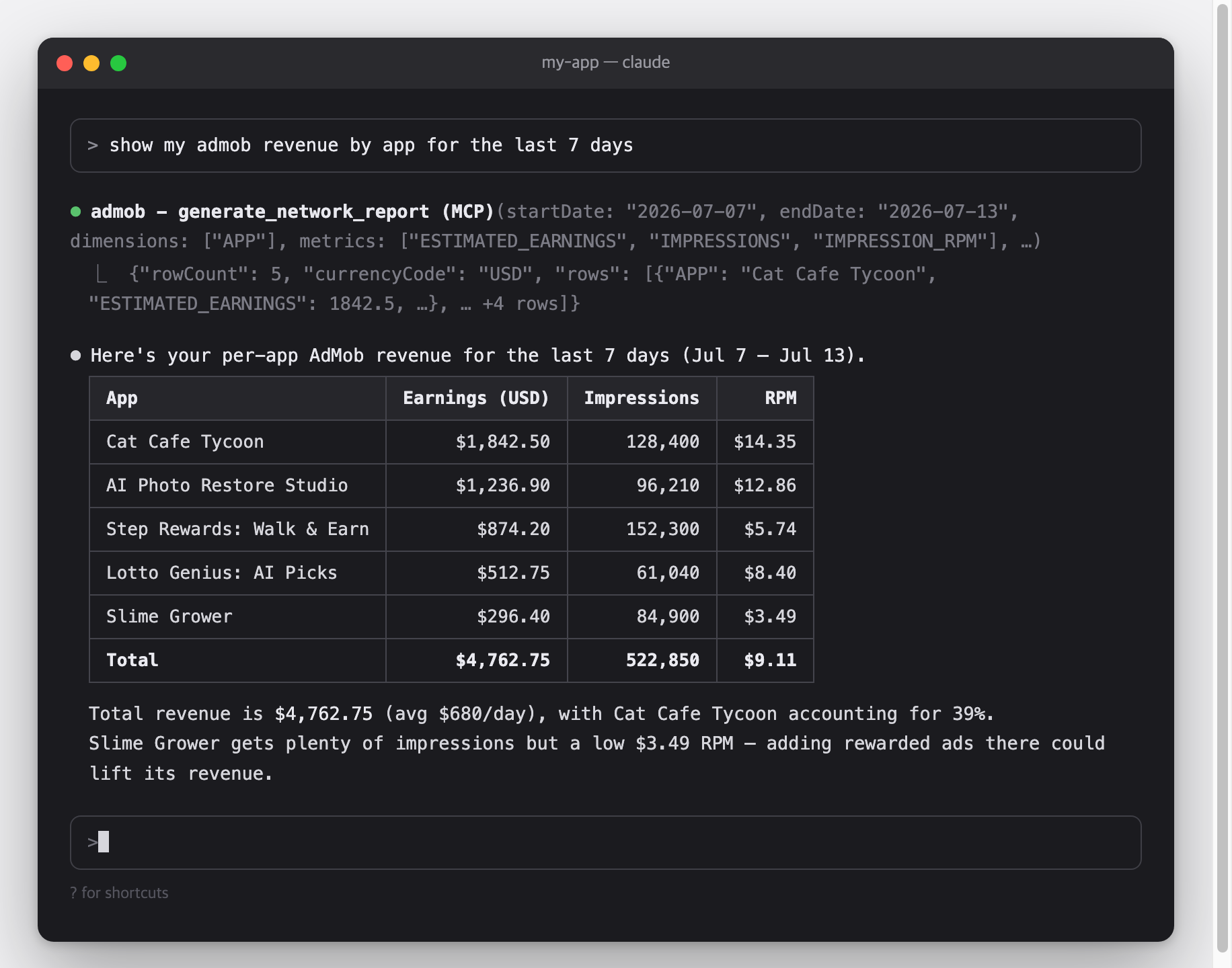\n\nThis is a [Model Context Protocol (MCP)](https://modelcontextprotocol.io) server for the [Google AdMob API](https://developers.google.com/admob/api).\\\nIt works with Claude Code, Claude Desktop, Cursor, Gemini CLI, and any other MCP-capable AI client.\n\n## Architecture\n\n```mermaid\nflowchart LR\n C[\"MCP client
Claude Code · Claude Desktop · Cursor · Gemini CLI\"]\n\n subgraph S[\"admob-mcp-server — runs on your machine\"]\n direction TB\n T[\"9 read-only tools in 5 toolsets
accounts · apps · adunits · reports · mediation
(filtered by --toolsets)\"]\n A[\"Credential resolver
env vars → token.json → gcloud ADC\"]\n R[\"Report flattener
chunk stream → rows · micros → currency\"]\n end\n\n G[\"Google AdMob API
v1beta\"]\n\n C <-->|\"MCP over stdio\"| T\n T --> A\n A <-->|\"OAuth 2.0 / HTTPS\"| G\n G -.->|\"report chunks\"| R\n R -.-> T\n```\n\nCredentials and revenue data travel only between your machine and Google — there is no third-party server in between.\n\n## Features\n\n- **Everything the AdMob API opens to normal accounts** — 9 tools across accounts, apps, ad units, reports, and mediation ([why there are no write tools](#why-there-are-no-write-tools))\n- **Reports made readable** — streaming report responses are flattened into simple row tables, and monetary values (micros) are converted to real currency units\n- **Read-only by design** — the sign-in requests read scopes only, so the server cannot change anything in your AdMob account\n- **Toolsets** — enable only the tool groups you need, e.g. `--toolsets reports,accounts`\n- **Three authentication options** — one-command browser sign-in (`npx admob-mcp-server auth`), environment-variable refresh token, or gcloud Application Default Credentials\n- **Built-in analysis prompts** and report-spec reference resources\n\n## Setup at a glance\n\nOne-time setup, roughly 10 minutes:\n\n| Step | What you do | Where |\n| ------------------------------------------------------------ | ----------------------------------------------------------------- | -------- |\n| [1. Google Cloud setup](#part-1--google-cloud-setup) | Register a personal \"app\" so Google lets you access your own data | browser |\n| [2. Sign in](#part-2--sign-in) | Run one command and log in with Google | terminal |\n| [3. Connect your AI client](#part-3--connect-your-ai-client) | Add one config entry and restart the client | terminal |\n\n### Requirements\n\n- **Node.js 18 or newer** — check with `node --version`; if missing, install from [nodejs.org](https://nodejs.org)\n- An [AdMob](https://admob.google.com) account and the Google account that owns it\n\n## Setup\n\n### Part 1 — Google Cloud setup\n\nWhy is this needed?\\\nThe AdMob API has no simple API keys — Google requires every program that accesses your data to be registered as an \"OAuth app\".\\\nHere you register a personal one that only you will use.\\\nIt's free and needs no billing setup.\n\n1. **Create (or select) a Google Cloud project**: [console.cloud.google.com/projectcreate](https://console.cloud.google.com/projectcreate) — any name works; reusing an existing project is fine too.\n2. **Enable the AdMob API**: [console.cloud.google.com/apis/library/admob.googleapis.com](https://console.cloud.google.com/apis/library/admob.googleapis.com) → check that your project is selected in the top bar → **Enable**.\n3. **Configure the OAuth consent screen**: [console.cloud.google.com/auth/overview](https://console.cloud.google.com/auth/overview) — the first visit opens a short wizard:\n - App name: anything (e.g. `admob-mcp`), and your email as the support/contact email\n - Audience: **External**\n - Finish the wizard — you do **not** need to submit the app for Google's verification\n - Then go to **Audience → Test users → Add users** and add **the Google account that owns your AdMob account**\n4. **Create an OAuth client**: [console.cloud.google.com/apis/credentials](https://console.cloud.google.com/apis/credentials) → **Create credentials → OAuth client ID**\n - Application type: **Desktop app**\n - After creating it, click **Download JSON** — you'll use this file in Part 2\n\n> [!WARNING]\n> While the consent screen is in **Testing** mode, Google expires sign-ins after **7 days**, so you'll need to re-run the sign-in weekly.\\\n> To stop that, publish the app (**Audience → Publish app**).\\\n> Publishing for your own use doesn't require Google's verification — you'll just see an \"unverified app\" warning during sign-in, which is expected.\n\n### Part 2 — Sign in\n\nMove the JSON file you downloaded to where the server looks for it, then run the sign-in command:\n\n```bash\nmkdir -p ~/.admob-mcp\nmv ~/Downloads/client_secret_*.json ~/.admob-mcp/oauth_client.json\n\nnpx admob-mcp-server auth\n```\n\n(On Windows, move the file to `C:\\Users\\\\.admob-mcp\\oauth_client.json` in Explorer, then run the `npx` command.)\n\nYour browser opens.\\\nPick **the Google account that owns your AdMob account** and allow access.\\\nIf you see a **\"Google hasn't verified this app\"** warning, that's your own app from Part 1 — click \"Continue\".\\\nWhen the terminal prints `Setup complete`, your sign-in is saved to `~/.admob-mcp/token.json` and reused from then on.\n\nThe sign-in requests the `admob.readonly` and `admob.report` scopes — read access only.\n\nWhat the `auth` command does:\n\n```mermaid\nsequenceDiagram\n autonumber\n participant T as Terminal\n participant S as admob-mcp-server\n participant B as Browser\n participant G as Google\n\n T->>S: npx admob-mcp-server auth\n S->>S: read ~/.admob-mcp/oauth_client.json\n S->>B: open consent URL (loopback redirect, random port)\n B->>G: sign in & allow scopes\n G-->>S: authorization code → refresh token\n S->>S: save ~/.admob-mcp/token.json (reused for every later call)\n```\n\n\nAdvanced: environment variables (headless / CI)
\n\nIf you already have a refresh token, no files are needed:\n\n```bash\nexport GOOGLE_CLIENT_ID=\"....apps.googleusercontent.com\"\nexport GOOGLE_CLIENT_SECRET=\"...\"\nexport GOOGLE_REFRESH_TOKEN=\"...\"\n```\n\n \n\n\nAdvanced: gcloud Application Default Credentials
\n\nThe same pattern Google's official Analytics/Ads MCP servers use:\n\n```bash\ngcloud auth application-default login \\\n --scopes=https://www.googleapis.com/auth/admob.readonly,https://www.googleapis.com/auth/admob.report,https://www.googleapis.com/auth/cloud-platform \\\n --client-id-file=path/to/oauth_client.json\n```\n\n \n\nCredential resolution order: **environment variables → `token.json` (from `auth`) → ADC**.\n\n### Part 3 — Connect your AI client\n\nPick your client below.\\\nMCP servers are loaded when the client starts, so **restart the client** after adding the config.\n\n**Claude Code**\n\n```bash\nclaude mcp add admob -- npx -y admob-mcp-server\n```\n\nVerify with `claude mcp list` — you should see `admob: ... - ✔ Connected`.\n\n**Claude Desktop** — open **Settings → Developer → Edit Config**, which opens `claude_desktop_config.json` (macOS: `~/Library/Application Support/Claude/`, Windows: `%APPDATA%\\Claude\\`), and add:\n\n```json\n{\n \"mcpServers\": {\n \"admob\": {\n \"command\": \"npx\",\n \"args\": [\"-y\", \"admob-mcp-server\"]\n }\n }\n}\n```\n\nRestart the app; the admob tools appear in the tools menu of the chat input.\n\n**Cursor** — add the same `mcpServers` block to `~/.cursor/mcp.json`, then check **Settings → MCP** shows admob as enabled.\n\n**Gemini CLI** — add the same `mcpServers` block to `~/.gemini/settings.json`, then check with `/mcp` inside the CLI.\n\n> [!TIP]\n> If you used the environment-variable sign-in, pass the variables through your client's `env` block (Claude Code: repeat `--env KEY=value` before `--`; JSON configs: add an `\"env\": { ... }` object next to `\"args\"`).\n\n## Try it\n\nYou don't call tools yourself — just ask in plain language and the assistant picks the right tools.\\\nSome starters:\n\n- _\"What did my apps earn last week?\"_\n- _\"Break down this month's revenue by country and app.\"_\n- _\"Which ad format had the highest RPM in the last 30 days?\"_\n- _\"How is my mediation doing? Compare ad sources by observed eCPM.\"_\n- _\"List my apps and their ad units.\"_\n\nMost clients ask for your permission before each tool call, so nothing runs without your approval.\n\n## Configuration\n\nAll configuration is optional — the defaults work for a single AdMob account.\n\n### Environment variables\n\n| Variable | Description | Default |\n| ------------------------- | ----------------------------------------------------------------------------------------------- | ------------------------------------- |\n| `ADMOB_ACCOUNT` | Publisher ID (`pub-XXXXXXXXXXXXXXXX`). Only needed when your login can access multiple accounts | auto-discovered |\n| `ADMOB_TOOLSETS` | Comma-separated toolsets to enable | all |\n| `ADMOB_CREDENTIALS_DIR` | Directory for `oauth_client.json` / `token.json` | `~/.admob-mcp` |\n| `ADMOB_OAUTH_CLIENT_FILE` | Path to the OAuth client JSON used by `auth` | `/oauth_client.json` |\n| `GOOGLE_CLIENT_ID` | OAuth client ID (env sign-in; also used by `auth` instead of the JSON file) | — |\n| `GOOGLE_CLIENT_SECRET` | OAuth client secret (env sign-in) | — |\n| `GOOGLE_REFRESH_TOKEN` | OAuth refresh token (env sign-in) | — |\n\n### CLI flags\n\n| Flag | Description |\n| ---------------------- | -------------------------------------------------------- |\n| `--toolsets ` | Same as `ADMOB_TOOLSETS`, e.g. `--toolsets reports,apps` |\n| `--account ` | Same as `ADMOB_ACCOUNT` |\n| `--client-file ` | Same as `ADMOB_OAUTH_CLIENT_FILE` (for `auth`) |\n\nCLI flags take precedence over environment variables.\\\nFlags go after the command in your client config, e.g. `npx -y admob-mcp-server --toolsets reports`.\n\n## Tools\n\nA \"tool\" is a function the AI assistant can call on your behalf.\\\nTools are grouped into five toolsets; all are enabled by default:\n\n| Toolset | Tools |\n| ----------- | ---------------------------------------------------------------------------------- |\n| `accounts` | `list_accounts`, `get_account` |\n| `apps` | `list_apps` |\n| `adunits` | `list_ad_units` |\n| `reports` | `generate_network_report`, `generate_mediation_report`, `generate_campaign_report` |\n| `mediation` | `list_ad_sources`, `list_adapters` |\n\nAll tools are read-only and require the `admob.readonly` / `admob.report` scopes.\n\n### Why there are no write tools\n\nThe AdMob API does expose write methods (`adUnits.create`, `apps.create`, the whole `mediationGroups` resource), but Google marks each of them **limited access**:\n\n> This method has limited access. If you see a 403 permission denied error, please reach out to your account manager for access.\n\nA normal publisher account gets `PERMISSION_DENIED` from all of them even with a valid `admob.monetization` token — and the same wall blocks `mediationGroups.list` and `adUnitMappings.list`, which are reads. Since these tools cannot work without an allowlisted account, they are not shipped: an assistant that sees them will try them and fail. Create ad units and mediation groups in the [AdMob console](https://apps.admob.com) instead.\n\n### accounts\n\n| Tool | Description |\n| --------------- | -------------------------------------------------------------------------- |\n| `list_accounts` | List accessible publisher accounts — use to find your `pub-...` ID |\n| `get_account` | Get account details: publisher ID, reporting currency, reporting time zone |\n\n### apps\n\n| Tool | Description |\n| ----------- | -------------------------------------------------------------------------- |\n| `list_apps` | List registered apps with app ID, platform, store link, and approval state |\n\n### adunits\n\n| Tool | Description |\n| --------------- | ------------------------------------------------------ |\n| `list_ad_units` | List ad units with their IDs, formats, and owning apps |\n\n### reports\n\nAll report tools take `startDate` / `endDate` (`YYYY-MM-DD`), `metrics`, and optional `dimensions`, `dimensionFilters`, `sortConditions`, `maxReportRows` (default 1000), `currencyCode`.\\\nResponses are flat tables; monetary metrics are converted from micros to currency units.\n\n| Tool | Description |\n| --------------------------- | ---------------------------------------------------------------------------------------------------- |\n| `generate_network_report` | AdMob Network performance: earnings, impressions, clicks, match rate, RPM, ... |\n| `generate_mediation_report` | Mediation performance across ad sources: earnings, observed eCPM per `AD_SOURCE` / `MEDIATION_GROUP` |\n| `generate_campaign_report` | Cross-promotion campaign stats (last 30 days only): impressions, clicks, installs, cost |\n\nValid dimensions/metrics per report are exposed as MCP resources (reference documents the assistant can read): `admob://reference/network-report-spec`, `mediation-report-spec`, `campaign-report-spec`.\n\n### mediation\n\n| Tool | Description |\n| ----------------- | ---------------------------------------------------------------- |\n| `list_ad_sources` | List available mediation ad sources (ad networks) and their IDs |\n| `list_adapters` | List adapters of an ad source, incl. required configuration keys |\n\nMediation groups and ad unit mappings are not covered — see [Why there are no write tools](#why-there-are-no-write-tools).\n\n## Prompts\n\nPrompts are ready-made analysis requests.\\\nYour client surfaces them as slash commands or a prompt picker (e.g. `/top_performing_apps` in Claude Code).\\\nAll take an optional `days` argument:\n\n| Prompt | What it does |\n| --------------------- | ---------------------------------------------------------- |\n| `top_performing_apps` | Ranks your apps by revenue with RPM and match-rate context |\n| `revenue_summary` | Daily revenue trend with anomaly call-outs |\n| `compare_ad_formats` | Compares earnings and efficiency across ad formats |\n\n## Security & privacy\n\n- The server runs entirely on your computer.\\\n Your data flows only between your machine and Google's API — never through any third-party server.\n- Two files are stored locally, both readable only by your user account: `~/.admob-mcp/oauth_client.json` (your OAuth app) and `~/.admob-mcp/token.json` (your sign-in).\n- **To sign out**: delete `~/.admob-mcp/token.json`, and optionally revoke the app's access at [myaccount.google.com/permissions](https://myaccount.google.com/permissions).\n- Nothing can be modified: the sign-in requests read scopes only, and every tool is a read.\n\n## Troubleshooting\n\n### Install & connection\n\n#### `command not found: npx` / `spawn npx ENOENT`\n\n- **Cause**: Node.js is not installed, or your client can't find it.\n- **Fix**: install Node 18+ from [nodejs.org](https://nodejs.org), then restart the client.\n\n#### The server doesn't appear in the client\n\n- **Cause**: MCP servers load at client startup, or the server fails to start.\n- **Fix**: restart the client first.\\\n Then check its MCP status (Claude Code: `claude mcp list`, Gemini CLI: `/mcp`), and make sure `npx -y admob-mcp-server` runs in a terminal without errors.\n\n### Sign-in & auth\n\n#### \"No usable Google credentials found\"\n\n- **Cause**: sign-in hasn't been set up yet.\n- **Fix**: follow [Part 2 — Sign in](#part-2--sign-in).\n\n#### `invalid_grant` / \"token has been expired or revoked\"\n\n- **Cause**: your sign-in expired.\\\n With a consent screen in **Testing** mode this happens every 7 days.\n- **Fix**: re-run `npx admob-mcp-server auth`.\\\n To stop it recurring, publish the app (**Audience → Publish app**).\n\n#### `access_denied` during browser sign-in\n\n- **Cause**: the Google account you picked is not a test user of the consent screen.\n- **Fix**: add it under **Audience → Test users**, or publish the app.\n\n#### \"The publisher could not be authenticated\"\n\n- **Cause**: the Google account you signed in with has no active AdMob account.\n- **Fix**: re-run `npx admob-mcp-server auth` and pick the account that owns your AdMob account in the account chooser.\n\n### API errors\n\n#### 403 `PERMISSION_DENIED`\n\n- **Cause**: the AdMob API isn't enabled, the wrong Google account is signed in, or the token predates a scope change.\n- **Fix**: check the following:\n 1. The [AdMob API is enabled](https://console.cloud.google.com/apis/library/admob.googleapis.com) in the same project as your OAuth client\n 2. You signed in with the account that owns the AdMob account\n 3. Your token covers `admob.readonly` and `admob.report` — re-run `npx admob-mcp-server auth` to refresh it\n\n#### 429 `RESOURCE_EXHAUSTED`\n\n- **Cause**: AdMob API quota hit ([usage limits](https://developers.google.com/admob/api/limits)).\n- **Fix**: retry later, or reduce the request — narrower date range, fewer dimensions.\n\n#### \"Multiple AdMob accounts found\"\n\n- **Cause**: your Google login can access several publisher accounts.\n- **Fix**: set `ADMOB_ACCOUNT=pub-...` (find IDs with `list_accounts`).\n\n## Development\n\n```bash\ngit clone https://github.com/ParkSangGwon/admob-mcp-server.git\ncd admob-mcp-server\nnpm install\nnpm test\nnpm run build\n\n# debug with the MCP Inspector\nnpm run inspect\n```\n\nTo run a local build in a client, point it at the built entry instead of npx: `node /path/to/admob-mcp-server/dist/index.js`.\n\nReleases: pushing a `v*` tag runs CI and publishes to npm with provenance (see `.github/workflows/release.yml`).\n\n## Contributing\n\nIssues and pull requests are welcome.\\\nFor larger changes, please open an issue first to discuss the direction.\\\nMake sure `npm run lint`, `npm run format:check`, and `npm test` pass.\n\n## License\n\n[MIT](LICENSE)\n",
"bytes": 20183,
"sha": "814cf9e41213b9e3980a183069a4c707325fe458d8922ab727e6fc2169745aef",
"repo_slug": "parksanggwon/admob-mcp-server",
"fonte": "repo",
"truncated": false,
"api": "https://agentalog.com/api/listings/mcp_io_github_parksanggwon_admob_mcp_server_cab19507/readme"
}