{
"markdown": "# OpenShorts.app\n\n[](https://opensource.org/licenses/MIT)\n[](https://opensource.org/)\n[](http://makeapullrequest.com)\n[](https://docs.docker.com/compose/)\n[](https://github.com/mutonby/openshorts)\n[](https://github.com/mutonby/openshorts/commits/main)\n\n**Open source AI video platform** with 3 tools in one: **Clip Generator**, **AI Shorts (UGC videos with AI actors)**, and **YouTube Studio**.\n\n\n\nTwo people on camera? OpenShorts stacks them instead of shrinking the wide shot, puts the captions on the seam where they cover nobody, and switches back to a face-tracked crop when the cut goes to one person. The AI picks the layout per video; nothing to configure.\n\n**Two ways to run it, same software either way:**\n\n| | Self-hosted (this repo) | Hosted on [openshorts.app](https://www.openshorts.app/) |\n|---|---|---|\n| **Price** | Free forever, MIT | Free plan, paid from $12/mo |\n| **Speed** | 5 to 8 min per 8-min video on CPU | About 50s on our NVIDIA GPU |\n| **API keys** | Bring your own Gemini, ElevenLabs, fal.ai | Gemini included, nothing to set up |\n| **Watermark / limits** | None, ever | Watermark and 20 min/mo on the free plan, neither on paid |\n| **Setup** | Docker, 8GB+ RAM, model downloads | Sign in and paste a link |\n| **MCP / API for agents** | Same `/mcp` endpoint, but only while your machine is on | Always-on endpoint at [mcp.openshorts.app](https://www.openshorts.app/mcp), API keys in one click |\n| **Your data** | Your server | Ours |\n\nSelf-hosting is genuinely free and always will be. It costs you a machine, your own API keys and the time to keep it running. The hosted plans exist to cover that hardware and those keys, not to unlock features.\n\nhttps://github.com/user-attachments/assets/b45fa983-16b4-48b5-ac5b-a267836b9ad9\n\n\n\n### Video Tutorial: How it works\n[](https://www.youtube.com/watch?v=xlyjD1qCaX0 \"Click to watch the video on YouTube\")\n\n*Click the image above to watch the full walkthrough.*\n\n---\n\n## 3 Tools in 1 Platform\n\n### 1. Clip Generator\nTurn your long-form videos — podcasts, webinars, livestreams, vlogs, interviews — into viral-ready 9:16 shorts for TikTok, Instagram Reels, and YouTube Shorts.\n\n\n\n### 2. AI Shorts (UGC Video Creator)\nGenerate marketing videos with AI actors for **any product or business**. No camera, no studio, no influencer budget. Just describe your product or paste a URL.\n\n\n\n- **Two cost modes**: Low Cost (~$0.65/video) and Premium (~$2/video)\n- Works for any business: SaaS, restaurants, e-commerce, coaching, local businesses\n- AI-generated actors with lip-sync, voiceover, b-roll, and TikTok-style subtitles\n- Choose from a shared avatar gallery or upload your own photo\n- Publish directly to TikTok, Instagram, and YouTube\n\n### 3. YouTube Studio\nComplete free AI YouTube toolkit: thumbnails, titles, descriptions, and direct publishing.\n\n\n\n- AI thumbnail generator with face overlay\n- 10 viral title suggestions with refinement chat\n- Auto-generated descriptions with chapter timestamps\n- One-click publish to YouTube\n\n### UGC Video Gallery\nAll generated videos and avatars are saved to a public gallery with SEO pages for each video.\n\n\n\n- Public gallery page with hover-to-play (`/gallery`)\n- Individual SEO video pages with og:video meta tags (`/video/{id}`)\n- JSON-LD structured data for search engines\n- Avatar gallery with prompt history\n\n---\n\n## Key Features\n\n### Clip Generator\n- **Viral Moment Detection**: Google Gemini 3.1 Flash-Lite analyzes transcripts and scene boundaries to detect 3-15 high-potential moments\n- **Runs fully local if you want**: point `LLM_BASE_URL` at Ollama, LM Studio, vLLM or any OpenAI-compatible server and the moment picker runs on your own model, no Google key needed (see [Run without a Google key](#6-run-without-a-google-key-local-llm-optional))\n- **Smart 9:16 Cropping**: AI reframing per scene — TRACK mode (MediaPipe + YOLOv8 face tracking), GENERAL mode (blurred background), SPLIT mode (two speakers stacked, captions on the seam) and SCREENCAST mode (screen over presenter); the layout is picked per video by Gemini or forced from the dashboard\n- **Auto Subtitles**: faster-whisper with word-level timestamps, styled and burned into clips\n- **AI Voice Dubbing**: ElevenLabs integration for 30+ languages with voice cloning\n- **Hook Text Overlays**: AI-generated attention-grabbing text overlays\n- **AI Video Effects**: Gemini-generated FFmpeg filters for professional effects\n\n### AI Shorts Pipeline\n1. **Analyze**: Scrape website URL + web research, or generate from manual description\n2. **Script**: AI writes viral scripts (hook - problem - solution - CTA format)\n3. **Actor**: Generate AI actors with Flux 2 Pro or select from shared gallery\n4. **Voice**: ElevenLabs TTS voiceover (English/Spanish, male/female)\n5. **Video**: Talking head generation (Hailuo 2.3 Fast img2video + VEED Lipsync)\n6. **B-roll**: AI-generated visuals with Ken Burns effect\n7. **Composite**: FFmpeg final assembly with subtitles and hook overlays\n8. **Publish**: Direct posting to TikTok, Instagram Reels, YouTube Shorts via Upload-Post\n\n### YouTube Studio\n- AI-powered title generation with 10 viral options\n- Interactive refinement chat for titles\n- AI thumbnail generation with custom face + background\n- Auto descriptions with chapter timestamps from Whisper transcript\n- Direct YouTube publishing via Upload-Post\n\n### Social Auto-Publishing\n- **One-click posting** to TikTok, Instagram Reels, and YouTube Shorts simultaneously\n- **Schedule uploads** for any date and time — plan your content calendar and let OpenShorts publish automatically\n- **Multi-platform distribution** — publish to all your social networks at once from a single interface\n- Upload-Post integration with async uploads\n\n### Infrastructure\n- S3 cloud backup (private bucket for clips, public bucket for gallery/avatars)\n- SEO gallery pages served by FastAPI with JSON-LD structured data\n- Shared avatar gallery across all users\n- Async job queue with configurable concurrency\n\n---\n\n## Who Is This For?\n\n- **Content creators** — Turn long videos into shorts automatically, publish to all platforms at once\n- **Marketing agencies** — Generate UGC videos for clients at scale, no actors or studios needed\n- **SaaS founders** — Create product demos and marketing shorts from just a URL\n- **E-commerce brands** — Product videos with AI actors for TikTok Shop, Instagram, YouTube\n- **Local businesses** — Restaurants, gyms, real estate, coaching — affordable video marketing\n- **Developers** — Self-host, customize the pipeline, integrate via API\n\n---\n\n## AI Shorts Showcase\n\nVideos generated with OpenShorts AI Shorts — no camera, no studio, no actors:\n\n| | | |\n|:---:|:---:|:---:|\n| [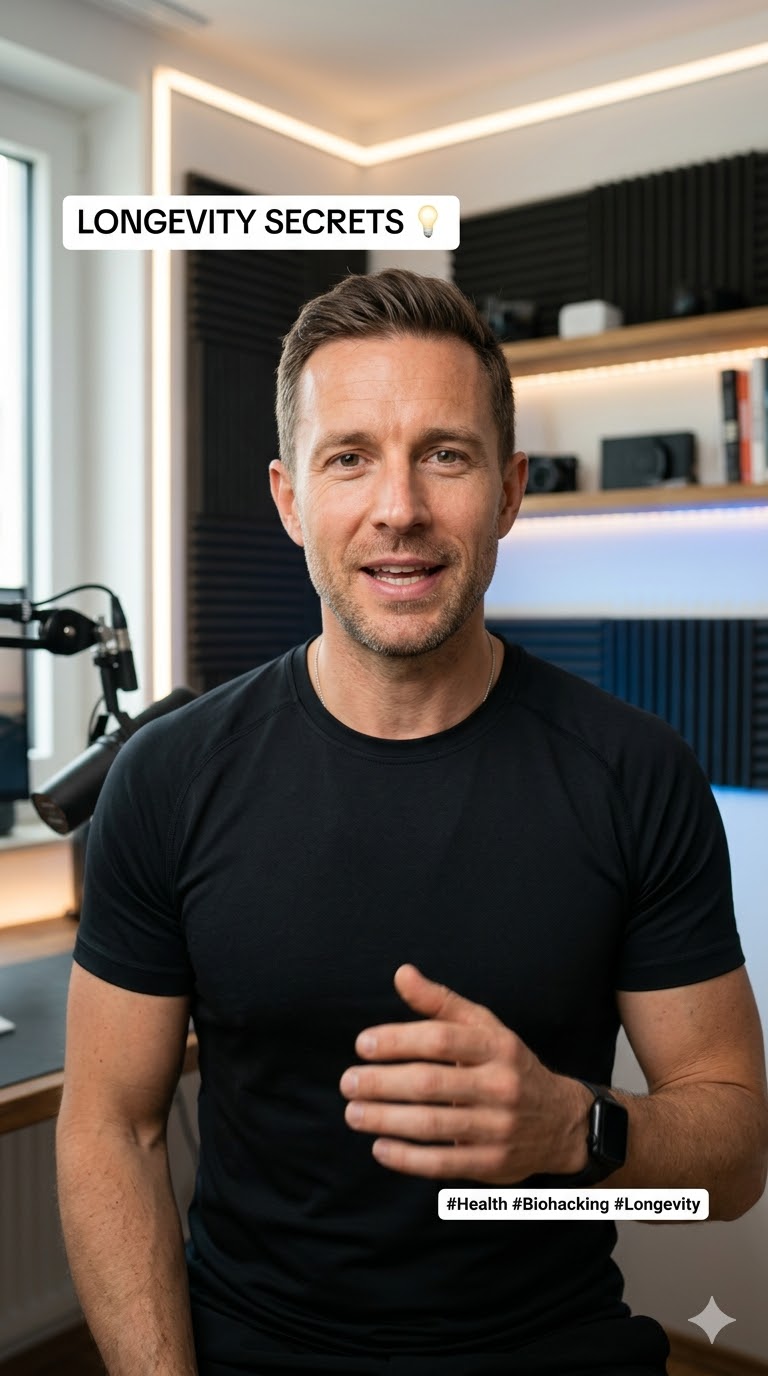](https://openshorts.app/video/cdceec1b) | [](https://openshorts.app/video/d3a80b6b) | [](https://openshorts.app/video/8ab7de92) |\n| **Biohacking for Investors** · LOW COST | **Secret Weapon for Devs** · LOW COST | **El Secreto de los Agentes de IA** · PREMIUM |\n\n> Browse all videos at [openshorts.app/gallery](https://openshorts.app/gallery)\n\n---\n\n## OpenShorts vs Competitors\n\n| Feature | OpenShorts | Opus Clip | CapCut | Vizard | Klap | Descript |\n|---------|:---:|:---:|:---:|:---:|:---:|:---:|\n| **Price** | **Free self-hosted**
from $12/mo hosted | $15-29/mo | $8/mo | $15-20/mo | $23-63/mo | $24-65/mo |\n| **Self-hosted** | **Yes** | No | No | No | No | No |\n| **Open source** | **Yes** | No | No | No | No | No |\n| **Watermark** | **Never self-hosted**
free plan only when hosted | Free tier | Some | Free tier | Free tier | Free tier |\n| **Upload limits** | **None self-hosted**
by plan when hosted | 10-30GB | Credit-based | 60min-10hr | 10-100 vids/mo | 60min-40hr |\n| **AI clip detection** | Yes | Yes | Yes | Yes | Yes | Yes |\n| **Smart 9:16 reframing** | Yes | Yes | Yes | Yes | Yes | No |\n| **Auto subtitles** | Yes | Yes | Yes | Yes | Yes | Yes |\n| **Voice dubbing (30+ langs)** | Yes | No | Pro only | No | Pro only | Business only |\n| **AI UGC actors** | **Yes** | No | No | No | No | No |\n| **AI video effects** | Yes | No | Yes | No | No | No |\n| **Hook text overlays** | Yes | No | No | No | No | No |\n| **YouTube Studio (titles, thumbnails)** | **Yes** | No | No | No | No | No |\n| **Social auto-publishing** | Yes | Pro only | TikTok only | Paid only | Paid only | No |\n| **Schedule uploads** | Yes | Pro only | No | Paid only | Paid only | No |\n| **Data privacy** | **Your server** | Their cloud | Their cloud | Their cloud | Their cloud | Their cloud |\n| **Works with a local LLM (Ollama)** | **Yes** | No | No | No | No | No |\n\n---\n\n## How Much Does It Cost?\n\nSelf-hosting OpenShorts is free. You provide the machine and you only pay for the AI APIs you use, and most have generous free tiers:\n\n| Service | Free Tier | Paid Cost | Used For |\n|---------|-----------|-----------|----------|\n| **Google Gemini** | Free trial with generous limits | < $0.01 per 10-min video | Viral moment detection, script generation, web research |\n| **Local LLM (Ollama, LM Studio, vLLM...)** | **Free, your hardware** | $0 | Viral moment detection instead of Gemini (`LLM_BASE_URL`) |\n| **fal.ai** | Pay-per-use | ~$0.50-1.50 per AI Short | Actor generation, talking head video, lip-sync |\n| **ElevenLabs** | Free tier available | Pay-per-use | Voiceover, voice dubbing |\n| **Upload-Post** | **10 free uploads/month** to all networks (no credit card) | Pay-per-use | Auto-publishing to TikTok, Instagram, YouTube |\n| **AWS S3** | Optional | ~$0.023/GB | Cloud backup for clips and gallery |\n\n**Bottom line:** You can clip videos for practically free with Gemini, and publish 10 videos/month to all social networks at zero cost with Upload-Post.\n\n**Don't want to run any of that?** [openshorts.app](https://www.openshorts.app/) is the same software on our hardware: our NVIDIA GPU clips an 8-minute video in about 50 seconds instead of the 5 to 8 minutes it takes on a typical CPU, the Gemini key is included, and auto-publishing is already wired up. Free plan is 20 minutes a month with a watermark and no credit card; paid plans start at $12/mo for 100 minutes without watermark.\n\n---\n\n## Requirements\n\n- **Docker & Docker Compose**\n- **Google Gemini API Key** ([Free — get it here](https://aistudio.google.com/app/apikey)) — required for all AI features\n- **fal.ai API Key** ([Pay-per-use](https://fal.ai)) — required for AI Shorts (actor generation, video, lip-sync)\n- **ElevenLabs API Key** ([Free tier](https://elevenlabs.io)) — required for voiceover/dubbing\n- **Upload-Post API Key** ([free tier](https://upload-post.com)) — required for direct social posting\n\n---\n\n## Getting Started\n\n### 1. Clone\n```bash\ngit clone https://github.com/mutonby/openshorts.git\ncd OpenShorts\n```\n\n### 2. Configure (optional)\n```bash\ncp .env.example .env\n# Edit .env with your AWS keys for S3 backup\n```\n\n### 3. Launch\n```bash\ndocker compose up --build\n```\n\n### 4. Open Dashboard\nNavigate to **`http://localhost:5175`**\n\n1. Go to **Settings** and enter your API keys (Gemini, fal.ai, ElevenLabs, Upload-Post)\n2. **Clip Generator**: Upload a long-form video to generate viral shorts\n3. **AI Shorts**: Describe your product or paste a URL to generate UGC marketing videos\n4. **YouTube Studio**: Generate thumbnails, titles, and descriptions for YouTube\n5. **UGC Gallery**: Browse all generated videos and avatars\n\n### 5. GPU acceleration (optional, NVIDIA)\n\nThe default image is CPU-only. With an NVIDIA card (any card with NVENC, e.g. RTX 4060) an 8-minute video clips in about a minute instead of 5 to 8. Nothing is passed through in the VM sense — the container just gets access to the host GPU.\n\n**Host:** install the NVIDIA driver (`nvidia-smi` must work) and the [NVIDIA Container Toolkit](https://docs.nvidia.com/datacenter/cloud-native/container-toolkit/latest/install-guide.html):\n```bash\nsudo nvidia-ctk runtime configure --runtime=docker && sudo systemctl restart docker\ndocker run --rm --gpus all nvidia/cuda:12.4.0-base-ubuntu22.04 nvidia-smi # sanity check\n```\nOn Windows use Docker Desktop with the WSL2 backend and the Windows NVIDIA driver; no driver inside WSL.\n\n**Compose:** create `docker-compose.override.yml` next to `docker-compose.yml` (picked up automatically). `GPU: \"1\"` adds cuBLAS/cuDNN and onnxruntime-gpu to the image (~2 GB); `video` is required for NVENC.\n```yaml\nservices:\n backend:\n build:\n context: .\n args:\n GPU: \"1\"\n deploy:\n resources:\n reservations:\n devices:\n - driver: nvidia\n count: all\n capabilities: [gpu, video]\n```\n\n**`.env`:**\n```\nWHISPER_MODEL=large-v3-turbo\nWHISPER_DEVICE=cuda\nWHISPER_COMPUTE=float16\nFFMPEG_ENCODER=auto # probes h264_nvenc at startup, falls back to x264\nTRANSCRIBE_BACKEND=parakeet # optional: ~2x faster than whisper, 25 European languages, auto-falls back to whisper\nASR_GPU_CONCURRENCY=1\n```\n\n**Verify:**\n```bash\ndocker compose up --build -d\ndocker exec openshorts-backend nvidia-smi -L\ndocker exec openshorts-backend ffmpeg -hide_banner -f lavfi -i testsrc=size=256x256:rate=1 -frames:v 1 -c:v h264_nvenc -f null -\n```\nThe backend log on the first job reports the chosen encoder and transcription device. A CUDA error in whisper (e.g. VRAM exhausted) retries once on CPU automatically. 8 GB of VRAM is enough for `large-v3-turbo` fp16 plus the detection models.\n\n---\n\n### 6. Run without a Google key (local LLM, optional)\n\nThe only cloud call in the clip pipeline is the moment picker: it sends the\ntranscript (never the video) to Gemini. Point it at any OpenAI-compatible\nserver instead and the whole pipeline stays on your box:\n\n```bash\n# .env\nLLM_BASE_URL=http://host.docker.internal:11434/v1 # Ollama on the host\nLLM_MODEL=qwen2.5:14b # any chat model that follows instructions\n# LLM_API_KEY=... # only if your server checks one (vLLM --api-key, OpenRouter)\n```\n\nWorks with Ollama, LM Studio, vLLM, llama.cpp server, LocalAI and OpenRouter.\nThe dashboard stops asking for a Gemini key when this is set. Two things to\nknow:\n\n- **Context length.** A scoring call carries three transcript windows\n (~2-3k tokens) and the detail call up to ten (~5k on a long podcast).\n Ollama defaults to a 4096-token context and truncates silently, so run it\n with `OLLAMA_CONTEXT_LENGTH=16384` (or set `num_ctx` in a Modelfile); raise\n `LLM_SCORE_BATCH` above 3 only if your context allows it. 7-8B models\n return valid JSON reliably, 3B ones do not.\n- **What still needs Gemini.** Anything that has to look at frames: the\n automatic layout picker (`AUTO_LAYOUT`), the on-screen content detector\n and silent videos (no speech to clip by). Without a Gemini key those fall\n back to the plain face-tracking crop, and a silent video fails with a\n message that says so. Add a key alongside `LLM_BASE_URL` and you get both.\n\n## Technical Pipeline\n\n### Clip Generator\n1. **Ingest** — Local video upload (or self-hosted URL ingest via yt-dlp)\n2. **Transcribe** — faster-whisper with word-level timestamps\n3. **Detect** — PySceneDetect for scene boundaries\n4. **Analyze** — Gemini identifies 3-15 viral moments (15-60s each)\n5. **Extract** — FFmpeg precise clip cutting\n6. **Reframe** — AI vertical cropping with subject tracking\n7. **Effects** — Subtitles, hooks, AI video effects\n8. **Publish** — S3 backup + Upload-Post social distribution\n\n### AI Shorts\n1. **Analyze** — Website scraping + Gemini web research (or manual description)\n2. **Script** — Gemini generates viral scripts with segments\n3. **Actor** — Flux 2 Pro portrait generation (or gallery/upload)\n4. **Voice** — ElevenLabs TTS voiceover\n5. **Video** — Hailuo 2.3 Fast img2video + VEED Lipsync (Low Cost) or Kling Avatar v2 (Premium)\n6. **B-roll** — Flux 2 Pro image generation + Ken Burns effect\n7. **Composite** — FFmpeg assembly with ASS subtitles and hook overlays\n8. **Gallery** — Upload to public S3 with metadata for SEO pages\n9. **Publish** — Upload-Post to TikTok, Instagram, YouTube\n\n---\n\n## Automate It: MCP Server, REST API and Webhooks\n\nYou don't need the dashboard. The whole pipeline is callable by AI agents and scripts.\n\n### MCP server (`/mcp`)\n\nOpenShorts ships a built-in [MCP](https://modelcontextprotocol.io) server, so Claude, ChatGPT, Cursor or any MCP client can clip and publish videos for you:\n\n**claude.ai and ChatGPT**: paste `https://mcp.openshorts.app/mcp` as a custom connector (Settings → Connectors) and approve the access on openshorts.app. The server does OAuth 2.1 with dynamic client registration, so there is no key to copy; the connection shows up under Account → API keys, where revoking it disconnects the app.\n\n```bash\n# Claude Code / Cursor / n8n (hosted): create an API key in your account page\nclaude mcp add --transport http openshorts https://mcp.openshorts.app/mcp \\\n --header \"Authorization: Bearer osk_...\"\n\n# Self-hosted (no key needed, BYOK rules apply):\nclaude mcp add --transport http openshorts http://localhost:8000/mcp\n\n# Self-hosted without running the web server: same tools over stdio\nclaude mcp add openshorts -- python mcp_stdio.py\n```\n\nTools: `process_video` (URL or `upload_id`; `captions: false` when the source already has subtitles, `auto_hook: false` to skip the hook line, burned by default like the dashboard), `create_upload` (hand the agent a local file: PUT the bytes, then process), `get_job_status`, `list_clips`, `get_quota`, `add_subtitles`, `recut_clip`, `publish_clip`. A prompt like *\"clip this podcast and schedule the best 3 to TikTok\"* is now a one-liner in your agent of choice.\n\n### REST API + API keys\n\nHosted accounts can mint `osk_...` API keys (account page). A key authenticates as you everywhere — same plan, same minutes, same job ownership:\n\n```bash\ncurl -X POST https://api.openshorts.app/api/process \\\n -H \"Authorization: Bearer osk_...\" -H \"Content-Type: application/json\" \\\n -d '{\"url\": \"https://youtube.com/watch?v=...\", \"acknowledged\": true,\n \"webhook_url\": \"https://your-server.com/hooks/openshorts\"}'\n```\n\nInteractive docs at `/docs` (OpenAPI) on any instance.\n\n### Completion webhooks\n\nPass `webhook_url` (and optionally `webhook_secret`) to `POST /api/process` and you get exactly one `POST` when the job reaches a terminal state — no polling loops in your n8n / Zapier / cron pipelines:\n\n```json\n{\"event\": \"job.completed\", \"job_id\": \"…\",\n \"clips\": [{\"index\": 0, \"title\": \"…\", \"video_url\": \"…\", \"download_url\": \"…\"}]}\n```\n\nWith a secret, the body is signed: `X-OpenShorts-Signature: sha256=`.\n\n### CLI\n\nThe same API from the terminal, zero dependencies (`cli/`):\n\n```bash\npip install openshorts # or: uvx openshorts\n\nexport OPENSHORTS_API_KEY=osk_... # hosted\n# export OPENSHORTS_API_URL=http://localhost:8000 # self-hosted, no key\n\nopenshorts process \"https://youtube.com/watch?v=...\" --wait\nopenshorts clips \nopenshorts publish 0 --platforms tiktok,youtube\n```\n\n### Agent skill\n\n`skills/openshorts/SKILL.md` follows the open\n[Agent Skills](https://agentskills.io) standard, so it works in any\nskill-capable agent:\n\n```bash\n# Claude Code (and most agents): copy the folder into the skills directory\ncp -r skills/openshorts ~/.claude/skills/\n\n# Hermes Agent: install straight from this repo\nhermes skills install mutonby/openshorts/skills/openshorts\n\n# OpenClaw: from ClawHub\nopenclaw skills install @mutonby/openshorts\n```\n\n### n8n\n\nAn importable workflow (video URL in, published-ready clips out, no polling)\nlives in [`examples/n8n/`](examples/n8n/).\n\n---\n\n## Tech Stack\n\n| Layer | Technology |\n|-------|-----------|\n| Backend | Python 3.11, FastAPI, google-genai, faster-whisper, ultralytics (YOLOv8), mediapipe, opencv-python, yt-dlp, FFmpeg, httpx |\n| Frontend | React 18, Vite 4, Tailwind CSS 3.4 |\n| AI APIs | Google Gemini, fal.ai (Flux, Hailuo, VEED, Kling), ElevenLabs |\n| Infrastructure | Docker + Docker Compose, AWS S3 |\n| Publishing | Upload-Post API (TikTok, Instagram, YouTube) |\n\n---\n\n## Environment Variables\n\n**Server-side (.env):**\n| Variable | Description |\n|----------|------------|\n| `AWS_ACCESS_KEY_ID` | AWS access key for S3 |\n| `AWS_SECRET_ACCESS_KEY` | AWS secret key |\n| `AWS_REGION` | AWS region (default: us-east-1) |\n| `AWS_S3_BUCKET` | Private bucket for clip backup |\n| `AWS_S3_PUBLIC_BUCKET` | Public bucket for gallery/avatars |\n| `MAX_CONCURRENT_JOBS` | Concurrent processing limit (default: 5) |\n| `LLM_BASE_URL` | OpenAI-compatible server for the moment picker (Ollama, vLLM, LM Studio...). Set it and the Gemini key becomes optional |\n| `LLM_MODEL` | Model name on that server (default `llama3.1:8b`) |\n| `LLM_API_KEY` | Bearer token for that server, if it checks one |\n| `LLM_SCORE_BATCH` | Transcript windows per scoring call (default 3 local, 8 Gemini) |\n\n**Client-side (encrypted in localStorage):**\n| Key | Description |\n|-----|------------|\n| `GEMINI_API_KEY` | Google Gemini — required unless `LLM_BASE_URL` is set (then only for layout picking and silent videos) |\n| `FAL_KEY` | fal.ai — required for AI Shorts |\n| `ELEVENLABS_API_KEY` | ElevenLabs — required for voiceover/dubbing |\n| `UPLOAD_POST_API_KEY` | Upload-Post — required, for social posting |\n\n---\n\n## Security & Performance\n\n- **Non-Root Execution**: Containers run as dedicated `appuser`\n- **Concurrency Control**: Semaphore-based job queue (`MAX_CONCURRENT_JOBS`)\n- **Auto-Cleanup**: Automatic purging of old jobs (1h retention)\n- **Encrypted Keys**: API keys encrypted client-side, never stored server-side\n- **Upload Validation**: Image uploads validated for format and minimum size\n- **File Limits**: 2GB upload limit protection\n\n---\n\n## Social Media Setup (Upload-Post)\n\n1. **Register**: [app.upload-post.com/login](https://app.upload-post.com/login)\n2. **Create Profile**: Go to [Manage Users](https://app.upload-post.com/manage-users)\n3. **Connect Accounts**: Link TikTok, Instagram, and/or YouTube\n4. **Get API Key**: Navigate to [API Keys](https://app.upload-post.com/api-keys)\n5. **Use in OpenShorts**: Paste the key in Settings\n\n---\n\n## Star History\n\n[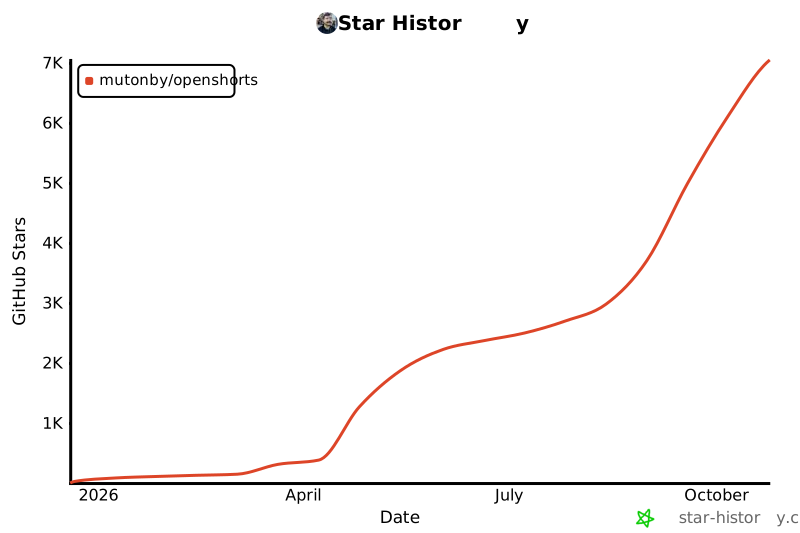](https://star-history.com/#mutonby/openshorts&Date)\n\n## Contributions\n\nContributions are welcome! Whether it's adding new AI models, improving the lip-sync pipeline, or building new features — feel free to open a PR.\n\n## License\n\nMIT License for the core application — OpenShorts is yours to use, modify, and scale.\n\n**Exception:** the [`cloud/`](cloud/LICENSE) directory (billing, managed keys, and the hosted-service infrastructure behind the optional `BILLING_ENABLED` flag) is source-available under the OpenShorts Commercial License. You can read it, modify it, and self-host it for personal or internal use, but you can't offer it to third parties as a paid/hosted service. Self-hosting the core app never requires this directory.\n",
"bytes": 24040,
"sha": "138dbc278061e20c23870275650ea298263cc6b3305915fdede48582fc8ce3d5",
"repo_slug": "mutonby/openshorts",
"fonte": "repo",
"truncated": false,
"api": "https://agentalog.com/api/listings/mcp_io_github_mutonby_openshorts_14df254e/readme"
}