{
"markdown": "# Kelvia MCP server\n\n[](https://github.com/gonnagetapower/kelvia-mcp/actions/workflows/ci.yml)\n[](https://www.npmjs.com/package/kelvia-mcp)\n[](LICENSE)\n[](https://glama.ai/mcp/servers/gonnagetapower/kelvia-mcp)\n\n[Kelvia](https://kelvia.app) is a task manager that AI agents can operate through\nthe [Model Context Protocol](https://modelcontextprotocol.io). This server exposes\n**58 tools** for boards, tasks, comments, worklogs, stages, members, invitations,\ntags, and a personal day planner.\n\nConnect to the hosted endpoint with OAuth — one command, no token to paste.\nA [local stdio mode](#local-stdio-setup) exists for clients that cannot do\nremote MCP, and for CI. You need a Kelvia account first — sign up at\n[kelvia.app](https://kelvia.app).\n\n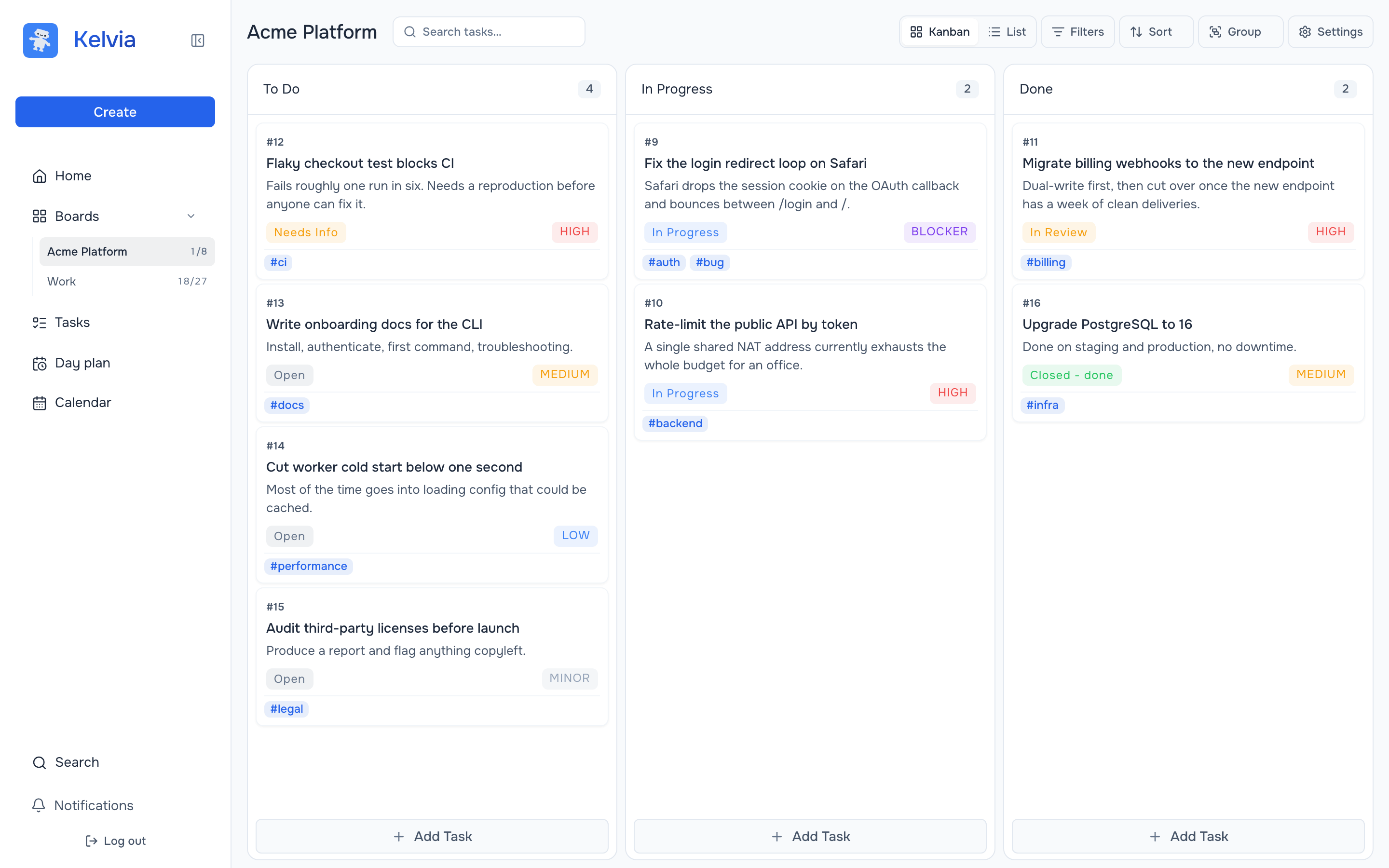\n\n## Why Kelvia MCP\n\n- **Complete workflow coverage** — create and triage tasks, move work across a\n board, log time, run stages, and plan a day. Not a read-only bridge.\n- **Controlled write access** — agent keys have read/create/edit/delete scopes\n intersected with the agent's role on each board.\n- **Visible agent activity** — changes, comments, and worklogs appear in Kelvia;\n supported task changes can be reverted by a human in the app.\n- **Load only what you need** — [toolsets](#toolsets) let a client publish one\n part of the product instead of all 58 tools.\n- **Modern remote auth** — Streamable HTTP with OAuth 2.1 + PKCE, or a Bearer\n token when an explicit agent identity is required.\n- **A local option when you need one** — [stdio](#local-stdio-setup) for clients\n without remote MCP support, for CI, and for keeping the key on one machine.\n\n## See it work\n\nFrom the client side — one prompt, and the agent reads the board, decides what\nmatters, files a follow-up task and comments on the blocker:\n\n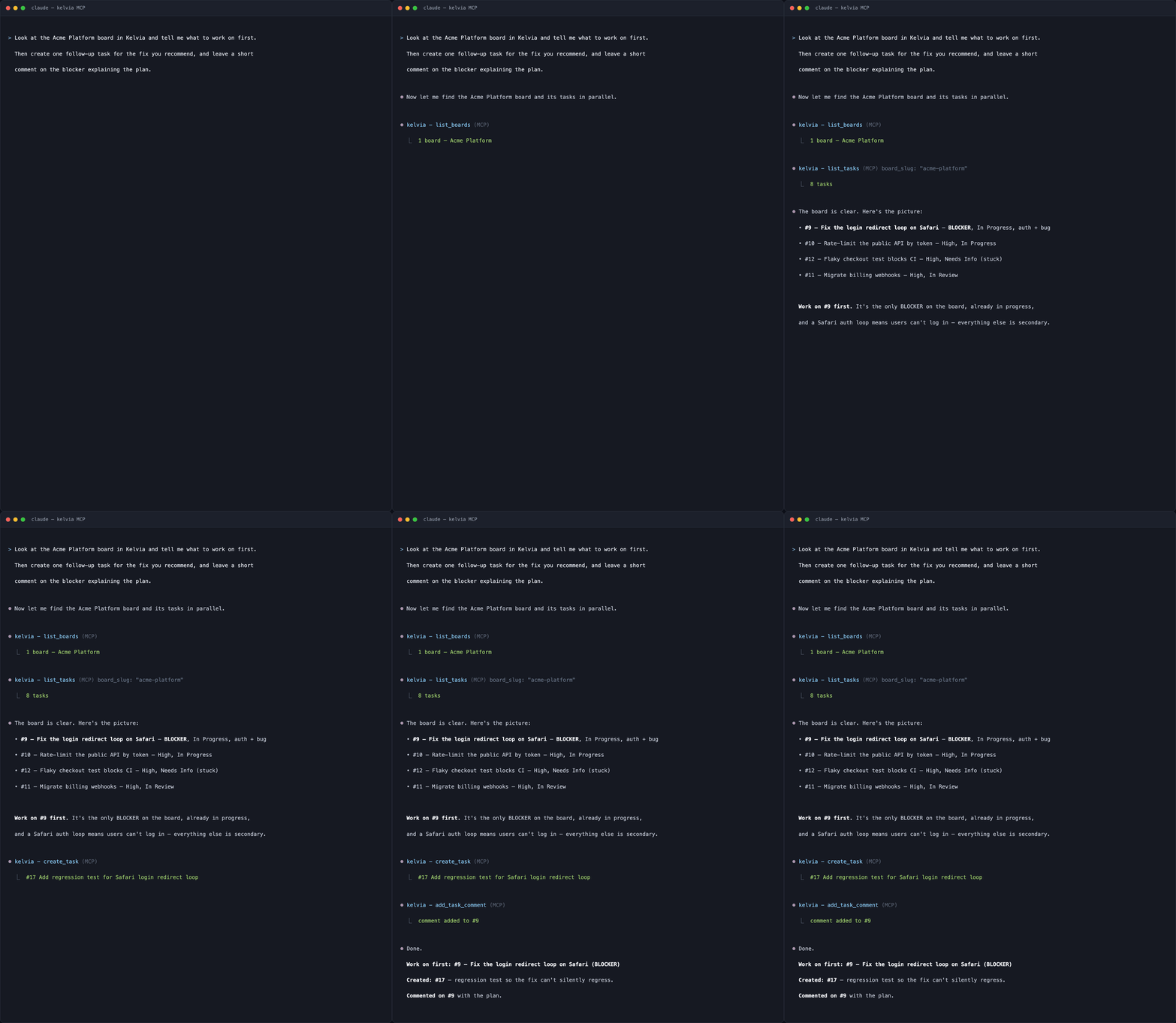\n\nA real session against `mcp.kelvia.app`, typeset from its transcript.\n`create_task` really did create #17, and `add_task_comment` really did comment\non #9 — which is what the rest of this section shows.\n\nAnd from the product side. Everything below was created by an agent over this\nserver — the board, the tasks, the discussion, and the logged time.\n\n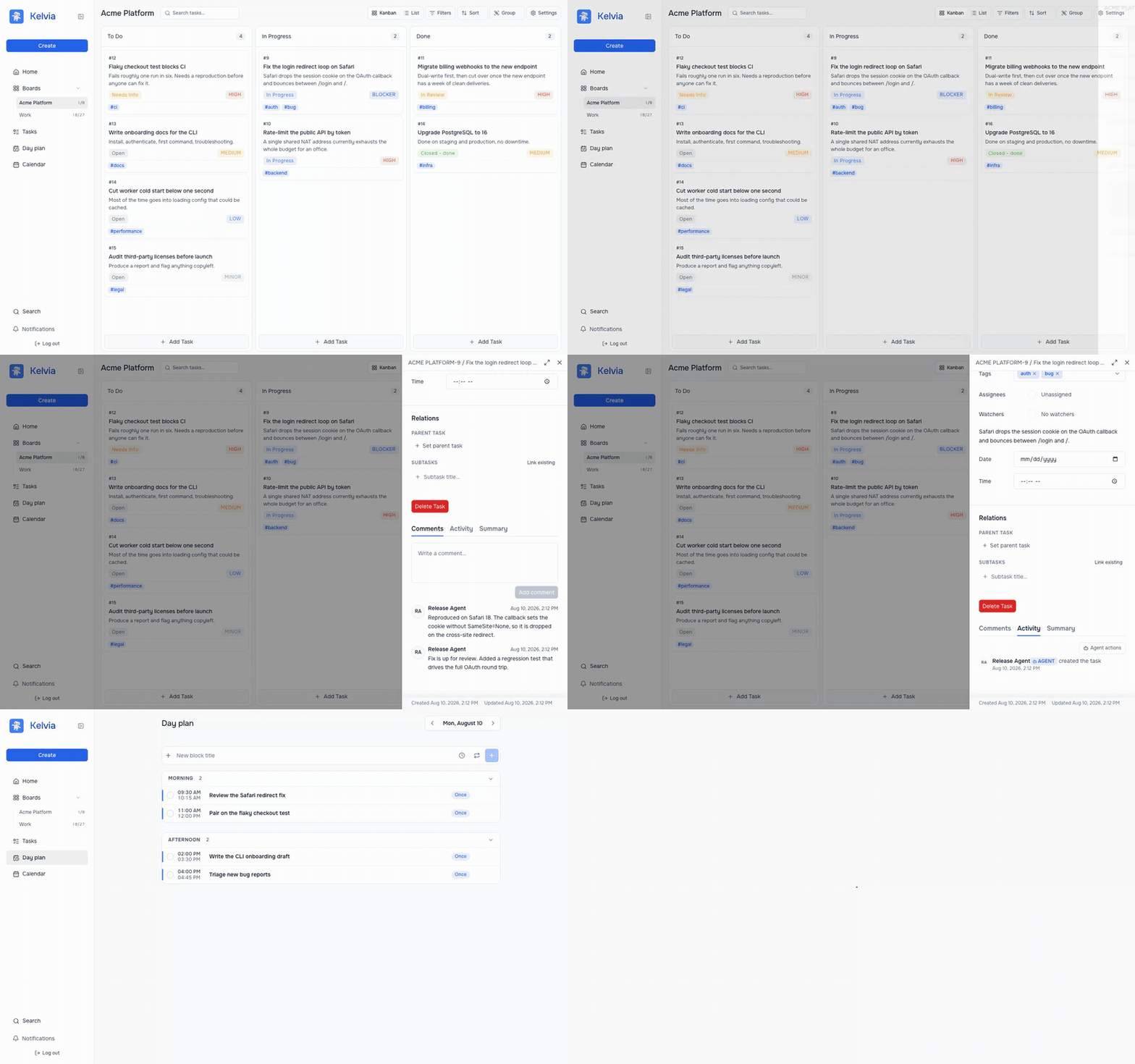\n\n*[Watch the same run as video](https://raw.githubusercontent.com/gonnagetapower/kelvia-mcp/main/docs/assets/demo.mp4)*\n\nEvery change an agent makes is attributed to it and filterable, so a human can\nreview exactly what happened rather than trusting a summary:\n\n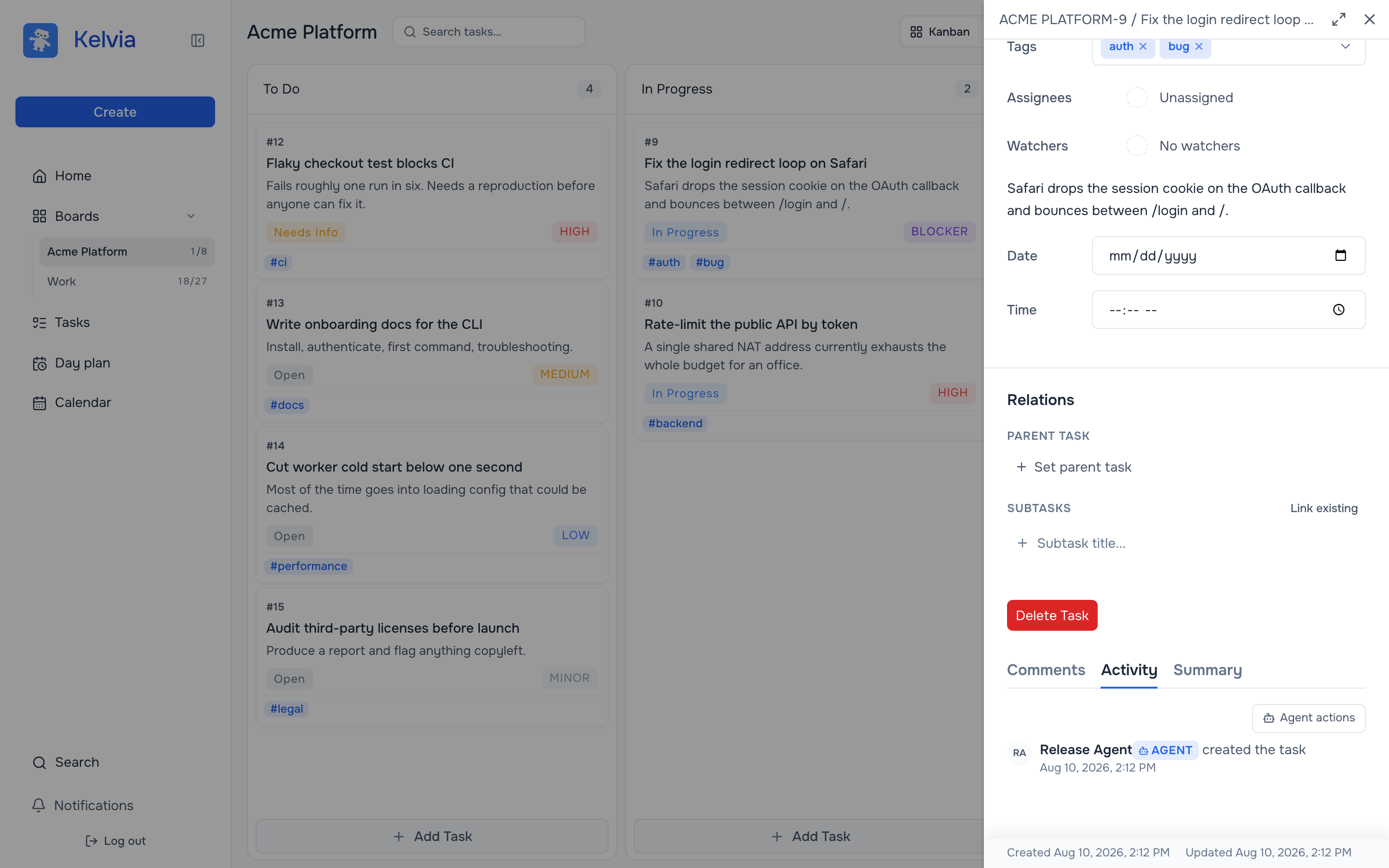\n\nThe personal day planner is part of the surface too, so an agent can block out\nthe work it just triaged:\n\n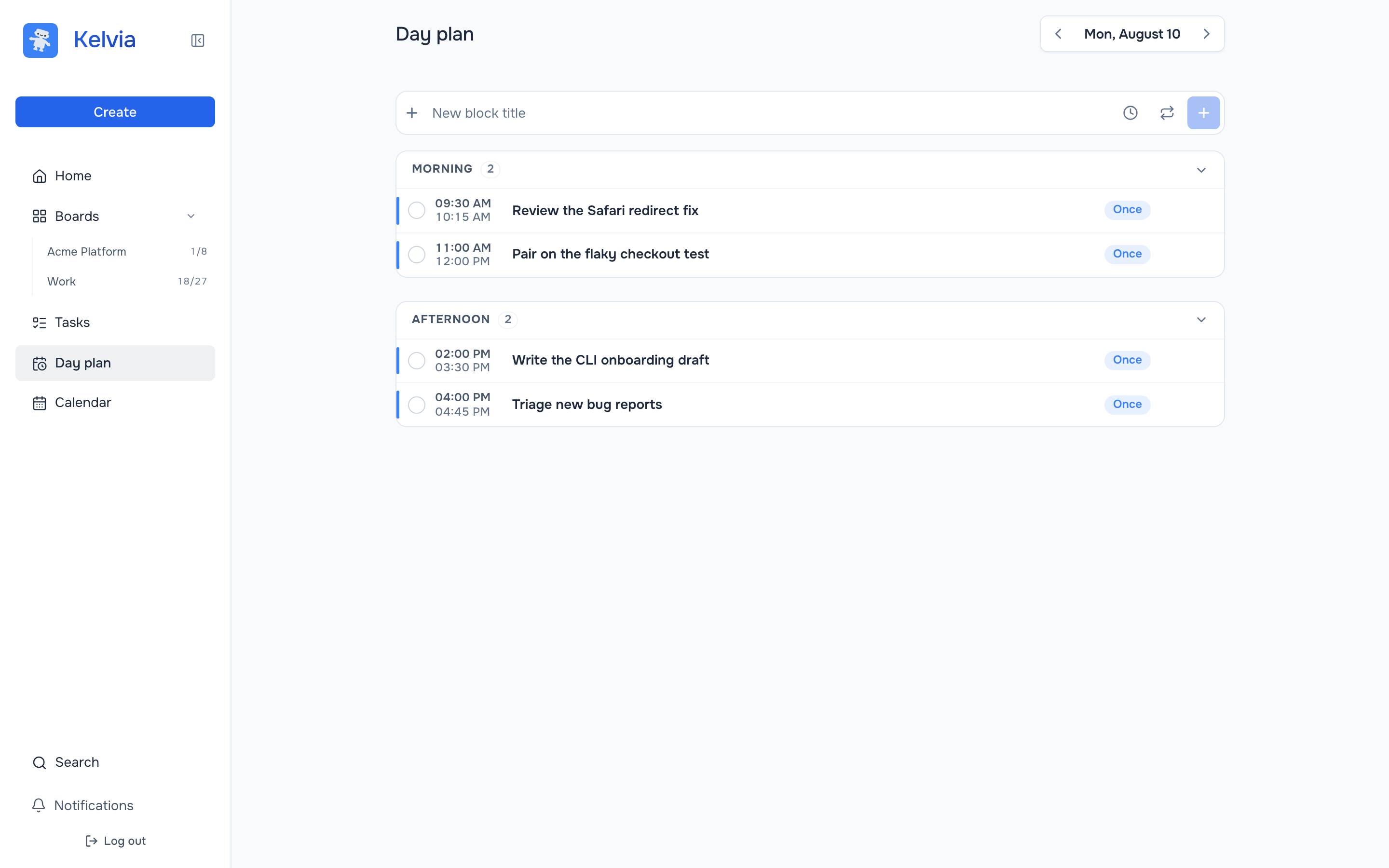\n\n## Hosted quick start (recommended)\n\nThe production endpoint is:\n\n```text\nhttps://mcp.kelvia.app/mcp\n```\n\nOAuth is the default. The client opens Kelvia in a browser, you approve access,\nand the client stores and refreshes its OAuth credentials. No API token needs to\nbe pasted into a configuration file.\n\n### Claude Code\n\n```bash\nclaude mcp add --transport http --scope user kelvia https://mcp.kelvia.app/mcp\nclaude mcp list\n```\n\nStart Claude Code, enter `/mcp`, choose `kelvia`, and complete **Authenticate** in\nthe browser. After authentication, verify the connection with:\n\n```text\nList my Kelvia boards.\n```\n\n### Codex app, CLI, and IDE extension\n\n```bash\ncodex mcp add kelvia --url https://mcp.kelvia.app/mcp\ncodex mcp login kelvia\ncodex mcp list\n```\n\nThe Codex app, CLI, and IDE extension share the same MCP configuration on a\nCodex host. In an interactive Codex session, use `/mcp` to inspect the server.\n\nEquivalent `~/.codex/config.toml`:\n\n```toml\n[mcp_servers.kelvia]\nurl = \"https://mcp.kelvia.app/mcp\"\nauth = \"oauth\"\n```\n\n### Cursor\n\nAdd the server globally in `~/.cursor/mcp.json`, or per project in\n`.cursor/mcp.json`:\n\n```json\n{\n \"mcpServers\": {\n \"kelvia\": {\n \"url\": \"https://mcp.kelvia.app/mcp\"\n }\n }\n}\n```\n\nOpen **Cursor Settings → Tools & MCP**, enable `kelvia`, and select **Connect** to\ncomplete OAuth in the browser. Ask Cursor to list your Kelvia boards after it\nreports the server as connected.\n\n## Agent-key authentication\n\nOAuth acts as the approving Kelvia user. Use an agent key instead when the\nconnection needs its own identity, board membership, role, expiry, and granular\nread/create/edit/delete scopes.\n\nCreate one in **Kelvia → Profile → Agents**:\n\n1. Create an agent identity.\n2. Add it to only the required boards and choose its board role.\n3. Create a key with the minimum required scopes and an expiry date.\n4. Copy the `klv_…` value when shown; Kelvia stores only its hash.\n\n### Codex with an agent key\n\nKeep the token in the environment; Codex stores only the variable name:\n\n```bash\nexport KELVIA_API_TOKEN='klv_your_agent_key'\ncodex mcp add kelvia --url https://mcp.kelvia.app/mcp \\\n --bearer-token-env-var KELVIA_API_TOKEN\ncodex mcp list\n```\n\nEquivalent `~/.codex/config.toml`:\n\n```toml\n[mcp_servers.kelvia]\nurl = \"https://mcp.kelvia.app/mcp\"\nbearer_token_env_var = \"KELVIA_API_TOKEN\"\n```\n\n### Claude Code with an agent key\n\nClaude Code expands environment variables in MCP JSON. Single quotes below keep\nyour shell from expanding the token into its command history:\n\n```bash\nexport KELVIA_API_TOKEN='klv_your_agent_key'\nclaude mcp add-json --scope user kelvia \\\n '{\"type\":\"http\",\"url\":\"https://mcp.kelvia.app/mcp\",\"headers\":{\"Authorization\":\"Bearer ${KELVIA_API_TOKEN}\"}}'\nclaude mcp list\n```\n\nDo not put tokens in URLs. The Streamable HTTP endpoint accepts authentication\nonly through the `Authorization` header.\n\n## Local stdio setup\n\n**Most people should use the hosted endpoint above.** Running the server\nlocally does not keep your tasks on your machine — they live in Kelvia either\nway, and the local process talks to the same API. What it changes is the path\nyour credential takes, and which clients can connect.\n\nUse stdio when one of these applies:\n\n- **Your client cannot do remote MCP or OAuth.** The major clients can, but\n older versions, some IDE plugins, and locked-down machines where a browser\n redirect will not open, cannot.\n- **You are automating in CI**, where nobody is around to approve an OAuth\n prompt. (An agent key against the hosted endpoint also works — this just\n removes a dependency.)\n- **Your key should not leave the machine.** With the hosted endpoint your\n token reaches `mcp.kelvia.app` and stays in its memory for the session; over\n stdio it only ever goes to the Kelvia API.\n\nRequirements: Node.js 20+.\n\nRun the published package without installing anything:\n\n```bash\nnpx kelvia-mcp\n```\n\nOr build from source (Node.js 20+ and pnpm 9+), then use an absolute path to\n`dist/index.js` in client configuration:\n\n```bash\ngit clone https://github.com/gonnagetapower/kelvia-mcp.git\ncd kelvia-mcp\npnpm install\npnpm build\n```\n\n### MCP Bundle for Claude Desktop\n\nFor local installation in Claude Desktop, build the MCP Bundle (`.mcpb`):\n\n```bash\npnpm run bundle:mcpb\n```\n\nThis produces `build/kelvia-mcp-.mcpb`. Open that file in Claude\nDesktop and enter a dedicated Kelvia agent key when prompted. The bundle is a\npackaged form of the same local stdio server; for the hosted OAuth connection,\nuse the [recommended quick start](#hosted-quick-start-recommended) instead.\n\n### Claude Code (stdio)\n\n```bash\nclaude mcp add --scope user \\\n --env KELVIA_API_TOKEN=klv_your_agent_key \\\n --transport stdio kelvia -- node /absolute/path/to/kelvia-mcp/dist/index.js\n```\n\n### Codex (stdio)\n\n```bash\ncodex mcp add kelvia \\\n --env KELVIA_API_TOKEN=klv_your_agent_key \\\n -- node /absolute/path/to/kelvia-mcp/dist/index.js\n```\n\n### Cursor (stdio)\n\n```json\n{\n \"mcpServers\": {\n \"kelvia\": {\n \"command\": \"node\",\n \"args\": [\"/absolute/path/to/kelvia-mcp/dist/index.js\"],\n \"env\": {\n \"KELVIA_API_TOKEN\": \"klv_your_agent_key\"\n }\n }\n }\n}\n```\n\n## Available tools\n\n\n58 tools
\n\n**Boards (9)** — `list_boards`, `get_board`, `create_board`, `update_board`,\n`archive_board`, `unarchive_board`, `delete_board`, `list_board_columns`,\n`get_board_activity`\n\n**Tasks (12)** — `list_tasks`, `list_daily_tasks`, `list_calendar_tasks`,\n`get_task`, `get_task_by_number`, `create_task`, `update_task`, `reorder_task`,\n`delete_task`, `get_task_activity`, `get_task_summary`, `set_task_summary`\n\n**Comments and worklogs (8)** — `get_task_comments`, `add_task_comment`,\n`update_task_comment`, `delete_task_comment`, `get_task_worklogs`,\n`add_task_worklog`, `update_task_worklog`, `delete_task_worklog`\n\n**Stages (8)** — `create_board_stage`, `materialize_board_backlog_stage`,\n`update_board_stage`, `delete_board_stage`, `reorder_board_stages`,\n`start_board_stage`, `complete_board_stage`, `reopen_board_stage`\n\n**Members and invitations (9)** — `list_board_members`, `update_board_member`,\n`remove_board_member`, `list_board_invitations`, `create_board_invitation`,\n`revoke_board_invitation`, `list_my_invitations`, `accept_board_invitation`,\n`decline_board_invitation`\n\n**Personal day planner (8)** — `list_daily_plan_blocks`,\n`list_daily_plan_definitions`, `list_overdue_daily_plan_blocks`,\n`create_daily_plan_block`, `update_daily_plan_block`,\n`set_daily_plan_block_status`, `reorder_daily_plan_blocks`,\n`delete_daily_plan_block`\n\n**Tags (3)** — `list_board_tags`, `list_tags`, `create_board_tag`\n\n**Core (1)** — `get_current_user`\n\n \n\nThe server also publishes two prompts (`create_task_from_pr` and\n`triage_board_backlog`) and two schema resources under `kelvia://schema/…`.\n\nEvery tool carries MCP annotations — `readOnlyHint`, `destructiveHint`,\n`idempotentHint` — so a client can auto-approve reads and prompt before a\ndelete. 22 of the 58 tools are read-only.\n\n## Toolsets\n\nThe full surface costs about 45 KB of JSON schema in every session. Load only\nthe parts a workflow needs:\n\n| Toolset | Tools | What it covers |\n| --- | --- | --- |\n| `boards` | 9 | Boards, columns, board activity |\n| `tasks` | 12 | Tasks, task activity, AI summaries |\n| `comments` | 8 | Comments and worklogs |\n| `stages` | 8 | Sprints and milestones |\n| `members` | 9 | Members, roles, invitations |\n| `planner` | 8 | Personal time-blocking day plan |\n| `tags` | 3 | Board and workspace tags |\n\n`get_current_user` is always published. Omitting the setting, or naming a\ntoolset that does not exist, publishes everything.\n\n```bash\n# stdio: environment variable\nKELVIA_TOOLSETS=tasks,planner npx kelvia-mcp\n\n# hosted: header (preferred)\nX-MCP-Toolsets: tasks,planner\n\n# hosted: query parameter, for clients that cannot set headers\nhttps://mcp.kelvia.app/mcp?toolsets=tasks,planner\n```\n\n`tasks,planner` publishes 21 tools and about 20 KB of schema instead of 45 KB.\n\n## Good first prompts\n\n```text\nList my Kelvia boards.\n```\n\n```text\nOn board \"product\", show open high-priority tasks and suggest a triage order.\nDo not modify anything.\n```\n\n```text\nCreate a task on board \"product\" titled \"Fix the login redirect\", assign high\npriority, and show me the created task.\n```\n\n```text\nPlan today using my three most urgent assigned tasks. Show the proposed blocks\nbefore creating them.\n```\n\n## Security model\n\n- Remote tokens are accepted only in the `Authorization: Bearer …` header.\n- OAuth uses authorization-code flow with PKCE and dynamic client registration.\n- OAuth tokens cannot manage account credentials, personal API tokens, agents,\n or MCP connections.\n- Agent keys are hashed at rest, revocable, optionally expiring, and limited by\n both key scopes and board roles.\n- Remote sessions appear in the Kelvia profile and can be revoked.\n- Legacy SSE exists for older clients at `/sse`; it may require a query token\n because browser `EventSource` cannot set headers. Prefer `/mcp` so credentials\n never enter URLs, browser history, or proxy access logs.\n\nTreat MCP servers as privileged integrations. Review a requested write before\napproving it, use a dedicated agent key for automation, and grant only the\nboards and scopes the workflow needs.\n\nReporting a vulnerability: see [SECURITY.md](SECURITY.md). Data handling for the\nhosted endpoint is described in the [AI and MCP data processing\npolicy](https://kelvia.app/ai-data-policy), and the\n[privacy policy](https://kelvia.app/privacy) covers Kelvia as a whole.\n\n## Privacy Policy\n\nThe MCP Bundle connects to the Kelvia API and sends the requests needed to\nperform the actions you ask it to take. It does not run a separate analytics or\nadvertising service. Review the [Kelvia Privacy Policy](https://kelvia.app/privacy)\nand the [AI and MCP Data Processing Policy](https://kelvia.app/ai-data-policy)\nbefore installing it.\n\n## Self-hosting the HTTP endpoint\n\nSetting `PORT` switches the process from stdio to Streamable HTTP.\n\n```bash\ndocker build -t kelvia-mcp .\ndocker run --rm -p 8080:8080 \\\n -e KELVIA_API_URL=https://api.kelvia.app/api \\\n -e MCP_PUBLIC_URL=https://mcp.example.com \\\n kelvia-mcp\n```\n\nThen check `GET /health`, which reports the available transports and toolsets.\n\n## Environment variables\n\n| Variable | Mode | Purpose |\n| --- | --- | --- |\n| `KELVIA_API_TOKEN` | stdio | Agent key or personal token |\n| `KELVIA_API_URL` | both | API base; defaults to `https://api.kelvia.app/api` |\n| `KELVIA_TOOLSETS` | both | Comma-separated toolsets; default all |\n| `PORT` | hosted | Enables HTTP mode and selects the listening port |\n| `MCP_PUBLIC_URL` | hosted | Public protected-resource origin |\n| `MCP_AUTHORIZATION_SERVER` | hosted | OAuth authorization-server origin |\n| `MCP_ALLOWED_ORIGINS` | hosted | Comma-separated CORS allowlist |\n| `MCP_RATE_LIMIT` | hosted | Requests per token per minute; default `300` |\n| `MCP_INSTANCE_COUNT` | hosted | Number of HTTP instances |\n| `MCP_STICKY_SESSIONS` | hosted | Required for multi-instance legacy SSE |\n\nStreamable HTTP is stateless at the MCP transport layer. Legacy SSE sessions\nare stored in process memory, so SSE requires one instance or sticky sessions.\n\n## Troubleshooting\n\n- **Needs authentication / HTTP 401** — complete OAuth from the client's MCP\n panel, or verify that the Bearer-token environment variable is available to\n the client process.\n- **HTTP 403** — the key lacks a required scope, the agent lacks the required\n board role, or the email/account state blocks that operation.\n- **Server connects but a board is missing** — add the agent identity to that\n board, or approve OAuth as a user who already has access.\n- **`Connection closed` in stdio mode** — run `pnpm build`, use an absolute path,\n and confirm Node.js 20+ plus `KELVIA_API_TOKEN` are present.\n- **No tools visible** — check `claude mcp list`, `codex mcp list`, or Cursor's\n **Tools & MCP** panel, then restart/reload the client after changing config.\n- **Large task output** — use compact `list_tasks`, filter by board/status, then\n call `get_task` for one record instead of requesting detailed lists.\n- **Too many tools for the client** — narrow the surface with\n [toolsets](#toolsets).\n\nHealth and OAuth discovery:\n\n```text\nGET https://mcp.kelvia.app/health\nGET https://mcp.kelvia.app/.well-known/oauth-protected-resource/mcp\nGET https://api.kelvia.app/.well-known/oauth-authorization-server\n```\n\n## Development\n\n```bash\npnpm install\npnpm run lint\npnpm run typecheck:strict\npnpm run test\n```\n\n`pnpm run test` builds the package, initializes the stdio server through the\nofficial MCP client SDK, and verifies the published tools, annotations,\ntoolsets, prompts, resources, and server instructions.\n\nSee [CONTRIBUTING.md](CONTRIBUTING.md) for how this repository relates to the\nKelvia monorepo and what a tool change needs to touch.\n\n## License\n\n[MIT](LICENSE)\n",
"bytes": 16458,
"sha": "bb4464acc304ea242449f10c64b5d886afa89c0ba4189d2a64de7b06caf859df",
"repo_slug": "gonnagetapower/kelvia-mcp",
"fonte": "repo",
"truncated": false,
"api": "https://agentalog.com/api/listings/mcp_io_github_gonnagetapower_kelvia_mcp_4633094f/readme"
}