\n\n```bash\n +------------------+ +--------------+ +------------------+\n | | | | | |\n | | | | | |\n | Claude Desktop +--->+ +--->+ PostgreSQL |\n | | | | | |\n | Claude Code +--->+ +--->+ SQL Server |\n | | | | | |\n | Cursor +--->+ DBHub +--->+ SQLite |\n | | | | | |\n | VS Code +--->+ +--->+ MySQL |\n | | | | | |\n | Copilot CLI +--->+ +--->+ MariaDB |\n | | | | | |\n | | | | | |\n +------------------+ +--------------+ +------------------+\n MCP Clients MCP Server Databases\n```\n\nDBHub is a minimal MCP server: token-efficient, zero-dependency, and just two tools by default with opt-in extras. This lightweight gateway allows MCP-compatible clients to connect to and explore different databases:\n\n- **Minimal**: Zero dependency, token efficient with a minimal set of MCP tools to maximize context window\n- **Multi-Database**: PostgreSQL, MySQL, MariaDB, SQL Server, and SQLite through a single interface\n- **Multi-Connection**: Connect to multiple databases simultaneously with TOML configuration\n- **Guardrails**: Read-only mode, row limiting, and query timeout to prevent runaway operations\n- **Secure Access**: SSH tunneling and SSL/TLS encryption\n\n> DBHub is the official example in the [Claude Code docs](https://code.claude.com/docs/en/mcp#example-query-your-postgresql-database) for connecting to PostgreSQL via MCP.\n\n## Token Efficiency\n\nDBHub loads just 2 tools by default at **1.4k tokens** — 13-14x fewer than alternatives — keeping the context window open for your actual work.\n\n| MCP Server | Default Config | Default Tools |\n|------------|---------------|--------------|\n| **DBHub** | **1.4k** | 2 (`execute_sql`, `search_objects`) |\n| MCP Toolbox | 19.0k | 28 |\n| Supabase MCP | 19.3k | all |\n\n## Use Cases\n\n- **Local Development**: Schema exploration, query validation, and data debugging with Claude Code, VS Code, Cursor, etc.\n- **Non-Technical Access**: Expose curated, read-only views to non-technical staff via Claude Desktop, VS Code, Cursor, etc.\n- **Multi-Database Consolidation**: Replace separate MCP servers for each database with a single DBHub process\n- **Production Troubleshooting**: Read-only diagnostics with guardrails against runaway queries\n\n## Supported Databases\n\nPostgreSQL, MySQL, SQL Server, MariaDB, and SQLite.\n\n## MCP Tools\n\nDBHub implements MCP tools for database operations:\n\n- **[execute_sql](https://dbhub.ai/tools/execute-sql)**: Execute SQL queries with transaction support and safety controls\n- **[search_objects](https://dbhub.ai/tools/search-objects)**: Search and explore database schemas, tables, columns, indexes, and procedures with progressive disclosure\n- **[explain_sql](https://dbhub.ai/tools/explain-sql)** (opt-in): Show a query's execution plan without running it\n- **[health_check](https://dbhub.ai/tools/health-check)** (opt-in): Report connection pool state and buffer cache hit ratio\n- **[Custom Tools](https://dbhub.ai/tools/custom-tools)**: Define reusable, parameterized SQL operations in your `dbhub.toml` configuration file\n\n## Workbench\n\nDBHub includes a [built-in web interface](https://dbhub.ai/workbench/overview) for interacting with your database tools. It provides a visual way to execute queries, run custom tools, and view request traces without requiring an MCP client.\n\n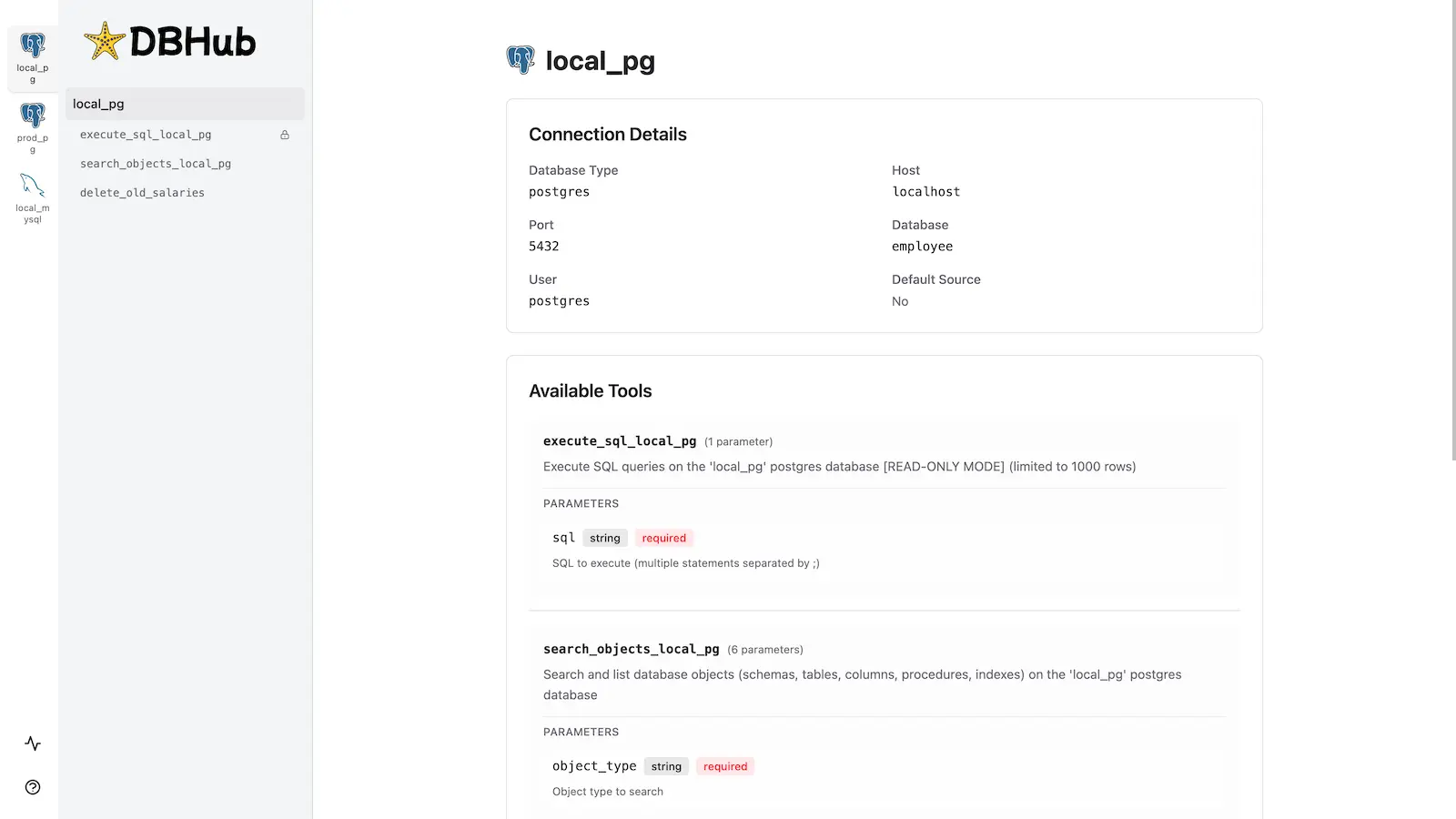\n\n## Installation\n\n```bash\nnpx @bytebase/dbhub@latest --transport http --port 8080 --dsn \"postgres://user:password@localhost:5432/dbname?sslmode=disable\"\n```\n\nAlso available as:\n\n- [Docker image](https://dbhub.ai/installation#docker)\n- [MCP Bundle](https://dbhub.ai/mcpb) (one-click install, read-only)\n- [Claude Code plugin](https://dbhub.ai/claude-code-plugin)\n\nSee the [Installation Guide](https://dbhub.ai/installation) for all options, [Command-Line Options](https://dbhub.ai/config/command-line) for parameters, and [Multi-Database Configuration](https://dbhub.ai/config/toml) for connecting several databases at once.\n\n## Development\n\nRequires Node.js >= 22.5.0 (DBHub uses the built-in `node:sqlite` module).\n\n```bash\n# Install dependencies\npnpm install\n\n# Run in development mode\npnpm dev\n\n# Build and run for production\npnpm build && pnpm start --transport stdio --dsn \"postgres://user:password@localhost:5432/dbname\"\n```\n\nSee [Testing](.claude/skills/testing/SKILL.md) and [Debug](https://dbhub.ai/config/debug).\n\n## Contributors\n\n\n \n\n\n## Star History\n\n\n \n \n \n \n \n\n",
"bytes": 7012,
"sha": "8eb6a02786ddb0825555f41767af5c6c915dc3eab22506843359f62227c5f31d",
"repo_slug": "bytebase/dbhub",
"fonte": "repo",
"truncated": false,
"api": "https://agentalog.com/api/listings/mcp_io_github_bytebase_dbhub_c648e40f/readme"
}
 \n
\n