\n
 \n
\n \n
\n
\n \n
\n
\n Secure Your PDFs with AI-powered Redaction\n
\n\n\n\n# PDF Redaction API\n\nIt is example of using API for [https://pdf-redaction.com](https://pdf-redaction.com)\n\nFree API for redacting PDFs available at [https://api.pdf-redaction.com/api/docs](https://api.pdf-redaction.com/api/docs)\n\n# Key Features\n\n* Redact PDF using custom prompt\n* Filter detected entities by type\n* Support for multiple languages\n* Support Digital and Scanned(image based) PDFs\n\n# API Key\n\nFor generate API Key please go to the: [https://pdf-redaction.com/apikeys/](https://pdf-redaction.com/apikeys/)\n\nFor check usage: [https://pdf-redaction.com/apikeys/usage/](https://pdf-redaction.com/apikeys/usage/)\n\n\n\nPut API Key to the env variable `PDF_REDACTION_API_KEY` or to `.env` file.\n\n# Limitations\n\nLimitations for free version:\n* 10 page per request\n* 100 Free requests per month\n* 5 requests per minute\n\n# 🚀 Instant Install self-hosted PDF Redaction API\n\n - Option A (curl): \n ```bash\n /bin/bash -c \"$(curl -fsSL https://raw.githubusercontent.com/StabRise/pdf-redaction-api/main/install.sh)\"\n ```\n\n - Option B (wget): \n ```bash\n /bin/bash -c \"$(wget -qO- https://raw.githubusercontent.com/StabRise/pdf-redaction-api/main/install.sh)\"\n ```\n# Jupyter Notebooks with examples\n\n| Chapter | Notebook |\n|----------------------------------------|-------------------------------------------------------------------------------------------------------------------------------------------------------------------------------------------------------------------|\n| 1: PDF Redaction API | [](https://colab.research.google.com/github/StabRise/pdf-redaction-api/blob/main/jupyter/PDF-Redaction-API.ipynb) |\n| 2: PDF Redaction API base64 | [](https://colab.research.google.com/github/StabRise/pdf-redaction-api/blob/main/jupyter/PDF-Redaction-API-base64.ipynb) |\n| 3: PDF Redaction API using prompt | [](https://colab.research.google.com/github/StabRise/pdf-redaction-api/blob/main/jupyter/PDF-Redaction-API-base64-prompt.ipynb) |\n| 4: Redact QR Codes from PDF | [](https://colab.research.google.com/github/StabRise/pdf-redaction-api/blob/main/jupyter/PDF-Redaction-API-base64-qrcode.ipynb) |\n| 5: Redact Rotated/Vertical text in PDF | [](https://colab.research.google.com/github/StabRise/pdf-redaction-api/blob/main/jupyter/PDF-Redaction-API-base64-rotated.ipynb) |\n| 6: Redact Signatures from PDF | [](https://colab.research.google.com/github/StabRise/pdf-redaction-api/blob/main/jupyter/PDF-Redaction-API-base64-signature.ipynb) |\n| 7: Redact Faces from PDF | [](https://colab.research.google.com/github/StabRise/pdf-redaction-api/blob/main/jupyter/PDF-Redaction-API-base64-face-redaction.ipynb) | \n| 8: Redact custom PII data | [](https://colab.research.google.com/github/StabRise/pdf-redaction-api/blob/main/jupyter/PDF-Redaction-API-custom-tags.ipynb) |\n| 9: Detect PII in PDF (no redaction) | [](https://colab.research.google.com/github/StabRise/pdf-redaction-api/blob/main/jupyter/PDF-Redaction-API-detect-pii-pdf.ipynb) |\n\n\n# Redaction PDF using custom prompt\n\nThis provides the flexibility to redact PDF using custom prompt.\n\n# Demo with web UI\n\nYou can try it out for free at [https://pdf-redaction.com](https://pdf-redaction.com)\n\n[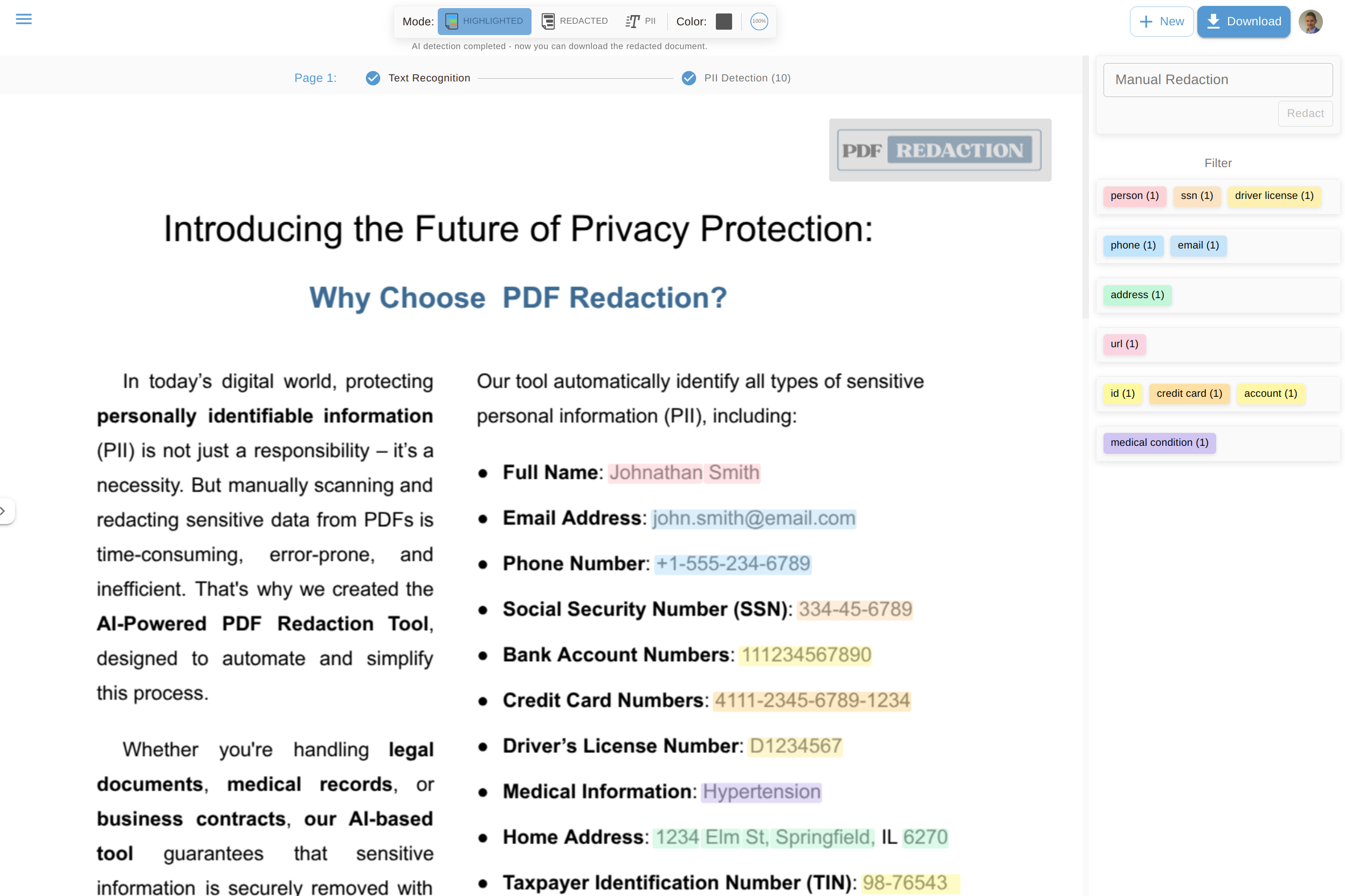](https://pdf-redaction.com)\n\n", "bytes": 5665, "sha": "e7393430c5fe26a30e9db1a4d50a92971fa892f32b7570327cc93a5774de609f", "repo_slug": "stabrise/pdf-redaction-api", "fonte": "repo", "truncated": false, "api": "https://agentalog.com/api/listings/mcp_com_pdf_redaction_pdf_redaction_mcp_6eaf4160/readme" } \n
\n 
